

Inspo - Recipes & Meal Planner
- 129.00
- 4.6
- Installs
- 50.00K
- Price
- Free

Screenshots
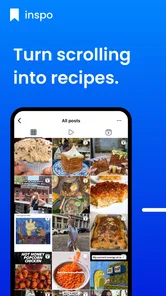
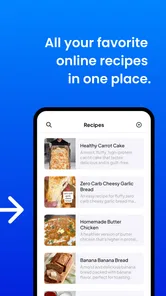


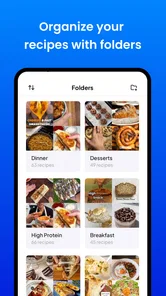
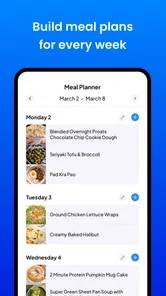
Analysis by Reviewed
I usually decide whether a food app deserves a permanent place on my phone by asking one practical question: does it make dinner easier after the initial setup, or does it simply give me another list to maintain? Inspo - Recipes & Meal Planner falls on the useful side of that test. It is a free Food & Drink app from Pinecone Labs LLC that brings recipes, meal planning, and grocery organization into one workspace. After spending time with it, I found its main value less in browsing recipes and more in turning several small decisions into one manageable routine.
Inspo - Recipes & Meal Planner is best understood as a planning tool rather than a complete cooking teacher. The recipe is only the starting point. The stronger workflow is choosing what you want to eat, arranging those choices across a plan, and then using the resulting grocery list to avoid the familiar late-week scramble. That distinction matters because someone looking for elaborate culinary instruction may want a dedicated recipe platform, while someone who repeatedly buys food without knowing how it will be used may get much more from this app.
How I judged the app and who gets the most from it
I judge a meal-planning app by whether it helps me make repeatable choices, not just whether it feels appealing during setup. In this section, I’ll focus on the everyday habits and kinds of cooks that make Inspo useful, including the point at which a simpler system may suit someone better. That gives the next section a practical benchmark: whether connecting recipes, plans, and shopping actually reduces friction.
The real decision is whether planning feels lighter
When I compare a meal-planning app with a notebook, a general notes app, or a recipe website, I look at the number of handoffs involved. A notebook may be flexible, but I still have to rewrite ingredients. A notes app can hold recipes and shopping reminders, but it rarely connects those pieces naturally. A recipe website can provide inspiration, yet I may end up opening several pages while trying to build a coherent week. Inspo earns its place when it reduces those transitions.
My first recommendation is to judge it by a full cycle rather than by the recipe screen alone. Pick a few meals, organize them into a plan, and prepare the grocery list before deciding whether it fits. The app’s store summary is simple, but that simplicity hides the important question: will you actually return to the plan when you are tired, busy, or standing in a supermarket? A useful planner should help at that exact moment, not only look tidy when you first install it.
The app has a 4.6 average from around 2K ratings, with over 50K installs, so it has already attracted a meaningful audience without presenting itself as an enormous all-purpose food platform. It is rated for Everyone, which makes it approachable for households sharing basic meal organization. It is free to install, although optional in-app purchases range from around twelve dollars to around forty dollars per item. I would therefore explore the free experience first and only pay if the planning workflow becomes part of my regular routine.
Three habits make the difference
The first useful habit is planning around real life instead of planning an imaginary perfect week. I would reserve the simplest meals for the evenings when work or commuting usually runs late, then place more involved recipes on days when I have time to cook. This sounds obvious, but many planners become frustrating because every day is treated as equally available. Inspo is more helpful when the plan reflects energy and time, not just nutritional ambition.
More From Our News Desk

 Gmail
GmailGmail in a Busy Inbox: Who Benefits Most?
From first account to crowded workday, Gmail earns its place through dependable search and flexible sorting—but its best fit depends on how much inbox maintenance you can tolerate.

 Prime Video
Switching to Prime Video: What Changes in Your Viewing Routine
Prime Video can make a compelling second home for streaming, but switching means learning a different catalog, rental layer, and route from browsing to playback.

 Universal TV Remote Control
Universal TV Remote Control Works Best as a Reliable Backup
A phone remote earns its place through quick setup and reliable habits. Here is how to get more from Universal TV Remote Control—and where its limits show.

 Weather - By Xiaomi
Weather by Xiaomi Review: Clear at a Glance, Less Clear Up Close
Xiaomi’s weather app makes everyday forecasts quick to scan, but its calm surface can leave useful details and recovery paths harder to find than they should be.

 X
XX Under Pressure: Can It Recover When Posting Goes Wrong?
A resilience-focused review of X, examining setup, mistaken posts, interruptions, weak connections, and the gaps that matter when recovery needs to be dependable.

 Clash of Clans
Clash of Clans Is Won Between the Battles
Its raids are quick; its community is a long-term project of coordination, teaching, rivalry, and shared responsibility—with all the friction that entails.
Latest News



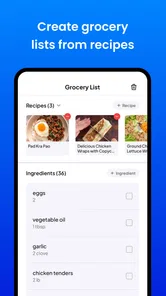
The second is to build the shopping list before opening the cupboard. That small change exposes duplicate purchases and reveals whether the plan is realistic. If I already have the basics for one meal, I can adjust the list rather than buying a second version of the same ingredient. The app’s value is strongest here: it gives the shopping trip a purpose instead of leaving me to remember which recipe needed what.
The third is to treat the plan as a flexible draft. A meal planner should not turn a missed dinner into a failed week. I would move an unused meal forward, swap the order, or keep a quick backup option available. This approach also shows a limitation: the app can organize decisions, but it cannot remove changing schedules, missing ingredients, or the need to make judgment calls while shopping.
What I would check before committing
Before moving my entire recipe collection into any new app, I would test how comfortable it feels to add one recipe, find it again, and use it during an actual grocery trip. That is more revealing than browsing a polished home screen. I would also check whether the app matches the way I cook. If I mostly improvise from a few staples, a structured planner may feel like extra work. If I cook from recipes and regularly forget what to buy, the structure is much more likely to pay off.
Device compatibility is fairly broad: the current version is 5.9 and it requires Android 6.0 or later. That makes it accessible on many older Android phones, though I would still keep the app updated when possible because planning tools are used repeatedly and small reliability issues become noticeable over time. The release date is May 18, 2025, so I see it as a relatively recent option rather than a long-established kitchen archive.
Where the combined workflow is genuinely strong
The app’s strongest case is the handoff from choosing a meal to knowing what to shop for, but that connection works best when I treat the plan as adjustable rather than fixed. Here, I’ll look at how a few small planning decisions can make the workflow more dependable over time, and where I still need to use my own judgment. That distinction matters when weighing convenience against the upkeep any organized routine requires.
From inspiration to an actionable week
The best part of Inspo is the connection between three tasks that people often handle separately. I can begin with a recipe idea, place it into a meal plan, and then use that plan to shape the grocery list. In my experience, the benefit is not dramatic at any single step. It comes from removing the small moments of uncertainty between steps: What was I planning to cook? Which day was it for? What do I need to buy?
That makes the app particularly suitable for people who are willing to cook but dislike deciding. A busy couple can outline several dinners before the workweek starts. A parent can create a shopping list that reflects planned meals instead of collecting random ingredients. Someone living alone can avoid buying for an unrealistic menu and plan portions around the days they will actually be home. These are modest use cases, but they are exactly where a planning tool earns repeat use.
A realistic weeknight example
Imagine I finish work late on a Tuesday and realize I have no idea what dinner was supposed to be. With a loose collection of saved recipes, I might search through messages, notes, and browser tabs before giving up and ordering food. With a plan already prepared in Inspo, I can see the intended meal and confirm whether the required ingredients were included in the grocery list. If Tuesday’s meal no longer makes sense, I can move another planned option into its place rather than rebuilding the entire week.
The important insight is that the app is most valuable before the crisis, not during it. A few minutes of planning on a quieter day can prevent several decisions later. I would not expect the app to invent a perfect dinner based on my mood every night. I would use it to create a small set of reasonable choices that are already connected to what I need to buy.
Why the grocery list changes the experience
Recipe collections are easy to accumulate and surprisingly hard to use. I can save dozens of appealing dishes and still arrive at the supermarket without a coherent plan. The grocery-list side of Inspo gives those saved ideas a practical destination. Instead of asking which recipes look good, I can ask which meals make sense together and what purchasing them requires.
There is also a useful trade-off here. A connected list is more convenient than copying ingredients manually, but it may encourage me to follow the plan too rigidly. I would review the list before shopping, especially for ingredients I already own, items sold in larger quantities, or products I prefer to substitute. The app can organize the list; I still need to apply household knowledge and supermarket judgment.
Where the free entry point helps
Because the app is free, the barrier to testing the workflow is low. I can see whether its approach fits my habits without paying before I understand the benefit. That is important in this category because meal planning is personal. Some people enjoy detailed organization, while others abandon anything that feels like homework.
The optional purchases deserve a careful approach. The listed range of about twelve to forty dollars per item is significant enough that I would not buy impulsively just because a feature looks convenient. I would first complete a normal planning cycle, then ask whether the paid option saves enough repeated effort to justify itself. If I only plan occasionally, the free experience may be sufficient. If I use it every week, a purchase could make more sense, but only after I know exactly what it changes for my routine.
Small workflow tips I found more useful than they sound
Plan by shopping trip rather than by an ideal calendar. This keeps the grocery list tied to what I can realistically carry, store, and use.
Place one deliberately easy meal into the plan. It acts as a pressure valve when a more ambitious recipe becomes inconvenient.
Review the list once at home and once before checkout. The first review catches pantry duplicates; the second catches substitutions caused by availability.
Use the plan to notice ingredient overlap. Several meals that share a few core ingredients can reduce waste, even when the recipes themselves feel different.
Where other categories may fit better
Inspo is not automatically the best choice for every food-related need. If my priority is discovering restaurant dishes, ordering takeout, or following highly visual cooking lessons, I would look at a different category of app. If I need detailed nutritional tracking, calorie accounting, or specialized dietary analysis, a nutrition-focused tool may offer a deeper system. If I simply want a searchable collection of recipes with no planning commitment, a recipe browser may feel faster.
A plain notes app remains a reasonable alternative for someone who values total flexibility. I can write a weekly menu in seconds and adapt it however I want. The cost is that I must maintain the connections myself. I would have to copy ingredients, update changes, and remember where each recipe lives. Inspo is preferable when that maintenance is exactly what I want to avoid, but the notes approach may be better for a highly individual cooking style that does not fit structured entries.
Paper also has a place. A handwritten list is quick, visible, and does not depend on a phone battery or an app interface. For a short shopping trip, paper may be more comfortable. Inspo becomes more compelling when the same recipes and planning decisions recur, because digital organization is easier to revise than rewriting a page every week.
The friction I would not ignore
The app’s connected design can create setup friction. Any planner is only as useful as the recipes and choices I put into it, so the first session may feel slower than opening a familiar recipe site. Users who expect instant, personalized meal decisions may be disappointed if they prefer the app to do the thinking for them. I see Inspo as a tool for organizing my decisions, not replacing them.
There is also a behavioral limitation. A grocery list can reduce forgetfulness, but it cannot guarantee that I will shop economically or use everything I buy. A plan can be well organized and still fail if it ignores leftovers, portion sizes, family preferences, or the time required to cook. I would start with a modest plan rather than loading an entire month into the app. That makes it easier to learn what I actually follow.
Finally, the presence of in-app purchases means I would pay attention to the moment when the free experience stops being enough. The app is not a bargain simply because installation costs nothing; value depends on whether any optional purchase solves a recurring problem. For occasional cooks, the extra cost may not be worthwhile. For consistent planners, it may be easier to justify, but I would still compare the benefit with the effort of keeping a simpler system.
What switching really involves
Moving from scattered recipes to Inspo is not technically difficult in the abstract, but it does require a change in habit. I would not try to transfer everything at once. I would begin with the meals I cook repeatedly, then add recipes that I genuinely expect to make soon. This avoids turning setup into a second chore and lets me judge the app using familiar food rather than a theoretical collection.
The biggest switching cost is mental: I need to remember to plan before shopping. Once that habit settles, the connected workflow can save time. If I continue choosing meals spontaneously every day, the app will feel like an extra layer between me and dinner. That is why I would recommend a short trial based on one normal shopping cycle, not a rushed first impression.
My recommendation for different kinds of users
I would recommend Inspo to a person who cooks at home, often forgets ingredients, and wants one place to connect recipes with a weekly plan and grocery list. It is also a good fit for households where one person chooses meals and another does the shopping, because a shared plan is easier to follow than scattered messages or memory. The Everyone rating supports its approachable positioning, while the free starting point makes experimentation sensible.
I would be more cautious for someone who wants advanced nutrition control, restaurant discovery, or a completely spontaneous cooking style. Those users may be better served by specialized apps or by a simple notes system. I would also avoid paying for optional items until the free workflow has proven that it changes my behavior rather than merely organizing information attractively.
Overall, I see Inspo - Recipes & Meal Planner as a practical middle ground between a recipe collection and a rigid household-management system. It does not make cooking effortless, and it cannot decide what my family will want to eat next Thursday. What it can do is turn a loose idea into a plan and a plan into a more purposeful shopping trip. My advice is to judge it by whether it reduces weekly decision fatigue, not by how many recipes you can collect.
For me, that is a strong reason to keep it installed. I would start small, plan only the meals I am likely to cook, check the grocery list against what I already own, and postpone any optional purchase until the routine feels natural. Used that way, this free Food & Drink app from Pinecone Labs LLC offers a clear, useful workflow for everyday meal organization without pretending to be a replacement for every other food app.
Inspo - Recipes & Meal Planner Frequently Asked Questions
What devices and operating systems can run Inspo - Recipes & Meal Planner?
Inspo - Recipes & Meal Planner is an app for organizing recipes, planning meals, and building grocery lists. Before downloading, check that your device meets its minimum operating-system requirement; the Android version requires Android 6.0 or later. A compatible device helps the app run as intended, while the available version and features may differ between platforms.
Who develops Inspo, and is it suitable for all ages?
Inspo is developed by Pinecone Labs LLC and is categorized as a Food & Drink app. Its content rating is Everyone, so it is presented as suitable for a broad audience. Families may still want to review how the app fits their household’s needs, particularly when children use a device or when meal choices involve allergies or other dietary considerations.
What is Inspo - Recipes & Meal Planner?
Inspo - Recipes & Meal Planner is designed to help you discover meal ideas, organize recipes, and plan what to cook throughout the week. Instead of searching randomly for inspiration every day, you can browse recipe suggestions, save dishes you want to try, and create a more structured meal routine. It can be useful for busy users, home cooks, and anyone trying to reduce last-minute food decisions.
Can I use Inspo to create a weekly meal plan?
Yes, the app is intended to support weekly meal planning by allowing you to choose recipes and organize them around upcoming meals. This can make it easier to decide what to prepare for breakfast, lunch, dinner, or other occasions. The exact planning tools may depend on the current app version, so users should review the available calendar, scheduling, and editing options after installation before relying on it for detailed dietary planning.
Does Inspo - Recipes & Meal Planner provide shopping lists?
Meal-planning apps are most useful when they connect recipes with grocery preparation, and Inspo may help you organize the ingredients needed for selected meals. Depending on the version and your device, ingredients may be available for review or list-building within the app. However, you should check whether quantities are combined automatically, whether items can be edited, and whether the shopping-list feature meets your personal grocery routine.
Pros
- Personalized recipe ideas make meal planning feel more tailored.
- Meal planning can simplify grocery preparation for the week.
- Recipe inspiration suits users who enjoy discovering new dishes.
- Saved recipes make it easy to revisit favorite meal ideas.
- Useful for organizing cooking ideas in one convenient place.
Cons
- Some recipes or features may require a premium subscription.
- The app may not support every dietary preference or restriction.
- Grocery lists may need manual adjustments for household portions.
- Recipe variety can depend on the selected preferences and region.
- Frequent notifications may feel unnecessary for casual users.











