InfinitePay Tap Conta Pix e IA
- 75.00
- 4.9
- Installs
- 10.00M
- Price
- Free

Screenshots
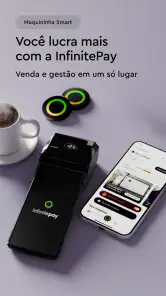

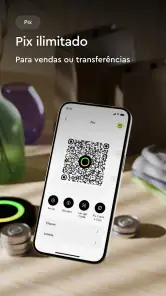
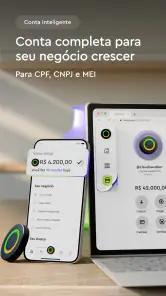
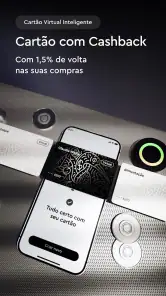



Analysis by Reviewed
For a small seller, the awkward part of getting paid is often not the transfer itself; it is choosing a method that fits the customer and then keeping track of what happened. I see InfinitePay Tap Conta Pix e IA as a finance app built around that practical problem. It brings several ways to collect money together with a digital account, which can make a working day feel less scattered. I would be more cautious about choosing it as my only financial app if I mainly want long-term budgeting or detailed account analysis.
One app for different ways to collect
The app’s mix of Pix, payment links, credit-based Pix, and phone-based payment acceptance points toward a practical need: getting paid in more than one setting. A seller can use a payment link when a customer is ordering remotely, then use a phone-based option for an in-person sale. Pix offers another route when both people are ready to transfer directly. Having these choices in one finance app can reduce the need to switch between separate payment tools, though it still helps to decide in advance which method suits each transaction.
That flexibility is more useful than a long feature list suggests. For example, if I sell a handmade item through messages, I could send a payment link rather than ask the customer to copy account details. If the same customer collects it in person, a phone-based payment option may fit better. I would still check the amount and payment status before handing over goods; convenience should not replace a simple end-of-sale check.
A realistic day at a small business
Imagine I run a small stall and also take occasional orders from people who cannot visit. During a busy stretch, one customer pays by Pix while another needs a payment link to complete an order from home. Keeping these collection methods in the same app can make the routine easier to follow, particularly when I’m moving between sales rather than sitting at a desk. The benefit is less about doing something flashy and more about having a workable payment route for different customers.
There is a useful habit here: keep the payment method tied to the situation, not to whatever button is quickest. A link is convenient for a remote customer, while an in-person method avoids turning a face-to-face sale into a messaging exchange. Afterward, I would review incoming activity as part of closing out the day, so a customer’s claim that they paid does not become the only record I rely on.
Making the workflow easier to trust
One small change can make this kind of setup more dependable: decide how you will label or otherwise distinguish orders outside the payment app before the day gets busy. A payment record tells me money arrived, but it may not remind me which item, appointment, or delivery that payment belongs to. I would keep a simple order note alongside the transaction, especially when several customers pay around the same time. That is not extra technology for its own sake; it is a way to avoid mixing up a paid order with one that still needs attention.
I would also test each collection route when I have time, rather than learning it while a customer is waiting. A low-stakes practice transaction helps me see where I should check for confirmation and what information I need to share. For a remote sale, I would make sure the customer can identify the order from the message accompanying the link. For a face-to-face sale, I would keep the item with me until the app shows the payment has gone through. These habits matter more than tapping quickly.
More From Our News Desk

Weather by Xiaomi Review: Clear at a Glance, Less Clear Up Close

X Under Pressure: Can It Recover When Posting Goes Wrong?

Clash of Clans Is Won Between the Battles

Android Auto Makes the Case for Quieter Car Software

MobiOffice: Transforming Mobile Productivity with Seamless Integration

EA SPORTS FC™ Mobile Soccer: Redefining Mobile Sports Gaming
How it compares with familiar alternatives
Compared with a basic digital banking app, InfinitePay is more compelling when accepting payments is part of the reason I’m opening the app at all. A conventional account can be enough for personal transfers and routine money management, but it may not bring several ways to collect payment together. Compared with using a separate payment service and a separate banking app, this approach may feel more convenient, although combining tasks does not automatically make every part of the experience better.
If I rarely sell anything and mostly need to pay bills, receive personal transfers, and keep an eye on spending, a simpler account could be a better fit. I would not choose a payment-focused setup just because it offers more tools; the right choice depends on whether those tools solve a recurring problem. Anyone comparing options should also check the current terms for the specific payment method they intend to use, rather than assume every route works identically.
That distinction helps set expectations for the app’s AI element, too. Spending insights may be useful as a prompt to look more closely at transactions, but I would treat them as guidance rather than a complete budget plan. For decisions that depend on exact categories, personal saving targets, or a full household picture, I would still keep my own records and verify the underlying transactions.
Credit-based Pix needs a deliberate choice
Credit-based Pix is worth thinking about separately from a direct Pix transfer. It may be useful when a customer or personal situation calls for a different way to fund a payment, but I would not treat it as interchangeable with paying directly from available funds. Before using it, I would check the terms shown for that transaction and consider how repayment fits into my budget. If I can make the transfer directly and that is the simpler choice, I would not add a credit option without a clear reason.
This is also where the app’s range calls for a little discipline. Having multiple collection routes in one place is convenient, but it can make it tempting to pick a method based only on speed. I would compare the practical effect for the person paying and for my own records: how the customer will complete the transaction, what I need to confirm, and whether the terms suit the sale. That short pause is particularly helpful for anyone using the app in a business routine.
What the experience is like day to day
When I first launched InfinitePay Tap Conta Pix e IA, I was greeted with a sleek and modern interface that’s as intuitive as it is visually appealing. Navigating through the app is a breeze, thanks to its user-friendly layout. It’s clear the developers put a lot of thought into making sure everything is accessible and easy to find, which is a huge plus for any finance app.
Useful tools, with a payment-first feel
One of the standout features of this app is its seamless integration with the Pix system, allowing you to manage transfers and payments effortlessly. Forget about the hassle of remembering account numbers; with Pix, it’s all about speed and convenience. Plus, the app leverages AI to provide personalized insights into your spending habits. This means you get a clear picture of where your money is going, helping you make informed financial decisions.
Another cool feature is the Tap feature, which lets you make payments in a snap. Just tap your phone and go - it’s that simple! This functionality is perfect for those moments when you’re in a rush and need to pay quickly without fumbling around with cash or cards.
Security and reliability in a money app
Now, I know what you’re thinking - is it safe? With all these features, how secure is InfinitePay Tap Conta Pix e IA? Rest easy, friends. The app employs top-notch security measures to ensure your data and transactions are protected. From biometric authentication to encryption, they’ve got you covered.
Reliability is another factor where this app shines. In my experience, transactions are processed swiftly, and I haven’t encountered any hiccups or delays. It’s reassuring to know that you can rely on an app to keep things running smoothly, especially when it comes to your finances.
Where the convenience has limits
No app is perfect, and while InfinitePay Tap Conta Pix e IA is pretty impressive, there are a couple of areas where it could step up its game. For instance, the app could benefit from more robust customer support options, such as live chat or a more comprehensive FAQ section. While I haven’t had any major issues, having quick access to support can be a lifesaver for users who might run into problems.
Additionally, while the app’s AI insights are helpful, they could be enhanced to offer more detailed analytics and tips on saving and budgeting. This would make it an even more powerful tool for managing personal finances.
Who is most likely to benefit?
I’d put independent sellers, service providers, and small businesses near the top of the list. If you regularly need to collect money face-to-face and remotely, bringing Pix, payment links, and phone-based acceptance into one finance app can make the workday feel less fragmented. CloudWalk is the developer, and the app is free to download, which makes it easy to explore before deciding whether its payment workflow suits your routine.
It is also aimed at Brazilian users comfortable with Pix as part of daily payments. If you are new to digital finance, the account and payment options may be approachable, but I would still take time to check each transaction before confirming it. I would skip it if I only want a minimalist account, if I do not accept customer payments, or if I need a dedicated budgeting system to organize complex household finances.
For context, it has a 4.9 average from around 648,000 ratings and over 10 million installs. Those figures suggest broad use, but they do not tell me whether its specific payment options match your needs. It is free, rated for Everyone, and its current version is 2.157.0; the app first appeared on December 2, 2019, and requires Android 7.0 or later. I would treat those details as a starting point, then make the decision based on the tasks I actually need it to handle.
One practical point I would check before relying on it for a sale is whether the payment method I plan to use is available and appropriate for that transaction. Pix, a payment link, and phone-based acceptance solve different problems; they are not interchangeable just because they sit in one app. For a remote order, I would send the link and confirm the payment before dispatch. For an in-person purchase, I would choose a method that keeps the exchange simple and verify the result before wrapping up.
For everyday personal use, the digital account may be convenient if it helps you keep incoming payments and routine activity together. But I would not assume it replaces every service I already use. People who need a particular banking feature, a detailed export workflow, or a specific customer-service channel should compare those needs directly before moving their main finances. The same goes for credit-based Pix: it may suit a particular payment situation, but I would review the applicable terms and repayment implications before choosing it instead of a direct transfer.
The app is free, but that alone is not a reason to route every payment through it. I would compare the current terms attached to the payment method, especially when deciding how to handle frequent business sales. A useful test is to run one familiar, low-stakes transaction first, learn where the confirmation appears, and only then make the workflow part of a busy sales day. That small rehearsal can prevent confusion when a customer is waiting.
A sensible way to decide
My recommendation would be to judge the app by one ordinary week of your own money tasks, not by how many options appear on its screen. If you take customer payments, try the route you expect to use most and notice whether it simplifies the handoff, record-checking, and follow-up. If you mainly want a personal account, look closely at whether its everyday tools cover your needs before moving routine finances into it. Either way, keep your existing method available until you know the new routine works for you.
All in all, InfinitePay Tap Conta Pix e IA offers a fantastic mix of functionality and ease of use, making it a great choice for anyone looking to streamline their financial management. Whether you’re a tech-savvy user or someone just dipping their toes into digital banking, this app has something to offer. Give it a spin and see how it can make your financial life easier and more organized!
InfinitePay Tap Conta Pix e IA Frequently Asked Questions
Is InfinitePay Tap Conta Pix e IA available in English?
InfinitePay Tap Conta Pix e IA is a finance app built around services such as Pix, a digital account, payment links, and payment acceptance. Pix is a Brazilian payment system, so the app is especially relevant to people who use financial services in Brazil. Before downloading, consider whether its payment tools and account features fit the way you manage money and make transactions.
What operating system does InfinitePay Tap Conta Pix e IA require?
For Android, InfinitePay Tap Conta Pix e IA requires Android 7.0 or later. Checking your phone’s operating system before downloading can help you avoid compatibility issues. If you use an iPhone or iPad, check the app’s compatibility details in the Apple App Store before installing, since operating-system requirements can differ between platforms.
Is InfinitePay Tap Conta Pix e IA free to download?
Yes, InfinitePay Tap Conta Pix e IA is free to download. It is a finance app from CloudWalk, with features centered on payments and a digital account. Before installing, check that your device meets the platform’s requirements and review the app’s current details in the store you use. Free access to the app does not necessarily mean every service or transaction has identical terms, so check the applicable conditions before using a feature.
What is InfinitePay Tap Conta Pix e IA?
InfinitePay Tap Conta Pix e IA is a financial application designed to streamline transactions and manage finances using advanced AI technology. It offers features like Pix payments, account management, and insights through artificial intelligence, making it easier for users to conduct transactions and maintain control over their financial health. Its offering also includes a cell phone machine, Pix on credit, payment links, and a digital account, making it relevant to people looking for several payment tools in one app.
How secure is InfinitePay Tap Conta Pix e IA for transactions?
InfinitePay Tap Conta Pix e IA prioritizes user security by implementing robust encryption protocols and adhering to regulatory standards for financial transactions. The app ensures that all data is securely transmitted and stored, providing users with peace of mind when handling their financial information and conducting transactions. As with any financial app, use a strong device passcode, keep the app updated, and avoid sharing account credentials or verification codes.
Pros
- User-friendly interface with intuitive navigation.
- Fast and reliable transactions with minimal delays.
- Supports multiple payment methods including Pix.
- Efficient customer support with quick response time.
- Regular updates with new features and improvements.
Cons
- Limited customization options for receipts.
- Requires stable internet connection to function.
- Occasional bugs during peak usage times.
- Lack of detailed transaction analytics.
- High fees for international transactions.
- Category
- Finance
- Version
- 2.157.0












