

iLocator : Family Location
- 16.00
- 3.7
- Installs
- 50.00K
- Price
- Free
Screenshots
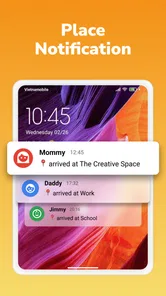
Analysis by Reviewed
Keeping track of family members by phone can be useful, but it can also become unnecessarily complicated when an app tries to do too much. iLocator: Family Location takes a more direct route: it is a free Maps & Navigation app from Betasoft Mobile built around GPS location and family location. After spending time with it, my view is that it works best as a focused location tool for households that want a simple way to stay aware of one another, rather than as a complete replacement for a full navigation platform.
The app has a clear appeal. I can imagine using it when a family member is travelling home, when someone is meeting relatives in an unfamiliar area, or when parents want a quick location check without opening a broader social platform. Its Everyone content rating also makes the intended audience feel broad. At the same time, the average score of 3.7 from around 243 ratings suggests a mixed experience rather than a universally smooth one. That is important context: iLocator: Family Location is worth considering, but I would approach it as a practical, purpose-built utility and not assume it will cover every location-sharing need.
What the app does well in everyday family situations
The strongest part of iLocator is its narrow focus. Many people do not need another app packed with travel planning, traffic layers, restaurant searches, or social features when all they want is a family member’s current location. By centring its identity on GPS location and family location, the app is easier to understand from the start. I do not have to guess whether it is primarily a route planner, a messaging service, or a location-sharing tool.
A realistic use case would be a household where one person finishes work at different times. Instead of sending repeated messages such as “Where are you now?” or “How far away are you?”, the family can use a location-focused app as a shared reference point. That does not eliminate the need for communication, especially if plans change, but it can reduce unnecessary back-and-forth. I find this particularly useful when someone is travelling through a busy area and a written description of their position would be vague.
Another useful situation is coordinating a meeting. Imagine two relatives arriving at a large public place from different directions. A location view can make it easier to understand whether one person is still approaching, has taken a wrong turn, or is already nearby. This is a small benefit, but it is exactly the kind of everyday friction that a dedicated family-location app should address.
The app is also approachable for people who are not enthusiastic about technology. Its purpose is easier to explain than that of a general-purpose mapping service: use it when you need to understand where family members are. That simplicity matters for households with different levels of technical confidence. A location-sharing tool only helps when everyone who needs it can understand the basic workflow.
iLocator is free to install, which lowers the barrier to trying it with a household. There are in-app purchases ranging from $6.99 to $39.99 per item, so I would still check the purchase screens carefully before committing to any paid option. The free entry point is useful for testing whether the app fits the family’s habits, while the presence of paid items means the long-term cost should be considered rather than assumed away.
More From Our News Desk

 Weather - By Xiaomi
Weather by Xiaomi Review: Clear at a Glance, Less Clear Up Close
Xiaomi’s weather app makes everyday forecasts quick to scan, but its calm surface can leave useful details and recovery paths harder to find than they should be.

 X
XX Under Pressure: Can It Recover When Posting Goes Wrong?
A resilience-focused review of X, examining setup, mistaken posts, interruptions, weak connections, and the gaps that matter when recovery needs to be dependable.

 Clash of Clans
Clash of Clans Is Won Between the Battles
Its raids are quick; its community is a long-term project of coordination, teaching, rivalry, and shared responsibility—with all the friction that entails.

 Android Auto
Android Auto Makes the Case for Quieter Car Software
The car interface is no longer judged by how much it can do, but by how quietly it helps. Android Auto shows what drivers now expect—and what still gets in the way.

 MobiOffice: Word, Sheets, PDF
MobiOffice: Transforming Mobile Productivity with Seamless Integration
MobiOffice: Word, Sheets, PDF is redefining mobile productivity with a surprising blend of functionality and innovation.

 EA SPORTS FC Soccer Mobile 26
EA SPORTS FC™ Mobile Soccer: Redefining Mobile Sports Gaming
Dive into EA SPORTS FC™ Mobile Soccer, where immersive gameplay and strategic depth transform mobile sports gaming.
Latest News



Its current version is 1.6.2, and it runs on Android devices using Android 7.0 or later. That gives the app a reasonably broad compatibility range for people using older phones, although compatibility alone does not guarantee that every handset will behave identically. GPS performance, battery management, and background restrictions can vary considerably between manufacturers, so I would test it on the actual phones that the family plans to use.
A better workflow than constant checking
One practical lesson I took from using a family-location tool is that it works best when the household agrees on when it should be used. If everyone constantly watches the map, the app can create anxiety instead of reducing it. I would set a simple routine: use it for meeting up, checking progress during a journey, or confirming that someone reached an expected area, then rely on a message or call when the situation needs explanation.
This is more than a matter of etiquette. A map can show a position, but it cannot explain why someone stopped, whether they are safe, or whether their plans changed. Treating the location as a starting point for communication makes the tool more reliable in practice. For example, if a teenager’s position appears unchanged for a while, the sensible next step is a direct message rather than repeated refreshing.
I also recommend agreeing on names and expectations before the first real trip. Family location tools become confusing when several people join without a shared understanding of who is being monitored, when location sharing is appropriate, and what counts as an urgent situation. iLocator is most useful when the family treats it as a cooperative aid, not as a silent substitute for trust or conversation.
Where it feels less convincing
The central weakness is that a focused GPS tool can feel limited beside the usual alternatives. Google Maps and Apple Maps are already familiar to many users and combine navigation with location-related functions, while messaging apps may let families share a position inside conversations they already use. Those alternatives can be more convenient for people who want directions, traffic information, place searches, and communication in one established environment.
iLocator’s focused identity is therefore both its advantage and its constraint. If my main task is finding a route across town, I would normally choose a dedicated navigation service. If I need to explain a delay or coordinate a change of plan, I would still use a messaging app. iLocator makes more sense when the family-location task itself deserves a separate space and the household is comfortable adding another app to its routine.
There is also a practical trust issue with any location-sharing application. Family members need to understand who can see a location and when sharing is active. I would not install it casually on someone else’s phone or assume that a relative is comfortable being tracked simply because the app is designed for families. A respectful setup, clear consent, and regular conversations about use are essential. The app can support coordination, but it should not become a tool for constant surveillance.
GPS is another source of possible frustration. Indoor positions, dense urban streets, underground areas, weak signals, and battery-saving behaviour can all affect how useful a location appears. When a map position looks old or imprecise, that does not automatically mean the person is in trouble or that the app has failed. I would treat the display as an aid with normal technical limits, not as a guaranteed live account of reality.
That limitation is especially important for safety-critical situations. I would not rely on iLocator as the only way to protect a child, locate someone in an emergency, or confirm that a vulnerable person is safe. In those circumstances, direct contact and appropriate emergency services matter more than any map display. The app may help provide context, but it should not be treated as a professional emergency system.
Who will get the most value
I think iLocator is a good fit for families that want a dedicated, uncomplicated location channel. It may suit relatives who live in different places, couples coordinating commutes, or households that regularly meet at changing locations. It is also a reasonable option for someone who wants to try a family-location app without paying at the installation stage.
The app is particularly attractive when the family’s needs are modest. If the goal is simply to check whether someone is nearby or still travelling, a focused tool can be less distracting than a larger platform. The Everyone rating may also make it easier to consider for a mixed-age household, although adults should still decide together how location sharing will be handled.
I would be more cautious about recommending it to users who expect a complete navigation suite. Drivers who need detailed route planning, traffic-aware guidance, extensive place information, or a mature navigation ecosystem will probably be happier with a mainstream mapping alternative. Likewise, people who already share locations comfortably through a messaging service may not gain enough to justify maintaining another app.
It is also not the right choice for anyone who wants location sharing without discussing boundaries. No application can solve the human side of family tracking. If the people involved disagree about visibility, timing, or privacy, adding a location app may intensify the problem. In that situation, the better first step is an agreement about communication, followed by a technical choice that everyone accepts.
Details worth checking before relying on it
Before using iLocator for a journey, I would install it on each intended phone, complete the setup together, and test it while everyone is in a familiar place. That simple trial can reveal whether the household understands the interface and whether a particular phone handles location updates in a dependable way. Testing at home is much better than discovering confusion when someone is already late for a meeting.
I would also review the app after installation rather than assuming that the initial setup is the end of the process. Check which family members are included, confirm that the correct person is being viewed, and make sure everyone knows how to stop relying on the map when a phone call is more appropriate. These steps are not glamorous, but they are what turn a location app from a novelty into a useful routine.
Because paid items are available, I would avoid purchasing anything until the free experience has answered the basic questions: Can the family use it comfortably? Does it fit the way everyone travels? Does it provide enough value beyond existing map or messaging apps? The listed purchase range reaches from $6.99 to $39.99 per item, so the difference between trying the app and investing in it is meaningful.
The app comes from Betasoft Mobile and was released on January 18, 2024. Its install base is over 50 thousand, which indicates that it has reached a real audience while remaining much smaller than the dominant mapping services. I see that as a reason to keep expectations realistic. A smaller app can be exactly right for a specific task, but users should value its direct purpose rather than expect the breadth and polish of the largest navigation platforms.
My final view after weighing the trade-offs
iLocator: Family Location is most convincing when I judge it on its own terms. It is a family-oriented GPS utility, not a universal replacement for Google Maps, Apple Maps, or a familiar chat app. Its main strength is the clarity of that purpose: families can try a dedicated location tool for free and decide whether it makes their everyday coordination easier.
My recommendation is therefore conditional but positive. I would suggest it to a household that wants a separate place for location sharing, is willing to establish sensible privacy boundaries, and does not need advanced navigation features. I would skip it in favour of an established alternative if route guidance, traffic information, or integrated messaging is the real priority.
The average rating of 3.7 reflects the fact that this is not a flawless, universal solution. Still, a focused app does not need to replace every other tool to be useful. If your family often asks where someone is, meets in unfamiliar places, or needs a quick progress check during journeys, iLocator may earn its place on your phones. My key advice is to test it as a shared family routine before paying for anything: its value depends less on the idea of GPS location and more on whether the people using it find the workflow clear, respectful, and genuinely helpful.
iLocator : Family Location Frequently Asked Questions
Is iLocator: Family Location free to download, and does it include paid features?
iLocator: Family Location is free to download, so you can try the app without paying upfront. It also offers in-app purchases priced from $6.99 to $39.99 per item. Before making a purchase, review the options shown in the app and consider whether they suit your needs; the family-location features are most useful when everyone understands how the app will be used.
Which devices can run iLocator: Family Location?
The app is listed for Android and iOS, making it a possible option for families using different mobile platforms. On Android, the minimum operating-system requirement is version 7.0. Check your device’s operating-system version and the app’s compatibility details in its store before downloading, particularly if you use an older phone or tablet.
What is iLocator: Family Location used for?
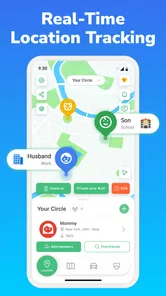
iLocator: Family Location is designed to help families share and view their real-time locations on a private map. After members join the same group, you can check where relatives are, coordinate meetups, and receive location-related updates. It can be useful for parents, couples, or caregivers, but everyone should understand and agree to the tracking arrangement before using it.
Does iLocator: Family Location require permission to access my location?
Yes. Location access is essential for the app’s main features, so iLocator may request permission to use your device’s location while the app is open or in the background. The exact options depend on your Android or iOS settings. Before downloading, review the requested permissions and choose the least extensive access that still supports the features you want to use.
Can I control who sees my location in iLocator?
Location sharing should be managed through your family group and the app’s privacy or sharing controls. Only invite people you trust, and check the member list regularly. Depending on the version and platform, you may be able to stop sharing, leave a group, or adjust permissions from inside the app or your phone’s settings. Do not treat location sharing as completely risk-free.
Pros
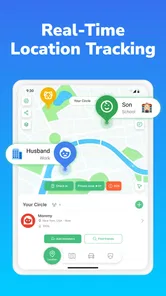
- Real-time location sharing helps families coordinate throughout the day.
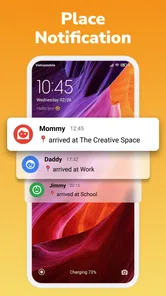
- Geofencing alerts can notify you when someone enters or leaves a place.
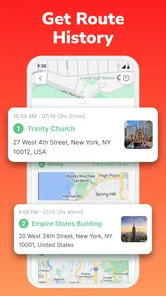
- Location history makes it easier to review recent movements when needed.
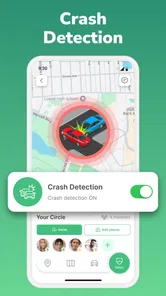
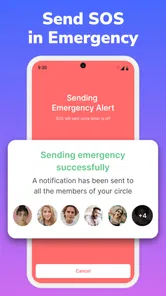
- Emergency features can provide extra reassurance during unexpected situations.
- The interface is generally straightforward for users of different ages.
Cons
- Continuous GPS use may noticeably reduce battery life on some phones.
- Accurate tracking depends on reliable GPS
- mobile data
- and background permissions.
- Some features may require a paid subscription or in-app purchases.
- Family members must consent to sharing their location for the app to work fully.
- Location updates can occasionally be delayed in buildings or areas with weak signal.











