

ICE2U
- 75.00
- 3.7
- Installs
- 50.00K
- Price
- Free

Screenshots
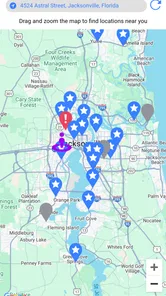
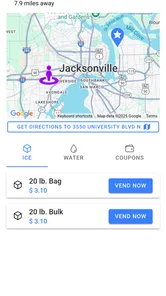
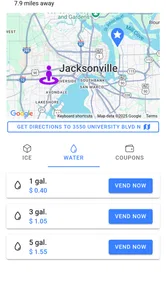
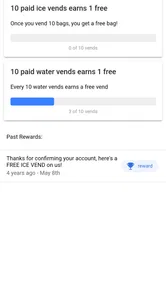
Analysis by Reviewed
I tried ICE2U as a practical companion for buying ice and water from participating vending machines, and my first impression was that it is aimed at a very specific moment: you are already near a machine, you need a purchase, and you want the app to make the transaction or reward side easier. That narrow purpose is also its main strength. It is not a general grocery app, a recipe tool, or a broad food-delivery service. It belongs to the Food & Drink category and focuses on the relationship between customers, ice and water vending, and rewards.
The app is developed by IceHouseAmerica and is free to install. It is rated for Everyone, which makes the intended audience broad, although the usefulness still depends heavily on whether the vending service is available where you live. The store summary presents it as a way to vend ice and water while earning rewards, while the short description uses the compact label “ICE2U.” That tells me the app is best understood as a companion to a physical vending network rather than a standalone shopping destination.
What using ICE2U feels like in everyday life
The most realistic use case is a quick stop during a busy day. Imagine loading a cooler before a beach trip, filling containers for a weekend event, or needing bagged ice after a grocery store has closed. With a conventional purchase, you would usually look for a nearby retailer, walk through the store, wait at a checkout, and carry the product out. An app connected to an ice-and-water vending setup can reduce that process to a more targeted visit, provided the relevant machine is convenient and accepts the kind of purchase you need.
That distinction matters. ICE2U is not trying to replace your supermarket. A grocery store gives you a wider selection and lets you combine ice with food, drinks, and household items. A dedicated vending option can be faster for a single-purpose stop, especially when you do not want to enter a store. The trade-off is that the app’s value is tied to the physical locations and services it supports. If none of those locations are practical for your route, the app cannot make a distant machine useful.
I also see a difference between occasional and repeat users. Someone who buys ice only once or twice a year may find the app unnecessary unless it helps locate a convenient machine or provides a reward worth remembering. A frequent customer, small event organizer, outdoor enthusiast, or person who regularly needs clean water and ice has more reason to keep it installed. For that audience, a rewards-focused companion can turn repeated errands into something easier to track than a series of disconnected purchases.
The app has reached more than fifty thousand installs and holds an average rating of 3.7 from around 184 ratings, with roughly 75 written reviews. Those figures suggest a real but still fairly focused user base. I would not interpret the rating as a guarantee of a smooth experience at every machine. Apps tied to physical equipment often depend on several moving parts: the phone, the app, the payment flow, the machine, and the local network connection. A problem at any one of those points can feel like an app problem even when the underlying cause is elsewhere.
Why the physical machine changes the review
With a normal food app, the main experience happens on the screen. With ICE2U, the screen is only one part of the journey. You may need to stand beside a vending machine, choose the right product or service, complete a transaction, and then collect something that is bulky or awkward to carry. That makes clarity more important than visual novelty. I care less about decorative design here than about whether the app helps me understand what I am buying, what I need to do next, and whether the reward outcome is clear.
More From Our News Desk

 Gmail
GmailGmail in a Busy Inbox: Who Benefits Most?
From first account to crowded workday, Gmail earns its place through dependable search and flexible sorting—but its best fit depends on how much inbox maintenance you can tolerate.

 Prime Video
Switching to Prime Video: What Changes in Your Viewing Routine
Prime Video can make a compelling second home for streaming, but switching means learning a different catalog, rental layer, and route from browsing to playback.

 Universal TV Remote Control
Universal TV Remote Control Works Best as a Reliable Backup
A phone remote earns its place through quick setup and reliable habits. Here is how to get more from Universal TV Remote Control—and where its limits show.

 Weather - By Xiaomi
Weather by Xiaomi Review: Clear at a Glance, Less Clear Up Close
Xiaomi’s weather app makes everyday forecasts quick to scan, but its calm surface can leave useful details and recovery paths harder to find than they should be.

 X
XX Under Pressure: Can It Recover When Posting Goes Wrong?
A resilience-focused review of X, examining setup, mistaken posts, interruptions, weak connections, and the gaps that matter when recovery needs to be dependable.

 Clash of Clans
Clash of Clans Is Won Between the Battles
Its raids are quick; its community is a long-term project of coordination, teaching, rivalry, and shared responsibility—with all the friction that entails.
Latest News



This is also where I would slow down before relying on it for an urgent purchase. If I were preparing for guests or leaving for a trip, I would not make the app my only plan until I had used the relevant machine successfully. A supermarket or convenience store remains the safer fallback when timing matters, because the purchase does not depend on learning a new vending workflow at the last minute. ICE2U makes more sense as a tool to test ahead of time, then reuse once the process feels familiar.
Rewards are useful only when the routine fits
The reward angle is potentially the most persuasive reason to return. However, rewards have practical value only when the earning and redemption process is understandable. I would pay attention to whether a purchase is visibly associated with my account, whether the balance updates promptly, and whether the app explains what I can do with an earned benefit. Those are not small details. A reward that is difficult to locate or understand does not feel like a real saving; it feels like an extra task attached to buying ice.
My advice is to treat rewards as a bonus rather than the sole reason to choose a machine. First compare the location, convenience, product need, and payment experience. Then consider the reward. This avoids a common mistake: travelling farther or accepting a less convenient purchase simply because an incentive sounds attractive. For a repeat buyer, the reward system may gradually improve the value of the routine. For an occasional buyer, convenience should remain the deciding factor.
Trust starts with visible choices, not promises
Because ICE2U can connect a mobile app with a physical purchase, I would judge it through the choices it shows me during setup and use. The important questions are straightforward: what information does the app request, which permissions appear on the device, can I review account details, and can I control whether I continue using the service? I would not assume that a food-and-drink app needs broad access to unrelated parts of my phone. If a permission appears, I would read its explanation and allow only what feels necessary for the action I am trying to complete.
This is particularly important for location-related access. A vending companion may be more convenient if it can help with nearby machines, but convenience does not mean I should automatically grant continuous access. I prefer to choose the narrowest option offered by the operating system, such as allowing access only while using the app, when that is available. If I am simply checking an account or reviewing rewards at home, I would rather not keep location access active without a clear reason.
The same cautious approach applies to account creation and payment. Before entering personal details, I would look for a clear explanation of why each field is needed. I would also check whether the app lets me review or update account information without hunting through unrelated screens. For payment, I would confirm the amount and purchase context on the device or machine before completing the transaction. A good habit is to pause when the screen changes unexpectedly, especially if the purchase is happening beside a machine and there is pressure to move quickly.
Account control matters more than a polished first screen
For me, trust is not established by a friendly welcome screen. It is established when the app makes ordinary account tasks understandable. I want to know how to sign out, how to correct an email address or other account detail, and what happens if I stop using the service. I also want the app to avoid making me feel trapped in a rewards program simply because I created an account for one purchase.
That does not mean every control must be prominent on the opening screen. It does mean I should be able to find account and privacy choices without guessing. If I were setting up ICE2U for a family member, I would show them where those controls are before they used the machine. This is a useful step for anyone who is less comfortable with mobile payments or who wants to keep app access limited to occasional purchases.
I would also keep the app updated through the official app store. The current version is 1.25.21, and the minimum operating-system requirement is iOS or Android 11. That requirement is worth checking before planning to depend on the app during a trip or event. If your phone runs an older system, the practical question is not whether the concept sounds useful; it is whether your device can install and run the current release. In that situation, a regular retailer is the more reliable alternative.
Moments when data sensitivity becomes practical
The most data-sensitive moments are likely to be setup, location discovery, account access, and payment. I would handle them separately instead of treating the whole app as either completely safe or completely risky. During setup, I would provide only information that is necessary for the account I intend to use. During location discovery, I would choose a limited permission where possible. During payment, I would verify the purchase before confirming it. Afterward, I would review the reward or transaction result while the details are still fresh.
This workflow has another benefit: it helps separate a failed transaction from a missing reward. If the machine does not dispense what I selected, I would first note the time, machine location, and visible transaction details. If the purchase succeeds but the reward does not appear, I would capture the relevant confirmation before closing the app. I would not repeatedly retry a payment just because the first screen takes a moment to update. Repeated taps can create confusion and, in the worst case, duplicate attempts.
That is one of the less obvious lessons of a vending companion: the physical environment can make digital mistakes harder to notice. You may be outdoors, carrying a cooler, dealing with noise, or trying to keep a queue moving. I recommend preparing before you reach the machine. Sign in at home if you are comfortable doing so, check that your phone has enough battery, and avoid beginning with a complicated purchase when you are already in a hurry. These small habits reduce the chance that convenience turns into troubleshooting.
How it compares with familiar alternatives
Compared with buying ice at a supermarket, ICE2U may offer a more direct path when a supported vending machine is nearby. The supermarket wins on variety, the ability to combine errands, and the familiarity of a normal checkout. It may also be better when you need several different products rather than only ice or water. The vending route wins when the dedicated machine is closer, faster, or available at a time when a store visit is inconvenient.
Compared with a convenience store, the choice is more balanced. A convenience store may provide staff assistance and a broader selection of drinks and snacks, while a vending machine can avoid entering a store and may suit a quick pickup. If the machine is busy, difficult to access, or unclear about the next step, the staffed counter may be less frustrating. I would choose ICE2U for a repeatable, familiar route, not automatically for every purchase.
Compared with a general rewards app, ICE2U is more focused but less flexible. A broad loyalty program may cover many everyday purchases in one place, whereas this app is relevant to a narrower routine. The focused design can be an advantage if you regularly use the supported vending service, because the reward relationship is tied to the exact type of purchase you are making. It is a poor substitute for a general shopping app if you want one account to manage unrelated food and drink spending.
Who should use it, and who should skip it
I would recommend trying ICE2U if you regularly buy bagged ice or water, pass supported vending locations, and are willing to use a mobile account for that routine. It is also worth considering if you organize outdoor activities or small gatherings and want a repeatable way to handle a basic supply need. The app’s free price removes the financial barrier to testing it, so the main cost is your time and attention during the first setup and purchase.
I would be more cautious if you rarely need these products, dislike account-based purchasing, or prefer to solve every errand inside one supermarket visit. I would also skip relying on it as the only option for a time-critical event until I had tested the exact machine and workflow I planned to use. People with older phones below the supported operating-system level should look for another purchasing method rather than planning around an installation that may not be possible.
Families should decide in advance who controls the account and payment method. Sharing a phone at the machine can be awkward, and mixing several people’s purchases in one rewards account may make the balance harder to understand. A single person handling the account, while others help carry the ice or water, is usually the cleaner arrangement. This is not a feature claim; it is simply the most sensible way to avoid confusion when a physical purchase and a digital record are linked.
A practical first-use routine
My preferred first-use routine would be deliberately low-risk. I would install the free app on a supported phone, read each permission request, and create an account only after deciding that the service fits my normal route. I would then visit a convenient machine during an ordinary day rather than during an emergency. Before paying, I would check the product choice and any visible purchase details. After the transaction, I would confirm that the physical result and the in-app record match.
On a later visit, I would test the reward side of the experience without changing too many variables at once. That makes it easier to understand whether a reward is connected to the account, how it is displayed, and what action is needed to use it. If something does not look right, I would stop and document the screen before trying again. This approach is slower than tapping through everything quickly, but it gives me much more confidence in the account and payment trail.
I would also review the app’s account controls after the first successful purchase. Knowing how to sign out, adjust available settings, or stop using the service is part of being comfortable with any app that touches purchases. If those choices are easy to locate, that improves my trust. If they are confusing, I would limit my use to situations where the convenience clearly outweighs the extra friction.
My cautious verdict after testing the idea
ICE2U is appealing because it addresses a real, specific errand instead of pretending to be a complete food platform. Its best scenario is a nearby supported vending machine, a repeat need for ice or water, and a user who appreciates having rewards connected to those purchases. The free download makes experimentation reasonable, and the Everyone rating keeps the intended audience broad. The app’s size and 3.7 average show that it has attracted genuine interest, but they do not remove the need to judge the experience at your own local machine.
My main reservation is not about the concept; it is about dependence on context. The app cannot compensate for an inconvenient location, an older phone, a confusing machine, weak connectivity, or a reward process that does not match your habits. I would keep a conventional store in mind whenever the purchase is urgent. I would also avoid granting permissions automatically and would treat payment confirmation as a moment that deserves attention, even when the purchase itself is small.
In short, I see ICE2U as a useful specialist tool rather than an essential app for everyone. Its real value appears when a vending stop is already part of your routine and the digital controls remain clear enough for you to stay in charge. If that describes you, installing it and trying one ordinary purchase is sensible. If you want broad grocery choice, staff help, or no account involvement, the usual supermarket or convenience store will probably be the better fit.
For readers deciding whether to keep it, my test is simple: use it once without rushing, verify the purchase, inspect the reward result, and review the account choices afterward. If those steps feel straightforward and the supported machines are genuinely convenient, the app earns a place on your phone. If the physical location or digital process creates more work than the purchase saves, there is no reason to force the match. That balanced approach is the fairest way to judge ICE2U on your own terms.
ICE2U Frequently Asked Questions
Can ICE2U help me find a place to buy ice or water?
ICE2U is connected with Twice the Ice, a service for vending ice and water, and its store summary also mentions earning rewards. It may be useful if you want to explore that service from your phone. Check the app’s current description and available features before relying on it for a particular location or purchase, as access can depend on where the service operates.
Who makes ICE2U, and what should I know before downloading it?
ICE2U is a Food & Drink app developed by IceHouseAmerica. It is listed as suitable for everyone, and its current version is 1.25.21. The app was released on February 13, 2025, and has more than 50,000 installs, with an average rating of 3.7 from 184 ratings. Reading recent user reviews can help you decide whether its current features fit your needs.
What is ICE2U and what can I use it for?
ICE2U is an application designed to help users access its specific digital services and features from a mobile device. Its connection with Twice the Ice is focused on vending ice and water, and the store summary also mentions earning rewards. Before downloading, check the app’s current description and supported functions, since availability may depend on your country, account type, or organization. Some features may require registration or an active internet connection.
Is ICE2U free to download and use?
ICE2U is free to download. Before using it, review the official store listing for the latest information about subscriptions, in-app purchases, premium options, or service fees. Some functions can also depend on a separate account or paid service. Checking the pricing details before creating an account helps avoid unexpected charges after installation.
What permissions does ICE2U require?
The permissions requested by ICE2U can vary according to the device and the features you use. Depending on its purpose, the app may request access to notifications, storage, location, camera, or account information. Review each permission carefully during setup and grant only what is necessary. You can later manage or revoke permissions through your Android or iOS privacy settings.
Pros
- Simple interface makes core features easy to find.
- Useful for users who need quick access to ICE-related information.
- Lightweight design should work well on many Android devices.
- Clear presentation helps beginners understand the available options.
- Convenient mobile access is helpful when away from a computer.
Cons
- The app may feel limited for users seeking advanced features.
- Some content or functions could depend on an internet connection.
- Compatibility may vary across older devices and operating systems.
- The interface may lack customization for individual preferences.
- Updates and support quality may depend on the developer’s activity.











