HuntSmart: The Trail Cam App
- 1.08K
- 4.4
- Installs
- 100.00K
- Price
- Free

Screenshots
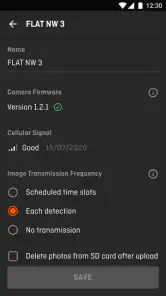
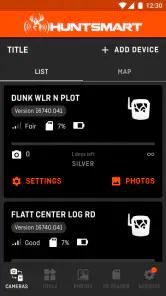
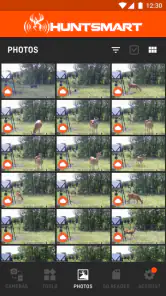
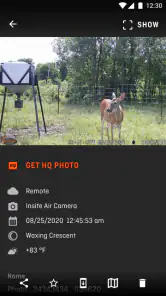
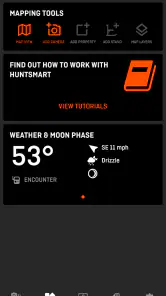
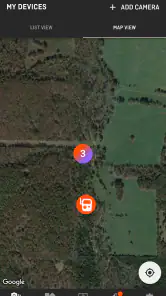
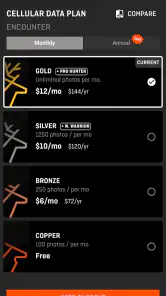
Analysis by Reviewed
When I use a trail camera app, I am not looking for another complicated hunting dashboard. I want to check activity quickly, understand what a camera has captured, and make a sensible decision before I head outside. HuntSmart approaches that job as a sports app from GSM Outdoors, and its focus is clear: helping hunters work with trail-camera information rather than treating every image as an isolated file.
That focus makes it more practical than a general photo viewer, especially when I am checking a collection of images connected to a hunting area. It is free, rated for Everyone, and available for devices running Android 8.0 or later. The current release is 3.8.6, and the app has passed the 100K-install mark. Those details make it easy to try without committing money or replacing a phone that is still perfectly usable.
After spending time with it, my view is positive but measured. HuntSmart is most useful when it becomes part of a repeatable trail-camera routine: review images, notice patterns, decide whether a location deserves attention, and return later with better context. It is less convincing for someone who only wants a basic gallery or expects a hunting app to solve every part of scouting automatically.
How clearly HuntSmart presents trail-camera information
The first thing I noticed is that readability matters more here than visual decoration. Trail-camera sessions can produce a large amount of material, and a useful app needs to help me move from one image to the next without making every check feel like an administrative task. HuntSmart’s value comes from putting hunting-oriented review ahead of the ordinary phone-gallery experience.
I find that distinction important for people who do not enjoy dense interfaces. A general gallery usually treats a camera image like any other photograph. In contrast, a dedicated trail-cam app gives the review process a clearer purpose: I am looking for animal activity, timing, and changes at a location. That context helps me decide what deserves a closer look instead of scrolling through unrelated pictures.
For users with limited vision, the practical question is not simply whether text can be read. It is whether the screen remains understandable when the phone is used outdoors, quickly, or under less-than-ideal lighting. I would recommend increasing the phone’s system text size and display contrast before relying on the app in the field. That adjustment can make labels and controls easier to distinguish, although it may also cause some screens to feel more crowded.
I also prefer reviewing images in a calm place rather than trying to interpret everything while standing beside a vehicle or walking between camera locations. The app is better suited to a deliberate inspection session than to hurried one-handed browsing. That is not a failure unique to HuntSmart; animal images often require concentration, and small visual clues can be easy to miss on a phone.
More From Our News Desk

Clash of Clans Is Won Between the Battles

Android Auto Makes the Case for Quieter Car Software

MobiOffice: Transforming Mobile Productivity with Seamless Integration

EA SPORTS FC™ Mobile Soccer: Redefining Mobile Sports Gaming

How Microsoft OneDrive Became a Mobile Productivity Giant

How Google Translate Breaks Language Barriers Effortlessly
One useful habit is to separate the first pass from the detailed pass. I use the first pass to identify images that appear relevant, then return to those images when I have enough time to examine them properly. This prevents me from spending equal attention on empty frames and potentially meaningful activity. It also makes the app more manageable for anyone who becomes tired when processing a long stream of similar pictures.
Navigation that works best with a planned routine
I would not describe HuntSmart as a replacement for careful organization. The app can support a workflow, but the quality of that workflow still depends on how consistently I review cameras and record what matters. Before opening a session, I find it helpful to decide what question I am trying to answer: Is a location active? Is activity happening at a useful time? Has the pattern changed since my last visit?
That simple preparation is more valuable than randomly browsing. It reduces the mental load of switching between images and helps me use the app as a decision tool. For a new user, I would begin with one camera or one small group of images, learn how the review process feels, and only then expand the routine. Starting with a large archive can make any trail-camera system seem harder than it needs to be.
The app’s average rating of 4.4 from around 6.6 thousand ratings suggests that many people find the basic experience worthwhile. I would treat that as a useful signal, not as proof that it will suit every hunter. A person who values straightforward image review may appreciate it more than someone who wants extensive customization or a highly technical analysis environment.
Motor, sensory, and cognitive considerations in everyday use
Trail-camera review can be physically awkward. I may be holding a phone in one hand, carrying equipment in the other, or trying to check a result while wearing gloves. HuntSmart is therefore easiest for me when I use it before or after the outdoor portion of a trip, rather than expecting it to be a perfect field companion during movement.
People with limited dexterity may prefer to prepare their review while seated, with the phone supported instead of held continuously. A stable position makes repeated taps and image inspection less tiring. It also lowers the chance of accidentally selecting the wrong item while moving over uneven ground. If a user depends on very precise gestures or cannot comfortably operate a phone for an extended period, the app may feel demanding even when its organization is sensible.
For users who are sensitive to visual clutter, the best approach is to keep the task narrow. I would avoid opening the app with the intention of reviewing everything at once. Instead, I would work in short sessions and stop after answering a specific scouting question. That method is especially helpful when many frames look alike, because visual repetition can become tiring long before the task is technically complete.
Hearing-related access is less central to the main purpose of this app than visual access, because trail-camera review is primarily an image-based activity. Still, I would not depend on sound as the only indication that something important happened. A user who cannot hear alerts or prefers a quiet environment should build a habit of checking the relevant visual information directly rather than assuming an audio cue will carry the whole experience.
Cognitive accessibility also deserves attention. Hunting decisions often involve uncertainty, and an app cannot remove that uncertainty simply by displaying more images. I find HuntSmart easier to use when I keep my own notes about dates, locations, and decisions outside the immediate image review. That division prevents the app from becoming a memory test and gives me a stable reference when I return to the same area later.
A concrete example is a weekend check after several days away. I might first review the newest material, mark the images that appear useful, and compare them with my previous notes. If the results do not justify a visit, I can postpone the trip without repeatedly reopening the same frames. If they do justify a visit, I already have a focused reason for going. This workflow saves effort for users with limited stamina as well as for anyone balancing hunting with work, family, or travel.
Where the app is more comfortable than the usual alternatives
The usual alternative is often a phone’s default gallery, a file browser, or a manufacturer-specific camera service. Those options may be familiar, but they are not built around the questions hunters ask. They can leave me manually sorting images, remembering which camera produced them, and trying to reconstruct a pattern from a pile of files.
HuntSmart has a clearer identity because it is dedicated to trail-camera use. That specialization is its strongest argument. I do not need a general photo app to understand that a camera image is part of a scouting process. When I choose a hunting-focused tool, I am accepting a narrower purpose in exchange for a more relevant workflow.
The trade-off is flexibility. A general gallery may be better for mixing trail-camera pictures with ordinary photos, editing images, or sharing them through a broad range of familiar tools. Someone who already has a highly organized file system may also find a dedicated app unnecessary. I would choose HuntSmart when the main task is hunting-related review, not when I want one universal image manager.
Using it in different places and conditions
Situational access is where my opinion becomes more cautious. A phone can be readable indoors and frustrating outdoors. Bright daylight, glare, cold fingers, wet conditions, and limited time all change how easy an app feels. HuntSmart is most comfortable when I prepare the review away from the camera site and use the field visit for decisions that have already been informed by the images.
For a hunter with reduced mobility, that distinction can be valuable. Instead of visiting every camera simply to discover whether anything happened, I can review first and make the trip more selective. The app does not remove the physical challenges of outdoor scouting, but it can help reduce unnecessary journeys. That is a practical form of support, particularly when distance, terrain, or fatigue makes repeated visits difficult.
Users who travel to areas with unreliable connectivity should plan their routine carefully. I would not assume that every part of a trail-camera workflow will feel identical away from a strong connection. Reviewing what is already available on the device may be more comfortable before leaving home, while any task that depends on communication with a camera or service should be considered before entering a remote area.
This is also where the app should not be confused with a complete replacement for field judgment. A picture can show activity without explaining every condition around it. Weather, terrain, access routes, privacy concerns, and local hunting rules still require human attention. HuntSmart can help me decide where to focus, but it cannot make a responsible decision on my behalf.
Another realistic scenario involves shared planning. One person may handle the outdoor equipment while another family member reviews images at home. That arrangement can make the process more inclusive for someone who cannot comfortably walk to camera locations or who prefers detailed image work indoors. I would still establish a clear naming and note-taking routine so that everyone understands which camera or location is being discussed.
For users who are new to trail cameras, I recommend treating the first few sessions as setup for a habit rather than a test of expertise. Review the images at a consistent time, write down what you learned, and avoid drawing a major conclusion from one unusual frame. The app becomes more useful as the user develops a comparison process around it.
Remaining barriers and situations where I would choose something else
HuntSmart’s biggest limitation is that a focused app can only be as helpful as the information and workflow surrounding it. If my cameras are poorly positioned, produce too many empty images, or are checked inconsistently, the app cannot turn that material into reliable scouting insight. The convenience of a dedicated interface should not encourage careless interpretation.
I would also hesitate to recommend it to someone who wants a broad outdoor toolkit in one place. If your priority is mapping, navigation, weather, licensing information, or detailed trip planning, a different hunting or outdoor app may be a better primary choice. HuntSmart makes more sense beside those tools than as a substitute for every one of them.
Another barrier is the phone itself. A small screen can make close image inspection tiring, especially for people with low vision. A larger display may be preferable for detailed review, even if the app remains installed on a phone for quick checks. Users who need keyboard navigation, specialized switch access, screen-reader-first design, or formal accessibility guarantees should test the current experience on their own device before building an essential workflow around it.
I also would not choose it solely because it is free. Free removes a financial obstacle, which is helpful, but it does not guarantee that the app matches a person’s preferred way of working. Someone who already has a reliable system for sorting and comparing trail-camera images may gain little from changing. The strongest reason to install it is its hunting-specific focus, not the absence of a purchase price.
The developer, GSM Outdoors, gives the app a clear connection to the outdoor sports space, and the product has accumulated around 1.1 thousand written reviews. I see that level of public use as encouraging, while still keeping expectations realistic: an app with a solid user base can remain unsuitable for a particular phone, workflow, or accessibility need.
Before depending on it for an important trip, I would run a small personal trial. Use one camera, review a manageable batch of images, enlarge the details that matter, and see whether the navigation remains comfortable after several minutes. Then repeat the process in the conditions where you actually hunt. This test reveals more than a quick installation because it includes glare, gloves, fatigue, and the user’s own visual and motor needs.
My inclusive verdict on HuntSmart
HuntSmart is a worthwhile free sports app for hunters who want a more relevant way to work through trail-camera material than a standard gallery provides. I like its narrow purpose, because the app encourages me to review images as part of scouting rather than as disconnected photographs. It is especially useful for reducing unnecessary trips and creating a calmer, more deliberate routine.
Its inclusive value is practical rather than absolute. It can support people who need to review cameras from home, limit outdoor travel, work in short sessions, or share the image-checking part of a hunting routine with someone else. Larger text, a stable phone position, good lighting, and a planned review process can make a meaningful difference. Those adjustments come from the surrounding setup as much as from the app itself.
I would skip it if I needed a full outdoor planning suite, a universal photo manager, or a guaranteed fit for specialized accessibility equipment. I would also avoid making it the sole basis for a hunting decision without considering the wider conditions around a camera image. In those cases, a general gallery, a mapping tool, or a more specialized system may be the better choice.
For everyone else, I think the low-risk approach is to install it and test it with one realistic scouting task. The app is free, supports older devices beginning with Android 8.0, and has enough adoption to show that it is not an obscure experiment. My recommendation is straightforward: choose HuntSmart when trail-camera review is the center of your routine, and judge it by how comfortably it fits your own eyes, hands, environment, and decision-making habits.
HuntSmart: The Trail Cam App Frequently Asked Questions
Can I use HuntSmart without owning a trail camera?
HuntSmart is built around managing and monitoring trail-camera activity, so its main purpose is most useful when you have compatible camera equipment to connect. You may be able to explore parts of the app before setting up a camera, but the core experience centers on camera images, activity, and related information. If you are considering a download, think of it as a companion for trail-camera use rather than a standalone hunting guide.
What devices can install HuntSmart?
HuntSmart is available for Android and iOS, with version 3.8.6 listed as the current version and Android 8.0 as the minimum Android requirement. It is a free Sports app from GSM Outdoors, with an Everyone content rating. Before installing, check that your phone’s operating system meets the requirement and that your device has enough room for the app and the camera images you plan to access.
What is HuntSmart: The Trail Cam App used for?
HuntSmart is designed to help hunters and outdoor enthusiasts organize, monitor, and review trail-camera activity from a mobile device. Depending on the supported camera and setup, the app can help you access captured photos or videos, sort observations, identify patterns, and keep useful information about wildlife activity in one place. It is primarily a management and monitoring tool, not a replacement for responsible field scouting or local hunting regulations.
Does HuntSmart work with every trail camera?
No. Compatibility depends on the specific trail camera, cellular system, connection method, and software support provided by the manufacturer. Before downloading, check whether your camera model is listed as compatible and whether it requires a separate subscription, SIM card, cloud plan, or account. Some features may also vary between Android and iOS devices, so confirming supported hardware and operating-system requirements can prevent setup problems.
Does the app require an internet connection or cellular service?
Most remote trail-camera features require an active internet or cellular connection, especially when receiving new images, checking camera status, or changing settings from a distance. Your camera may also need adequate signal and a compatible data plan. Basic information already stored on your phone might remain available offline, but real-time updates and uploads generally cannot work without connectivity. Signal quality and data limits can affect performance.
Pros
- Quickly browse and organize trail-camera photos in the field.
- Useful tagging tools help sort animals
- locations
- and sightings.
- Cloud access keeps camera records available across supported devices.
- Designed for hunters who want scouting data in one dedicated app.
- Can reduce time spent manually reviewing large photo collections.
Cons
- Some features may require a paid plan or additional subscription.
- Performance can depend heavily on mobile signal and camera connectivity.
- Battery use may increase when syncing many photos or receiving alerts.
- Initial setup may feel complicated for users with several cameras.
- Compatibility can vary between camera brands and phone models.
- Category
- Sports
- Version
- 3.8.6





