HuntStand: GPS Maps & Tools
- 9.59K
- 3.0
- Installs
- 1.00M
- Price
- Free

Screenshots
Analysis by Reviewed
Before I rely on any hunting map, I ask two separate questions: does it help me plan, and do I feel comfortable with the choices it puts in my hands? HuntStand: GPS Maps & Tools is built around outdoor mapping, but using it well still means thinking carefully about location, access, and what I choose to share. I see it as a potentially useful companion for a prepared outing, not a substitute for judgment or a backup plan.
Trust starts with the decisions I make
A map can show information that feels precise, yet the real-world consequences of acting on it can be significant. I would treat property details as a starting point for checking access, not a final ruling, and I would avoid assuming that a marked route is safe or permitted simply because it appears on screen. That distinction matters most when a trip crosses unfamiliar land or brings several people together.
I also separate the app’s practical value from questions that depend on the settings and wording visible on my own device. Before a trip, I would look at the location permission choices presented by the operating system and app, consider whether the access level suits my use, and revisit those choices if my needs change. I would not enable more access simply because an app is designed for outdoor navigation.
Useful habits before heading out
One small but valuable workflow is to prepare a few clearly named markers before leaving. A parking place, a meeting point, and a turn that could look similar to nearby tracks are easier to recognize when they have descriptive names than when they are a collection of unnamed pins. I would keep the labels practical and avoid putting private details in them if other people may see or receive the map.
For a group outing, I would agree in advance on what needs to be shared. A meeting point may be enough; sending every saved location can reveal more than the group needs for coordination. If somebody changes plans, I would update the people who need to know rather than assume everyone is watching the same map. This makes the social and navigation sides more useful without turning location sharing into an automatic habit.
There is also a simple trade-off between convenience and resilience. Bringing mapping, weather, and land context together can reduce app-switching, but it does not remove the need to prepare for a weak signal, a low battery, or changing conditions. I would check the route and relevant information before setting off, carry a suitable backup, and make sure another person knows the plan when the outing calls for it. Those habits matter more than any one screen.
HuntStand is a free sports app from GSM Outdoors. Its average rating is 3.0 from around 22,000 ratings, alongside roughly 9,600 written reviews. That mixed reception does not tell me which individual tool will work for a particular trip, but it does make a hands-on trial sensible before I build my routine around it.
More From Our News Desk

Clash of Clans Is Won Between the Battles

Android Auto Makes the Case for Quieter Car Software

MobiOffice: Transforming Mobile Productivity with Seamless Integration

EA SPORTS FC™ Mobile Soccer: Redefining Mobile Sports Gaming

How Microsoft OneDrive Became a Mobile Productivity Giant

How Google Translate Breaks Language Barriers Effortlessly
Trust, planning, and getting around
The trust question matters with a location-focused app: maps and property details can shape where I go, while location information can be sensitive. I look for clear choices and dependable information before relying on a service in the field. I would judge the app by whether its mapping and controls fit my own outing, rather than assume every tool will suit every person or place.
Unpacking the Toolbox
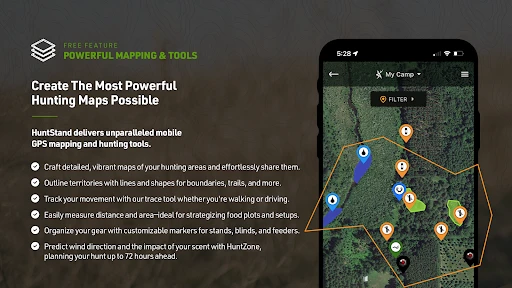
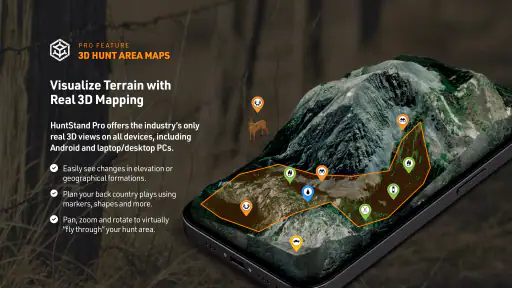
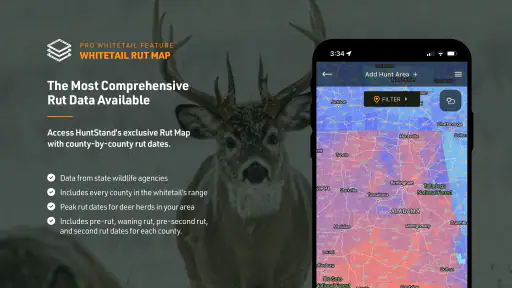
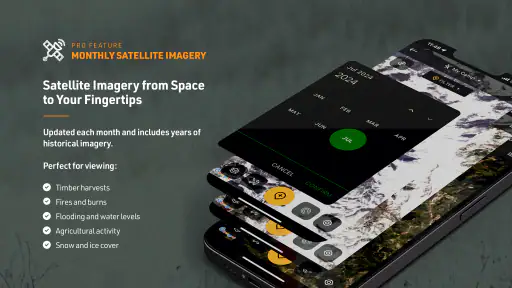
The first time I fired up HuntStand, I was immediately struck by its user-friendly interface. It’s like having a Swiss Army knife dedicated to hunting and outdoor adventures, right in your pocket! The app is jam-packed with features, ranging from detailed GPS maps, weather forecasts, and even property boundary details. The map layers are incredibly detailed, showing everything from topography to satellite imagery. I mean, you can literally see every nook and cranny of the land you’re about to explore.
That range is helpful, but I’d use it as a planning aid rather than assume every boundary or map detail is definitive. Before crossing onto land or making a route decision, I would check the relevant local information and use good judgment on the ground. A phone screen can make a map feel authoritative; it cannot settle a boundary dispute or replace permission to enter private property.
Mapping Your Journey
One of the standout features is the GPS mapping tool. Whether you're deep in the forest or traversing open plains, this app ensures you’re never lost. The ability to mark waypoints, create trails, and measure distances on the map is a game-changer. It’s like having a digital compass with a touch of magic. You can plan your routes before heading out and adjust them on the fly, which is perfect for those spontaneous detours.
I’d make waypoints useful before the trip, not just during it: mark a parking spot, a meeting point, or a turn that would be easy to miss on the way back. A simple naming habit can make those markers more useful when I’m tired or the light is changing. I would also check the route at a comfortable pace before leaving and carry a backup navigation option; GPS mapping is valuable, but I would not make a single app my only plan in unfamiliar terrain.
Weather or Not?
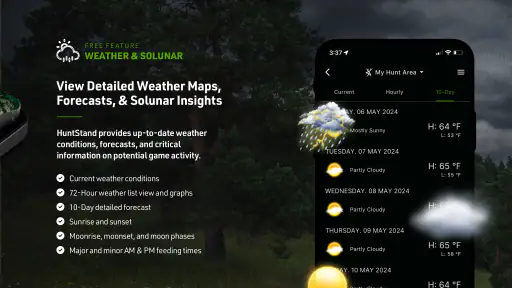
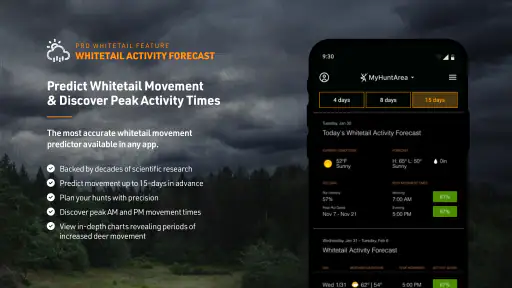
Another highlight for me was the weather integration. Let’s be honest, there’s nothing worse than getting caught in a downpour without rain gear. HuntStand provides accurate weather updates, so you can plan your hunting trips with confidence. It’s like having a weather station on demand, right there in your hand.
For a realistic day out, I might check conditions while packing, then use the forecast as one input when deciding what clothing and supplies to bring. I would still pay attention to changing conditions rather than treating a forecast as a promise. Anyone who needs a dedicated weather tool for detailed forecasts may prefer to compare it with a specialist weather app; HuntStand’s appeal is having weather alongside hunting maps, not necessarily replacing every focused alternative.
Land and Property Insights
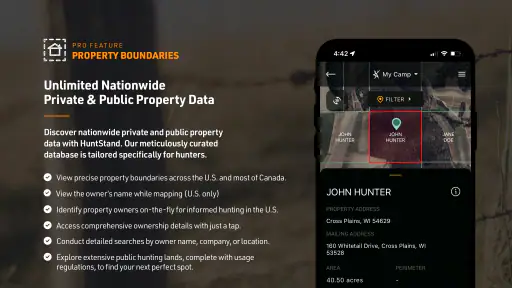
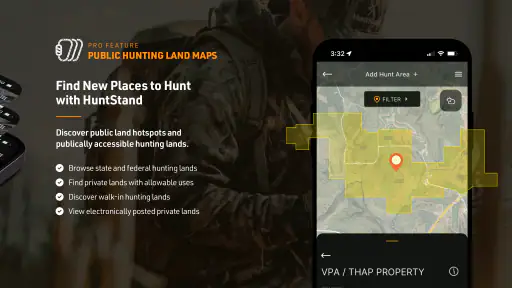
For those of us who need to keep track of land boundaries, the property info feature is a lifesaver. The app allows users to view property lines and even the names of landowners. This is particularly useful if you’re hunting on shared land or looking to avoid trespassing. It’s kind of like having a land surveyor whispering in your ear.
Property information is also where I’d be most careful about relying on a screen. I would use it to spot questions worth checking before a trip, not as permission to enter or as a final legal answer. If I’m visiting unfamiliar or shared land, confirming access with the appropriate person is a better choice than guessing from a map. That extra step is especially worthwhile when a route runs close to a boundary.
Social Connection
What’s also neat about HuntStand is its social aspect. You can connect with other hunters, share your favorite spots, and even join in on group hunts. It’s a community out there, and this app makes sure you’re a part of it. It’s like Facebook, but for hunters!
Sharing a location can be more consequential than sharing an ordinary post. I’d think twice before passing along a precise spot, particularly if it is a private place, a sensitive area, or somewhere I have been invited to hunt. A group can make coordination easier, but each person should understand what is being shared and with whom. If I only need a private navigation tool and have no interest in a hunting community, the social side may add little value.
Choosing the right role for the app
HuntStand makes the most sense for hunters who want mapping, route planning, property context, weather, and social tools gathered in one place. That combination can be more convenient than switching between a general mapping app, a separate forecast app, and messages with a group. A general map may be simpler for casual walks, while a dedicated navigation tool may be a better fit for someone who prioritizes a specific mapping workflow over hunting-oriented extras.
For example, if I were meeting friends at a new area, I would use the map to plan an approach, mark the parking spot, and set a clear meeting point before anyone leaves home. I would check property context separately with the relevant source if access were uncertain, then share only the location information the group needs. On the day, weather information could help me reconsider what to pack, while the route markers would make it easier to retrace the way back. That is a more realistic benefit than expecting one app to make every decision for me.
It is also worth deciding which parts of the app you will actually use. Someone who mainly wants a simple route from one public trailhead to another may find a general map less complicated. Someone who plans hunts with changing routes, land context, and group coordination may appreciate having those concerns together. If you are new to hunting, the mapping tools can help with preparation, but they do not replace learning local regulations, safe practices, or how to navigate without relying on a phone.
The app is free to download, but it includes in-app purchases ranging from $5.99 to $99.99 per item, so I’d look carefully at what is included before paying for anything. Its Everyone content rating makes it broadly accessible, though the practical audience is clearly people interested in hunting and outdoor navigation. It has been available since November 21, 2013, and the current version is 8.0.63; it requires iOS 8.1 or later. HuntStand has over one million installs, but that reach does not guarantee that its interface or paid options will suit my needs.
Before spending, I would identify the specific capability I want and check whether it is included in the free experience or offered as an in-app purchase. That keeps the decision grounded in my own use rather than the assumption that paying automatically improves every trip. If I only need occasional route marking, I would first see whether the basic tools cover that job. If a paid option is important, I would read its on-screen description and price carefully before confirming.
For trust and user control, I would review the choices shown in the app and the device’s location settings before heading out, and decide whether I’m comfortable with the access I enable. I would also avoid saving or sharing more location detail than the trip requires. Those are practical checks, not assumptions about how the developer handles data. If a particular permission or account option matters to you, inspect its wording on your own device before relying on the app.
That is especially relevant when using the app around a home, a regular hunting location, or a group’s meeting point. I would pause before saving a location that identifies someone’s private property, and I would ask before sharing a place that another person considers sensitive. If I stop using a feature, I would revisit the available controls and device settings rather than leave access choices untouched out of habit. The right level of sharing depends on the trip, not on a default assumption that every marker belongs in a group.
In conclusion, HuntStand: GPS Maps & Tools is a must-have for anyone serious about their outdoor pursuits. It’s like having a personal assistant who’s got your back, ensuring you’re well-prepared and informed. Whether you’re a seasoned hunter or a newbie, this app caters to all levels of expertise. So, gear up and let HuntStand guide you on your next adventure. Trust me, once you try it, you’ll wonder how you ever managed without it!
My cautious verdict
I’d recommend giving it a try if hunting maps and outdoor planning are regular parts of your routine, especially if combining several tools in one app sounds useful. I would skip it if I only need straightforward walking directions, dislike social features, or expect a phone map to settle access questions by itself. The practical test is whether its maps and controls work for the places and decisions that matter to you. Use it as a helpful companion, keep a backup plan, and make your own checks before trusting a boundary or sharing a location.
HuntStand: GPS Maps & Tools Frequently Asked Questions
Is HuntStand useful for someone who is new to hunting apps?
HuntStand is built around hunting and outdoor activities, with GPS maps and tools intended to support planning and time in the field. Someone new to this kind of app may find it helpful to explore the available features before relying on them for a trip. Its broad Everyone content rating means the app is not restricted to adults, though its subject matter is specifically geared toward outdoor enthusiasts.
What should I check before relying on HuntStand for a hunting trip?
Before heading out, take time to open the maps and tools you expect to use and make sure they suit your plans. If you intend to visit an area with limited connectivity, prepare any maps you need while you still have internet access. As with any GPS mapping app, keep your device ready for outdoor use and treat map information as a planning aid rather than a replacement for good judgment in the field.
Does HuntStand help with planning and managing hunting areas?
HuntStand includes tools for creating and sharing hunting areas, viewing property boundary information, and managing land. These options can be useful when organizing a location or coordinating plans with others. The app also offers advanced map layers and activity tracking, giving outdoor users several ways to work with their maps and keep track of hunting-related activity.
What devices and operating systems can run HuntStand?
HuntStand is a mobile app for outdoor use, and its listed minimum operating system is 8.1. Before downloading, check that your phone or tablet meets that requirement and has enough space for the app and any maps you plan to save. The app is free to download, so you can install it and see how it fits your device and hunting routine.
Who makes HuntStand, and is it intended for a broad audience?
HuntStand is developed by GSM Outdoors and is listed in the Sports category. Its content rating is Everyone, while its tools are designed around hunting and outdoor activities. The app has been available since November 21, 2013, and its store summary calls it “The Only Hunting App You Need.” That gives prospective users a quick sense of its focus before deciding whether to install it.
Pros
- Comprehensive map layers for hunting.
- Easy-to-use interface for navigation.
- Offline maps available for remote areas.
- Weather tracking tailored for hunters.
- Syncs data across multiple devices.
Cons
- Some features need premium subscription.
- Battery drain due to GPS usage.
- Limited social features for community.
- Occasional map loading delays.
- Not all regions fully covered.
- Category
- Sports
- Version
- 8.0.63





