COMMAND PRO
- 3.92K
- 4.3
- Installs
- 100.00K
- Price
- Free

Screenshots
Analysis by Reviewed
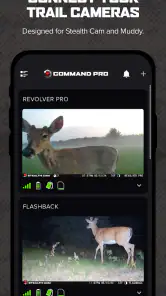
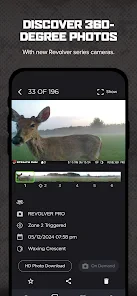
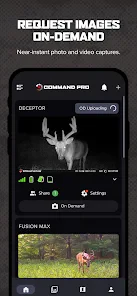
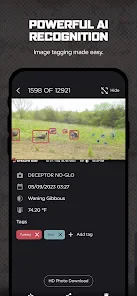
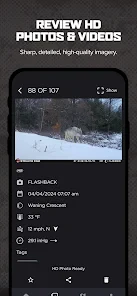
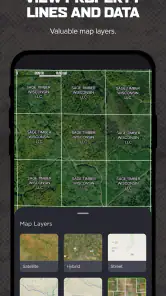
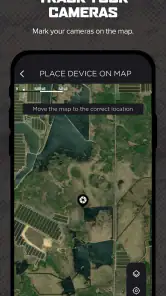
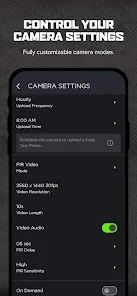
I would not treat a trail-camera controller as a general command-line tool, and that distinction matters before you install COMMAND PRO. It is a sports-category app from Stealth Cam, LLC, made for managing compatible Stealth Cam and Muddy cellular trail cameras. If you are choosing it to check or manage that camera setup from your phone, the purpose is clear; if you want to run computer commands remotely, this is not the app I would pick.
Start with the camera, not the app
Before downloading, I’d identify the exact camera model and confirm that it belongs to the Stealth Cam or Muddy setup this app is intended to manage. That check matters more than comparing menus or looking for a generic wildlife-camera feature: the app’s value depends on having compatible equipment. If you have a camera from another manufacturer, its own companion app—or a camera designed to work without a cellular service workflow—is likely the more sensible choice.
I’d also think about what I actually need to do from the field. If my goal is to manage a cellular trail camera without making every routine check a physical visit, a phone companion can fit naturally into the job. If I mainly want to take pictures with my phone, sort wildlife photos, or monitor cameras from several brands in one neutral interface, this is not a replacement for those tools.
The User Experience
First off, let’s talk about the user interface. At a glance, COMMAND PRO is sleek and intuitive. You don’t need to be a tech wizard to navigate through its features. The app’s design is minimalistic, ensuring that users can focus on functionality without getting overwhelmed by unnecessary bells and whistles. Whether you're a seasoned developer or someone who's just starting out, the app's layout is straightforward, making it a breeze to use.
Made for a particular camera setup
The most useful way to think about this app is as a phone-based companion to compatible cellular trail cameras, rather than a broad wildlife-monitoring service. I’d consider it when I already use Stealth Cam or Muddy equipment and want camera management in the same place as my everyday phone tasks. Someone with a different camera brand, or someone who only needs a basic standalone camera, should first check whether this app fits their equipment; the brand-specific focus is central to whether it will be useful.
A practical routine is to check in before heading out to a property, then use the app as part of the camera-management workflow rather than making an extra trip solely to inspect a camera. That can be especially handy when a camera is placed somewhere inconvenient to reach. Cellular coverage and the camera setup still matter, though: a phone app cannot make a remote camera useful where its connection or configuration is not working. I’d treat it as a way to manage compatible equipment, not as a guarantee of uninterrupted field access.
Features That Stand Out
One of the coolest features of COMMAND PRO is its cross-platform compatibility. Imagine being able to execute commands on your desktop from your phone! This feature alone is a game-changer for those who are always on the go. Besides, the app supports a wide array of command-line instructions, so you're not limited in what you can accomplish. From basic tasks like file management to more complex operations, COMMAND PRO has got you covered.
More From Our News Desk

Clash of Clans Is Won Between the Battles

Android Auto Makes the Case for Quieter Car Software

MobiOffice: Transforming Mobile Productivity with Seamless Integration

EA SPORTS FC™ Mobile Soccer: Redefining Mobile Sports Gaming

How Microsoft OneDrive Became a Mobile Productivity Giant

How Google Translate Breaks Language Barriers Effortlessly
Another standout feature is the real-time synchronization. Any changes you make on one device are instantly reflected on another. This means you can start a task on your phone and seamlessly continue it on your tablet or laptop. It's like having a universal remote for all your devices!
Choosing it over a generic camera app
Compared with a general photo or camera app, the appeal here is the connection to Stealth Cam and Muddy cellular trail-camera equipment. A generic camera app is better for taking pictures with your phone; it is not a substitute for managing a compatible trail-camera setup. Conversely, if you want a brand-neutral place to organize cameras from several manufacturers, a manufacturer-specific app may feel restrictive. I’d choose this one for a matching camera system, not simply because I want a wildlife camera app in the abstract.
One useful habit is to sort out the camera side of the setup before relying on the app during a time-sensitive trip: make sure the camera is configured and connected where it will be used, then check the app while you still have time to address a problem. That small planning step avoids expecting the phone interface to solve an issue caused by placement, coverage, or equipment compatibility. It also helps you distinguish an app-navigation question from a field connection problem.
Making the remote check worthwhile
For a realistic routine, imagine checking a camera before leaving home to visit a distant property. I would use that moment to decide whether the trip still makes sense, rather than assuming the app can replace every on-site inspection. If the camera needs attention, knowing that before setting out may help me plan the visit; if everything appears in order, I can focus the trip on other work. The practical benefit is better preparation, not a promise that every issue can be handled remotely.
For people responsible for more than one location, I’d keep a basic offline note of camera placement and the reason each camera is there. That gives me a useful reference when I’m looking at a camera in the app and later need to decide which site to visit. It also reduces the chance of confusing two similar setups during a busy season. This is a personal organization tip, not a feature I’m attributing to the app.
Ease of Use
Let’s be real, no one likes spending hours trying to figure out how to use an app. Thankfully, with COMMAND PRO, this isn't a problem. The app is designed with user-friendliness in mind. There are detailed tutorials and a help section that guides you through each feature step-by-step. So, even if you're new to command-line interfaces, you'll feel like a pro in no time.
There is a sensible trade-off in any phone-based camera workflow: it can reduce unnecessary visits, but it also puts more of the routine in one app and depends on the camera system being set up as intended. If you manage several remote locations, I’d keep a simple note of which camera belongs where and when I last checked each one. That is not a special app feature; it is a low-effort way to make remote management less confusing when you are planning a visit or troubleshooting.
Who benefits—and who should pass
I see the strongest fit for someone who already owns compatible cellular trail cameras, checks remote locations regularly, and wants a phone-based route into camera management. It may also suit a landowner or outdoor enthusiast who would rather make a planned visit than travel out just to check equipment. The app is free, so trying it does not require a purchase, but compatibility and the connected-camera workflow are still the real decision points.
I would pass if I wanted a universal camera dashboard, a phone photography tool, or a standalone camera that does not depend on a connected setup. I’d also think twice if I rarely need to manage the cameras remotely: an app can add little value when the equipment is easy to reach and occasional in-person checks are already convenient. The best choice depends on the job, not on whether remote access sounds appealing in theory.
Trust and data-sensitive moments
Trail cameras can be used in places that matter to their owners, so I would be thoughtful about who can access the phone and account used to manage them. Before putting the app into regular use, I’d review the permissions Android or iOS presents, consider whether each requested access makes sense for the task, and secure the device itself. Those are practical checks, not claims about particular app permissions or data handling. If you share camera responsibilities, agree on who should manage the setup instead of casually sharing account access.
The app is free, has an Everyone age rating, and is on version 6.4.14. It has a 4.3 average from around 20,000 ratings, with over 100,000 installs. Those figures suggest it has reached a substantial audience, but I would still judge it by whether it works with my cameras and fits my routine. Its focused purpose is a strength for owners of supported equipment and a reason to look elsewhere for everyone else.
What to check before depending on it
A sensible first test is to use the app while you are still near the camera or otherwise able to address setup questions, rather than making your first attempt from far away on a day when you need the camera to work. That gives you a chance to see whether the equipment and phone workflow suit one another before remote access becomes part of a routine. If you are helping another person manage cameras, agree on who will handle setup and day-to-day checks, so account access stays deliberate rather than improvised.
It is also worth separating three questions that can feel like one problem: whether the camera is compatible, whether it is configured as intended, and whether the location supports its connection. A difficulty in one area does not necessarily mean the app itself is hard to use. I’d work through those checks in that order before deciding the app is the wrong fit. For a reader choosing a camera system from scratch, I’d compare the camera’s own requirements and management approach before committing to the hardware.
Security Measures
Security is a big deal, especially when dealing with command executions. COMMAND PRO employs robust security protocols to ensure your data and commands are protected. The app uses encryption to secure your sessions, so you can execute commands with peace of mind knowing that your information is safe from prying eyes.
As a cautious user, I would avoid assuming that any app’s presence on my phone tells the whole story about privacy. I’d read the available privacy information, look over the permissions shown on my device, and keep the operating system and account access under my control. Those steps are useful with any connected-camera service, particularly when the equipment is installed away from home. If you are uncomfortable managing a connected account or checking these controls, a simpler camera arrangement may suit you better.
A careful recommendation
In conclusion, COMMAND PRO is a versatile and powerful tool that bridges the gap between mobile and desktop command execution. Its ease of use, coupled with its robust features and security measures, makes it a must-have app for anyone looking to streamline their command-line tasks. Whether you're managing files or executing complex scripts, this app is your go-to solution. And who knows, with COMMAND PRO, you might just find yourself enjoying the command-line experience more than you ever thought possible!
For the actual trail-camera use case, my recommendation is narrower and more practical: consider it if you own compatible Stealth Cam or Muddy cellular cameras and want to manage them from a mobile device. Skip it if you need a general command terminal, expect it to work with unrelated camera brands, or would rather avoid connected-account management. That distinction is the clearest way to decide whether it belongs in your setup.
My overall view is therefore cautious rather than universal: this is a focused companion for a particular camera ecosystem, not a substitute for choosing the right camera or planning for conditions at a remote site. Its free price and accessible age rating make it straightforward to consider, while its brand-specific purpose gives you a clear reason to check fit first. If your equipment matches and remote management genuinely saves you effort, it is worth exploring; if not, a tool built around your own camera brand or a simpler local setup is the better option.
COMMAND PRO Frequently Asked Questions
What is COMMAND PRO used for?
COMMAND PRO is a sports app for managing Stealth Cam and Muddy cellular trail cameras. It is intended for people who use those cameras and want to manage them through a mobile app. If you are looking for a general task manager, project planner, or team collaboration tool, COMMAND PRO is not designed for those purposes; its central role is connected to trail-camera management.
Should I already own a Stealth Cam or Muddy cellular trail camera before downloading COMMAND PRO?
The app’s stated purpose is to manage Stealth Cam and Muddy cellular trail cameras, so it is most relevant if you use one of those camera brands. Before downloading, consider whether you have a compatible camera and whether managing it from your phone is what you need. COMMAND PRO is not presented as a general-purpose camera app or a standalone outdoor activity tracker.
What devices and operating system does COMMAND PRO support?
Before downloading, check that your device meets the app’s compatibility requirements. COMMAND PRO is available for Android devices running version 9 or later, and it is designed for managing Stealth Cam and Muddy cellular trail cameras. If you use one of those cameras, the app’s purpose is straightforward: it provides a way to manage it from your device.
Is COMMAND PRO free, and what is its age rating?
COMMAND PRO is free to download and is rated Everyone, making it suitable for a broad audience. Its listed price is free, so you can try the app without an upfront purchase. Keep in mind that camera compatibility and the features you need are important considerations before installing; COMMAND PRO is specifically intended to manage Stealth Cam and Muddy cellular trail cameras.
What is Command Pro and what does it do?
Command Pro is a sophisticated task management application designed to streamline your workflow and boost productivity. It offers a wide array of features such as project tracking, collaboration tools, and deadline reminders. Suitable for both individual users and teams, Command Pro helps you organize tasks, set priorities, and achieve your goals efficiently.
Pros
- Intuitive interface for quick navigation.
- Comprehensive command library.
- Customizable shortcuts.
- Offline access for remote work.
- Regular updates with new features.
Cons
- Limited integrations with other apps.
- Requires learning curve for new users.
- Occasional bugs in new releases.
- No free version available.
- Limited customer support options.
- Category
- Sports
- Version
- 6.4.14