

Hulu for Android TV
- 2.96K
- 2.5
- Installs
- 10.00M
- Price
- Free

Screenshots
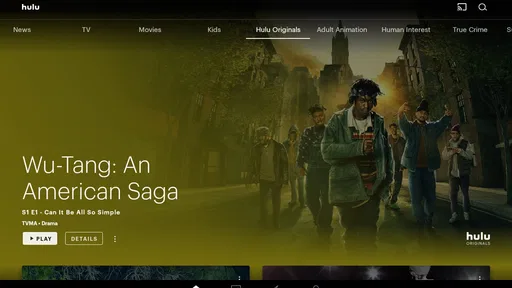
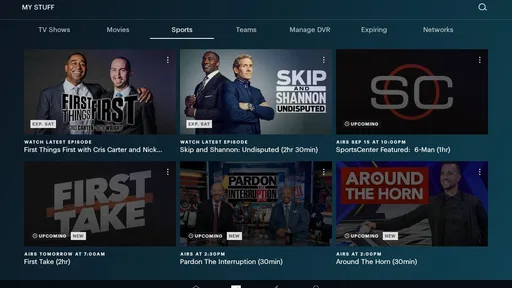
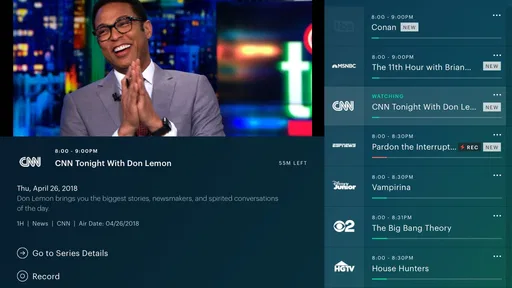
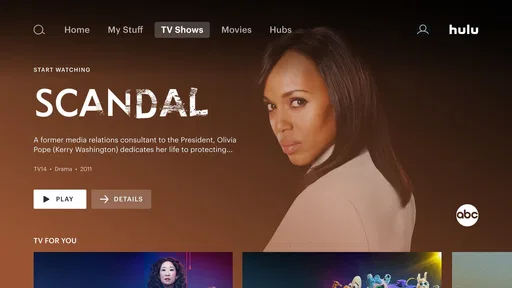
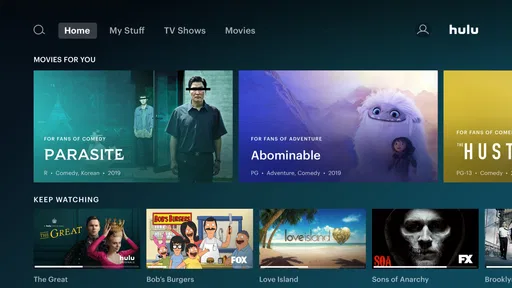

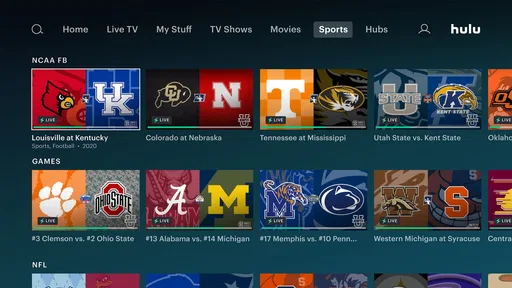
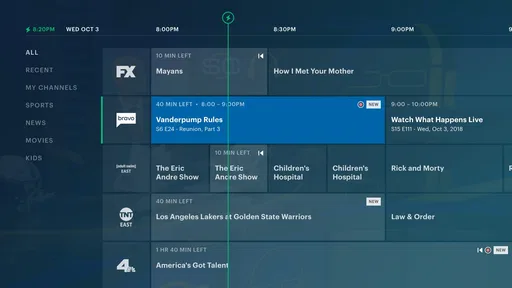
Analysis by Reviewed
Hulu for Android TV is the kind of entertainment app I judge less by its opening screen and more by what happens after I sit down with the remote. Its main appeal is straightforward: it brings Hulu’s movie and television catalog to a television-sized interface, with access to Hulu Originals and familiar shows without forcing me to watch on a phone or computer. That sounds simple, but the difference between a useful living-room app and a frustrating one is usually found in navigation, playback decisions, and how quickly I can get from an idea to something worth watching.
Developed by Disney, this free entertainment app is aimed at viewers using compatible Android TV devices. It carries a Teen content rating, so I would treat it as a household streaming tool rather than an automatically child-safe space. The app has been available since October 24, 2014, and its current version is C59F39CFP3.10.33. It supports Android 4.4 or later, although the actual experience still depends heavily on the television or streaming hardware running it.
My overall impression is mixed but clear. Hulu’s strongest capability is bringing a broad, TV-focused viewing routine into one remote-friendly place. When that routine matches what I want—especially catching up on shows or watching Hulu-exclusive programming—the app feels useful. When I want a completely frictionless, service-neutral way to search every streaming platform at once, a different tool is usually better.
Why the television experience matters more than the phone version
I find the television version matters most when watching is a shared, settled activity rather than a quick check between errands. This section looks at what changes when Hulu moves from a personal screen to the living room, including why a remote-friendly interface can help—and where it remains less useful than a broader service guide.
A focused way to watch on a larger screen
The most important feature here is not simply that Hulu can play video. Many services can do that. The meaningful capability is the shift from browsing on a small personal device to choosing and watching content from the sofa, using the television as the center of the experience. That changes how I use the service. I am less likely to sample something while multitasking and more likely to choose a film, settle into an episode, or hand the remote to someone else in the room.
That makes Hulu for Android TV particularly relevant for shared viewing. A phone app is convenient when I already know what I want, but a television interface makes browsing feel more deliberate. I can scan categories, return to a partly watched program, and make a choice without passing a handset around. The benefit is modest when I watch alone at a desk, yet it becomes much more noticeable during an evening with family or friends.
The app’s store summary points to three connected uses: discovering movies, streaming Hulu Originals, and watching television shows. In practice, I see those as separate decisions. Discovery is useful when I have time to browse. Originals matter when I joined Hulu for a particular exclusive. Returning to an ongoing series is the everyday task, and that is where a living-room app earns its place. I do not need a complicated feature set if it gets me back to the right program quickly.
More From Our News Desk

 Gmail
GmailGmail in a Busy Inbox: Who Benefits Most?
From first account to crowded workday, Gmail earns its place through dependable search and flexible sorting—but its best fit depends on how much inbox maintenance you can tolerate.

 Prime Video
Switching to Prime Video: What Changes in Your Viewing Routine
Prime Video can make a compelling second home for streaming, but switching means learning a different catalog, rental layer, and route from browsing to playback.

 Universal TV Remote Control
Universal TV Remote Control Works Best as a Reliable Backup
A phone remote earns its place through quick setup and reliable habits. Here is how to get more from Universal TV Remote Control—and where its limits show.

 Weather - By Xiaomi
Weather by Xiaomi Review: Clear at a Glance, Less Clear Up Close
Xiaomi’s weather app makes everyday forecasts quick to scan, but its calm surface can leave useful details and recovery paths harder to find than they should be.

 X
XX Under Pressure: Can It Recover When Posting Goes Wrong?
A resilience-focused review of X, examining setup, mistaken posts, interruptions, weak connections, and the gaps that matter when recovery needs to be dependable.

 Clash of Clans
Clash of Clans Is Won Between the Battles
Its raids are quick; its community is a long-term project of coordination, teaching, rivalry, and shared responsibility—with all the friction that entails.
Latest News



Discovery is helpful, but it can also become the main activity
One subtle trade-off is that a large catalog can make choosing harder rather than easier. On a television, rows of posters are pleasant to browse, but browsing can turn into a long search through recommendations. I find the app most effective when I begin with an intention: continue a series, look for a particular kind of film, or check Hulu’s own programming. Without that starting point, the interface can encourage passive scrolling.
My practical tip is to decide whether I am searching or browsing before opening the app. If I know the title, I use the quickest available route instead of drifting through shelves. If I want something new, I give myself a small limit—one category or a short scan—then choose. This is not a hidden button or an advanced setting; it is a workflow that makes the television format work better and prevents the catalog from taking over the evening.
What the app is really replacing
Hulu for Android TV is not replacing every entertainment app equally. It can replace the habit of moving between a laptop and a television, or the awkward process of casting a show from a phone when a native television app is available. It does not replace a general media center that combines services, local files, live channels, and personal libraries in one interface. It also is not the best answer for someone who only wants free, ad-supported video from a wide range of unrelated sources.
The comparison with other streaming apps comes down to focus. A platform-neutral search tool is better when I am deciding where a title is available. A service with a stronger emphasis on personal media management is better when my collection is stored locally. Hulu makes more sense when the content I want belongs to Hulu and I want a direct route to it on the television.
How I use it during a normal evening
On an ordinary evening, I get the most from Hulu when I decide whether I am resuming a familiar show or looking for something new before I start browsing. That small choice keeps the app from turning into an endless tour of titles. Next, I’ll describe a practical routine that makes the network and the television setup part of the decision, not an afterthought.
Starting with a known show
My smoothest use case begins with a series I have already chosen. I open the app, look for the continuation of that program, and use the television interface rather than reaching for another device. This is where the app feels most purposeful. I am not asking it to solve the entire problem of entertainment; I am asking it to let me resume a specific habit in the room where I intend to watch.
That distinction matters because television interfaces reward clear goals. A viewer who knows the show, movie, or Hulu Original they want will usually get more value than someone expecting the app to act as a universal recommendation engine. The app’s role is strongest as a doorway into Hulu’s own catalog, not as a complete map of everything available across the internet.
Using it for shared viewing
Imagine a realistic weekday evening: I have finished dinner, another person wants a show, and neither of us wants to hold a phone while watching. Hulu for Android TV fits that moment well. We can browse together, agree on a title, and leave the mobile devices aside. The television becomes the shared decision point, which is more comfortable than asking one person to control playback from a small screen.
There is also a useful social advantage in keeping the choice visible. When I search privately on a phone, other viewers may not know what I am considering. On a television, the selection process is open, so the app works better for a household with different tastes negotiating one program. That does not eliminate disagreements, of course, but it reduces the feeling that one person is silently controlling the queue.
Making the remote work for you
Remote navigation rewards patience. I try not to treat every row as something I must inspect. I move with a purpose, pause when a title catches my attention, and return rather than repeatedly crossing the same shelves. If the device supports voice input, that can be a more efficient way to reach a known title, but I would not make that the reason to choose Hulu because the quality of voice search depends on the Android TV hardware and its setup.
Another practical habit is to check the television’s own input and audio arrangement before blaming the app for a poor viewing session. On a living-room device, picture mode, sound output, network stability, and remote responsiveness all affect the experience. Hulu is only one part of that chain. A good app cannot make an overloaded wireless connection or an awkward television menu feel instant.
When watching on more than one device
The Android TV version is most valuable when the television is the main destination. If I expect to start on a phone, continue on a tablet, and finish on a television, I would think about the entire Hulu setup rather than judging this version alone. The convenience of switching screens depends on how well my account, devices, and playback position work together in that moment.
For a household, I would also decide in advance who is responsible for choosing the next program. That sounds minor, but shared streaming often becomes frustrating when several people browse without a decision. Hulu’s television presence makes group viewing easier, yet it cannot create agreement. A simple rule—one person chooses the show, another chooses the film—can make the app feel much faster.
The trade-offs I noticed before recommending it
Before recommending Hulu, I weigh the moments when a connection or device problem can interrupt the plan against the convenience of having the service on the television. I also consider how much patience I have for troubleshooting when all I wanted was to watch one episode. The following section focuses on those trade-offs and on sensible ways to recover without assuming every hiccup has the same cause.
The rating suggests a less-than-perfect experience
Hulu has an average rating of 2.5 from around nine thousand ratings, with roughly three thousand written reviews. I would not treat that figure as a complete verdict, because television apps are affected by device models, operating-system versions, account situations, and network conditions. Still, it is a meaningful warning that the experience is not consistently smooth for everyone.
That lower score changes how I recommend the app. I would install it because I specifically want Hulu on Android TV, not because I expect every screen and interaction to feel flawless. If the app behaves well on my device, its focused purpose is valuable. If I encounter sluggish navigation or playback trouble, the fact that the service is free to install does not make the lost time irrelevant.
Free to install does not mean every viewing situation is free
The app itself is free, which removes an obvious barrier to trying it. However, I would separate the cost of obtaining the app from the broader question of access to the content I want. A free download does not automatically make every program available without an account or other service requirements. I would therefore decide based on whether Hulu’s catalog is relevant to me, rather than assuming the installation alone provides unlimited entertainment.
This is an important distinction for occasional viewers. If I only want one specific movie and do not otherwise use Hulu, another rental or subscription service may be more practical. If I regularly follow Hulu programming, the free app is a sensible way to put that viewing habit on the television. The right choice depends on repeated use, not on the download price by itself.
Teen content requires deliberate household use
The Teen age rating is another reason I would not hand the remote to a young child without supervision. The app is built for a general entertainment audience that includes mature themes, so parents should make the viewing decision rather than assuming the television interface is automatically filtered for children.
For adults and older teenagers, that rating is unlikely to be a problem. For a family looking primarily for tightly controlled children’s programming, I would choose a service designed around that purpose. Hulu can be part of a mixed household setup, but I would not present it as a dedicated children’s environment.
Older hardware may change the experience
The minimum operating-system requirement is Android 4.4, which makes the app broadly accessible on older compatible systems. That does not guarantee that an older television or streaming box will feel as responsive as newer hardware. App compatibility and enjoyable performance are different things, especially when menus, video playback, and remote input all depend on the device.
Before settling on this as my main television app, I would check whether the Android TV device still responds quickly in other demanding apps. If the whole system already feels slow, Hulu may not be the only source of frustration. In that case, upgrading the streaming hardware could improve more than switching between entertainment services.
Catalog value depends on what I actually watch
The central limitation is not a missing novelty feature; it is the fact that Hulu is a single service. Its value rises sharply when its movies, shows, and Hulu Originals match my taste. It falls when I mainly watch content from other platforms. I would not choose it as my only app simply because it has a large audience—its reach is substantial, with over ten million installs, but popularity does not guarantee that its catalog fits my household.
If my viewing is divided between several services, I use Hulu as one destination among others and keep expectations realistic. If I want one interface to organize all subscriptions, I would look elsewhere for discovery and use Hulu only for playback. That separation keeps the app from being judged for a job it was not meant to perform.
Who gets the most from Hulu for Android TV
Hulu for Android TV makes the most sense to people who already want Hulu’s programming in the living room and have a dependable way to stream it. It is a less obvious fit for viewers who mainly want universal discovery, local playback, or a service built around children’s viewing. I’ll close by clarifying which viewing habits make the app worth keeping close at hand.
It suits regular Hulu viewers
The best match is someone who already knows that Hulu contains programs they want to watch and prefers the comfort of a television. For that person, the app removes unnecessary steps: no casting routine, no laptop balanced near the sofa, and no need to turn a phone into a remote unless that is preferred. The capability is basic, but repeated small conveniences matter when used several times a week.
It is also a good fit for households that share a screen. The app’s value increases when the viewing decision is social, because the television interface makes browsing and choosing visible to everyone. I would recommend it to a friend who says, “We use Hulu, but we keep watching it on smaller screens.” The Android TV version addresses exactly that inconvenience.
It is less convincing for service hoppers
I would be more cautious with someone who constantly jumps between platforms and wants a single search box for every catalog. Hulu can still be useful for playing its own programs, but it will not be the most efficient discovery tool for that person. A broader guide or aggregation experience would reduce the number of apps they need to open while deciding what to watch.
I would also hesitate to recommend it to someone with unreliable home internet, an aging Android TV box, or a strong preference for local media playback. The app cannot solve those underlying needs. In those cases, the better choice may be improved hardware, a local media player, or a different service whose catalog and device support align more closely with the viewer’s routine.
Three habits that make the app more useful
- Use it with a clear viewing goal: begin with a known show, movie, or Hulu Original when possible, rather than treating every opening as an invitation to scroll indefinitely.
- Separate catalog discovery from playback: if you compare several streaming services, choose the title first with a broad guide, then open Hulu when it is the correct destination.
- Test the whole television setup: judge remote response, sound, network stability, and device speed together instead of assuming every problem comes from the app.
These habits reveal the real trade-off. Hulu for Android TV is not compelling because it transforms television viewing into something completely new. It is compelling when it makes one particular service feel natural in the living room. That is a narrower promise than “one app for everything,” but it is also a more honest way to evaluate it.
My final recommendation after using it
I see Hulu for Android TV as a practical, purpose-built entertainment app with a clear best case: I want Hulu content on a television, controlled from the sofa, without relying on a phone or computer. In that situation, it does what I need and makes shared viewing more comfortable. The presence of Hulu Originals, movies, and television shows gives the app a reason to exist beyond simply mirroring another screen.
My reservations are equally important. The modest average rating, the Teen content classification, the dependence on compatible hardware, and the limits of a single-service catalog mean I would not recommend it blindly. I would also avoid presenting the free installation as a complete answer to the cost or availability questions surrounding streaming content.
For a regular Hulu viewer with an Android TV device, I think it is worth trying. For someone searching for a universal entertainment hub, a child-focused service, or a solution for an old and sluggish television box, I would choose a different approach. My recommendation is conditional but positive: use Hulu for Android TV when the television is where you want Hulu to live, and judge it by that focused job rather than expecting it to replace every other way of finding and watching video.
Hulu for Android TV Frequently Asked Questions
What is Hulu for Android TV, and who publishes it?
Hulu is an entertainment app published by Disney. Its Android TV app is designed for watching Hulu on a television, with a store description highlighting movies, Hulu Originals, and TV shows. The app is free to download, but access to most viewing content requires a Hulu account and an applicable subscription. Check that it is the official Hulu app before installing.
Can I watch Hulu on Android TV?
Yes, Hulu is available on compatible Android TV devices through the Google Play Store. After installing the official app, open it and sign in with your Hulu account or start a subscription if you are a new user. Availability can depend on your country, device compatibility, Android TV version, and whether Hulu officially operates in your region.
Is Hulu free to download and use on Android TV?
The Hulu app can generally be downloaded at no additional cost, but watching most content requires an active Hulu subscription. Depending on the plan, you may see advertising or have access to a more expensive ad-free option. Hulu may also offer promotional trials from time to time, although eligibility, pricing, and trial length can change.
What content can I watch with Hulu on Android TV?
Hulu provides access to a broad selection of television shows, films, original productions, documentaries, and, with eligible plans, live television channels. The exact catalog depends on your subscription and location, while live content may require a specific plan and supported regional availability. Some programs can also require additional network or premium add-ons.
Does Hulu support multiple profiles and simultaneous streaming on Android TV?
Hulu supports individual profiles, allowing members of a household to receive more personalized recommendations and maintain separate watch histories. The number of devices that can stream at the same time depends on your subscription plan. Live TV plans and premium add-ons may have different limitations, so it is worth checking the current account rules before sharing access.
Pros
- Large library of current TV shows
- originals
- movies
- and network content.
- Live TV plans include news
- sports
- and local channels in supported areas.
- Profiles and personalized recommendations make shared viewing more convenient.
- Downloads are available on supported plans for offline mobile viewing.
- Works smoothly with Android TV voice search and compatible remote controls.
Cons
- Availability and channel lineups vary significantly by location and subscription plan.
- Some content includes frequent ad breaks unless you pay for an ad-free tier.
- Offline downloads are limited to supported mobile devices
- not Android TV.
- The cheapest plan may have restrictions on premium features and simultaneous streams.
- Certain shows and movies can leave the service when licensing agreements expire.













