

HonkMobile: Pay for Parking
- 191.00
- 4.4
- Installs
- 1.00M
- Price
- Free

Screenshots
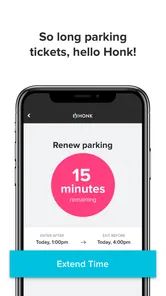
Analysis by Reviewed
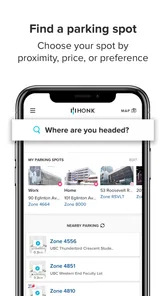
I find parking apps most useful when they remove one small but stressful task without creating a new one. HonkMobile is built around that idea: it helps drivers search for parking, locate a suitable space, and pay through a phone instead of relying on a traditional parking meter. After using it as a Maps & Navigation app, I see its main value in those rushed moments when I would rather handle payment from the car than walk around looking for a machine.
That convenience needs to be judged carefully, though. A parking app deals with location, payment, vehicle details, and time-sensitive decisions. I do not treat a polished interface as proof that an app deserves my trust. My view of HonkMobile is more practical: it is a useful tool for drivers in places where its parking coverage is available, but it works best when I check the visible choices before starting a session and keep a backup plan for unfamiliar areas.
What HonkMobile feels like in everyday parking
The app comes from HonkMobile, a developer focused on the parking-payment experience rather than general navigation. It is free to install and has an Everyone content rating, which makes it approachable for ordinary drivers and families. Its long presence on mobile stores also gives it a more established feel than a brand-new parking utility. It was released on February 4, 2014, and the current version is 6.18.1, with Android support beginning at version 5.1.
Its public reach is substantial: the app has passed one million installs, with an average rating of 4.4 from around 7,500 ratings. I would not read those figures as a guarantee that every parking session will be smooth, because parking availability and payment rules vary by location. Still, they suggest that HonkMobile is not a niche experiment. There is enough adoption for a new user to reasonably consider it alongside a city parking app, a garage operator’s app, or a physical meter.
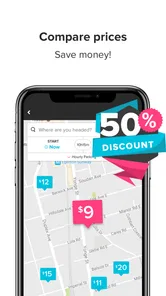
The basic workflow is easy to understand. I open the app when I need to park, search for a nearby option, inspect what is presented, and pay for the selected parking session. That is a much narrower job than using a full navigation app, and I appreciate the focus. A general map may show garages or street locations, but it often leaves me to work out how payment is handled. HonkMobile puts the parking transaction at the center.
A realistic example is arriving downtown for a short appointment. I may be running late, carrying a bag, and unwilling to search for a meter in bad weather. If a supported parking location appears in HonkMobile, I can use the phone before walking away from the car. The practical benefit is not dramatic; it is the few saved minutes and the reduced need to handle a public payment machine.
Where the app earns my confidence
Trust begins with clear expectations. HonkMobile does not present itself as a replacement for every navigation service. Its store summary is centered on searching, finding, and paying for parking, so I judge it on that specific task. When an app has a focused purpose, I find it easier to notice whether each screen is relevant or whether it is pushing me toward unrelated actions.
More From Our News Desk

 Weather - By Xiaomi
Weather by Xiaomi Review: Clear at a Glance, Less Clear Up Close
Xiaomi’s weather app makes everyday forecasts quick to scan, but its calm surface can leave useful details and recovery paths harder to find than they should be.

 X
XX Under Pressure: Can It Recover When Posting Goes Wrong?
A resilience-focused review of X, examining setup, mistaken posts, interruptions, weak connections, and the gaps that matter when recovery needs to be dependable.

 Clash of Clans
Clash of Clans Is Won Between the Battles
Its raids are quick; its community is a long-term project of coordination, teaching, rivalry, and shared responsibility—with all the friction that entails.

 Android Auto
Android Auto Makes the Case for Quieter Car Software
The car interface is no longer judged by how much it can do, but by how quietly it helps. Android Auto shows what drivers now expect—and what still gets in the way.

 MobiOffice: Word, Sheets, PDF
MobiOffice: Transforming Mobile Productivity with Seamless Integration
MobiOffice: Word, Sheets, PDF is redefining mobile productivity with a surprising blend of functionality and innovation.

 EA SPORTS FC Soccer Mobile 26
EA SPORTS FC™ Mobile Soccer: Redefining Mobile Sports Gaming
Dive into EA SPORTS FC™ Mobile Soccer, where immersive gameplay and strategic depth transform mobile sports gaming.
Latest News



I also pay attention to the point where a search becomes a payment. A nearby result is not automatically the right space. I want to see the location, the applicable parking choice, and the session details before confirming. The important habit is to slow down at that boundary. A quick tap is convenient, but it can be costly if I select the wrong area or misunderstand the parking restrictions posted at the curb.
The safest way to use HonkMobile is to treat the app as a payment assistant, not as permission to ignore street signs. The physical sign remains the authority for restrictions, hours, maximum stays, loading zones, and local exceptions. I use the app to complete the transaction, while I use the surroundings to decide whether I am legally parked.
This distinction is especially important when several parking locations appear close together. A map pin can look nearby even when the entrance is on another street, or when two zones serve different rules. I make a habit of matching the app’s location with the sign beside the vehicle. That extra check is one of the most valuable improvements a driver can make to the workflow.
Controls that matter before payment
For a parking service, visible user choices matter more to me than decorative design. Before I confirm anything, I look for the ability to choose the correct parking location and the intended duration. I also review the information connected to the session rather than assuming the app has selected the right option automatically.
Account control is another practical concern. A driver may use the app occasionally, while a household may share a vehicle or payment method. I prefer to keep my account details current and remove old information when it is no longer needed. If I am using a borrowed car, I double-check the vehicle information before beginning a session. A payment can succeed while still being associated with the wrong vehicle, which defeats the purpose of a digital parking record.
Notifications and reminders deserve the same attention. I do not want a parking session to continue simply because I missed a prompt, but I also do not want to assume that a reminder changes the legal limit of a space. Any alert should be treated as a convenience, not as an extension of the permitted stay. I still set my own alarm when the appointment is important or the parking rules are strict.
One useful workflow is to prepare before reaching the destination. When I know I will be parking in a busy area, I can open the app while still stopped safely, review the available location, and make sure my account and vehicle details are correct. That prevents me from making rushed choices beside traffic. It also makes the app feel less like an emergency tool and more like a controlled part of the trip.
Privacy-sensitive moments in the parking process
Parking naturally involves sensitive information. Location can reveal where I spend time, while payment and vehicle details connect a transaction to me. I therefore avoid granting more attention or access than the task requires, and I read the choices displayed during setup and payment instead of tapping through automatically.
I cannot judge trust from the app’s name or rating alone. What I can do is examine the visible controls available to me: account settings, payment information, notification choices, and any permission prompts that appear on my device. I decide whether a requested access makes sense for the action I am taking. If I am only reviewing parking options, I am more cautious about granting access than when I am actively using location-based search.
The most data-sensitive moment is the transition from browsing to paying. That is when I check the selected location, the vehicle information, and the session details. I also make sure I am not confirming a choice simply because it is the first result on the screen. This is not a criticism unique to HonkMobile; it is the point in any mobile payment workflow where a few seconds of review can prevent a much larger problem.
I also avoid using public Wi-Fi for a rushed payment when I have a safer connection available. If I must park immediately, I would rather use mobile data or a trusted network than focus only on speed. The app can make payment easier, but it cannot remove the general responsibility that comes with entering financial information on a phone.
Another cautious habit is signing out or securing the phone when someone else may use it. A parking app is not something I would leave open on an unlocked device in a shared car. I review stored details periodically and keep the phone protected with its normal device security. These steps are simple, but they give me more control over who can start a session or view account information.
How much control does the driver really have?
Good user agency means I can understand what will happen before I commit. HonkMobile is most comfortable for me when I use it deliberately: select the location, verify the vehicle, choose the intended parking period, and confirm only after reviewing the screen. The app’s value drops if I treat it like a one-tap shortcut and stop checking the context around the car.
I also want to know what to do when circumstances change. If my appointment ends early, I do not assume that closing the app ends the parking session. I look for the active-session controls and follow the options shown in the app. If I am uncertain, I keep the confirmation information and check the location’s rules rather than guessing. Digital payment is helpful, but it does not eliminate local policies about refunds, extensions, or maximum stays.
For a driver who parks regularly in supported areas, the app can become a convenient routine. I can use it to avoid carrying coins, reduce time at a meter, and keep the transaction on the phone. For someone who parks only once in a while, the setup may feel like more work than using a card or contactless payment at a meter. That trade-off is important: the app saves time after the account is ready, but the first use can require more attention.
People who need broad route planning should probably use a general navigation app alongside HonkMobile. I would not rely on a parking-payment tool alone to plan a complicated journey, compare traffic, or guide me through unfamiliar streets. Conversely, someone who already uses a city-specific parking app may find that local alternative more useful if it offers deeper information about municipal rules or public transport connections. HonkMobile makes the most sense when its supported parking choices match the places I actually visit.
Small frictions that affect real use
The biggest limitation is coverage. A parking app is only valuable where the relevant parking locations are available in its search and payment system. I would check the destination before depending on it, especially for a long drive or an event where finding another payment method may be difficult. Keeping a card or another payment option available is sensible because a phone app cannot help if the location is not supported or the connection fails.
Location accuracy can also create friction. Dense streets, underground garages, and areas with several nearby zones are not ideal places to trust a map pin without reading the signs. I prefer to compare the result with the actual entrance or curb marker. This is a non-obvious but important trade-off: the app may make payment faster, yet the driver still has to do the physical identification work that a meter makes obvious.
Battery and connectivity are practical concerns too. If my phone is nearly empty, I do not wait until I am parked to discover that I need it for payment. I charge before a long outing and keep the confirmation visible until I am satisfied that the session started correctly. A screenshot or saved receipt may help with personal records, but I would not treat it as a substitute for following the location’s enforcement rules.
Another limitation is that digital convenience can encourage overconfidence. I may feel that the parking problem is solved as soon as the payment goes through, even though the car could still be in a restricted space. I deliberately separate three questions: am I legally parked, did I select the right location, and did the payment complete? HonkMobile addresses the third question; I remain responsible for the first two.
Who should use it, and who should skip it?
I would recommend HonkMobile to drivers who frequently park in supported urban areas and want a phone-based way to handle payment. It is particularly suitable for people who dislike searching for coins, regularly move between parking locations, or prefer to review transactions on a device. The free price also makes it easy to try without committing to a purchase.
I would be more cautious about recommending it to someone who rarely parks away from home, has an older phone close to the minimum operating-system requirement, or visits places where parking options are mostly handled by local systems. In those situations, a physical meter or a municipal alternative may be simpler. Drivers who dislike creating accounts or entering payment details into parking services may also prefer the usual card-based method.
It is not the right primary tool for a person looking for full travel navigation. HonkMobile can help with the parking part of a trip, but it should not replace route planning, traffic information, or careful local research. I see it as one piece of a journey rather than the whole journey.
My cautious verdict after using the app
HonkMobile succeeds because it focuses on a familiar annoyance and gives it a straightforward mobile workflow. I like the idea of searching for a parking option and paying without standing at an old meter, and the app’s established presence, one-million-plus install base, and 4.4 average rating make it a reasonable option to test. Its current version, 6.18.1, also means Android users should check compatibility if their device is older than Android 5.1.
My recommendation comes with conditions. I would use it after checking the parking sign, confirming the location, reviewing the vehicle and payment details, and keeping another payment method available. I would also inspect the app’s visible account and permission choices rather than granting access automatically. Those habits do not make the process slower in any meaningful way; they make the convenience safer and more predictable.
In the end, HonkMobile is best for a driver who values convenience but is willing to remain involved. It can reduce the friction of paying for parking, yet it does not remove the need to understand where I am parked or how long I may stay. My honest view is that it is a useful parking companion, not a substitute for reading the curb and keeping control of the transaction.
HonkMobile: Pay for Parking Frequently Asked Questions
Is HonkMobile: Pay for Parking free to download, and which devices can run it?
HonkMobile is free to download and is intended for phones running Android 5.1 or later. It is a parking payment app in the Maps & Navigation category, so its main purpose is to help with parking rather than general route planning. Before installing, check that your device meets the operating-system requirement and that the app is available for your device and region.
Is HonkMobile available in every city and at every parking facility?
No parking app can be used at every meter or facility, and HonkMobile works with participating parking locations. Search for the location or zone in the app before relying on it to pay. Availability and the options shown can depend on the city or parking operator, so follow the posted parking instructions if the location is not listed or the app does not show the expected zone.
What is HonkMobile: Pay for Parking used for?
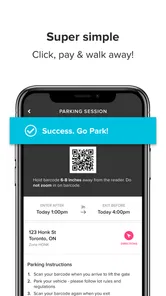
HonkMobile: Pay for Parking is a mobile parking app that helps drivers find participating parking locations, pay for parking sessions, and manage their vehicles from a phone. Instead of searching for a meter or using a payment machine, you can select the correct zone or location in the app, choose how long to stay, and receive digital confirmation of the transaction. Availability and features depend on the city or parking operator.
How do I pay for parking with HonkMobile?
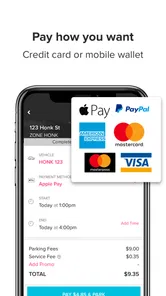
After creating an account and adding a vehicle and payment method, open the app and select the parking location or zone where you are parked. Check that the license plate and location details are correct before confirming the session. The app normally displays the parking duration, price, and applicable fees before payment. Once completed, keep the digital receipt available in the app in case you need to review the transaction.
Does HonkMobile charge additional fees?
The total cost may include more than the posted parking rate. Depending on the location, HonkMobile or the parking operator may apply a convenience, service, or transaction fee, and taxes may also be added. The exact amount can vary by municipality and facility. Before confirming payment, review the final price shown in the app so you understand what will be charged to your selected payment method.
Pros
- Find and pay for parking directly from your phone.
- Extend parking time remotely when more time is needed.
- Digital receipts make it easier to track parking expenses.
- Useful parking reminders can help prevent unnecessary fines.
- Available parking information can simplify city visits.
Cons
- Coverage depends on whether your local parking authority supports the app.
- Service or convenience fees may increase the total parking cost.
- Location and payment features require a reliable internet connection.
- Incorrect zone selection could result in an invalid parking session.
- Some users may find account setup and verification time-consuming.











