HiMelody: Offline Pure Music
- 1.43K
- 4.7
- Installs
- 1.00M
- Price
- Free

Screenshots

Analysis by Reviewed
I’d judge HiMelody by a practical question: can I get from opening a music app to hearing something I want, especially when the connection is unreliable? That’s the promise that makes this music and audio app worth considering. HiMelody: Offline Pure Music is free, and its appeal is straightforward: keep music handy for moments when streaming is inconvenient. I find that focus useful, though offline listening works best when you plan ahead rather than expect an app to fix every playback problem on the spot.
Where setup and playback can snag
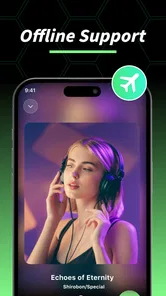
The common point of friction with any offline player is the handoff between finding music and having it ready without a connection. If you open an app on the way out the door and expect a complete collection to appear instantly, you may be disappointed. I’d first check what music is already available on the device and try playback while online; then I’d test again in airplane mode before relying on it for a commute. That small check helps separate a genuine offline-use issue from a song that was never available locally.
It is also worth distinguishing listening offline from discovering something new. A saved collection is useful in a tunnel, on a flight, or where mobile data is patchy; browsing and searching may be less convenient when your connection is gone. My advice is to settle on a few albums or playlists before leaving, rather than build the day’s listening plan after the signal drops. That is a simple workflow, but it avoids the most frustrating kind of interruption: opening a music app with no clear next track.
Making offline listening work in everyday life
When it comes to offline music apps, HiMelody: Offline Pure Music really hits the nail on the head. I've tried my fair share of music apps, and let me tell you, the struggle of buffering and "no connection" errors is real. But HiMelody swoops in with its offline capabilities that actually work. No more staring at a loading screen or having your vibe killed halfway through a song. It's like having your entire playlist tucked away in your pocket, ready to unleash a musical storm whenever you fancy.
User-Friendly Interface
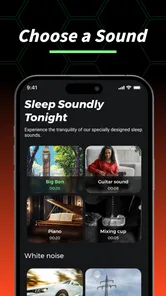
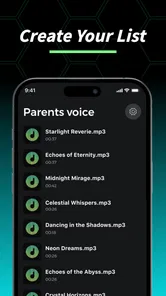
Now, let's talk about the user interface. I know some apps can feel like a maze, with menus buried within menus. But HiMelody keeps it simple and intuitive. The layout is so straightforward that even my grandma could navigate through it like a pro. You can easily create playlists, search for songs, and even sort your music without feeling like you're solving a Rubik's Cube. It's a breath of fresh air in the cluttered world of app interfaces.
Sound Quality that Strikes a Chord
One thing I absolutely love about HiMelody is its commitment to sound quality. It's like they've sprinkled some magic dust on their audio files because the clarity is top-notch. Whether you're into classical, rock, or pop, every note feels crisp and immersive. Trust me, when you hit play on HiMelody, you'll feel like you've stepped into your own private concert.
Choosing it over streaming habits
The useful comparison is not simply “offline versus online.” A streaming service is generally the better fit when I want a huge, changing catalogue and discovery tied to an internet connection. HiMelody makes more sense for someone who wants a direct music-player routine and less dependence on a steady signal. It is not a replacement for every kind of music service: if your priority is exploring new releases or managing a carefully synced library across devices, a larger streaming platform may suit you better.
More From Our News Desk

Weather by Xiaomi Review: Clear at a Glance, Less Clear Up Close

X Under Pressure: Can It Recover When Posting Goes Wrong?

Clash of Clans Is Won Between the Battles

Android Auto Makes the Case for Quieter Car Software

MobiOffice: Transforming Mobile Productivity with Seamless Integration

EA SPORTS FC™ Mobile Soccer: Redefining Mobile Sports Gaming
For a realistic example, I’d prepare a playlist before a long bus ride, test a track, and then leave the app ready to resume playback. I’d also keep the playlist focused rather than sorting through a sprawling collection in a crowded station. That small bit of preparation is a practical advantage of a simpler player: fewer decisions once you are on the move. The trade-off is that convenience depends on having the right music ready beforehand.
Another cool feature worth mentioning is the app's ability to personalize your music experience. It learns your preferences and suggests songs that align with your taste. It's like having a personal DJ who knows exactly what you want to hear, even before you do. Now that's what I call service!
What I would check before relying on it
If a track will not play, I would first try another song, then check whether the problem is limited to offline playback or happens while connected too. I’d close and reopen the app, confirm that the phone itself can play audio, and try the track again with a working connection. These basic checks are useful because a silent or interrupted song can come from the file, the device, or the current connection—not necessarily from the player alone.
I would also make a short test playlist before depending on HiMelody for a full day away from Wi-Fi. Play it once online, then disconnect and see whether the tracks still work. If only one song fails, I would replace that selection instead of rebuilding everything. This is a low-effort way to avoid discovering a problem when you have no time or signal to troubleshoot it.
Why You Should Give It a Spin
In a world where we're constantly bombarded with ads and pop-ups, HiMelody's ad-free experience is a blessing. I mean, who wants their jam session interrupted by an ad for cat food? Not me, that's for sure. Plus, the app's lightweight design means it won't hog your phone's resources. It's efficient, effective, and downright enjoyable.
Who will get the most from it
I’d recommend HiMelody to listeners who want a simple way to keep music close for commutes, travel, or places where reception comes and goes. It is especially appealing if you prefer making a playlist yourself instead of relying on a stream to decide what comes next. Someone who mostly listens at home with dependable Wi-Fi and enjoys browsing a vast catalogue may have less reason to switch from their usual service.
HiMelody is developed by Power Enhance Technology Co., Ltd. It has a 4.7 average from around 51,000 ratings, with over 1 million installs, and is rated for everyone. The app’s current version is 1.4.5, and it requires Android 9 or later. Those details make it easy to check whether it fits your device before trying it; the more important question for me is whether its offline-first approach matches how you actually listen.
So, if you're on the hunt for a reliable offline music app, HiMelody: Offline Pure Music is definitely worth a download. It's a seamless blend of simplicity, quality, and personalization that caters to all music lovers. Give it a whirl, and let your musical journey begin!
HiMelody: Offline Pure Music Frequently Asked Questions
What does HiMelody offer for listening without Wi-Fi?
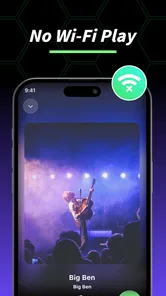
HiMelody is presented as a no-Wi-Fi MP3 app for listening to songs and young radio, with a focus on trending music offline. That can make it appealing when you want music available without relying on a Wi-Fi connection. Its central idea is straightforward: explore music listening through an app and enjoy offline playback where available.
Is HiMelody suitable for a general audience?
HiMelody has an Everyone content rating, so it is presented as suitable for a general audience. It is a Music & Audio app, making its main purpose music listening rather than a game or social network. As with any app, it is sensible to consider how its music features fit your own preferences and the way you use your device before installing it.
What does the app’s size and offline focus mean for my phone storage?
Offline music listening can make available device storage an important consideration, since music kept on a phone takes up space. Before downloading HiMelody, it is worth checking that you have room both for the app and for any tracks you intend to keep available offline. How much storage you use will depend on your own listening habits and the music you choose.
Is HiMelody: Offline Pure Music free to download?
HiMelody: Offline Pure Music is a free music and audio app, so you can try it without paying for the download. Its focus is offline listening, which can be useful when you want to enjoy music away from Wi-Fi. Before installing, check that your device meets the app’s operating system requirement and has room for the app and any music you plan to keep.
What devices and operating systems can run HiMelody?
HiMelody is available for Android and iOS, and its minimum operating system requirement is version 9. Checking your device’s system version before downloading can help avoid installation problems. The app is rated for Everyone, so it is presented as suitable for a general audience. Once installed, you can explore its music-listening features and decide whether they fit the way you use your phone.
Pros
- High-quality offline music playback
- User-friendly interface
- Diverse music library
- No internet required
- Customizable playlists
Cons
- Limited free features
- Occasional app crashes
- Ads in free version
- No live streaming option
- Limited social sharing features











