

Healthy Dinner : 500+ Recipes
- 26.00
- 4.7
- Installs
- 10.00K
- Price
- Free

Screenshots
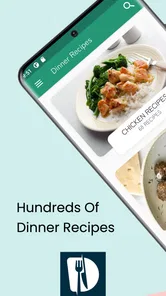

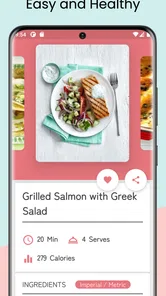
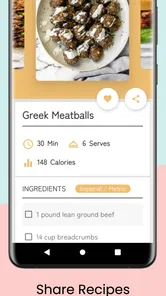
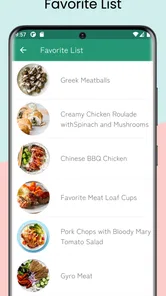
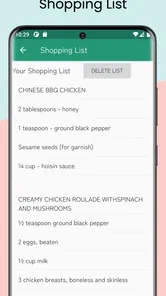
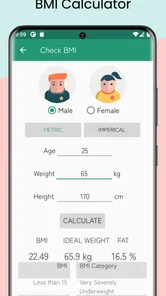
Analysis by Reviewed
I tried Healthy Dinner: 500+ Recipes as a practical cooking companion rather than treating it like a glossy food magazine. Its appeal is straightforward: it puts a large collection of dinner ideas on an Android device, where I can check inspiration at the moment I need it. The app is free to install, belongs to the Food & Drink category, and is developed by kiran chavan. After spending time with it, I see the strongest value in ordinary household cooking, especially when dinner has become repetitive and nobody wants to search through several websites before choosing something.
The app has built a 4.7 average from over two hundred ratings and has passed ten thousand installs, which gives it a reassuring level of interest without making it feel like an enormous, impersonal platform. It is rated for Everyone, so it can sit comfortably on a shared family tablet or a parent’s phone. That does not automatically make every recipe suitable for every age or dietary need, of course, but the presentation is approachable enough for a household to explore together.
How it works when dinner is a shared household decision
My favorite way to use this kind of app is not alone in the kitchen, but during the short conversation that happens before cooking starts. One person can hold the phone while another suggests a style of meal, and the app becomes a menu of possibilities instead of a last-minute search tool. That works particularly well when one household member is tired of choosing and another wants to try something different.
In a realistic evening scenario, I might open the app after work, browse for a dinner idea, and then show the options to someone else at home before committing. This small step matters because a recipe that looks appealing to the cook may not suit everyone eating. The app helps with inspiration, but the final decision still needs a quick conversation about preferences, available ingredients, and how much time the household has.
The title points to a collection of more than five hundred recipes, so the main benefit is variety rather than a narrow specialty. I would not expect every suggestion to become a regular meal, and I would not use the total collection as a promise that every recipe fits my personal definition of healthy. Instead, I treat it as a broad starting point. The useful question is not “Will this replace my entire cookbook?” but “Can it help me escape the same three dinners I keep making?” For that purpose, it is a sensible companion.
On a shared device, the app is easiest to manage when the household agrees that the person cooking has temporary control of the screen. Keeping the phone near the preparation area can be convenient, but it also means everyone should remember that the device may be exposed to spills, flour, or greasy fingers. I prefer reading through a recipe first, gathering the likely ingredients, and only then bringing the phone into the kitchen. That workflow reduces interruptions and avoids discovering halfway through that an important item is missing.
What makes the collection useful in practice
The less obvious strength of a large recipe collection is how it changes planning. I can use it in three different ways: to find a meal for tonight, to collect ideas for the next few days, or to identify a different use for ingredients already in the kitchen. The third approach is the most valuable. If I have vegetables, grains, or a protein that needs using, browsing with that ingredient in mind can lead me away from a familiar default.
More From Our News Desk

 Gmail
GmailGmail in a Busy Inbox: Who Benefits Most?
From first account to crowded workday, Gmail earns its place through dependable search and flexible sorting—but its best fit depends on how much inbox maintenance you can tolerate.

 Prime Video
Switching to Prime Video: What Changes in Your Viewing Routine
Prime Video can make a compelling second home for streaming, but switching means learning a different catalog, rental layer, and route from browsing to playback.

 Universal TV Remote Control
Universal TV Remote Control Works Best as a Reliable Backup
A phone remote earns its place through quick setup and reliable habits. Here is how to get more from Universal TV Remote Control—and where its limits show.

 Weather - By Xiaomi
Weather by Xiaomi Review: Clear at a Glance, Less Clear Up Close
Xiaomi’s weather app makes everyday forecasts quick to scan, but its calm surface can leave useful details and recovery paths harder to find than they should be.

 X
XX Under Pressure: Can It Recover When Posting Goes Wrong?
A resilience-focused review of X, examining setup, mistaken posts, interruptions, weak connections, and the gaps that matter when recovery needs to be dependable.

 Clash of Clans
Clash of Clans Is Won Between the Battles
Its raids are quick; its community is a long-term project of coordination, teaching, rivalry, and shared responsibility—with all the friction that entails.
Latest News



I also found it helpful to separate browsing from cooking. When I am hungry, I tend to choose the first acceptable idea and rush. Looking earlier in the day gives me time to compare the recipe’s apparent effort with my energy level. A recipe can be healthy in principle but still be a poor weekday choice if it demands too much preparation. Healthy Dinner: 500+ Recipes works best when I use it to make that decision before the pan is hot.
Another practical tip is to read the whole recipe before beginning, not just the first instruction. This is especially important in a collection-based app, where recipes may vary in complexity and sequence. I want to know whether anything needs to rest, marinate, soften, or cook separately. That habit also lets me check whether the recipe makes sense for the people sharing the meal, rather than assuming the title tells me everything I need to know.
Setting boundaries before sharing the device
The app is free, which makes it easy to suggest for a household without asking everyone to buy access first. At the same time, the listing includes in-app purchases ranging from $1.99 to $11.99 per item. That is worth discussing if children or guests use the same device. A free starting point does not mean every possible part of the experience has the same cost, so I would keep purchasing decisions with the adult who manages the device.
This is not a criticism of the cooking content itself; it is simply a sensible boundary for shared use. I would let younger family members browse ideas, but I would not leave them responsible for deciding whether to make a purchase. The Everyone age rating describes the app’s general audience, not the suitability of every ingredient or cooking task for a child. Hot surfaces, knives, allergies, and food preparation still require adult judgement.
For a shared tablet, I would also establish a simple routine: one person chooses the recipe, another checks the ingredient cupboard, and the cook has the final say on whether the plan is realistic. That avoids the common household problem where several people browse enthusiastically but nobody confirms what is actually available. The app can support coordination, but it does not replace it.
Because the current version is 6.6 and the minimum operating system is Android 9, compatibility is fairly straightforward for many Android users with a reasonably recent device. I would still check the device before planning to use an older phone or a family tablet, especially if it has been kept around for occasional browsing. A shared-device setup is only useful if the app opens reliably on the screen everyone expects to use.
Coordinating meals without turning cooking into a project
Recipe apps often fail in a household not because the recipes are poor, but because they do not fit the way people make decisions together. One person may care about nutrition, another about speed, and another about whether the meal will produce leftovers. My advice is to agree on the priority before browsing. If tonight must be quick, reject complicated options early. If the goal is variety, accept that the first choice may require a shopping trip. If leftovers matter, consider how the meal will work the following day.
Healthy Dinner: 500+ Recipes is useful during that negotiation because it gives the group something concrete to discuss. Instead of arguing abstractly about what sounds good, we can look at an actual recipe and decide whether it fits the evening. I appreciate that role more than the idea of the app making the decision for me.
A good shared workflow is to choose one primary recipe and one backup before shopping. The backup should use overlapping ingredients where possible, so a change of mind does not create unnecessary waste. This is a non-obvious advantage of browsing a broad collection: it can help me think in pairs or small groups of meals rather than isolated dishes. I can plan around what I already own instead of buying a completely separate set of ingredients for every night.
I would also avoid treating the app as a synchronized family planner. It is better understood as a recipe reference that several people can consult. If one person browses on a phone and another later cooks from a tablet, the household should communicate the selected recipe directly rather than assuming that everyone will see the same choice. That small boundary prevents confusion when several ideas have been considered.
For people cooking with a partner or roommate, the app can be a useful compromise tool. One person can choose the general direction while the other decides whether the preparation fits the available time. For parents, it can encourage children to participate in choosing vegetables or flavors, while an adult handles the safety-sensitive parts. For someone living alone, the same collection can reduce decision fatigue, but portion planning becomes more important because not every recipe will suit a single serving without adjustment.
Age, trust, and sensible expectations
The Everyone rating makes the app approachable for a family environment, but I would not confuse an age label with a cooking lesson. A child may be able to browse a recipe, identify ingredients, or help wash produce, yet still need close supervision around heat and sharp tools. The app can be part of a shared activity, not a substitute for an adult deciding what is safe.
Ingredient trust also deserves attention. I would check each recipe against allergies, intolerances, religious requirements, and personal dietary choices before serving it. The word “healthy” is broad, and households use it differently. One family may be reducing processed foods, another may be watching salt, and another may simply want more vegetables. I use the app’s theme as a direction for browsing, then apply my own standards to the final choice.
This is where a specialized alternative may be better. Someone following a medically prescribed diet, strict calorie targets, or a carefully controlled allergy plan should rely on a source designed for that need rather than assuming a general dinner collection provides enough detail. Likewise, a cook who needs exact nutritional calculations may prefer a dedicated meal-planning or nutrition app. Healthy Dinner: 500+ Recipes is more convincing as an idea generator than as a clinical dietary authority.
Trust also means checking the practical details yourself. I would confirm ingredient substitutions, cooking temperatures, and serving suitability before handing a recipe to a young helper. If a household member has limited cooking experience, start with a familiar meal and use the app to introduce one new element at a time. That approach makes the collection less intimidating and gives beginners a better chance of learning what works for them.
Where it beats ordinary alternatives, and where it does not
The usual alternative is a web search. Search engines offer almost endless choices, but they also bring long pages, distracting content, repeated results, and uncertainty about which recipe is worth trying. This app feels more focused because its purpose is already narrowed to dinner ideas. When I want inspiration without opening several browser tabs, that focus is valuable.
A printed cookbook still has advantages. It never needs a charged battery, it stays open on the counter, and it can be easier to annotate with personal changes. A well-loved family notebook is even better for recipes that have already been tested and adjusted. I would choose the app when I want discovery, and a paper collection when I want dependable repetition.
Dedicated meal-planning services can be stronger for shopping lists, schedules, dietary filters, household accounts, or nutrition tracking. I would choose one of those if coordination is the main problem. This app is a better fit when the main obstacle is a lack of dinner ideas. That distinction matters: a large recipe library can inspire a plan, but it does not automatically organize the entire week around budgets, stock levels, and individual profiles.
There is also a trade-off between breadth and precision. A large collection gives me more chances to find something appealing, but it can take longer to decide. I avoid endless browsing by setting a limit: choose a meal after comparing a few realistic options, then move on to preparation. Without that rule, the app can become another form of procrastination, especially when everyone in the household has a different preference.
Small habits that make the app more useful
My first habit is to browse when I am calm, not when I am already late. I look for a recipe that matches the time I actually have, then inspect the ingredient requirements before making a promise to the household. This prevents the familiar mistake of selecting an appealing dinner that depends on a missing item or more preparation than the evening allows.
My second habit is to use the collection for ingredient rotation. Rather than asking only what I feel like eating, I ask what needs to be used soon. This can turn the app into a simple waste-reduction tool. It is not a full inventory system, but the broad range of dinner ideas makes it easier to avoid buying the same ingredients while forgotten food sits in the cupboard.
My third habit is to keep personal judgement in the loop. I do not assume that a recipe’s title settles questions about balance, portion size, or suitability. I adjust the meal to the people eating it, and I treat substitutions as part of normal home cooking. That makes the app more flexible, but it also means the user must be comfortable making decisions rather than following every instruction blindly.
For a family, I would rotate the chooser. One night an adult selects the recipe, another night a child picks the main vegetable, and another night a roommate chooses the flavor direction. The app becomes a conversation starter rather than a silent database. This works best when the household agrees that choosing means helping with preparation too, within safe limits.
My household verdict
I recommend Healthy Dinner: 500+ Recipes to anyone who wants a free, focused source of dinner inspiration and is comfortable doing a little planning around it. Its broad collection is useful for breaking routine, comparing realistic meal ideas, and involving other people in the decision. The Everyone rating and simple purpose also make it a reasonable app for a shared household device, provided adults manage purchases and supervise cooking tasks appropriately.
I would skip it if I needed a complete family food-management system, detailed nutrition tracking, strict medical-diet guidance, or built-in coordination between separate household accounts. A specialist app, a trusted cookbook, or a family’s own recipe notes may serve those needs better. I would also avoid relying on it as the only authority for allergies or safety-sensitive cooking decisions.
For me, the app succeeds because it solves a modest problem well: what could we make for dinner that is different from yesterday? It does not need to control the whole kitchen to be useful. With a short ingredient check, a realistic time estimate, and a clear agreement about who is cooking, it can turn a vague evening question into an achievable meal. That makes it a worthwhile free download for curious home cooks, especially when the device is shared and dinner is a group decision.
Healthy Dinner : 500+ Recipes Frequently Asked Questions
Who is Healthy Dinner: 500+ Recipes designed for?
Healthy Dinner: 500+ Recipes is a Food & Drink app for people looking for ideas for nutritious evening meals. It can suit anyone who wants to explore dinner recipes, from home cooks seeking variety to people trying to make healthier meals part of their routine. The app is rated for Everyone, making it broadly accessible, though individual recipes may still call for ingredients or cooking steps that are not right for every user.
What devices and operating systems can run the app?
The app is available for Android devices running version 9 or later. Before installing, check your device’s operating system version and make sure there is enough storage for the download. The app is listed as version 6.6, and compatibility can depend on the device and platform, so it is sensible to confirm that the current store page supports your particular phone or tablet.
What is Healthy Dinner: 500+ Recipes?
Healthy Dinner: 500+ Recipes is a recipe app focused on nutritious evening meals for different tastes and lifestyles. Its collection includes ideas built around vegetables, lean proteins, grains, and other everyday ingredients. The app is useful when you want to plan a balanced dinner, discover new meal combinations, or replace repetitive takeout with simple homemade dishes.
Does Healthy Dinner: 500+ Recipes work for specific diets?
The app offers a broad selection of recipes, and many meals may suit common preferences such as vegetarian, low-calorie, high-protein, or lighter eating. However, users should check each recipe’s ingredients and preparation instructions carefully because dietary labels, allergens, and nutritional needs can vary. People following a strict medical or allergy-related diet should confirm ingredients independently before cooking.
Are the recipes suitable for beginners?
Most recipes are designed to be practical for home cooking and can help beginners prepare more organized dinners without advanced culinary skills. Before starting, review the ingredient list, cooking time, serving size, and required equipment. Some meals may still involve techniques such as chopping, baking, sautéing, or meal preparation, so experience and difficulty can differ from one recipe to another.
Pros
- Over 500 recipes provide plenty of variety for different dinner preferences.
- Recipes focus on healthier ingredients and balanced meal ideas.
- Useful for planning lighter meals without complicated cooking techniques.
- Suitable for discovering new dishes beyond standard weeknight recipes.
- Recipe collection can help reduce reliance on takeout and processed meals.
Cons
- Some recipes may require ingredients that are difficult to find locally.
- Nutritional information may not be available for every recipe.
- The large recipe library can make choosing a meal feel overwhelming.
- Portion sizes may need adjustment for families or specific dietary goals.
- Users with strict allergies should verify every ingredient before cooking.











