

Hammer: Truck GPS & Maps
- 5.15K
- 4.6
- Installs
- 1.00M
- Price
- Free

Screenshots
Analysis by Reviewed
I find Hammer: Truck GPS & Maps most useful when a journey has to work for a commercial vehicle, not just get a car from A to B. It is a free navigation app from TruckersReport.com, built around truck-focused routing and road information. That distinction matters on a shared household device: a family member can still use a familiar screen for a truck trip, but the route needs to reflect the vehicle being driven. I would treat it as a work tool first, rather than a general-purpose map for every outing.
Sharing one device without sharing assumptions
If a truck driver and a partner take turns using the same phone or tablet, the important habit is to check the vehicle setup before relying on a route. A route suitable for a smaller vehicle may not suit a truck, and the app’s truck-oriented guidance is only useful when the trip is planned for the right rig. I would make that check part of the handoff, just as I would confirm the destination and route before pulling away.
For a practical example, imagine one person uses the device for errands, then a driver takes it for an early delivery. Rather than assuming yesterday’s settings and route still fit, I would review the truck details and destination before starting. That small pause is more useful than treating any navigation app as an unquestioned authority, especially where clearances and road suitability matter.
Make the handoff deliberate
A shared phone can preserve continuity, but it also makes it easy to carry over the wrong assumptions. I would have the person taking the device check the destination, vehicle details and intended trip before moving off, rather than relying on a route left open by someone else. This is especially useful when the household switches between a truck and a car: the same screen does not mean the same routing needs.
There is a practical privacy boundary here, too. Anyone borrowing the device may see recent navigation activity or other information already open on it, depending on how the device is set up. I would close or clear anything I do not want the next user to see and keep personal device access arrangements separate from the navigation task. That is ordinary shared-device care, not a special Hammer feature.
Driving with Ease
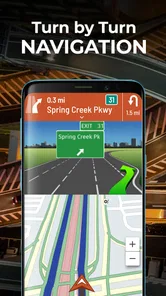
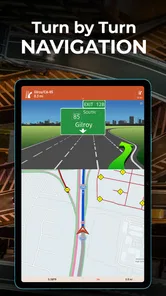
From the moment I installed Hammer: Truck GPS & Maps, I could tell it was tailored for those who spend more time on the road than at home. The interface is super intuitive, and setting up my truck's dimensions was a breeze. Unlike other GPS apps, Hammer takes into account the size of your vehicle, helping you avoid low bridges and narrow roads that could turn your haul into a headache.
Plan the vehicle before the route
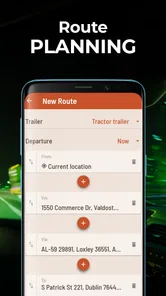
The most valuable step is not simply entering a destination; it is making sure the trip reflects the vehicle that will actually travel it. Truck dimensions are not a cosmetic preference. They influence whether a route is sensible, so I would update the setup whenever the device is being used for a different rig rather than assuming a saved configuration will fit every job.
More From Our News Desk

 Weather - By Xiaomi
Weather by Xiaomi Review: Clear at a Glance, Less Clear Up Close
Xiaomi’s weather app makes everyday forecasts quick to scan, but its calm surface can leave useful details and recovery paths harder to find than they should be.

 X
XX Under Pressure: Can It Recover When Posting Goes Wrong?
A resilience-focused review of X, examining setup, mistaken posts, interruptions, weak connections, and the gaps that matter when recovery needs to be dependable.

 Clash of Clans
Clash of Clans Is Won Between the Battles
Its raids are quick; its community is a long-term project of coordination, teaching, rivalry, and shared responsibility—with all the friction that entails.

 Android Auto
Android Auto Makes the Case for Quieter Car Software
The car interface is no longer judged by how much it can do, but by how quietly it helps. Android Auto shows what drivers now expect—and what still gets in the way.

 MobiOffice: Word, Sheets, PDF
MobiOffice: Transforming Mobile Productivity with Seamless Integration
MobiOffice: Word, Sheets, PDF is redefining mobile productivity with a surprising blend of functionality and innovation.

 EA SPORTS FC Soccer Mobile 26
EA SPORTS FC™ Mobile Soccer: Redefining Mobile Sports Gaming
Dive into EA SPORTS FC™ Mobile Soccer, where immersive gameplay and strategic depth transform mobile sports gaming.
Latest News



I would also plan a little time for a route check before departure. A driver can compare the suggested path with the intended stops and the road signs encountered along the way. If the route looks unusual, that is a reason to pause and reassess before committing, not a reason to follow it blindly. Navigation is an aid to judgement, not a replacement for it.
Real-Time Updates
One of the coolest features is the real-time traffic updates. We all know how frustrating it is to be stuck in traffic, especially with a deadline looming. Hammer keeps you informed, suggesting alternative routes when traffic gets gnarly. It's like having a trusty co-pilot who's always got your back.
An alternate route is most useful when there is enough time to consider what it changes. A faster-looking line on a screen may not be the right answer for a commercial vehicle, so I would weigh the traffic benefit against the road’s suitability and the next planned stop. That quick check helps keep an alert from turning into a rushed decision, particularly when a delivery schedule is already tight.
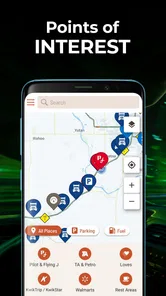
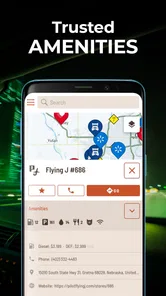
Truck-Specific Points of Interest
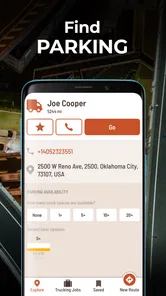
Another thing I love is the app’s focus on truck-specific points of interest. Whether it’s finding a rest stop with ample parking or a truck-friendly diner, Hammer’s got it covered. You won’t be left wondering where to take a break or grab a bite.
For a long trip, I would look at stops as part of the route rather than waiting until I need one. A driver can think ahead about where a break might fit and whether the stop makes sense for the vehicle, instead of choosing a place at the last minute. That is a small planning habit, but it can make a shared schedule easier to manage: the household can agree on a likely pause without needing everyone to monitor the driver’s progress.
Offline Maps
Don’t you hate it when you’re in the middle of nowhere and your GPS loses signal? With Hammer, you can download maps for offline use. This feature is a lifesaver, ensuring that you’re never without guidance, even in the most remote areas.
I would treat offline preparation as a before-you-leave task, not something to improvise once reception becomes unreliable. Check that the relevant area is available for offline use while connected, and think about the full route rather than only the starting point. Offline maps can help when a signal drops, but they do not make every live service available without a connection; that distinction matters if you are counting on current traffic information.
Choosing it over an everyday map
For someone who drives a commercial truck regularly, a truck-oriented navigator has a clear purpose that a car-first map may not address as directly. The vehicle-specific planning and truck-relevant stops are the reasons I would open Hammer for a work journey. A standard map remains the easier choice for walking directions, quick local errands or an ordinary car trip where truck restrictions are irrelevant.
Neither type of app removes the need to watch the road and follow posted restrictions. I would use Hammer to prepare and support a route, then treat road signs, closures and conditions as more current than a screen suggestion. A driver who needs a verified answer about a particular road should not infer certainty merely because a navigation app draws a line through it. That cautious approach is especially important when the cost of a wrong turn is more than a few extra minutes.
Planning around the household schedule
Where Hammer can help with shared-device coordination is in the trip itself: a driver can check the route, traffic and truck-relevant stops before setting out, then let others know the expected plan in ordinary conversation. I would not treat the app as a family location-sharing or messaging system; it is navigation software, so coordination still belongs between the people making the journey. A useful routine is to agree on the destination and likely break points before departure, then avoid fiddling with the phone while driving.
That routine can be helpful even when only one person is driving. For example, a partner arranging dinner or a pickup can work from the driver’s stated plan and likely break timing, rather than expecting a live location feed. If traffic changes the arrival estimate, the driver can communicate when it is safe to do so. The app supports the journey; it does not replace a household’s own way of keeping plans clear.
For a shared device, I would also settle who is responsible for keeping the route ready. One person can enter the destination and check the vehicle setup before the trip, while the driver confirms the plan before departure. Once underway, the driver should avoid typing or browsing. If a passenger is present, that person can help with a route check, but the driver still needs to stay focused on signs and conditions.
Age, access and trust
The app is rated for Everyone, but that age label does not make it a toy or a substitute for adult supervision on a trip. It is aimed at navigation, and the person behind the wheel should be the one making driving decisions. On a shared device, I would keep account and device access arrangements clear among household members rather than assuming the app provides special family controls. It is free to install, with optional in-app purchases ranging from $2.99 to $5.99 per item, so I would check what an optional purchase covers before confirming it on a device used by more than one person.
That matters most in a household where several people can make purchases on one device. I would agree in advance who can approve an optional purchase and review the purchase prompt before proceeding. The app’s Everyone rating is useful context for general suitability, but it does not answer questions about who should operate navigation while a vehicle is moving. For that, I would keep the rule simple: the driver concentrates on driving, and any passenger assistance happens without distracting them.
Who will get the most from it
Hammer is easiest to recommend to someone whose work involves commercial-vehicle trips and who wants truck-specific route planning in the same app as navigation and truck-related stops. It is also a reasonable choice for a household that occasionally shares a device with a truck driver, provided the person setting up each journey checks the vehicle and destination instead of treating the phone as a universal navigator.
I would be less likely to recommend it as the only map for someone who mainly walks, cycles or drives a regular car. A general-purpose navigation app is usually more convenient for those everyday tasks, and adding a specialized tool can create unnecessary switching. Likewise, a driver who expects the app to make every road decision for them may be disappointed: its value is in helping plan and navigate, while the driver remains responsible for judging the actual road.
Its audience is sizeable, with a 4.7 average from around 63,000 ratings and over 1 million installs. Those figures can offer reassurance that it is used by many people, but I would still judge it against my own routes and vehicle needs. The developer is TruckersReport.com, and the app sits in the maps and navigation space rather than trying to be a general household organizer.
What to check before relying on it
If you are trying it for the first time, start with a familiar trip where you can compare the suggested route with your own knowledge. Confirm the truck setup, destination and planned stop before departure, and do not choose an unfamiliar route solely because it appears faster. This gives you a chance to understand how the app fits your routine without making the first test a high-pressure delivery.
It is also worth distinguishing the app’s different kinds of help. Route guidance, traffic information, truck-related points of interest and offline map preparation answer different needs. A downloaded map can be useful when coverage is poor, while a live traffic update depends on having current information available. Planning with both in mind is more realistic than assuming every feature works identically in every location or situation.
Planning around the household schedule
Where Hammer can help with shared-device coordination is in the trip itself: a driver can check the route, traffic and truck-relevant stops before setting out, then let others know the expected plan in ordinary conversation. I would not treat the app as a family location-sharing or messaging system; it is navigation software, so coordination still belongs between the people making the journey. A useful routine is to agree on the destination and likely break points before departure, then avoid fiddling with the phone while driving.
Compared with a standard car-navigation app, Hammer’s truck emphasis is the main reason to choose it, while a general map may be more convenient for walking, local errands or everyday car trips. It also should not replace a driver’s judgement: road conditions and signs take priority, and a suggested alternative deserves a quick sanity check before following it. The practical trade-off is that a specialized route planner is most valuable when the vehicle and job call for it; for a household that only drives cars, it may be more app than needed.
Age, access and trust
The app is rated for Everyone, but that age label does not make it a toy or a substitute for adult supervision on a trip. It is aimed at navigation, and the person behind the wheel should be the one making driving decisions. On a shared device, I would keep account and device access arrangements clear among household members rather than assuming the app provides special family controls. It is free to install, with optional in-app purchases ranging from $2.99 to $5.99 per item, so I would check what an optional purchase covers before confirming it on a device used by more than one person.
For a long-haul driver, the app is a more relevant starting point than a car-first navigator, especially when planning around truck routes and stops. For someone who rarely drives a commercial vehicle, a familiar general map is likely simpler. Hammer has a 4.7 average from around 63,000 ratings and over 1 million installs, which suggests a substantial audience, but I would still test a planned route against the actual vehicle and current road signs. Its current version is 2.15.1, it runs on Android 7.0 or later, and its content rating is Everyone.
Overall, Hammer: Truck GPS & Maps has made my trucking experience smoother and less stressful. It’s like having a reliable buddy in the passenger seat, always ready to help navigate the challenges of the road. If you’re a trucker looking for a navigation app that truly understands your needs, Hammer is definitely worth checking out.
Hammer: Truck GPS & Maps Frequently Asked Questions
Who is Hammer: Truck GPS & Maps designed for?
Hammer: Truck GPS & Maps is a Maps & Navigation app developed by TruckersReport.com, with features aimed at commercial truck drivers. Its truck-oriented GPS navigation and route information may be useful for drivers who want navigation tailored to truck travel rather than a general-purpose driving app. It is free to download, and the app is rated for Everyone.
What device requirements and cost should I consider before downloading Hammer?
Hammer: Truck GPS & Maps is free to download and runs on Android devices with version 7.0 or later. In-app purchases are available, with listed item prices ranging from $2.99 to $5.99. The app’s current version is 2.15.1. Checking your device’s operating system before installing can help ensure it meets the stated minimum requirement.
Is Hammer: Truck GPS & Maps suitable for someone who has never used a truck navigation app?
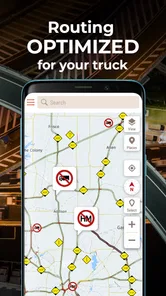
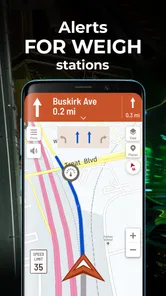
Hammer: Truck GPS & Maps is a Maps & Navigation app aimed at commercial truck drivers, so its truck-focused tools are intended to support route planning and trips on the road. Its features include truck-optimized GPS navigation, truck-specific routing, traffic updates, and alerts related to parking, speed limits, diesel fuel, and weigh stations. A new user can explore these tools and decide whether they fit their driving needs.
What features does Hammer: Truck GPS & Maps offer for truck drivers?
Hammer: Truck GPS & Maps is specifically designed for truck drivers, offering features like truck-optimized GPS navigation, real-time traffic updates, truck-specific routing options to avoid low bridges and narrow roads, and up-to-date maps. It also includes tools for logging Hours of Service (HOS) and fuel tracking, ensuring compliance with trucking regulations.
Is Hammer: Truck GPS & Maps free to use?
Yes, Hammer: Truck GPS & Maps is available for free download on Android and iOS devices. While the app offers a comprehensive set of features for free, there might be additional premium features or services that require in-app purchases or subscriptions. Users can choose to upgrade if they find the advanced features beneficial for their needs. In-app purchases are available, with listed item prices ranging from $2.99 to $5.99.
Pros
- User-friendly interface for easy navigation
- Offers real-time traffic updates
- Provides offline maps for remote areas
- Customizable routes for trucks
- Reliable GPS accuracy
Cons
- Consumes significant battery power
- Occasional app crashes reported
- Limited free features availability
- Requires constant internet for updates
- Large app size affects storage











