

Hairu: Hairstyle Try On
- 24.00
- 4.6
- Installs
- 100.00K
- Price
- Free

Screenshots
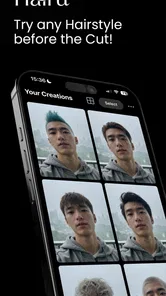
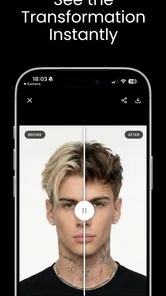
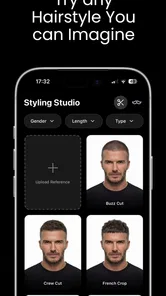
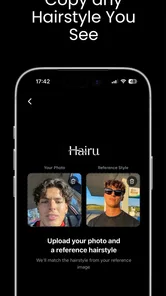
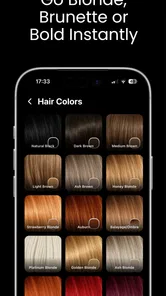
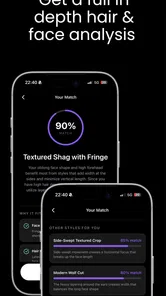
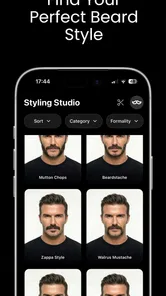

Analysis by Reviewed
I can see why Hairu: Hairstyle Try On is tempting: choosing a cut from a reference photo is easy, but knowing whether it will suit your own face is much harder. This beauty app is built around that decision, letting you explore hairstyle ideas before making a change you may have to live with for months. My view is that it works best as a low-pressure visual aid—not as a substitute for a stylist’s judgement or a promise of exactly how a real cut will look.
The first few sessions are the most naturally engaging. You arrive with a question—would shorter hair work, or should you keep your current length?—and the app gives you a way to think through options on your own image. That makes it useful before a salon appointment, but also for a quieter moment at home when you are curious and not ready to commit. I would use it to narrow a broad idea into a couple of directions, rather than expecting it to settle every detail.
From first try-on to a useful routine
I look at Hairu as most useful when curiosity turns into a real decision: a possible trim, a change in shape, or a salon visit you want to approach with a clearer idea. This section follows that path from an initial try-on to a routine that stays focused, so the app remains a practical reference rather than an endless source of new looks.
Why the first week feels appealing
In its first week, a hairstyle try-on app has an obvious novelty factor: you can compare possible looks without scissors, dye, or an awkward period of growing a cut out. The real value is not simply seeing a different style on screen. It is having something concrete to react to. A vague thought like “maybe I should change my hair” can become “I like the shorter shape, but not that much volume.” That is a more helpful starting point for a conversation with a professional.
I recommend treating each try-on as a prompt, not a verdict. A picture can help you notice proportions and overall mood, but a phone image cannot fully reproduce how hair moves, how its texture behaves, or how much effort a particular shape takes each morning. A look that seems appealing in a still image may be less practical if your routine is quick or your hair does not naturally behave that way. Keep those differences in mind before turning a visual preference into a salon instruction.
A useful first-session workflow is to begin with the change you are genuinely considering. If you are only weighing a trim, do not let an extreme transformation distract you from the decision at hand. Try a small set of plausible directions, pause between them, and note what you like about each: length, outline, or general feel. This keeps browsing purposeful and makes the app more useful than a stream of entertaining but unrelated makeovers.
That restraint matters because visual tools can make unfamiliar options feel more appealing simply because they are new. I would save the most convincing ideas and revisit them later, ideally after the initial excitement has passed. If the same direction still feels right, it is more likely to reflect a real preference. If it does not, you have learned something without making a costly or difficult-to-reverse change.
More From Our News Desk

 Gmail
GmailGmail in a Busy Inbox: Who Benefits Most?
From first account to crowded workday, Gmail earns its place through dependable search and flexible sorting—but its best fit depends on how much inbox maintenance you can tolerate.

 Prime Video
Switching to Prime Video: What Changes in Your Viewing Routine
Prime Video can make a compelling second home for streaming, but switching means learning a different catalog, rental layer, and route from browsing to playback.

 Universal TV Remote Control
Universal TV Remote Control Works Best as a Reliable Backup
A phone remote earns its place through quick setup and reliable habits. Here is how to get more from Universal TV Remote Control—and where its limits show.

 Weather - By Xiaomi
Weather by Xiaomi Review: Clear at a Glance, Less Clear Up Close
Xiaomi’s weather app makes everyday forecasts quick to scan, but its calm surface can leave useful details and recovery paths harder to find than they should be.

 X
XX Under Pressure: Can It Recover When Posting Goes Wrong?
A resilience-focused review of X, examining setup, mistaken posts, interruptions, weak connections, and the gaps that matter when recovery needs to be dependable.

 Clash of Clans
Clash of Clans Is Won Between the Battles
Its raids are quick; its community is a long-term project of coordination, teaching, rivalry, and shared responsibility—with all the friction that entails.
Latest News



What remains useful month to month
Hairu is more likely to earn a place on your phone if you have recurring decisions to make. Someone who changes their look regularly, grows out a previous cut, or likes collecting references for future appointments may return to it more often than someone who is happy with one dependable style. For occasional users, the value may be concentrated around a single haircut decision; that is still worthwhile if it helps you communicate clearly and avoid choosing on impulse.
The app is made by Max App Studio and sits in the beauty category, with a 4.6 average from around 4.4K ratings. It has over 100K installs, which suggests that this kind of preview has found an audience, though popularity alone does not tell you whether a result will suit your hair. I would judge it by whether it helps you form a clearer plan, not by how many dramatic options you can scroll through.
It also differs from the usual alternatives. A social-media search gives you real people and real salon results, but those images may involve different hair textures, lighting, styling, and face shapes. A consultation with a stylist can account for your hair’s condition and upkeep, but it takes more time and is not always the first step when you are only exploring. A try-on app is convenient between those two: faster than a consultation and more personal than a folder of reference photos, while still less reliable than seeing a professional in person.
For a practical monthly habit, I would use Hairu when a real decision comes up, rather than opening it just to browse. Before an appointment, try a few restrained alternatives and bring your preferred direction into the discussion. Ask the stylist what would need to change to make the look work with your own texture and routine. The app can help you express taste; the stylist can help translate it into a cut that is achievable and maintainable.
Keeping the effort proportionate
The maintenance burden is light in one sense: experimenting digitally does not require a salon visit or a commitment to a new routine. But there is still a time cost. Comparing too many possibilities can leave you less certain than when you started, especially if you treat every preview as a new contender. A short, focused session is usually more useful than repeatedly cycling through alternatives without a decision in mind.
My best tip is to separate inspiration from evaluation. First, identify the broad change you want to consider. Then compare only options that could realistically fit your day-to-day life. For each one, ask whether you would still like it when styled simply, whether you are comfortable with the upkeep it might imply, and whether you would be happy waiting for it to grow out if it disappoints. Those questions turn an entertaining preview into a more grounded choice.
It is also worth remembering that a visual match is not the same as a hair-care plan. If you are considering a major change, use the preview to explain the silhouette or mood you like, then ask a hair professional about texture, styling time, and how the result might change as it grows. This is especially important when the look depends on a finish you would not normally create at home. The app can show you what attracts you; it cannot make the everyday work disappear.
Hairu is free to download and is rated for Everyone. Optional in-app purchases range from $0.99 to $28.99 per item, so I would decide what you need from the app before spending. If your goal is simply to test whether a particular direction appeals to you, start with the free experience and see whether it answers that question. Paying only makes sense if you have a clear reason to continue and the available purchase fits your budget.
The current version is 4.2.0, and the minimum operating-system requirement is 7.0. That makes compatibility a straightforward check before installing: confirm that your device meets the requirement, then see whether the app’s style of visual exploration suits you. The important choice is less about collecting every possible preview and more about whether you will use the tool at a moment when it can inform a real decision.
Where novelty can turn into fatigue
The main risk is that trying on looks becomes its own entertainment and stops helping with an actual choice. A parade of dramatic changes may be fun for a while, but it can also make your current hair feel inadequate or leave you with an unrealistic target. I would be cautious about judging a style from a single image, especially if the result looks polished in a way that would require more daily effort than you want to spend.
Another source of fatigue is overconfidence. A preview can make a hairstyle feel certain because you can see it on your face, yet the real result depends on factors a still image cannot settle: your hair’s natural behavior, the cut’s shape as it grows, and how you style it on an ordinary morning. If you are making a substantial change, use Hairu to identify what you like, then treat the appointment as a conversation rather than a request to reproduce the screen exactly.
It may not be the right choice if you want a precise technical consultation, need advice about hair health, or already know that you will rely on a stylist’s assessment before changing anything. In those cases, a direct professional discussion is the better tool. It may also be a poor fit if you rarely reconsider your hairstyle; an app that you open once for curiosity may not deserve permanent space on your device. That is not a flaw so much as a matter of matching the app to your habits.
By contrast, it makes sense for someone who likes to arrive at an appointment with a clearer visual idea, or who tends to hesitate because imagining a new cut is difficult. A realistic everyday example is planning a trim after months of keeping the same length: you can explore a few possible directions at home, settle on the one that still appeals after a day or two, and explain the shape you want more clearly at the salon. The benefit is better preparation, not guaranteed results.
Making a try-on useful at the salon
One small but useful habit is to describe the parts of a preview rather than presenting the whole image as an exact target. I would point out the length, outline, or general impression that appeals to me, then explain what I would not want copied. That distinction gives a stylist room to adapt the idea to my hair instead of treating a screen image as a technical specification.
If you are torn between two options, it can help to choose a deciding question before opening the app: do you want less length, a different overall shape, or simply a fresh look? Compare your short list against that question. This is a practical way to avoid confusing a dramatic visual change with the feature you actually want, and it makes the resulting salon conversation more focused.
Does it deserve lasting space?
My long-term verdict is that Hairu: Hairstyle Try On earns its place for people who revisit hair decisions and want a personal visual reference before acting. Its strongest recurring value is helping you compare ideas and articulate a preference, particularly when you feel stuck between staying familiar and trying something new. It is less compelling as a daily-use app, and I would not keep returning to it simply to chase the novelty of another transformation.
Use it with a small goal, give your favourite options time to settle, and take the result as inspiration rather than a guarantee. If that process makes your next hair conversation clearer, the app has done something genuinely useful. If you need a stylist’s technical advice, prefer real-world examples, or have no upcoming change in mind, you can skip it without missing an essential part of a beauty routine. For everyone in between, its value depends on a sensible balance: explore enough to learn what you like, then let real hair and professional advice guide the final call.
Hairu: Hairstyle Try On Frequently Asked Questions
What is Hairu: Hairstyle Try On, and what can I use it for?
Hairu: Hairstyle Try On is a virtual styling app designed to help you preview different hair looks using a photo. It can be useful when you are considering a new cut, color, or overall style but want to see a rough visual reference first. Treat the result as inspiration rather than a guaranteed preview of how a real hairstyle will look on you.
How do I try a hairstyle in Hairu?
The usual process is to choose or take a suitable portrait, then browse the available hairstyle options and apply one to your image. A clear, well-lit photo with your face visible and positioned toward the camera generally makes it easier for the app to align the style. Follow the in-app prompts, as the exact tools and steps may vary by version.
Is Hairu: Hairstyle Try On free to download and use?
Check the app’s store listing before installing, because pricing and access can change by region and over time. An app may be free to download while reserving some styles or features for in-app purchases or a subscription. Review the listed prices, trial terms, and renewal details carefully so you know what is included before confirming any payment.
Does Hairu need access to my photos, and how is my image handled?
A hairstyle preview requires an image, so Hairu may ask for permission to access your camera or selected photos. You can often choose a single image rather than granting broader photo-library access, depending on your device and operating system. Before uploading personal photos, review the app’s current privacy policy and permissions to understand how images may be stored or processed.
Will Hairu show exactly how a haircut or hair color will look in real life?
No virtual try-on can fully reproduce real hair texture, lighting, color, or the way a stylist adapts a cut to your features. Hairu’s previews are best used to compare ideas and communicate preferences, not as a promise of the final result. For a major change, share your preferred look with a professional stylist and ask whether it suits your hair and maintenance needs.
Pros
- Try on a range of hairstyles before making a salon appointment.
- Useful for comparing different looks without changing your real hair.
- A convenient way to explore styles from your phone.
- Can help you narrow down ideas to discuss with a hairstylist.
- Virtual previews make hairstyle experimentation low-risk.
Cons
- Results may look less realistic than a professional in-person consultation.
- Hair placement can be tricky if the selfie angle or lighting is poor.
- Some styles or features may require an in-app purchase.
- The available styles may not suit every hair texture or face shape.
- Virtual color and cut previews cannot predict real salon results.











