

Hairstyle Try On Hair AI
- 18.00
- 4.2
- Installs
- 50.00K
- Price
- Free
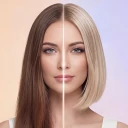
Screenshots
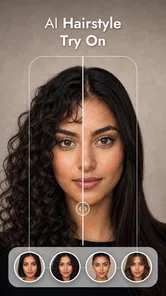
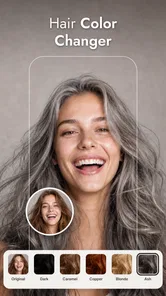
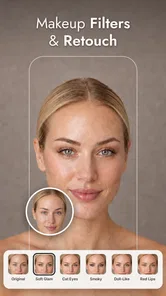
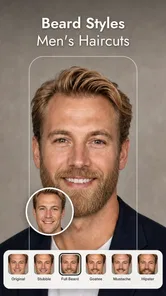
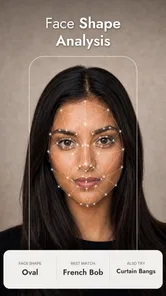
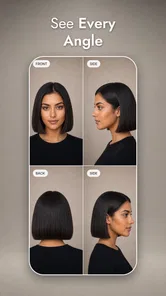
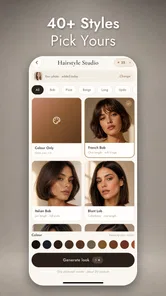
Analysis by Reviewed
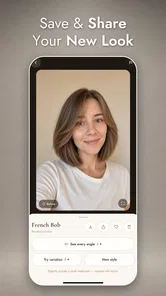
I find virtual makeover apps most useful when they help me make a decision, not when they promise a perfect preview. Hairstyle Try On Hair AI is built around that practical idea: it lets me explore hair, color, makeup, and beard looks using my own photo. The appeal is easy to understand before a haircut, while comparing a new shade, or simply when I want to see whether a style suits my face. The important caveat is that a phone preview is a visual guide, not a guarantee of how a salon result will look.
Trying a look is only as easy as the photo—and connection
Because the app uses AI to work with a personal image, I would approach it as a connected visual tool rather than assume every step will work without a network. That matters most at the moment I want a quick answer: selecting a photo, waiting for an effect to appear, or switching between several ideas. If image processing or other parts of the experience take time, a weak connection can make a casual experiment feel less immediate.
For the smoothest session, I’d choose a clear, front-facing photo before opening the styling options. Even lighting and a visible hairline make it easier to judge a proposed cut or color; a shadow across the face or hair tucked beneath a hat can make the result harder to interpret. This is not a special trick that makes AI infallible, but it can help me distinguish a genuinely interesting look from an awkward result caused by the source image.
The app is a beauty app from illebra.app, and its focus is unusually broad for a photo-based makeover: hair shape, hair color, makeup, and beards all sit within the same general idea. I like that range because it lets me consider a whole look rather than treating a haircut as an isolated choice. Still, when I’m evaluating one specific change, I’d keep the comparison focused. Trying a different cut and a bold color at once may be entertaining, but it makes it difficult to tell which change actually works.
A useful mobile routine, not a salon measurement
On a phone, the app makes most sense in short, deliberate sessions. I can imagine opening it at home before booking a trim, saving a few candidate ideas mentally, and then using those images to explain the direction I want to a stylist. It is less useful as a precise preview of length, texture, or how a style will behave after washing. A digital overlay can suggest proportions, but real hair falls, curls, and reflects light differently.
For a realistic everyday example, say I’m considering a shorter cut before an appointment. I’d take a recent photo with my hair visible, compare a conservative option with a more noticeable change, and ask myself whether I like the outline around my face in both. If the app requires a moment to produce or change a result, I’d wait for each version to settle before making a judgment rather than rapidly tapping through options. That slower comparison is more informative than collecting a screen full of novelty looks.
It can also be a low-pressure way to talk through a change with someone else. I’d show a friend two alternatives and ask which one feels closer to my usual style, then take the strongest idea to a professional. The app is not replacing that conversation; it gives both of us a concrete visual starting point. For makeup or beard experiments, the same principle applies: treat the image as inspiration, not as a promise that a product or grooming choice will look identical in person.
More From Our News Desk

 Gmail
GmailGmail in a Busy Inbox: Who Benefits Most?
From first account to crowded workday, Gmail earns its place through dependable search and flexible sorting—but its best fit depends on how much inbox maintenance you can tolerate.

 Prime Video
Switching to Prime Video: What Changes in Your Viewing Routine
Prime Video can make a compelling second home for streaming, but switching means learning a different catalog, rental layer, and route from browsing to playback.

 Universal TV Remote Control
Universal TV Remote Control Works Best as a Reliable Backup
A phone remote earns its place through quick setup and reliable habits. Here is how to get more from Universal TV Remote Control—and where its limits show.

 Weather - By Xiaomi
Weather by Xiaomi Review: Clear at a Glance, Less Clear Up Close
Xiaomi’s weather app makes everyday forecasts quick to scan, but its calm surface can leave useful details and recovery paths harder to find than they should be.

 X
XX Under Pressure: Can It Recover When Posting Goes Wrong?
A resilience-focused review of X, examining setup, mistaken posts, interruptions, weak connections, and the gaps that matter when recovery needs to be dependable.

 Clash of Clans
Clash of Clans Is Won Between the Battles
Its raids are quick; its community is a long-term project of coordination, teaching, rivalry, and shared responsibility—with all the friction that entails.
Latest News



What to do when a result stalls or looks wrong
AI image tools can be sensitive to the photo and to the conditions under which a result is produced. If a preview appears incomplete or does not seem to change, my first response would be to check the connection and give the current attempt a little time. I would avoid repeatedly submitting the same image in quick succession, since that can make it harder to tell whether the app is still working or whether a fresh attempt is needed.
If the output looks misplaced, I’d check the source photo before blaming the style itself. Hair crossing the face, strong side lighting, a tilted head, or a busy background can all make a preview less convincing. I’d try a cleaner image and compare again. That workflow is especially valuable for color: if the original hair is partly hidden or the lighting is warm, a simulated shade may not provide a fair basis for deciding whether a real color change will suit me.
There is a trade-off here with the usual alternatives. A simple hairstyle gallery is quicker to browse and may show polished examples, but it cannot make the idea feel as personal as seeing it against my own face. A professional consultation is more grounded in hair condition and styling technique, but it takes more effort and does not offer the same quick experimentation at home. This app occupies the middle ground: more personal than stock inspiration, less dependable than a stylist’s assessment.
Privacy-minded habits for personal photos
Using a selfie naturally raises a sensible question: how much personal imagery do I want to provide to an app? I would choose a photo I’m comfortable using for a styling experiment, avoid including other people in the frame, and keep the session focused on the look I’m trying to evaluate. Those are prudent habits for any photo-based service, not claims about how this particular app stores or handles images.
Connectivity is part of that decision too. If I’m on a limited mobile plan or a public network, I’d save the experiment for a connection that feels appropriate and convenient. I would also avoid treating a slow response as a reason to upload several versions of the same image. A single clear photo gives me a cleaner comparison and limits unnecessary retries.
Someone who wants a purely offline tool, or who does not want to use a personal photo for AI styling, may be happier with hairstyle reference images or an in-person consultation. Likewise, a person seeking a technically exact preview of a specific cut should speak with a stylist who can account for hair type, density, and maintenance. The app is best for exploring possibilities, not resolving every practical detail of a haircut.
Cost, access, and who will get the most from it
The app is free to install, with optional in-app purchases listed from $0.99 to $49.99 per item. I’d explore the basic experience first and make sure the image-based approach is useful to me before considering any purchase. That is particularly sensible for a tool I might use only when I’m thinking about changing my appearance. The listed content rating is Everyone, and the minimum operating system is Android 7.0.
Hairstyle Try On Hair AI is on version 3.2.0, and it has an average rating of 4.2 from around 500 ratings, with more than 50,000 installs. Those figures suggest that people are using it for this specific kind of visual experimenting, but I would not read them as proof that every preview will suit every face or photo. Individual results are the point at which my own test matters most.
I’d recommend it to someone who likes to compare looks before making a change, especially if they want hair, color, makeup, and beard ideas in one place. I’d skip it if I need a reliable technical consultation, expect a simulation to match real hair perfectly, or prefer not to use a personal image. People with a stylist appointment soon may find it most useful as a conversation aid: choose a direction, then let a professional adapt it to what is actually achievable.
My connectivity verdict
What I like most is the directness of the idea: I can test a visual direction on my own face instead of imagining it from a generic model. What gives me pause is that image-based experimentation is only as convincing as the photo and the conditions around the session. I’d use a stable connection, work from one well-lit picture, and compare a small number of deliberate options rather than chasing endless variations.
My recommendation is to treat Hairstyle Try On Hair AI as a connected source of inspiration, not a virtual appointment with a stylist.
A better way to compare options
One useful habit is to change only one element at a time. I’d first compare a few silhouettes while keeping the color close to my current hair, then test color ideas against whichever shape seems most promising. That makes the result easier to read: if I like the image, I can identify whether the appeal comes from the cut, the shade, or their combination. It also gives me a clearer way to describe the idea later instead of showing a stylist a dramatic look I can’t quite explain.
I’d also keep the original photo in mind as a reference point rather than treating every generated version as equally realistic. A front-facing image is helpful for judging the general frame around the face, but it cannot show how a style looks from the side or how it moves. If I’m choosing between a subtle trim and a major change, I would use the preview to decide whether I want to explore that direction, then ask a stylist about the details that a still image cannot settle.
Who benefits—and when another approach is better
The strongest fit is someone who already has a few possibilities in mind and wants a low-pressure way to narrow them down. The app can be especially handy if I’m unsure whether to stay close to my current look or try something noticeably different, because comparing ideas on my own photo makes the choice feel less abstract. Its range also suits people who want to think about grooming and makeup alongside hair rather than opening separate sources of inspiration.
By contrast, I wouldn’t use it to decide whether a particular cut is manageable with my routine, or whether a color is suitable for my hair’s current condition. Those questions depend on details a visual preview cannot reliably assess. A stylist is the better choice when the decision involves damage, upkeep, or a precise result. And if I just want a broad collection of examples without using a selfie, a regular image gallery is simpler and avoids the personal-photo trade-off.
For a quick check before leaving home, I’d keep expectations modest: this is more suited to an unhurried session than a last-minute decision on a patchy connection. I’d prepare one useful photo, try a small set of alternatives, and stop once I have a direction worth discussing. That keeps the exercise practical and avoids mistaking endless variations for better advice.
Choosing whether to try it
Before installing, I’d ask myself two simple things: am I comfortable testing a personal photo, and do I want visual inspiration rather than a dependable salon prediction? If both answers are yes, the app’s mix of hairstyles, shades, makeup, and beard looks gives me a reason to try it. I’d begin without assuming I need to pay for anything, then decide whether the experience is useful enough to return to when a change is actually on the table.
For me, its value is in making the first conversation easier: I can arrive with a visual direction instead of a vague request. The final choice still belongs to me and, where practical hair advice matters, to a professional who can see and assess my hair in person. That is a sensible role for an AI makeover app, and the one in which I’d be most comfortable recommending it.
Hairstyle Try On Hair AI Frequently Asked Questions
What is Hairstyle Try On Hair AI, and what can I do with it?
Hairstyle Try On Hair AI is a virtual makeover app designed to help you preview different hairstyles using a photo. Depending on the features available in your version, you may be able to explore cuts, lengths, colors, or AI-generated looks and compare them before visiting a salon. Treat the results as visual inspiration rather than a guaranteed prediction of how a style will look in real life.
How do I get the best hairstyle preview?
Start with a clear, front-facing photo taken in even lighting, with your face unobstructed and your hair pulled away from your features if possible. A simple background can also make the preview easier to assess. After uploading or taking a picture, position it as the app requests and try several styles. Results can vary with lighting, image quality, face angle, and how well the hairstyle effect fits the photo.
Does Hairstyle Try On Hair AI require payment or offer in-app purchases?
Pricing and access can differ by app version, platform, region, or promotion. Some hairstyle tools offer free previews while reserving certain styles, AI features, or downloads for a subscription or one-time purchase. Check the app’s store listing and its payment screen before confirming a purchase, and review any trial length, renewal date, and cancellation instructions so you understand what continued use may cost.
Do I need to upload a photo, and how is my personal data handled?
Trying on a style may require taking or selecting a photo, so review the requested permissions and the app’s privacy policy before sharing one. The policy should explain whether images are processed on your device or uploaded, how long they may be retained, and whether they are used to improve services. Avoid submitting photos you do not have permission to use, and remove access when it is no longer needed.
Can I rely on the app to choose a haircut or hair color that will suit me?
The app can help you compare ideas and communicate preferences to a stylist, but its previews are estimates, not professional consultations. A generated result may not account for your hair texture, density, current color, maintenance needs, or the way a cut moves in person. Use a preview as a starting point, then discuss practical options with a hair professional before making a major change.
Pros
- Preview different hairstyles on your own photo before making a change.
- AI-powered suggestions make it easy to explore a variety of looks.
- A quick way to compare styles without visiting a salon first.
- Useful for finding inspiration for a stylist appointment.
- Photo-based previews make hairstyle ideas more personal.
Cons
- Results can look less realistic if the photo has poor lighting.
- Hair overlays may not match your actual texture or volume.
- Some styles may fit the face photo unevenly.
- The app’s suggestions are not a substitute for professional advice.
- Access to certain styles or features may require payment.











