

HairLook: AI Hairstyle Try On
- 31.00
- 3.9
- Installs
- 10.00K
- Price
- Free

Screenshots
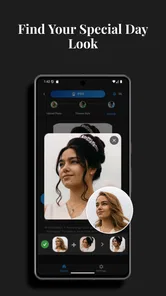
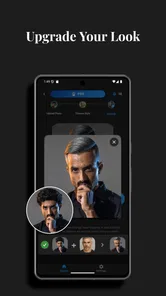
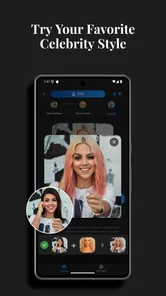
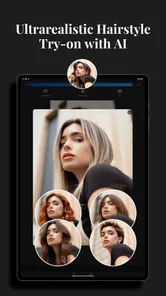
Analysis by Reviewed
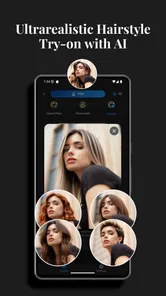
I opened HairLook: AI Hairstyle Try On with a simple question: would a virtual hairstyle preview actually help me decide what to ask for at a salon, or would it create another polished image that looks nothing like real life? After working through the app’s photo-to-style process, I found it most useful as a conversation starter. It can make a haircut, color, highlight, or balayage idea easier to discuss, but I would not treat the generated image as a promise of the final result.
This is a free beauty app from Antac S.A.S., aimed at anyone who wants to experiment visually before changing their hair. It is available for Everyone, runs on Android devices using version 7.0 or later, and the current release is 2.8.0. The app has passed ten thousand installs and holds a 3.9 average from 473 ratings, which feels consistent with my experience: the basic idea is approachable and fun, while the quality of the outcome depends heavily on the starting photo and how realistic the chosen look is for that image.
From a real hair dilemma to a usable preview
I start with the real decision behind a hairstyle preview: what do I want to change, and what do I need to keep? That distinction makes trying options more useful than simply chasing the most dramatic image. I’ll look at how a clear starting photo and a focused question can turn a quick experiment into a reference worth discussing with a stylist.
Starting with the right photo
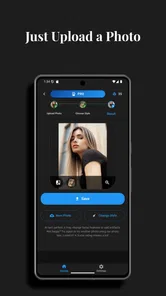
The first important decision happens before the AI does anything. I would not begin with a dim selfie, a heavily angled portrait, or a picture where hair is hidden behind a hood or another person. A front-facing image with the face visible and the existing hair reasonably clear gives the app a better foundation. This is not a minor detail: a weak input can make the preview look strange, and it becomes difficult to tell whether the problem is the hairstyle or the image itself.
For an everyday test, imagine that I am considering a shorter cut before booking an appointment. I take a fresh photo in ordinary indoor light, keep my head fairly straight, and avoid covering the sides of my hair. That picture is more useful than an old photo with a flattering filter because I want the preview to support a real decision, not simply produce the most attractive portrait possible.
I also recommend taking a second photo with a slightly different angle if the first result seems unconvincing. Comparing two inputs can reveal whether a style is consistently interesting or only works because of one particular pose. This is one of the app’s less obvious lessons: the quality of the experiment begins with controlling the photo, not with endlessly switching hairstyles.
Choosing a look without losing the original goal
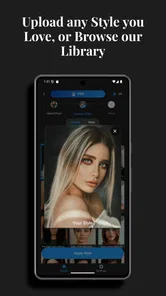
Once the image is ready, the appeal is immediate. HairLook is built around trying visual changes quickly, so I can move from my current appearance to a different cut or color without first learning a complicated editing workflow. That makes it more practical than manually painting over hair in a general photo editor, especially when the purpose is to imagine a change rather than create a finished social-media image.
More From Our News Desk

 Gmail
GmailGmail in a Busy Inbox: Who Benefits Most?
From first account to crowded workday, Gmail earns its place through dependable search and flexible sorting—but its best fit depends on how much inbox maintenance you can tolerate.

 Prime Video
Switching to Prime Video: What Changes in Your Viewing Routine
Prime Video can make a compelling second home for streaming, but switching means learning a different catalog, rental layer, and route from browsing to playback.

 Universal TV Remote Control
Universal TV Remote Control Works Best as a Reliable Backup
A phone remote earns its place through quick setup and reliable habits. Here is how to get more from Universal TV Remote Control—and where its limits show.

 Weather - By Xiaomi
Weather by Xiaomi Review: Clear at a Glance, Less Clear Up Close
Xiaomi’s weather app makes everyday forecasts quick to scan, but its calm surface can leave useful details and recovery paths harder to find than they should be.

 X
XX Under Pressure: Can It Recover When Posting Goes Wrong?
A resilience-focused review of X, examining setup, mistaken posts, interruptions, weak connections, and the gaps that matter when recovery needs to be dependable.

 Clash of Clans
Clash of Clans Is Won Between the Battles
Its raids are quick; its community is a long-term project of coordination, teaching, rivalry, and shared responsibility—with all the friction that entails.
Latest News



I found it helpful to decide what question I wanted each preview to answer. For example, I might compare a noticeably shorter shape with a version that keeps more length, then test a warmer color separately. If I change the cut, color, highlights, and balayage all at once, the result may look exciting, but I lose the ability to identify which part I actually like. A controlled sequence produces better information.
That workflow also makes the app more useful for people who are nervous about change. Someone who has always worn one length can first explore a modest variation, save the idea mentally, and then move toward a bolder option. HairLook does not replace a stylist’s judgement about texture, density, maintenance, or chemical processing, but it can reduce the blank-page feeling that often comes before a salon visit.
Reading the image as a suggestion, not a measurement
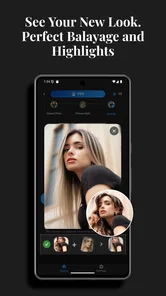
The generated preview is best treated as a visual direction. I look at the overall impression first: does the shape make the face feel more open, does the color fit the mood I want, and does the change still resemble me? I pay less attention to whether every strand, edge, or transition is technically perfect.
This distinction matters particularly with color work. Highlights and balayage are not just flat overlays; they depend on placement, movement, existing color, and the condition of the hair. A preview can help me say “I want something softer around the face” or “I prefer this darker base,” but it cannot tell me how many salon sessions may be needed or how the result will behave as it grows out.
The strongest use of the app is turning a vague wish into a specific reference. Instead of telling a stylist that I want a dramatic change and hoping we imagine the same thing, I can show the general direction I prefer and discuss what needs to be adapted for my actual hair.
Managing the handoff to a stylist
The handoff is where the app becomes more than a novelty. I would bring the selected preview alongside a short explanation of what I like about it. Perhaps the length is appealing but the color is not, or the fringe works visually but would be inconvenient in daily life. Separating those points helps a professional translate the image into a realistic plan.
I would also show more than one version rather than presenting a single AI image as an instruction. A small set of related previews communicates priorities: one may show the preferred length, another the desired tone, and a third a compromise that feels easier to maintain. This is a practical workflow advantage because it gives the conversation room for professional adjustments.
For someone booking a haircut online or asking a friend for advice, the same handoff works. The app can help explain the difference between “I want a change” and “I want to keep some length but add movement.” It is especially useful when words such as layered, blunt, warm, cool, bright, or subtle mean different things to different people.
What the result does well
HairLook is quick to understand because its purpose is narrow and visual. I do not need to build a full composition or learn a traditional retouching tool. The focus stays on seeing myself with a different hairstyle, which is exactly why it can be more helpful than searching through unrelated hairstyle photos. Reference images of other people may show a beautiful cut, but they do not answer the personal question of how that direction might frame my own face.
The app is also useful for comparing categories of change. A person deciding between a cut and a color refresh can use separate previews to understand which alteration feels more natural. That can prevent an impulsive appointment based on a single dramatic idea. In my view, the best outcome is not necessarily the most striking image; it is the option that gives me enough confidence to have a better real-world conversation.
Another strength is its low barrier to experimentation. Because the app is free to download, I can investigate the concept before deciding whether it deserves a place in my regular beauty routine. There are in-app purchases priced from $6.99 to $9.99 per item, so I would pay attention to which parts of my workflow actually provide value before spending money. For casual curiosity, the free starting point is important; for repeated planning, the purchase decision deserves more thought.
Where the flow breaks down
The biggest weakness is the gap between a clean digital preview and the physical realities of hair. A generated style may appear smooth even when my own hair is curly, fine, thick, damaged, or difficult to control. The image can suggest a silhouette without showing the time, products, heat, skill, or upkeep required to reproduce it. Anyone choosing a style solely because it looks effortless in the preview may be disappointed later.
Color deserves extra caution. Screen brightness and display settings affect how a shade appears, and the final salon color depends on the starting base. A light balayage shown on an image does not guarantee that the same effect is immediately achievable on dark or previously treated hair. I would use the preview to discuss tone and placement, then ask a professional about the process and maintenance.
There is also a creative limitation in relying on AI previews: the most flattering result is not always the most practical one. A cut may look excellent from the front but require daily styling. A fringe may suit the image but become inconvenient during exercise or humid weather. Before accepting a result, I ask myself whether I would still want it on a rushed weekday morning, not only while looking at the polished preview.
Input quality can create another point of friction. If the face is partly obscured, the hair blends into the background, or the photo has unusual lighting, I may spend time adjusting the picture instead of evaluating the hairstyle. That is why I prefer a small, deliberate test set: one clear image, one alternate angle, and only a few meaningful comparisons. More attempts do not automatically produce better decisions.
Who will get the most from it?
I think HairLook suits people who already have a change in mind but struggle to describe it. It is particularly handy before a first major haircut, a color consultation, or a conversation with a stylist who needs a visual reference. It can also help friends compare ideas when one person wants an outside opinion but cannot imagine the change from words alone.
It is less suitable for someone seeking a technically accurate simulation of salon results. If the decision depends on exact curl behavior, precise color correction, or a detailed consultation about hair health, I would choose a professional assessment first. The app can support that process, but it should not lead it.
I would also skip it if my main goal were advanced photo editing, social-media retouching, or creating a carefully composed beauty portrait. A general editor offers more control for those tasks. HairLook makes more sense when the central question is specifically, “How might I look with this kind of hair change?”
How it compares with familiar alternatives
Searching the web or social platforms gives access to a much wider range of haircut references, but those images usually feature different faces, hair types, lighting, and styling. They are excellent for collecting inspiration, yet weaker for personal visualization. HairLook’s advantage is putting the proposed direction onto my own image, even if the result remains approximate.
A salon consultation is more reliable for feasibility because a stylist can inspect texture, condition, previous treatments, and growth patterns. It is also better for discussing upkeep and cost in practical terms. The trade-off is that an appointment takes more time and may feel intimidating when I am still unsure what I want. I see HairLook as a useful preparation step before that consultation, not as a substitute for it.
Manual editing apps offer greater control over individual details, but they demand more patience and skill. I would choose one when I need to adjust a specific area with precision. For quick hairstyle comparisons, HairLook is more direct because it keeps the workflow centered on the hair rather than on general image manipulation.
Small habits that improve the experience
I get better value by keeping the original photo and judging every preview against it. That prevents me from forgetting what changed and helps me notice whether I prefer the cut, the tone, or simply the lighting of the generated image. I also avoid comparing a natural-looking version with an exaggerated one as if they were equal choices; they answer different questions.
When a result looks attractive but unrealistic, I use it as a prompt for follow-up questions. I might ask a stylist whether the shape works with my natural texture, whether the color can be reached without excessive processing, and how often the look would need refreshing. This turns the app from a yes-or-no decision tool into a planning aid.
Finally, I would not make a permanent change immediately after one exciting preview. I prefer to revisit the image later and check whether I still like the idea without the initial surprise. That pause is especially valuable for dramatic colors or major length changes, where enthusiasm can hide the everyday commitment.
My overall recommendation
HairLook: AI Hairstyle Try On is a focused beauty app with a clear practical role: it helps me visualize possibilities before I explain them to someone who works with real hair. Its free entry point, Everyone rating, and straightforward purpose make it approachable, while the paid items mean frequent users should decide whether repeated experimentation justifies the extra cost.
My recommendation is positive, with sensible limits. Use a clear photo, test one change at a time, compare a few realistic directions, and carry the best previews into a real consultation. Do not read the image as an exact forecast of texture, color, maintenance, or salon technique. If you want help finding the language for a new look, this app can make that first step much easier. If you need certainty about what your hair can actually do, a qualified stylist remains the better final authority.
HairLook: AI Hairstyle Try On Frequently Asked Questions
Is HairLook: AI Hairstyle Try On free to download, and what devices can run it?
HairLook is a free beauty app from Antac S.A.S., so you can try it without paying for the initial download. It requires Android 7.0 or later. The app is rated for Everyone, making its stated age guidance broad, though parents may still want to review how photo-based features are used on a shared device.
What is HairLook: AI Hairstyle Try On, and how does it work?
HairLook: AI Hairstyle Try On is an app that uses artificial intelligence to preview different hairstyles on your photo. After selecting or taking a picture, you can explore virtual haircuts, lengths, colors, and styling options. The result is intended as a visual guide rather than a guaranteed representation of how every hairstyle will look in real life.
Does HairLook require a subscription or offer free features?
HairLook may provide a limited selection of hairstyle previews for free, while additional styles, advanced effects, or unlimited use can require in-app purchases or a subscription. In-app purchases are listed from $6.99 to $9.99 per item. Before confirming payment, review the pricing, trial period, renewal terms, and cancellation instructions shown in the app store, since available plans and features may change over time.
Can I use my own photo for a realistic hairstyle preview?
Yes, the app is designed to work with a photo from your device or an image captured with the camera, depending on the permissions you grant. For better results, use a clear, front-facing image with good lighting and your face and hair fully visible. Images with hats, heavy shadows, filters, or unusual angles may produce less accurate results.
Are the hairstyle results accurate enough to show a hairdresser?
HairLook can be useful for collecting ideas and comparing possible cuts or colors, but its previews should not be treated as an exact prediction. Artificial intelligence may alter facial proportions, hair texture, volume, or color. If you plan a major change, show the generated image to a professional stylist and discuss whether it suits your natural hair and maintenance routine.
Pros
- Lets you preview many hairstyles before visiting a salon.
- Simple interface makes trying different looks quick and accessible.
- Useful for comparing short
- long
- curly
- and straight styles.
- Can help communicate your preferred haircut to a stylist.
- AI previews provide inspiration for experimenting with your appearance.
Cons
- Results may look unrealistic with poor lighting or unclear photos.
- Some hairstyles may require in-app purchases or subscription access.
- The AI may alter facial features or hair texture inaccurately.
- Processing can be slower when generating several hairstyle previews.
- Uploaded photos may raise privacy concerns for some users.











