

HairHunt: AI Hairstyle Try-On
- 68.00
- 4.1
- Installs
- 100.00K
- Price
- Free

Screenshots
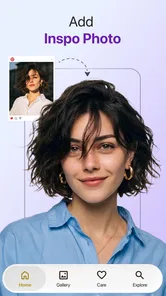
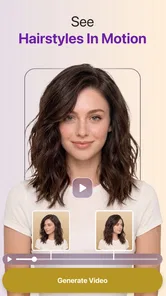
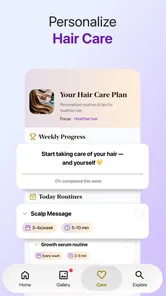
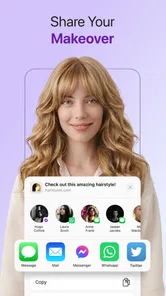
Analysis by Reviewed
Trying a new haircut in your head is easy; knowing whether it will suit your face is harder. HairHunt: AI Hairstyle Try-On is a beauty app built around that decision: it uses AI to let you preview different hair looks on a photo of yourself. I find that idea most useful as a way to narrow down possibilities before talking to a stylist, not as a promise that a digital preview will predict the exact result in a salon.
That distinction matters for trust as well as expectations. A hairstyle preview involves a personal image, so I would think carefully about which photo I choose and what I am comfortable uploading before experimenting. HairHunt is made by Sugesta LLC, is free to install, and is rated for Everyone. Those details help describe the app, but they do not answer every question a cautious user might have about image handling. I would avoid assuming anything about permissions or data practices without checking the app’s current disclosures and the choices presented during use.
What a photo preview can—and cannot—tell you
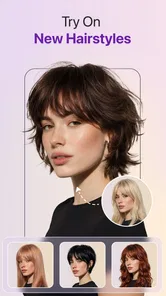
The appeal is straightforward: instead of relying only on reference pictures of someone else, you can see how a haircut might look in the context of your own face. The app’s focus includes styles such as bangs, bobs and pixie cuts, making it relevant to anyone considering a noticeable change. I’d use it to compare the general shape and mood of a look, rather than to judge exact length, texture or how the cut will behave after washing and styling.
AI image editing has an important trade-off here. A convincing preview can help you get past the uncertainty of imagining a dramatic change, but it can also make a style look more natural than it would in real life. Hairline placement, lighting, image angle and the way your hair is arranged in the source photo can all affect what you see. Treat the result as a conversation starter, not a digital consultation with a stylist.
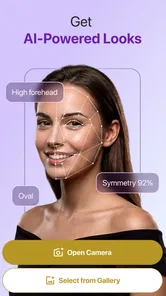
For a useful first test, I’d choose a clear, front-facing photo in even light, with the hairline visible and no hat or heavy shadow. Keep the camera angle and expression neutral if you plan to compare several looks. This is not a guarantee of better AI output; it is simply a way to make the comparison fairer. If the source photo changes between previews, it becomes difficult to tell whether the haircut or the photography is responsible for the difference.
A practical workflow is to start with one change that feels plausible, then compare it with a more adventurous option. For example, try a bob before moving to a very short cut, or compare fringe with no fringe while keeping the rest of the look similar. That gives you a clearer sense of which feature you actually respond to. Saving or sharing images, where those options are available, should be a deliberate choice—especially if the photo feels personal.
Make the preview useful before a salon visit
HairHunt is most valuable when you turn its visual experiment into specific questions. If a shorter style catches your eye, ask a stylist how much length would need to come off, whether your hair texture supports the shape, and what daily styling would involve. If bangs look appealing in a preview, ask how they might sit with your natural part and how often they would need trimming. Those practical questions are more useful than asking a professional to reproduce an AI image pixel for pixel.
More From Our News Desk

 Gmail
GmailGmail in a Busy Inbox: Who Benefits Most?
From first account to crowded workday, Gmail earns its place through dependable search and flexible sorting—but its best fit depends on how much inbox maintenance you can tolerate.

 Prime Video
Switching to Prime Video: What Changes in Your Viewing Routine
Prime Video can make a compelling second home for streaming, but switching means learning a different catalog, rental layer, and route from browsing to playback.

 Universal TV Remote Control
Universal TV Remote Control Works Best as a Reliable Backup
A phone remote earns its place through quick setup and reliable habits. Here is how to get more from Universal TV Remote Control—and where its limits show.

 Weather - By Xiaomi
Weather by Xiaomi Review: Clear at a Glance, Less Clear Up Close
Xiaomi’s weather app makes everyday forecasts quick to scan, but its calm surface can leave useful details and recovery paths harder to find than they should be.

 X
XX Under Pressure: Can It Recover When Posting Goes Wrong?
A resilience-focused review of X, examining setup, mistaken posts, interruptions, weak connections, and the gaps that matter when recovery needs to be dependable.

 Clash of Clans
Clash of Clans Is Won Between the Battles
Its raids are quick; its community is a long-term project of coordination, teaching, rivalry, and shared responsibility—with all the friction that entails.
Latest News



One non-obvious benefit of trying a few contrasting styles is that it can reveal what you do not want. You might discover that you like the softness of a layered outline but not the short length, or that fringe changes the impression more than the overall cut. That helps you describe the desired result in ordinary terms. Bring a screenshot only if you are comfortable sharing it, and be ready to explain which part of the image you want to keep rather than treating the whole preview as a blueprint.
The app is also suited to a low-pressure everyday decision: imagine you are debating a haircut the night before booking an appointment. A quick comparison can help you decide whether to ask for a subtle change or explore something bolder. I would still give myself time to look at the image again later. A style that feels exciting in a brief experiment may not suit your routine, especially if it requires more styling than you want to do each morning.
That pause can make the experiment more useful than cycling through every available look in one sitting. I would shortlist two or three possibilities, then think about what each would mean for my usual week: whether I wear my hair tied back, how much time I spend getting ready, and whether I am comfortable with regular trims. The preview can start the decision, but those routine questions help decide whether the look is livable.
Privacy deserves attention alongside the fun
Because the central activity involves a personal photo, I would review the app’s permission prompts and privacy information before selecting an image. Grant only the access needed for the task you want to perform, and pause if a request does not make sense to you. App permissions and data practices can change, so I would check the current wording on the device and in the relevant store rather than relying on assumptions or another person’s experience.
Think about the photo itself, too. A close-up may include more than your hairstyle: it can reveal your face, home surroundings or other people in the frame. A plain background and a picture without bystanders make for a more considered test. If you are trying the app on someone else’s photo, get their permission first. That is a simple courtesy, and it gives them control over how their image is used.
For a particularly privacy-conscious approach, use a photo you are comfortable sharing with an app for this purpose, and avoid including anything sensitive in the frame. Check the visible controls before proceeding, including any choices related to account access, image selection or sharing. I would not infer that an image stays on the device, is deleted automatically or is handled in a particular way unless the app clearly says so. When that information matters to you, read the current policy before uploading.
A useful personal boundary is to decide before opening the app whether you are willing to use a face photo at all. If you are, choose one image specifically for the hairstyle comparison instead of casually browsing your camera roll. If you are not, there is no need to talk yourself into it just because the preview sounds convenient; a model gallery or a conversation with a stylist can still help you explore the idea.
Costs, controls and room to experiment
The app is free to install, but it also offers in-app purchases ranging from $4.99 to $49.99 per item. I would explore the free experience first and pay only after understanding what a purchase unlocks and whether it suits my needs. Before confirming any transaction, check the item description and the purchase screen carefully. A wide price range makes it especially sensible not to assume that every feature or package costs the same.
HairHunt has an average rating of 4.1 from around 938 ratings, with 68 written reviews, and it has passed 100,000 installs. I treat those figures as useful context about its reach, not as a guarantee that the app will work equally well with every face, hairstyle or photo. Individual results depend heavily on the image and on what the user expects from a simulated look.
The current version is 1.3.1, and the app requires Android 7.0 or later. Before installing, I’d check that the device meets that requirement and that the app is the one intended for your platform. Updates can alter interfaces and available options, so the controls you see on your own device are the ones to follow. If a feature or permission feels unclear, stopping to inspect the on-screen explanation is better than tapping through automatically.
When deciding whether a paid option is worthwhile, I would first ask what decision I am trying to make. If a brief trial with a few silhouettes is enough to prepare for a salon conversation, paying may not add value for me. If I am still weighing several directions, I would inspect the purchase description and available choices before spending, then make sure the added access addresses that specific need. The important point is to judge the purchase by what it enables, not by the hope that a paid preview will become a perfect forecast.
Who will enjoy it, and who may prefer another route
I can recommend HairHunt to someone who already has a few haircut ideas and wants a more personal visual reference than a gallery of models can provide. It may also help a person who feels stuck between a cautious trim and a bigger change, provided they understand the preview is approximate. The strongest use is exploration: compare silhouettes, notice what draws your eye, then use that insight to guide a real conversation.
It is less suitable if you need a precise prediction of how your own hair will fall, or if you want professional advice about texture, maintenance and suitability. A stylist who can examine your hair in person is a better choice for those questions. A basic photo editor may be preferable if you only want to test a color or make a manual mock-up, while a hairstyle gallery may be enough if you are collecting inspiration and do not want to use a personal picture.
Compared with searching for haircut photos, the app’s useful difference is that the face in the preview is yours, which can make broad proportions easier to judge. The trade-off is that a gallery may show a real cut on real hair more faithfully, while the app’s simulation can smooth over how texture, density and styling affect the result. I would use both only if each answers a different question: the personal preview for general shape, and real reference photos for the details a stylist needs to assess.
It is a better fit for visual decision-making than for technical hair advice. Someone who knows they want a bob but is unsure whether to add bangs may get a helpful comparison; someone deciding whether a particular cut will work with curls, a cowlick or a specific maintenance routine should ask a professional. The app can help clarify taste, but it cannot replace an informed assessment of the hair itself.
I would also skip the experiment if uploading a face image is outside your comfort zone and the available privacy information does not settle your concerns. The app’s core appeal depends on trying looks against a personal image, so that hesitation is not a minor inconvenience. You do not need an AI preview to make a good haircut decision; reference photos, a stylist’s advice and a clear description of your routine can do the job without this particular workflow.
A cautious recommendation
My view is that HairHunt works best as a decision aid with modest ambitions. It can make haircut brainstorming more personal and help turn a vague idea into a conversation about shape, fringe or length. Its AI previews are not a substitute for seeing how real hair behaves, and the photo-based approach calls for a little care around permissions, sharing and the image you choose.
If you are curious, start with a neutral photo, compare a small number of clearly different styles, and use the results to identify what you like rather than to demand an exact match. Check the current privacy disclosures and purchase details before making choices that involve your image or money. For that kind of thoughtful trial, HairHunt is worth considering; if you need certainty about a cut or are uncomfortable using a personal photo, I’d choose a stylist or a non-photo-based source of inspiration instead.
HairHunt: AI Hairstyle Try-On Frequently Asked Questions
What is HairHunt: AI Hairstyle Try-On?
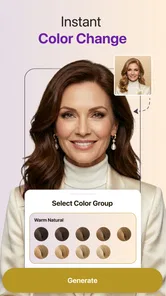
HairHunt is an AI-powered hairstyle try-on app that lets you preview different looks using a photo. You can use it to explore cuts, styles, and hair colors before deciding what you might want in real life. Results are digital visualizations, so they are best treated as inspiration rather than an exact prediction of how a hairstyle will look after a salon visit.
How do I try a hairstyle in HairHunt?
The usual process is to provide a clear photo, select a hairstyle or color option, and let the app generate a preview. For a more useful result, choose an image with your face visible, even lighting, and little obstruction from hats or hair accessories. Available options and the exact steps may vary by app version, so check the in-app instructions before uploading a photo.
Is HairHunt free to use?
HairHunt’s pricing and access may depend on the version, platform, and region. Some features in AI photo apps can be limited, require credits, or be offered through a paid subscription or in-app purchase. Review the app listing and its payment terms before starting a trial or subscribing, and check whether a charge will renew automatically and how cancellation works.
Does HairHunt protect my photos and personal information?
Because the app uses a photo to create hairstyle previews, it is sensible to review its privacy policy and the permissions requested before uploading an image. Check whether photos are processed on your device or sent to online services, how long they may be retained, and whether they can be used to improve AI features. Avoid uploading sensitive images if the policy is unclear.
Are HairHunt’s hairstyle previews accurate, and can I use them offline?
The previews can help you compare ideas, but AI results may not perfectly match your natural hair texture, face shape, lighting, or the way a stylist would create a cut or color. Some image generation features may also need an internet connection, while offline availability can vary. Use a preview as a conversation starter with a hair professional, not a guaranteed final result.
Pros
- Lets you preview different hairstyles before committing to a real haircut.
- AI-generated looks offer a quick alternative to browsing reference photos.
- Useful for comparing styles against your own face shape and appearance.
- Can help you explain a preferred look to a hairstylist.
- Virtual previews avoid the time and cost of trying temporary styling changes.
Cons
- Results may look unrealistic if the source photo has poor lighting or an awkward angle.
- AI previews cannot reliably show how a cut will behave with your hair texture.
- Some styles or features may require payment or a subscription.
- Generated images may not match the exact color or finish achievable at a salon.
- Uploading face photos raises privacy questions; check the app’s data policy first.











