

HAIR U: AI Haircut Scanner
- 6.00
- 4.3
- Installs
- 100.00K
- Price
- Free

Screenshots
Analysis by Reviewed
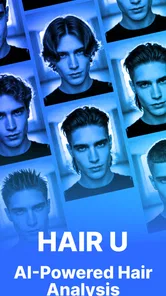
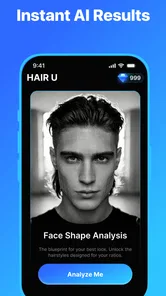
Choosing a haircut from a reference photo is easy; knowing whether it will suit your own face is harder. HAIR U: AI Haircut Scanner is built around that decision: it uses a photo to give you a quick look at a possible haircut before you commit to asking a stylist for it. I like the idea because it addresses a familiar moment of uncertainty, not just the fun of browsing hairstyles. Its value depends on treating the result as a visual aid rather than a promise of what a salon visit will produce.
Why seeing a style on your own photo helps
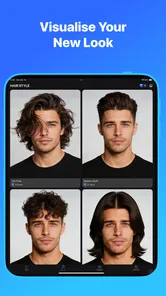
The useful shift is from judging a haircut on someone else to judging its general impression against your own face. A reference picture can show a polished result, but it leaves you to imagine how its outline, apparent length, or balance might look on you. A personal preview makes that first comparison more concrete, which can be especially helpful when you struggle to picture a change from words alone.
That does not make the image a reliable forecast of the finished cut. It is a way to test your reaction: do you like the broad direction, or does it feel unlike you? I would use that answer to guide what to explore next, not as evidence that a stylist can reproduce every detail exactly.
What a quick haircut preview can—and cannot—tell you
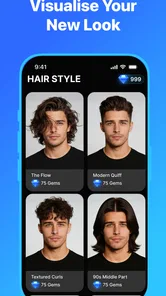
The app’s central appeal is speed. Instead of relying only on imagination, you can see a haircut idea applied to your own image and use that preview to decide whether the direction feels right. That can help turn a vague request such as “something shorter” into a more specific conversation about length, shape, or overall style.
That distinction matters: an AI preview is not the same as a stylist’s assessment. Hair texture, density, growth patterns, styling habits, and the exact way a cut is finished all affect the real result. A simulated look can help you explore the broad impression of a style, but I would not use it to assume that every detail will transfer neatly to your hair.
For me, the best way to use a tool like this is as a decision starter. If a preview makes you more interested in a cut, save the image or keep it available while you discuss the idea with your barber or stylist. If it looks wrong, that is useful too: you may have learned that a particular length or silhouette is not for you without making a change you have to grow out.
Make the photo useful before judging the result
A preview is only as helpful as the image you give it. For a more meaningful comparison, start with a clear photo where your face and current hair are easy to see. Avoid judging the result from an image with a dramatic angle, heavy shadows, or hair partly hidden by a hat. Those conditions can make it harder to tell whether the proposed look itself appeals to you.
More From Our News Desk

 Gmail
GmailGmail in a Busy Inbox: Who Benefits Most?
From first account to crowded workday, Gmail earns its place through dependable search and flexible sorting—but its best fit depends on how much inbox maintenance you can tolerate.

 Prime Video
Switching to Prime Video: What Changes in Your Viewing Routine
Prime Video can make a compelling second home for streaming, but switching means learning a different catalog, rental layer, and route from browsing to playback.

 Universal TV Remote Control
Universal TV Remote Control Works Best as a Reliable Backup
A phone remote earns its place through quick setup and reliable habits. Here is how to get more from Universal TV Remote Control—and where its limits show.

 Weather - By Xiaomi
Weather by Xiaomi Review: Clear at a Glance, Less Clear Up Close
Xiaomi’s weather app makes everyday forecasts quick to scan, but its calm surface can leave useful details and recovery paths harder to find than they should be.

 X
XX Under Pressure: Can It Recover When Posting Goes Wrong?
A resilience-focused review of X, examining setup, mistaken posts, interruptions, weak connections, and the gaps that matter when recovery needs to be dependable.

 Clash of Clans
Clash of Clans Is Won Between the Battles
Its raids are quick; its community is a long-term project of coordination, teaching, rivalry, and shared responsibility—with all the friction that entails.
Latest News



Try to keep the comparison fair. If you are considering a big change, look at the preview alongside your current appearance in similar lighting and from a similar angle. This helps separate the haircut’s effect from differences in the photo. It also makes it easier to notice what you actually care about: perhaps the outline around your face, the apparent length, or whether the overall look feels too bold for everyday life.
One practical tip is to decide what question you want the image to answer before you open the scanner. “Would I like a shorter shape?” is more useful than asking whether the whole image looks perfect. A single preview cannot settle every styling question, but it can help narrow the choice before you spend time collecting reference pictures or booking a consultation.
A realistic use: narrowing down a salon request
Imagine you have a haircut appointment coming up and have saved several inspiration photos. They show different people, so it is difficult to picture how those styles might read on you. A quick personal preview can help you sort the options into “worth discussing” and “probably not for me.” You can then bring the strongest reference to your appointment and explain which parts appeal to you, rather than asking a stylist to reproduce an image without context.
I would use the result to communicate, not to dictate. A stylist can tell you whether the shape works with your hair and how much maintenance it may involve; the app’s preview cannot replace that conversation. The useful outcome is a clearer starting point: you arrive with a preference and a visual reference, while staying open to adjustments that suit your actual hair.
It can also help when you are considering a change but are not ready to book. A preview lets you test your reaction privately, without the pressure of having to explain a half-formed idea to someone else. If you find yourself repeatedly drawn to one general direction, that is a better basis for a consultation than choosing a cut simply because it is popular in a photo.
Where the convenience has limits
The five-second promise in the app’s summary sets an expectation of a fast check, and that quickness is appealing when you only want an initial impression. But speed should not be mistaken for certainty. Haircuts are three-dimensional and move as you turn your head; a single image cannot show every angle, how a cut behaves after washing, or how much effort it takes to style.
There is another trade-off: a preview may look convincing while still being a poor guide to upkeep. Before choosing a style, consider how much time you want to spend styling your hair and whether you are comfortable visiting a salon regularly to maintain its shape. The image can help with appearance, but the everyday routine is still your decision.
I would also avoid treating one result as a final verdict. If the preview feels off, check whether the original photo gives a fair view before rejecting the haircut outright. Conversely, if it looks excellent, remember that the image is an illustration, not a guarantee. That balanced approach makes the scanner more useful than either dismissing it as a novelty or trusting it as a virtual stylist.
How it fits among the usual ways to choose a cut
Compared with browsing salon galleries or social posts, a personal preview has one clear advantage: it shifts the question from “Does this look good on that person?” to “Do I like this direction on me?” Inspiration galleries remain better for discovering a wide range of styles and seeing how cuts look on different people. A consultation remains the better choice for advice about your hair’s texture, condition, and practical styling needs.
So I see HAIR U as a bridge between inspiration and a real haircut decision. It is most useful when you already have a rough idea and want a quick visual check, rather than when you need a complete menu of styles or expert guidance. If you are choosing a major transformation, bring the preview into a conversation with a professional instead of relying on it alone.
Small decisions that make the preview more useful
For a change you are unsure about, I would keep the test deliberately narrow. Decide whether you are weighing length, overall silhouette, or how bold the look feels, then judge the image against that one question. Trying to assess all three at once can turn a quick check into a vague thumbs-up or thumbs-down that does not help you explain what you want.
It is also worth separating “I like this image” from “I want to live with this haircut.” Ask yourself how the style might fit the clothes and routines you already have, and whether the look still appeals when you imagine an ordinary weekday rather than a polished appointment-day photo. That mental check is useful precisely because the preview is visual: it cannot answer lifestyle questions for you.
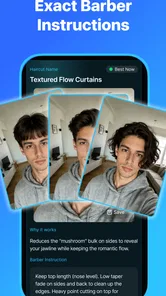
If you are sharing the image with a stylist, point out the specific quality that caught your eye rather than presenting it as an exact target. For example, you might be drawn to the shorter outline but prefer to keep more length elsewhere. That gives the professional room to translate the idea to your hair instead of treating the generated picture as a strict template.
Who is likely to get the most from it
This beauty app from Mavtao is aimed at people who want to think through a haircut before making a commitment. It is especially suited to someone who finds it hard to imagine a style from a reference photo, or who wants a low-pressure way to compare an idea with their current look. It may be less satisfying if you expect detailed salon advice, a full consultation, or a precise forecast of how your hair will behave.
The app is free to download, with in-app purchases listed from $0.99 to $99.99 per item, so I would check what is offered in the app before deciding whether to spend. It is rated for Everyone, has a 4.3 average from around 8.3 thousand ratings, and has passed 100 thousand installs. Those figures suggest that people are trying it as a practical beauty tool, but they do not change the main point: its usefulness comes from how thoughtfully you interpret the preview.
On the technical side, the current release is version 1.0.2 and it requires Android 8.0 or later. If your device meets that requirement and you want a fast visual starting point, it is a straightforward option to consider. I would skip it if you only want a professional’s tailored recommendation or if a single-image preview would make you more anxious than informed.
A helpful first step, not the final haircut decision
My recommendation is to use the scanner to narrow your thinking, then take the result into the real-world conversation where a haircut can be adapted to your hair and routine. Its strongest contribution is a quick way to test your reaction to a style on your own image. Used with realistic expectations, that can make the next decision clearer; used as a guarantee, it asks more of the preview than it can reasonably provide.
When a different approach makes more sense
If you are still at the “I have no idea what I want” stage, I would start with a stylist’s gallery or a collection of reference images rather than expecting a personal scanner to supply direction. Browsing gives you variety and helps you notice recurring details you like. Once you have a candidate look, a preview can help you decide whether it is worth discussing. The two approaches solve different parts of the problem, so using them in that order is more useful than treating either as a complete answer.
Likewise, if your decision depends on how a cut will work with a particular curl pattern, hairline, or daily styling routine, a conversation with a professional is the better first move. The scanner is for visual exploration, not tailored hair-care advice. People who want an exact prediction, or who might mistake a flattering image for a guaranteed outcome, are better off skipping it and asking a stylist to assess the change directly.
Making the appointment conversation clearer
A practical way to carry the preview into a salon is to prepare one sentence about what you want to keep and one about what you want to change. You might like the shorter profile but want a softer transition, for instance. This prevents the image from speaking for you and gives the stylist useful context about your comfort level. It also makes the appointment less about copying pixels and more about agreeing on a cut that suits your real hair.
For a first-time experiment, I would avoid making the preview the sole reason for a dramatic change. Treat it as a prompt to ask better questions: what would need to be adjusted for my hair, what styling would this require, and how often might I need a trim to maintain the shape? Those are the details that determine whether a haircut works after the initial reveal, and they are exactly where a human consultation adds value.
What to expect before trying it
HAIR U is free to install and is developed by Mavtao. Its Everyone content rating makes it suitable for a broad audience, while the optional purchases mean the free starting point may not include every paid offering. I would explore the basic experience first and decide whether it answers your particular question before spending. The app’s central appeal is a quick visual impression, so the sensible test is whether that impression helps you choose what to discuss next.
Ultimately, this is a small decision aid rather than a replacement for a barber, stylist, or careful browsing. If you want a fast way to see whether a haircut direction feels promising on your own photo, it can make the decision less abstract. If you need expert suitability advice or certainty about the finished result, take the idea to a professional instead. I would recommend it to curious users who can keep that boundary clear: a preview can clarify your preference, while the actual haircut still needs a real-world plan.
HAIR U: AI Haircut Scanner Frequently Asked Questions
What is HAIR U: AI Haircut Scanner, and how does it work?
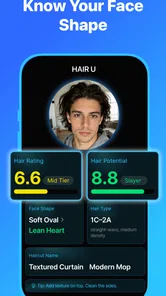
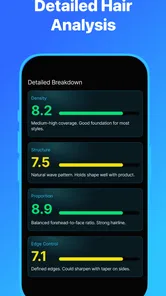
HAIR U is an AI-powered hairstyle and haircut preview app. You typically add a selfie or take a new photo, then use the available tools to explore hairstyles, hair colors, or haircut ideas on your image. The result is intended as a visual reference rather than a guaranteed prediction of how a style will look after a salon visit. Features and the exact workflow may vary by app version.
Does HAIR U require a subscription or in-app purchases?
The app may offer some features for free while reserving additional styles, tools, or results for a paid plan or in-app purchase. Check the current listing and the purchase screen before starting a trial or subscribing, since prices, trial periods, and plan terms can change by region and over time. If you do subscribe, review the cancellation instructions in your Apple App Store or Google Play account.
Do I need to upload a photo, and is my image private?
To preview hairstyles on your own face, you will generally need to take or select a photo, so the app may request access to your camera or photo library. Before uploading personal images, read HAIR U’s privacy policy and the relevant app-store disclosures to understand how photos and other data are processed, stored, or shared. Grant only the permissions needed for the features you intend to use.
Can HAIR U show exactly how a haircut or hair color will look in real life?
No hairstyle preview can guarantee a salon-accurate result. Lighting, camera angle, hair texture, length, density, and the way a style is cut or colored can all affect the finished look. HAIR U can help you compare ideas and communicate preferences, but treat its AI images as approximate inspiration. For a practical assessment, show your preferred preview to a stylist and ask what is achievable for your hair.
What should I check before downloading HAIR U on Android or iOS?
Confirm that the app is available for your device and region, and check its current minimum operating-system requirements, developer information, recent reviews, and listed permissions. Make sure you have enough storage and a suitable photo if you plan to use the preview tools. Download it from Google Play or Apple’s App Store rather than an unofficial source, and review pricing and privacy details before sharing images or making purchases.
Pros
- Preview different hairstyles before making a real-life change.
- AI recommendations make it easier to explore unfamiliar looks.
- A quick scan offers a convenient starting point for style ideas.
- Useful for comparing haircuts without visiting a salon first.
- Can help you communicate your preferred look to a stylist.
Cons
- AI previews may not accurately reflect your actual hair texture.
- Results can vary depending on photo quality and lighting.
- Some styles may require a paid plan or in-app purchase.
- The app may need access to photos or camera for scanning.
- A virtual preview cannot guarantee how a haircut will look in person.











