

Hair Color & Hairstyle Try On
- 102.00
- 4.4
- Installs
- 100.00K
- Price
- Free
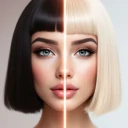
Screenshots
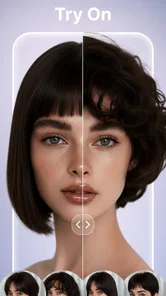
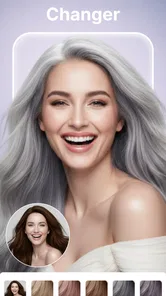
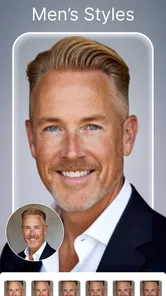
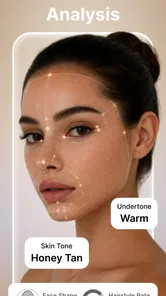
Analysis by Reviewed
I would use Hair Color & Hairstyle Try On as a visual planning aid, not as a promise of exactly what I’ll look like after a salon appointment. Its appeal is straightforward: I can explore hair-color and hairstyle ideas on a photo before asking a stylist to make a real change. That makes this beauty app most useful when I have a vague idea—perhaps lighter, shorter, or more flattering to my face—and want something concrete to discuss.
The first thing I’d keep in mind is that a preview depends heavily on the photo and on my expectations. A digital look can help me compare directions, but it cannot account perfectly for how a cut falls in motion, how color behaves on my current hair, or what a stylist can achieve in one visit. Used with that distinction in mind, Hair Color & Hairstyle Try On can make an uncertain salon conversation more focused rather than replacing it.
When a preview feels less convincing than expected
With photo-based styling, the most common point of friction is not choosing a look; it is getting a useful comparison. If the image makes my hair hard to distinguish from the background, or my face is turned away, a preview may be less helpful. I’d begin with a clear, straightforward portrait and judge the result as an idea, not as a faithful rendering of a future appointment.
Lighting matters for color decisions. A photo taken in warm indoor light can make shades look different from those in daylight, so I would avoid deciding that a particular tone is perfect based on one image. If I’m torn between two directions, I’d compare them using the same photo and similar viewing conditions. That keeps the face and lighting constant, making the contrast between looks easier to assess.
Hairstyle previews also have limits that are easy to overlook. A style can appear to suit my face in a still image while requiring a length, texture, or amount of daily styling that doesn’t fit my routine. Before saving a look as a serious candidate, I’d ask myself whether I’d actually maintain it and whether my current hair gives a stylist a realistic starting point. The app can spark an idea; it cannot answer those practical questions for me.
This is where I find the app’s strongest role: narrowing choices. Instead of arriving at a salon with only a celebrity reference that may not match my hair, I can use a preview to explain the general direction I want. I’d still bring the stylist into the decision, especially for a major color change, a dramatic cut, or anything that depends on my hair’s condition.
Start with a photo that makes comparisons fair
I’d choose a recent picture with my face clearly visible and hair unobstructed. A hat, heavy shadow, or busy background can distract from the very details I’m trying to evaluate. Keeping the image simple also makes it easier to notice whether I like the shape around my face or merely the overall mood of the picture.
More From Our News Desk

 Gmail
GmailGmail in a Busy Inbox: Who Benefits Most?
From first account to crowded workday, Gmail earns its place through dependable search and flexible sorting—but its best fit depends on how much inbox maintenance you can tolerate.

 Prime Video
Switching to Prime Video: What Changes in Your Viewing Routine
Prime Video can make a compelling second home for streaming, but switching means learning a different catalog, rental layer, and route from browsing to playback.

 Universal TV Remote Control
Universal TV Remote Control Works Best as a Reliable Backup
A phone remote earns its place through quick setup and reliable habits. Here is how to get more from Universal TV Remote Control—and where its limits show.

 Weather - By Xiaomi
Weather by Xiaomi Review: Clear at a Glance, Less Clear Up Close
Xiaomi’s weather app makes everyday forecasts quick to scan, but its calm surface can leave useful details and recovery paths harder to find than they should be.

 X
XX Under Pressure: Can It Recover When Posting Goes Wrong?
A resilience-focused review of X, examining setup, mistaken posts, interruptions, weak connections, and the gaps that matter when recovery needs to be dependable.

 Clash of Clans
Clash of Clans Is Won Between the Battles
Its raids are quick; its community is a long-term project of coordination, teaching, rivalry, and shared responsibility—with all the friction that entails.
Latest News



One useful, less obvious trick is to decide what question I want the image to answer before browsing. “Would a warmer color suit me?” is more manageable than “What should I do with my hair?” Likewise, comparing a softer fringe with a more defined one tells me more than cycling through unrelated cuts. A focused comparison reduces the temptation to treat every attractive preview as a realistic next step.
If I’m considering a color change, I’d save a mental note of the lighting in the original photo and avoid comparing a bright, sunlit image with a dim indoor one. If I’m considering shape, I’d pay attention to how the style frames my face, not just whether the displayed hair looks polished. These small checks make the preview more useful without requiring me to treat it as a technical consultation.
Simple setup checks before changing looks
Hair Color & Hairstyle Try On is a free beauty app from Toon Tech Ltd, and the store identifies its current version as 9.8.4. It is intended for Everyone and has a minimum operating-system requirement of 7.1. If I run into trouble before I can properly try it, I’d first check that my device meets that requirement and that the app has finished installing and opening normally.
I’d also make sure I’m working with a photo I can view clearly on my device. If the image looks blurry or oddly cropped before I start comparing styles, I would switch to a clearer portrait rather than assuming that every preview will improve it. Closing and reopening the app is a reasonable general first step if it stops responding; if the issue continues, checking for an available update or restarting the device is a sensible next move.
Those are basic troubleshooting steps, not a guarantee that every problem has the same cause. I wouldn’t repeatedly change unrelated settings or buy something just to test whether a display issue goes away. First establish whether the problem is tied to one image, one session, or the app generally. That simple distinction can save time and keeps the evaluation grounded in what I can actually observe.
It is also worth separating the free starting point from optional spending. The app is free to download, with in-app purchases listed from $6.99 to $59.99 per item. I’d explore the experience and decide whether it fits my needs before considering a purchase, and I’d check the price shown at the point of purchase rather than assuming every option costs the same. That matters most if I only want a one-off idea for an upcoming appointment.
A more useful salon-planning workflow
My preferred workflow would be to start with a clear photo, settle on one question, and compare a small number of plausible directions. For example, if I’m thinking about going darker, I’d focus on a few variations in that general direction instead of judging a dramatic cut and a new color at the same time. Separating decisions helps me understand what I actually like.
After choosing a promising preview, I’d use it as a conversation starter rather than a final instruction. I might tell my stylist that I like the face-framing effect or the overall depth of the color while staying open to an adjustment that works better with my real hair. That approach is especially useful when a preview makes a style seem effortless but I know my hair behaves differently day to day.
A practical everyday scenario: before a routine salon visit, I’m unsure whether to keep my familiar look or try a noticeable change. I can use the app to compare a few ideas, identify the one detail that appeals to me—perhaps the length around the face—and take that direction into the consultation. Even if the stylist recommends a modified version, I’ve replaced a vague request with a clearer starting point.
I’d also avoid treating a single favorite image as proof that I should make an irreversible change. If I like a look only under a particular lighting condition or because the whole image feels fashionable, I’d pause and consider whether the shape or shade itself is what I want. A preview is most valuable when it helps me explain a preference, not when it pressures me to copy an image exactly.
When the result is misleading, look beyond the app
Sometimes the mismatch is about the source photo rather than the app. A camera image can represent color differently from what I see in person, and room lighting can shift my impression further. If a shade looks unexpectedly bold or dull, I’d compare the preview in consistent light before deciding that the app has given me a reliable color target.
Sometimes the gap is between a still preview and real hair. Hair texture, existing color, length, and styling habits all affect what can be achieved and how a look sits. I would not use an attractive result to assume that my stylist can reproduce it immediately, or that it will need no upkeep. For a substantial change, professional advice is more useful than trying to resolve every detail through a screen.
There is also a difference between visual inspiration and hair-care guidance. This is a styling try-on app, so I wouldn’t rely on it to tell me whether a chemical process is appropriate for my hair or how to maintain a treatment. If my main concern is damage, color correction, or a change that depends on my hair history, a consultation with a stylist is the better choice.
Who will enjoy it, and who should choose another route
I think the app suits people who want to experiment privately before a salon visit, especially anyone who struggles to describe a haircut or color in words. It may also help someone who is choosing between a few broad looks and wants a visual prompt to talk through with a stylist. Its audience is reflected in its store performance: it has a 4.4 average from around 8,200 ratings, with over 100,000 installs.
Compared with a general photo editor, a dedicated hair try-on app is a more direct place to explore appearance changes rather than manually assembling an edited portrait. But someone who wants professional color diagnosis, precise haircut measurements, or a guarantee of how a style will behave in daily life should not treat this kind of preview as a substitute. A salon consultation—or a more specialized professional service—is the better choice for those needs.
I’d also skip it if I only want a dependable technical answer about what a stylist can safely do with my current hair. The app can help me discover what I’m drawn to, but the final decision still needs real-world context. And if I’m not interested in trying visual alternatives or discussing them at an appointment, a digital preview may add little to my routine.
My practical verdict
Hair Color & Hairstyle Try On is at its best as a low-pressure way to turn “maybe I should change my hair” into a more specific conversation. I like the idea of comparing looks before committing, but I would keep the process simple: use a clear photo, test one kind of change at a time, and treat the result as inspiration rather than a forecast.
Released on April 8, 2025, the app has a clear purpose and a free entry point, while optional purchases mean I’d pay attention before choosing anything paid. My recommendation is for curious salon-goers who want a visual starting point and are comfortable with some uncertainty in photo-based previews. If you need expert advice about what your hair can realistically handle, start with a stylist instead—and bring the app’s most useful ideas along as conversation material.
Make the preview useful beyond the screen
If I were trying it before a consultation, I’d keep a short list of what each candidate is meant to show: a softer outline, more visual length, or a different color direction. That helps me avoid turning a collection of attractive images into an unfocused request. I would also separate “I like this look” from “I want this exact result,” since the first can guide a conversation while the second may not fit my hair or maintenance habits.
For someone who changes their mind easily, a useful test is to revisit the saved idea later rather than deciding during the first browsing session. If it still appeals after the novelty wears off, it is more likely to be a genuine preference. This is especially helpful for a noticeable change: the app can make experimenting feel low-risk, but an actual cut or color appointment is not just another edit to undo.
Choose the right tool for the decision
Against salon reference photos, the app’s advantage is that I can explore a look on my own image instead of guessing how a model’s face and hair compare with mine. A reference photo is still better for showing a stylist a specific cut or finish, while a try-on preview can help me express the direction I’m drawn to. I’d bring both kinds of visual context when useful, rather than expecting one to do the other’s job.
It is also not the right choice for every beauty question. If I’m choosing a product, checking ingredients, or looking for a professional assessment of hair condition, a styling preview does not answer those needs. Its value is narrower and clearer: help me think through appearance options before I make a real-world decision. That focus is a strength when I use it for planning, and a limitation if I expect advice beyond visual exploration.
What to do when a session goes off track
If a preview looks wrong, I’d change one variable at a time. First I’d try a clearer portrait; if that does not help, I’d return to the original image and compare a different kind of look. Changing the photo and the style together makes it harder to tell what caused the difference. This simple reset also helps me distinguish a weak source image from a look that simply does not appeal to me.
If the app itself seems unresponsive, I’d stop and reopen it before repeating the same action several times. I’d then check whether the issue happens again in a fresh session, and use the ordinary device steps already mentioned if needed. I would not interpret one awkward result as proof that every option will behave the same way; a single, controlled retry is more useful than rapidly cycling through choices without knowing what changed.
My final recommendation is fairly specific: try it if you want a private, visual way to clarify what to ask for at a salon, and keep your expectations grounded in what a still photo can show. Skip it if you need a reliable technical verdict or a precise promise about the finished hair. Used as a starting point rather than a decision-maker, it can make the next conversation easier without pretending that a screen can replace a stylist’s judgment.
Hair Color & Hairstyle Try On Frequently Asked Questions
What can I do with Hair Color & Hairstyle Try On?
Hair Color & Hairstyle Try On is designed to let you preview changes to your appearance using a photo. Depending on the tools available in your version, you can experiment with different hair colors and hairstyle options, then compare the results before visiting a salon. Treat the images as a visual guide rather than a guarantee: lighting, photo quality, hair texture, and the actual coloring process can all affect how a style looks in real life.
How do I get the most realistic hairstyle or hair-color preview?
Start with a clear, front-facing photo taken in even light, with your face and hair visible and without filters or heavy shadows. Keep your head straight and avoid hats or anything covering your hairline. After choosing a style or shade, adjust its placement and size if the app provides those controls. A preview can look less convincing when the photo angle, hairstyle, or lighting differs significantly from the example.
Is Hair Color & Hairstyle Try On free to use?
The cost and available features can vary by platform, region, and app version. Some try-on tools may be available without payment, while additional styles, colors, or editing options could require an in-app purchase or subscription. Check the app-store listing and its purchase details before subscribing, and review the renewal terms and cancellation instructions if a trial is offered. Do not assume every preview or feature is free.
Does the app upload or store my photos, and is my privacy protected?
Photo handling depends on the app’s current privacy policy and how its editing features work. Before selecting a personal image, review the privacy information and requested permissions in the app-store listing and on your device. Check whether photos are processed locally or sent to a server, how long they may be retained, and whether you can delete them. Avoid uploading images you would not want handled under those terms.
Can I use the preview to choose a real salon hairstyle or hair color?
Yes, the preview can help you compare ideas and explain your preferences to a stylist, but it should not be treated as a precise salon simulation. The final result depends on your existing color, hair condition, texture, length, and the products and techniques used. Save a few reference images and discuss what is achievable with a professional, especially before a major color change or chemical treatment.
Pros
- Preview different hair colors and styles before committing to a change.
- Useful for comparing looks with your own photo.
- Quick way to explore bold shades without dyeing your hair.
- Can help you gather ideas before visiting a salon.
- Simple virtual try-ons make experimenting convenient.
Cons
- Results may look less realistic with poor lighting or blurry photos.
- Hair overlays may not match your hairline or hairstyle precisely.
- Some styles or colors may require in-app purchases.
- The app may request access to photos or the camera.
- A digital preview cannot show how a color will look in real life.











