

Hair Color Changer: Hairstyles
- 27.00
- 3.1
- Installs
- 100.00K
- Price
- Free
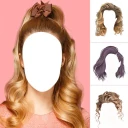
Screenshots
Analysis by Reviewed
I often use a hair-color preview as a low-stakes way to test an idea before making a real change. Hair Color Changer: Hairstyles is aimed at exactly that kind of experimenting: it lets you play with color and hairstyles in a photo rather than committing at the salon. I’d treat the result as inspiration, not a promise of how dye will look on your actual hair.
Who benefits most from a photo preview
I think this app is most useful when you already have a decision in mind but need help narrowing it down. If you are choosing between a few shades, trying them on a familiar photo can make the choice feel less abstract than browsing a gallery of models. It is also a light, low-pressure option for someone curious about a dramatic look but not ready to book a color appointment.
It is less suitable if you expect a reliable forecast of the salon result. A digital overlay cannot show how dye will interact with your existing color, hair texture, or condition, and a photo can make a shade look different from what you see in person. I would use the preview to start a conversation with a stylist, not as technical advice about what can be achieved in one appointment.
A small workflow that makes comparisons fairer
When I want to compare shades, I would keep the source photo fixed and change only one thing at a time. First I’d try a natural tone, then a brighter option, and save each version with a simple label so I can remember which is which. That avoids relying on memory and makes it easier to spot whether I prefer the shade itself or just the more dramatic edit.
There is also a useful trade-off between a polished selfie and an honest reference photo. A carefully framed picture may make the color easier to inspect, but I would avoid choosing one with a strong filter or unusual lighting if I am trying to imagine an everyday look. A second photo in ordinary indoor light can be a better reality check than endlessly adjusting one image.
Trying On a New You
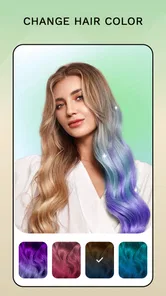
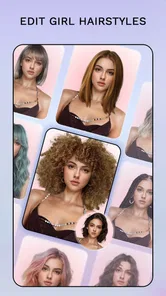
First off, let's talk about the magic of virtual hair color changing. With this app, you can try on a whole rainbow of hair colors without making a trip to the salon. The app's interface is super user-friendly. You just snap a selfie, and voila! You can pick from a wide palette of colors. From bold blues and fiery reds to subtle browns and blondes, the choices are plentiful. The app even lets you adjust the intensity of the color, so you can go from a gentle tint to a full-on statement color.
Features That Stand Out
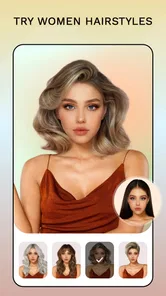
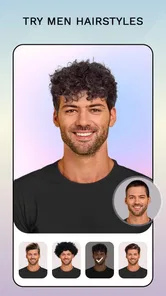
What I love about the Hair Color Changer: Hairstyles app is the realistic result it delivers. Thanks to its advanced AR technology, the color looks surprisingly natural and blends seamlessly with your original hair texture. Plus, the app isn’t just a one-trick pony. It offers various hairstyles to try on, which means you can experiment with a new cut along with your new color. How cool is that?
More From Our News Desk

 Gmail
GmailGmail in a Busy Inbox: Who Benefits Most?
From first account to crowded workday, Gmail earns its place through dependable search and flexible sorting—but its best fit depends on how much inbox maintenance you can tolerate.

 Prime Video
Switching to Prime Video: What Changes in Your Viewing Routine
Prime Video can make a compelling second home for streaming, but switching means learning a different catalog, rental layer, and route from browsing to playback.

 Universal TV Remote Control
Universal TV Remote Control Works Best as a Reliable Backup
A phone remote earns its place through quick setup and reliable habits. Here is how to get more from Universal TV Remote Control—and where its limits show.

 Weather - By Xiaomi
Weather by Xiaomi Review: Clear at a Glance, Less Clear Up Close
Xiaomi’s weather app makes everyday forecasts quick to scan, but its calm surface can leave useful details and recovery paths harder to find than they should be.

 X
XX Under Pressure: Can It Recover When Posting Goes Wrong?
A resilience-focused review of X, examining setup, mistaken posts, interruptions, weak connections, and the gaps that matter when recovery needs to be dependable.

 Clash of Clans
Clash of Clans Is Won Between the Battles
Its raids are quick; its community is a long-term project of coordination, teaching, rivalry, and shared responsibility—with all the friction that entails.
Latest News



Another nifty feature is the ability to compare before and after photos. This makes it easy to see just how dramatic the change can be. Plus, you can save these photos to your device or share them on social media to get feedback from friends. Who knows, you might just inspire someone else to take the plunge and try something new!
Getting the Most Out of the App
To get the best results, make sure your photo is well-lit and your hair is clearly visible. The app does a great job of detecting hair outlines, but a little help from your end can make the outcome even better. Another tip is to try different lighting settings within the app to see how the color might look in various environments.
For a useful comparison, try taking a second photo in a different room rather than judging a shade from one selfie alone. Keep your face position and framing similar, then compare the same color at different intensities. This helps separate the effect of the shade from changes in lighting or angle. If the outline looks off around flyaways or a dark background, I’d retake the photo before deciding that a particular color does not suit me.
Where Connectivity Enters the Picture
A photo-editing session can feel different depending on whether you are on a reliable connection. I’d choose a moment with steady access if I plan to share a result or ask friends for opinions, since that part of the workflow involves sending an image beyond the app. For a quick personal preview, I would not assume every step works without a connection; it is safer to check the app’s behavior on your device before relying on it somewhere with limited service.
That makes the app handy during a quiet break at home, when I can compare options without rushing, but less ideal as a last-minute decision tool in a salon with patchy reception. If something does not load or a sharing action stalls, I’d keep the original photo, return to the screen when the connection is stable, and avoid repeatedly changing the image just to troubleshoot. A clean, well-lit source photo is also worth keeping so I can start again if an edit goes wrong.
A Practical Fit for Different Hair Decisions
I’d recommend this kind of preview to someone debating a noticeable change, especially a person choosing between a natural-looking brown or blonde and a vivid color. It can also help when discussing ideas with a stylist: a saved image gives you a visual starting point, while a conversation with a professional can account for your current color, hair condition, and the work needed to reach the shade. The preview cannot replace that advice, because a photo effect does not reproduce the actual dye process.
For a realistic everyday use, imagine considering a brighter color before a weekend event. I’d try a restrained version first, save it, then compare it with a more saturated option and show both to a friend. That is more useful than scrolling through inspiration photos of strangers because the face and general framing remain familiar. Still, the screen can make colors appear different from real life, so I would not use a single preview as the only reason to book a major change.
Compared with browsing hairstyle galleries, the personal-photo approach makes it easier to picture a shade on your own face. Compared with a salon consultation, it is quicker and more playful, but less dependable for predicting the final result. If precise color matching, detailed hair analysis, or professional guidance is the priority, I’d choose a stylist or a tool built specifically around those needs instead.
Cost, Compatibility, and a Sensible Workflow
The app is free to download, though some features require in-app purchases, so I’d explore the basic options first and decide whether anything beyond them is genuinely useful. It is made by Smart Dev Group, is rated for Everyone, and has reached over 100,000 installs. Its average rating is 3.1 from around 636 ratings, which suggests I should set realistic expectations rather than assume every edit will be convincing. It was released on July 24, 2024, and the current version is 11.0, with Android 10 as the minimum operating system.
Because the workflow uses personal photos, I’d select an image I am comfortable editing and sharing, and think before posting it publicly. If I want opinions, I can share only the result with people I trust rather than turning a private style experiment into a public post. Keeping a before-and-after pair also makes it easier to compare choices later without relying on memory.
It’s also worth noting that while the app is free to download, there are some features that require in-app purchases. However, the basic functions provide plenty of fun and are quite satisfying on their own.
How I handle a stalled edit or share
If a screen seems unresponsive, I would avoid starting over immediately or making several edits in quick succession. I’d first keep the original image available, then try the same simple preview again when the phone has a steadier connection. That gives me a clean way to tell whether the issue was temporary or whether the particular photo is difficult to work with.
For a decision that matters, I would save the result before asking anyone else to weigh in. A friend’s reaction can be useful, but it should not become the only copy of the idea. I’d also compare the preview on the phone in ordinary light rather than judging it under a bright display or a strong screen filter; the apparent shade can shift with the viewing conditions, just as the source photo does.
Choosing how much to share
Sharing is convenient when I want a second opinion, but it is not necessary for the app’s main purpose of trying a look on a photo. I would decide first whether I want advice from a trusted person or simply want to explore privately. If I do send an image, I’d choose the version that shows the hairstyle or shade clearly and leave out anything I do not want circulated.
This is also where the app differs from a purely visual inspiration board. A gallery gives you polished examples without involving your own image, while a personal preview can make the idea more relatable but asks you to think about where that photo goes. For someone who prefers not to use personal pictures in edits, browsing examples or talking directly with a stylist is the more comfortable route.
What to expect from the experience
The name and focus make the purpose straightforward: this is a beauty app for trying hair colors and hairstyles in a photo, not a full salon-planning tool. Smart Dev Group’s app is free, rated for Everyone, and the current version is 11.0. Its average rating is 3.1, so I would approach it as a casual experiment rather than a polished professional consultation. The rating does not tell me exactly how it will behave on my phone, but it is a reason to judge the result for myself before relying on it.
One question people often have is whether a preview will tell them what a color looks like on their real hair. My answer is no: it can help visualize an idea, but it cannot account for the full dye process or replace a stylist’s assessment. Another practical question is whether a connection matters. I would expect sharing or asking friends for feedback to depend on connectivity, and I would test the app’s other steps on my own device instead of counting on them in a low-signal place.
Overall, if you're curious about how a new hair color or style would suit you, this app is definitely worth a try. It's a fun, risk-free way to experiment with your look and maybe even find your next real-life hairstyle. So go ahead, give it a whirl, and let your inner stylist shine! I’d use it as a playful idea-board rather than a guarantee, especially when connectivity or photo quality gets in the way. If you want a quick visual nudge and are happy to judge the result with a little caution, it’s an enjoyable place to start.
Hair Color Changer: Hairstyles Frequently Asked Questions
Is Hair Color Changer: Hairstyles suitable for everyone?
Hair Color Changer: Hairstyles is a beauty app with an Everyone content rating, so it is intended for a broad audience. It offers a way to explore possible hair-color changes through photos before making a real-life decision. As with any photo-editing app, the result depends on the image you use and how closely the preview matches your hair and lighting.
Which phones can run Hair Color Changer: Hairstyles?
The app requires Android 10 or later. Before downloading, check your device’s operating system version to make sure it meets that requirement. Hair Color Changer: Hairstyles is developed by Smart Dev Group, and its current version is v11.0. If your device is compatible, you can try the app without paying, then decide whether its virtual hair-color previews suit your needs.
What is Hair Color Changer: Hairstyles app all about?
Hair Color Changer: Hairstyles is a mobile application designed to help users experiment with different hair colors and styles virtually. It uses advanced augmented reality technology to allow users to see how they would look with various hair colors without actually dyeing their hair. It's a great tool for anyone considering a new hair color change.
How user-friendly is the Hair Color Changer: Hairstyles app?
The app is designed with an intuitive user interface, making it accessible even for those who aren't tech-savvy. Users can easily upload their photos, select from a variety of hair colors, and preview the results in real time. The seamless experience ensures users can navigate through the app without any hassle.
Does the app offer realistic hair color simulations?
Yes, Hair Color Changer: Hairstyles provides highly realistic hair color simulations. The app uses sophisticated algorithms to map the selected hair color onto your photo, ensuring the results look natural and convincing. This feature helps users make informed decisions about their hair color choices.
Pros
- Easy to use interface for quick changes
- Offers a wide range of color options
- Realistic color blending
- Supports multiple photo formats
- Quick processing and preview
Cons
- Ads can be intrusive
- Limited free features
- Occasional app crashes
- Requires internet for full functionality
- Some colors appear unnatural











