

GPS Tracking - Number Locator
- 0.00
- 4.1
- Installs
- 100.00K
- Price
- Free

Screenshots
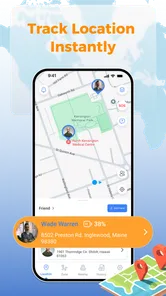
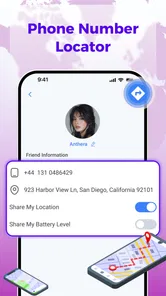
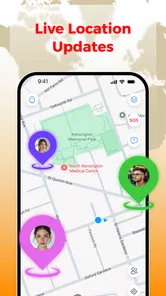
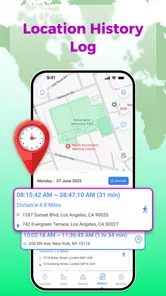
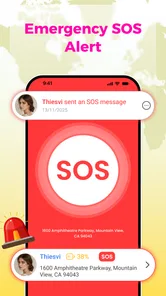
Analysis by Reviewed
I approached GPS Tracking - Number Locator as a practical Maps & Navigation app rather than a general-purpose map replacement. Its focus is straightforward: helping users think about family safety, number-based location lookup, GPS tracking, and real-time location in one place. That makes it potentially useful for checking in with people I care about, but it also means the app deserves a more careful first setup than a normal route-planning tool.
The app is free, aimed at everyone, and developed by サウズヒロ. It has reached over one hundred thousand installs and holds a 4.1 average from around two hundred ratings. Those figures suggest that it has attracted a meaningful audience without making it look like a universal replacement for established navigation services. I would describe it as a focused utility: most valuable when I already know why I want location information, less compelling when I simply need directions across town.
Getting from installation to a useful first check
Before relying on a location check, I’d make sure the person involved understands when and why I might use it, then agree on a simple check-in routine. That small conversation makes the first test more useful: it gives both of us a shared idea of what a clear result should mean and when a direct call is the better next step.
What I would expect before opening it
The store summary sets the tone around GPS tracking, number location, family safety, and real-time location. In practical terms, I would not install this expecting detailed traffic guidance, public transport planning, business discovery, or the broad map layers found in large navigation platforms. The central question is different: can I use the app as part of a location-sharing routine with someone I trust?
That distinction matters because location tools are only helpful when everyone involved understands the arrangement. A family member may need to participate, a phone number may need to be entered correctly, and the person being located should know what is happening. I would treat this as a consent-based safety tool, not as a way to secretly monitor someone. That mindset also makes the setup less confusing: the goal is to establish a clear check-in method, not to turn the app into an invisible surveillance system.
My first recommendation is to decide on one simple use case before exploring anything else. For example, a parent might want a quick way to check whether a teenager has arrived at an agreed destination, or two relatives might want a location reference during a crowded event. Starting with one person and one situation is much easier than trying to configure an entire household immediately.
The first setup should be deliberate
After installation, I would read each screen carefully and avoid rushing through prompts. A location app can feel broken when the real issue is that the phone has not granted the access it needs, the wrong contact has been selected, or the user is trying to check a number that is not connected to the expected workflow. The safest approach is to keep the first test small and use a willing family member or friend who is standing nearby.
More From Our News Desk

 Weather - By Xiaomi
Weather by Xiaomi Review: Clear at a Glance, Less Clear Up Close
Xiaomi’s weather app makes everyday forecasts quick to scan, but its calm surface can leave useful details and recovery paths harder to find than they should be.

 X
XX Under Pressure: Can It Recover When Posting Goes Wrong?
A resilience-focused review of X, examining setup, mistaken posts, interruptions, weak connections, and the gaps that matter when recovery needs to be dependable.

 Clash of Clans
Clash of Clans Is Won Between the Battles
Its raids are quick; its community is a long-term project of coordination, teaching, rivalry, and shared responsibility—with all the friction that entails.

 Android Auto
Android Auto Makes the Case for Quieter Car Software
The car interface is no longer judged by how much it can do, but by how quietly it helps. Android Auto shows what drivers now expect—and what still gets in the way.

 MobiOffice: Word, Sheets, PDF
MobiOffice: Transforming Mobile Productivity with Seamless Integration
MobiOffice: Word, Sheets, PDF is redefining mobile productivity with a surprising blend of functionality and innovation.

 EA SPORTS FC Soccer Mobile 26
EA SPORTS FC™ Mobile Soccer: Redefining Mobile Sports Gaming
Dive into EA SPORTS FC™ Mobile Soccer, where immersive gameplay and strategic depth transform mobile sports gaming.
Latest News



I would also confirm that both people understand which phone number is being used and what result they expect to see. This is a surprisingly important detail. A number may be saved with a country prefix, spaces, or an old contact entry, and those small differences can create uncertainty during the first attempt. Before blaming the app, I would compare the number directly with the contact’s current device and make sure I am not selecting a duplicate entry.
Another useful habit is to perform the first test while both phones have a reliable connection and enough battery for location services to work normally. This is not a special requirement unique to this app; it is simply good practice for any real-time location tool. Testing it at home also gives me a calm opportunity to understand the result instead of discovering a setup problem when someone is already late or lost.
The current release is version 1.0.2, and it requires Android 9 or later. That makes checking the phone’s operating system worthwhile before spending time on troubleshooting. On a compatible device, I would keep the app updated through the normal store process, especially because location utilities can become frustrating when the app and the phone’s system behave differently.
The first meaningful success
For me, a successful first action would not be merely opening a map. It would be completing a small, agreed check with another person and receiving a location result that makes sense. I would ask the other person to remain in one place, carry out the lookup or tracking action, and compare the result with the real situation. If the displayed position is delayed or approximate, I would repeat the test after a short pause rather than assuming the tool is unusable.
This first test reveals more than a quick glance at the interface. It shows whether the chosen number is being interpreted as intended, whether the other person has completed the necessary participation, and whether the result is useful enough for the situation I have in mind. A location app should earn trust through a predictable routine, not through one lucky demonstration.
A practical workflow is to create a simple verbal agreement: “I will check after you leave, and you will tell me when you arrive.” That prevents the app from becoming the only source of truth. If the result does not update, I still know whether the person has arrived because communication remains part of the plan. In my view, this is one of the most important trade-offs with any real-time location service: convenience is helpful, but it should support communication rather than replace it.
I would save the first successful check as a mental reference point. Notice what the app shows, how long the action takes, and whether the result is easy to interpret at a glance. This gives me a baseline for later use. If a future result looks unusual, I can compare it with the original experience instead of guessing whether the app has changed or the phone is simply in a different environment.
Where first-time users may become confused
The phrase “number locator” can create unrealistic expectations. A phone number is not automatically a precise live position in every circumstance. A number may identify the person or device involved in a location workflow, but the quality of the result still depends on the device, network conditions, phone settings, and participation of the person being located. I would therefore avoid treating a number search as a guaranteed answer to an urgent emergency.
Real-time location can also be misunderstood as continuous, perfectly instant movement. In everyday use, a displayed position may take time to refresh or may represent the most recent available information rather than the person’s exact current step. That is why I prefer using the app for agreed check-ins and broad reassurance, not for directing someone around a complex building or making a safety decision based on a tiny map difference.
Another point of friction is the difference between tracking a device and contacting a person. If a family member leaves the phone behind, turns it off, loses connection, or has location access disabled, the app cannot provide the same confidence as when the device is with them and functioning normally. A thoughtful household plan should include a backup message or call, particularly for journeys where timing matters.
I would also avoid entering numbers casually. Location information is sensitive, and a responsible workflow starts with permission. If I were helping an older relative, I would explain the purpose in plain language and show them how the process works rather than configuring it without their understanding. That makes the tool more comfortable for everyone and reduces the chance of a misunderstanding later.
How it compares with familiar alternatives
Compared with a conventional navigation app, this tool appears more narrowly concerned with people and location checks than with getting from one address to another. If I need turn-by-turn driving guidance, route alternatives, business hours, or transit information, I would choose a mature navigation platform instead. Those services are designed around journeys, while this app is better considered when the person is the subject of the check.
Compared with a messaging app’s built-in location sharing, the appeal here is concentration. I can approach it with a specific tracking or number-location task instead of searching through a conversation for an old shared position. That said, messaging apps often have the advantage of an existing relationship and a familiar communication channel. If my family already uses one consistently and everyone understands its location-sharing controls, switching tools may not be worth the extra learning.
Dedicated family-safety services may offer a broader collection of household features, such as more elaborate routines, alerts, or account controls. I would consider those when I need a complete family management system rather than a focused location utility. The trade-off is usually greater complexity. For a first-time user who only wants a simple location check, the narrower approach may feel more approachable; for a larger family with detailed safety rules, a more comprehensive service could be a better fit.
The app’s free price is a clear advantage for trying this focused workflow without committing money. Still, free does not automatically mean effortless. The real value depends on whether the app’s location process matches the way my family communicates. I would test that fit with one trusted person before asking everyone to rely on it.
A realistic everyday scenario
Imagine that I am waiting for a family member who is returning from an unfamiliar area. Instead of repeatedly sending “Where are you?” messages, we agree that I will use the app for a location check while they keep their phone with them. I first verify the correct number, perform the check, and compare the result with the expected route or meeting area. If the position looks old or unclear, I contact them directly rather than assuming the map tells the whole story.
This scenario shows where the app can be genuinely useful: reducing unnecessary back-and-forth when both people have agreed on a simple routine. It also shows its limit. I would not use one location result to conclude that someone is safe, especially if the position has not refreshed or the person is in a place where connectivity is unreliable. The app can add context, but it cannot replace a conversation or a sensible safety plan.
For an older relative, I would make the process even simpler. I would test it during a familiar trip, explain what the location check means, and agree on a backup call. For a child, I would be transparent about the purpose and boundaries. For a friend at a festival or large public venue, I would use it as a meeting aid rather than expecting pinpoint indoor accuracy. These small adjustments make the same utility more realistic across different situations.
Three details that improve the experience
- Start with a stationary test. A person standing in one place makes it easier to tell whether the result is delayed, incorrect, or simply still refreshing. Testing while someone is moving introduces too many variables at once.
- Use one agreed contact workflow. Repeatedly switching between manually typed numbers and contact entries can create avoidable mistakes. I would choose the correct person once, confirm the digits, and keep the routine consistent.
- Keep a non-app fallback. A call, text message, or agreed meeting point matters when a phone battery is low, connectivity changes, or the displayed location is not current. This is especially important when the app is being used for family reassurance.
These are not flashy features, but they are the practices that determine whether a location tool feels dependable. The most useful improvement often comes from reducing ambiguity around the app rather than pressing more buttons. I would rather have one clearly understood check-in routine than a complicated arrangement nobody remembers how to use.
Who should try it, and who should skip it
I think this app is worth trying for someone who wants a free, focused way to explore GPS tracking and number-based location checks with a consenting family member or friend. It may suit first-time users who do not need a full navigation suite and prefer to begin with one practical safety scenario. The everyone age rating also makes it broadly approachable, although responsible adult guidance is still sensible when children are involved.
I would skip it if my main need is driving directions, walking routes, traffic information, or detailed place discovery. I would also look elsewhere if I need a fully managed family platform with extensive controls and established household automation. Finally, I would not rely on it as the sole solution for an emergency or for covertly locating another person. Those expectations go beyond what a responsible location utility should promise.
Privacy is another reason to pause before adopting it across a household. Anyone considering the app should discuss who can request a location, when checks are appropriate, and what everyone should do if the result appears stale. A clear agreement protects relationships as much as it protects phones. In my experience, that conversation is not an optional extra; it is part of setting up the app properly.
My next step after the first test
Once the first check works, I would not immediately add every possible contact. I would repeat the same test on a normal short trip and see whether the routine remains understandable outside the home. I would pay attention to whether the result is timely enough for my purpose, whether the number workflow remains clear, and whether the other person feels comfortable participating.
If those checks go well, I would write down a household rule in ordinary language: use the app for agreed check-ins, confirm important situations by phone, and do not interpret an old location as proof of someone’s current safety. That rule turns a basic utility into a more responsible process. It also answers the practical question many new users have after installation: what should I do when the map and reality do not seem to match?
My overall impression is cautiously positive. GPS Tracking - Number Locator is most convincing as a simple starting point for consent-based location checks, not as an all-purpose navigation replacement or a guaranteed emergency tracker. Its free access lowers the barrier to testing, and the focused purpose can be easier to understand than a large suite of family tools. The experience becomes much better when I use a nearby test, verify the number carefully, and keep a communication backup.
With version 1.0.2 and support for Android 9 or later, it is accessible to many Android users who want to try this kind of workflow. I would recommend it to a person who has a specific family-safety use case and is willing to establish expectations with the other participant. I would recommend a traditional navigation app for routes, a familiar messenger for casual sharing, and a more comprehensive family service for advanced household management. Used within its proper limits, GPS Tracking - Number Locator can be a practical addition to a safety routine, provided the routine remains transparent, measured, and backed by ordinary human communication.
GPS Tracking - Number Locator Frequently Asked Questions
Is GPS Tracking - Number Locator available for my phone?
GPS Tracking - Number Locator is a mobile app in the Maps & Navigation category. Its current version is 1.0.2, and it requires Android 9 or later. The app is free, and its age rating is Everyone. Check your device’s operating system before downloading so you can confirm it meets the minimum requirement.
Who makes the app, and how widely is it used?
The developer is サウズヒロ. GPS Tracking - Number Locator has more than 100,000 installs and an average rating of 4.1 from 183 ratings. Those figures offer a broad sense of its reach and user feedback, but they cannot predict whether its features will suit your particular needs. Consider the privacy and accuracy limitations of location tools before relying on them.
What is GPS Tracking - Number Locator, and what does it actually do?
GPS Tracking - Number Locator is designed to help users identify approximate locations associated with phone numbers and use location-related tools from a mobile device. It should not be confused with a guaranteed real-time tracking service. Results may depend on available network information, regional support, device settings, and whether the person being located has granted the necessary permission.
Can GPS Tracking - Number Locator track someone without their knowledge or consent?
No legitimate location app should be used to secretly monitor another person. GPS Tracking - Number Locator may require permission, shared location access, or other authorization before accurate device tracking is possible. Users should always obtain clear consent and follow local privacy laws. Attempting to track a partner, family member, employee, or stranger without permission can be unethical and potentially illegal.
How accurate are the locations shown by GPS Tracking - Number Locator?
Location accuracy is not guaranteed and can vary considerably. GPS signals are usually more precise outdoors, while buildings, underground areas, poor reception, disabled location services, and limited network coverage can reduce accuracy. A phone-number lookup may provide general information rather than an exact live position, so the app should not be relied on for emergencies, navigation, or safety-critical decisions.
Pros
- Simple interface makes location tools easy to find and use.
- Can help users identify unknown numbers more quickly.
- Useful for sharing location during trips or outdoor activities.
- May support safer coordination with family and friends.
- Available on mobile devices for convenient access on the go.
Cons
- Location accuracy can vary in buildings or areas with weak signals.
- Some features may require an active internet connection.
- Number searches may not reveal private or unlisted information.
- Background location use can increase battery consumption.
- Privacy permissions should be reviewed carefully before using the app.











