

GPS Tracker & Location Tracker
- 163.00
- 4.4
- Installs
- 1.00M
- Price
- Free

Screenshots
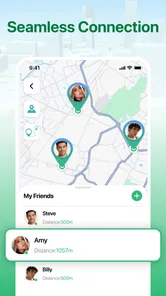
Analysis by Reviewed
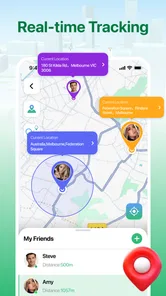
I look at GPS Tracker & Location Tracker as a focused Maps & Navigation app: its central promise is helping you keep track of a loved one’s location in real time. That can be genuinely reassuring when people are out and about, but it also makes the app’s usefulness depend on a few practical things: everyone involved needs to be comfortable with location sharing, the phone needs to be able to report its position, and the person checking needs to treat a location as a guide rather than a guarantee.
My overall take is that this is best considered a tool for agreed, everyday coordination—not a substitute for a conversation, a safety plan, or a dedicated emergency service. It is free, rated for Everyone, and developed by NAICOO PTE. LTD. The appeal is easy to understand: when a family member or friend is travelling, a shared location can answer the simple question of where they are without a chain of calls and messages.
Real-time tracking is useful when it answers a specific question
I find shared location most useful when it helps someone make a small, practical decision—whether to wait, head toward a meeting point, or send a quick message. In this section, I’ll focus on how to keep that check purposeful rather than turning it into constant monitoring. A clear, limited reason for opening the map also makes the everyday workflow easier to judge.
A location view can reduce everyday uncertainty
The most valuable part of a GPS tracker is not the dot on a map by itself. It is the time and worry it can save when two people are trying to coordinate. If I am waiting to meet someone, being able to check their location can help me decide whether to stay put, start walking, or send a message. For a parent coordinating a journey home, it can offer a quick sense of progress without asking for repeated updates.
That benefit is strongest when the people sharing locations already have a clear reason to do so. A short agreement—who can see whom, and for what purpose—makes tracking feel like a practical arrangement rather than surveillance. I would be wary of installing any location app on another person’s device without their knowledge. Trust and consent matter more here than any map feature.
The app’s focus is narrower than a full navigation service. A navigation app is usually built to find routes, estimate journeys, or guide a driver turn by turn. A tracker is more about checking a person’s whereabouts. If the main question is “How do I get there?”, a conventional maps app is likely the better choice. If the question is “Has my family member reached the area we agreed on?”, a shared tracker can be more relevant.
What “real time” means in an everyday decision
Even when an app is designed for live tracking, a location should be read as a recent signal, not an unquestionable account of someone’s movements. A phone may be indoors, temporarily disconnected, or unable to update at the moment you check. Map position can also be less useful in dense buildings or places where a street address does not explain which entrance someone is using.
More From Our News Desk

 Weather - By Xiaomi
Weather by Xiaomi Review: Clear at a Glance, Less Clear Up Close
Xiaomi’s weather app makes everyday forecasts quick to scan, but its calm surface can leave useful details and recovery paths harder to find than they should be.

 X
XX Under Pressure: Can It Recover When Posting Goes Wrong?
A resilience-focused review of X, examining setup, mistaken posts, interruptions, weak connections, and the gaps that matter when recovery needs to be dependable.

 Clash of Clans
Clash of Clans Is Won Between the Battles
Its raids are quick; its community is a long-term project of coordination, teaching, rivalry, and shared responsibility—with all the friction that entails.

 Android Auto
Android Auto Makes the Case for Quieter Car Software
The car interface is no longer judged by how much it can do, but by how quietly it helps. Android Auto shows what drivers now expect—and what still gets in the way.

 MobiOffice: Word, Sheets, PDF
MobiOffice: Transforming Mobile Productivity with Seamless Integration
MobiOffice: Word, Sheets, PDF is redefining mobile productivity with a surprising blend of functionality and innovation.

 EA SPORTS FC Soccer Mobile 26
EA SPORTS FC™ Mobile Soccer: Redefining Mobile Sports Gaming
Dive into EA SPORTS FC™ Mobile Soccer, where immersive gameplay and strategic depth transform mobile sports gaming.
Latest News



In practice, I would use the map to orient myself and then confirm anything important with the person. If a location appears unchanged, I would not immediately assume something is wrong; I would send a message or call. That small habit prevents an ordinary delay in location updates from turning into unnecessary alarm.
A helpful workflow is to agree on a simple check-in rule before anyone is travelling: for example, use the tracker for general progress, but message when arriving at the final meeting point. That divides the work sensibly. The map helps with broad coordination; a direct message handles the details a location pin cannot show, such as which gate, floor, or entrance to use.
A realistic trip where it earns its place
Picture a teenager taking public transport home while a parent is finishing work. Rather than sending “Where are you?” every few minutes, the parent can check the shared location when it is useful, then arrange to meet near the final stop. If the teenager’s position looks delayed, the parent can ask for a quick update instead of treating the map as proof of a problem.
This scenario shows both the strength and the limit of GPS tracking. It can reduce repetitive check-ins and make handoffs easier, but it cannot explain why someone has stopped or whether they are safe. A location is context, not a conversation. I would use it as one part of a sensible routine, especially when the people involved can easily contact one another.
The same approach can help adults coordinating a pickup, friends meeting in a busy area, or relatives checking whether someone is nearing a shared destination. It is less compelling for people who rarely need to coordinate locations. If everyone already sends a quick arrival message and there is no recurring uncertainty, adding another app may create more setup than value.
Small habits make tracking less stressful
One non-obvious benefit of a shared location is that it can change how often people interrupt one another. Instead of calling repeatedly during a commute, the person waiting can check once at a useful moment. The trade-off is that a map can encourage over-checking. I would resist watching someone’s movement continuously; the app works better when it answers a practical question and then gets out of the way.
It also helps to decide what counts as a meaningful update before a journey begins. A location near the destination may be enough for a pickup, while a person travelling through an unfamiliar area may need a direct check-in at a specific point. This avoids treating every small movement or pause as noteworthy. The goal should be smoother coordination, not constant supervision.
For a household, a short trial with one routine is a sensible way to judge whether the app fits. Try using it for a regular pickup or a journey home, then ask whether it actually reduced calls and confusion. If it did, keep the arrangement limited to that useful purpose. If it created anxiety or extra checking, a simple message-based routine may be better.
The trade-offs I would consider before relying on it
Location sharing is personal, so the first trade-off is privacy. A tracker is only a good fit when every participant understands the arrangement and can make an informed choice. Families may find shared visibility reassuring, while friends or partners may prefer to share a location only during a particular trip. I would discuss those boundaries openly rather than assuming that installing the app settles them.
The second trade-off is dependence on the phone and its connection. A tracker cannot provide useful updates if the device is unavailable or unable to communicate its position. That is why I would not treat it as a guaranteed safety net, or rely on it as the only way to respond to an urgent situation. For a critical concern, contact the person directly and use the appropriate local help rather than waiting for a map to resolve uncertainty.
There is also a difference between seeing a person on a map and knowing their exact circumstances. A pin may show an area, but it cannot tell you whether the person is at a particular platform, inside a building, or waiting at the opposite side of a road. A short message with a landmark or entrance can be more actionable than repeated map checks. Pairing the two is often the most practical workflow.
Compared with ordinary messaging, a tracker can reduce the need to type updates while travelling, but a message is clearer when someone needs to explain a delay or change of plan. Compared with a navigation app, it is aimed at shared whereabouts rather than route guidance. I would not replace either tool wholesale: choose the tracker for agreed location coordination, messaging for explanations, and navigation for directions.
Who is most likely to benefit
I think GPS Tracker & Location Tracker will make the most sense for families or small groups with recurring journeys and a shared reason to coordinate. That might be a parent and older child, relatives arranging pickups, or friends travelling separately to the same meeting place. The key is that everyone involved sees a clear benefit and agrees on when checking a location is appropriate.
It is less suitable for anyone expecting a complete navigation suite, a guaranteed emergency response, or precise explanations of what another person is doing. People who are uncomfortable sharing location should not feel pressured to use it. If the only goal is to announce “I’m here,” a message may be simpler; if the goal is to find a route, a map service designed for navigation is a better fit.
The app has an average rating of 4.4 from around 3.8 thousand ratings, and it has passed one million installs. Those figures suggest that many people have tried it, but they cannot tell me whether its approach to sharing suits a particular household. I would make that decision based on consent, the reliability of the routine in your day-to-day use, and whether the location view genuinely reduces friction.
The current version is 1.2.3, and the stated minimum operating-system requirement is version 7.0. Those details make it easier to check basic compatibility before getting started. Since the app is free, trying it does not require a purchase, though the real cost is the time spent setting up a shared routine and deciding what boundaries feel comfortable.
A measured recommendation
GPS Tracker & Location Tracker is most convincing as a low-friction way to coordinate location sharing among people who already trust one another. I would recommend it to someone who repeatedly needs to know whether a family member or friend is progressing toward a meeting point, and who wants fewer check-in calls. I would not recommend treating any live location as proof of safety or using tracking without clear consent.
My practical advice is to begin with one specific use, agree on who can see the location, and keep a backup way to communicate. If the map makes a commute or pickup calmer, it has earned a place on your phone. If you find yourself monitoring it constantly or interpreting every pause as a warning, step back and use direct communication instead. That balance is what makes a GPS tracker helpful rather than intrusive.
For readers considering GPS Tracker & Location Tracker, the deciding question is straightforward: will shared location answer a recurring coordination problem in your life? If yes, this focused Maps & Navigation app is worth considering. If what you need is turn-by-turn directions, detailed explanations, or guaranteed emergency coverage, another tool—and, in the last case, a direct safety plan—will serve you better.
Set up a routine that answers one question
Before relying on the location view, I would choose one recurring moment when it is genuinely helpful, such as a pickup after an evening activity or a trip between familiar stops. This keeps the app from becoming a background source of worry. It also gives everyone a concrete way to judge whether sharing is useful: does checking the map help the person waiting decide what to do, or does it simply invite more checking?
For a pickup, agree on a practical boundary: the map can show when someone is getting close, while a message confirms the exact side of the street or meeting entrance. If plans change, the person travelling should still send a note rather than expecting a moving pin to communicate the change. That small division of responsibilities makes the tracker more dependable as a coordination aid without asking it to do the work of conversation.
Think about the person carrying the phone
A location-sharing arrangement needs to work for the person being tracked, not only for the person checking. I would explain what the other person can expect from the routine and make sure they can say when it no longer feels comfortable. With a family journey, for instance, it may be enough to use sharing for the trip home rather than treating it as an all-day arrangement. A clear purpose makes consent more meaningful and reduces the chance that a useful tool feels intrusive.
There is also a practical difference between a phone owner and the person who is waiting. The person checking may be tempted to interpret every map change, while the traveller may assume the map replaces check-ins altogether. Agreeing that neither is true avoids a common mismatch: the tracker offers orientation, but a call or message remains the right choice for an explanation, a change of destination, or a concern that needs a quick answer.
When another tool is the better fit
If your main need is to coordinate a group meeting, a chat may be enough because people can share a landmark, say they have arrived, and adjust plans in plain language. If you are driving somewhere unfamiliar, a navigation app is more useful because its purpose is to guide the route. This tracker makes most sense in the narrower space between those tools: you want a shared sense of progress, and the people involved have agreed to provide it.
I would also skip it if location sharing would create tension, if the group rarely travels separately, or if someone expects the map to provide a reliable emergency response. In those cases, the extra app may add a privacy concern without solving a real problem. A direct check-in plan is often clearer and less demanding. The right choice is not the one with the most visibility; it is the one that makes a specific routine easier without taking away anyone’s comfort.
As a Maps & Navigation app from NAICOO PTE. LTD., it keeps its appeal in that focused role rather than trying to replace every tool used during a journey. I would try it with a willing family member or friend, use it for a clearly defined trip, and judge the result by whether it cuts uncertainty without prompting constant monitoring. That is a more useful test than simply leaving location sharing on and hoping it will be reassuring.
GPS Tracker & Location Tracker Frequently Asked Questions
What is GPS Tracker & Location Tracker used for?
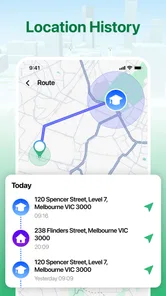
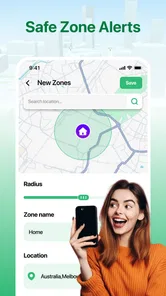
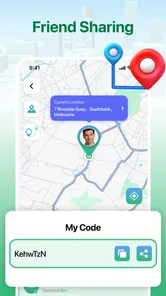
GPS Tracker & Location Tracker is designed to help users view and share location information using a mobile device’s GPS. Depending on the app’s features and setup, it may be used to check a device’s position, keep track of location changes, or share whereabouts with selected people. Its usefulness depends on an active location signal, the app’s permissions, and a reliable internet connection.
Does GPS Tracker & Location Tracker track someone without their knowledge?
Location tracking should be used transparently and with the consent of the person being tracked. The app requires access to location data on the device, and features such as sharing a live location generally need to be enabled by the device user. Do not use it to monitor another person without permission; this may violate their privacy and could be unlawful depending on where you live.
What permissions and connections does the app need?
To provide location information, GPS Tracker & Location Tracker may request permission to access your device’s location, including in the background if you want tracking to continue when the app is not open. Some functions may also need mobile data or Wi-Fi to send location updates. Review each permission request, your operating system’s location settings, and the app’s privacy information before deciding what to allow.
Can GPS Tracker & Location Tracker work without internet or GPS?
The phone’s GPS receiver can often determine an approximate position without an internet connection, but sharing that position with another device usually requires mobile data or Wi-Fi. Accuracy can also be reduced indoors, underground, or in areas with a blocked view of the sky. If GPS is disabled or the device cannot obtain a location fix, updates may be unavailable or delayed.
Does using GPS Tracker & Location Tracker affect battery life, and is it free?
Frequent location checks, especially when tracking runs in the background, can use more battery than occasional app use. Battery impact varies with device settings, signal conditions, and how often the app updates. Check the current Google Play or App Store listing for the latest pricing, in-app purchases, subscriptions, and supported features, since availability and terms can change by region or version.
Pros
- Simple interface makes key location details easy to find.
- Useful for coordinating meetups with family or friends.
- Location updates can help check whether someone has arrived.
- May provide peace of mind when sharing locations with trusted contacts.
- Handy for keeping track of a phone if its location-sharing features are enabled.
Cons
- Accurate tracking depends on GPS signal and network availability.
- Frequent location updates can increase battery consumption.
- People being tracked must agree to share their location.
- Background location access may raise privacy concerns.
- Location sharing may be unreliable indoors or in areas with weak signal.











