

GPS Speedometer - Odometer App
- 3.62K
- 4.0
- Installs
- 10.00M
- Price
- Free
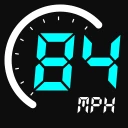
Screenshots
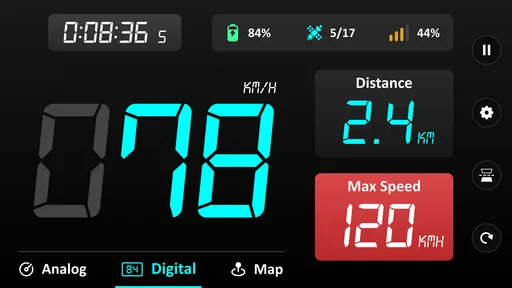
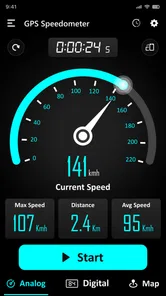
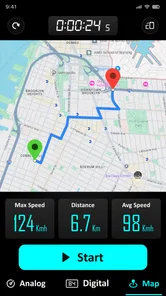
Analysis by Reviewed
On a familiar drive, I usually trust the car’s dashboard. But on a borrowed vehicle, a bicycle ride, or a route where I want a separate speed check, a phone-based display can be useful. GPS Speedometer - Odometer App is built around that simple purpose: showing speed and helping track distance, location, and time. I see it as a handy companion rather than a replacement for every navigation tool or vehicle instrument.
When a second speed reading is useful
The app makes the most sense when I want a speed-and-distance view without opening a full map. On an unfamiliar rental car, for example, the dashboard may be hard to read from my seating position, or I may simply want an independent reference. For a casual bike ride, keeping speed and trip distance visible can also be more useful than switching between several screens.
There is a trade-off: a phone display is only helpful if it is positioned where I can glance at it safely. I would set the phone in a secure mount before moving, adjust the view while parked, and leave it alone once the trip starts. If I need to interact with a screen frequently, this is the wrong setup; safer driving and riding matter more than checking another number.
What GPS speed can—and cannot—tell you
A GPS speed reading is most useful when the phone has a clear view of the sky and is moving steadily. In a tunnel, among tall buildings, or just after setting off, the reading may take time to settle or behave less smoothly than a built-in vehicle speedometer. I would treat it as a useful reference, not as a precision instrument for decisions where an exact speed matters. The app’s value is having a separate readout available, especially when the vehicle’s own display is missing or hard to see.
That distinction is worth keeping in mind if you are comparing it with the usual alternatives. A car’s built-in speedometer is already in front of the driver and does not depend on a phone mount, while a dedicated cycling computer or sports watch is designed to stay accessible during exercise. A navigation app has a different job: it helps with routes and destinations, but may place speed among many other details. This app is more appealing when I want a focused readout, not an all-purpose travel assistant.
Everyday trips and busier sessions
For example, if I borrow a car for a weekend trip, I can check the phone’s speed against the dashboard on an open stretch, then use the app as a secondary reference when the display is awkwardly placed. On a bicycle, it can make a short training ride easier to review by pairing speed with distance and time. I would mount the phone securely before moving and avoid handling it while driving; the point is a quick glance, not another distraction.
On a longer outing, battery use and screen visibility become practical trade-offs for any phone-based speedometer. Keeping the display on may be convenient, but it can drain the phone faster than checking a screen only occasionally. I’d start with a charged device, set the preferred units before leaving, and avoid relying on the phone as the only record of a trip that matters. Those small habits make the app more useful without assuming it can replace a dedicated cycling computer or the car’s instruments.
More From Our News Desk

 Weather - By Xiaomi
Weather by Xiaomi Review: Clear at a Glance, Less Clear Up Close
Xiaomi’s weather app makes everyday forecasts quick to scan, but its calm surface can leave useful details and recovery paths harder to find than they should be.

 X
XX Under Pressure: Can It Recover When Posting Goes Wrong?
A resilience-focused review of X, examining setup, mistaken posts, interruptions, weak connections, and the gaps that matter when recovery needs to be dependable.

 Clash of Clans
Clash of Clans Is Won Between the Battles
Its raids are quick; its community is a long-term project of coordination, teaching, rivalry, and shared responsibility—with all the friction that entails.

 Android Auto
Android Auto Makes the Case for Quieter Car Software
The car interface is no longer judged by how much it can do, but by how quietly it helps. Android Auto shows what drivers now expect—and what still gets in the way.

 MobiOffice: Word, Sheets, PDF
MobiOffice: Transforming Mobile Productivity with Seamless Integration
MobiOffice: Word, Sheets, PDF is redefining mobile productivity with a surprising blend of functionality and innovation.

 EA SPORTS FC Soccer Mobile 26
EA SPORTS FC™ Mobile Soccer: Redefining Mobile Sports Gaming
Dive into EA SPORTS FC™ Mobile Soccer, where immersive gameplay and strategic depth transform mobile sports gaming.
Latest News



A realistic routine is to open it while parked at the start of a ride, confirm the units and make sure the display is legible in the mount, then leave the phone alone while travelling. Afterward, the distance and time can provide a simple sense of how the outing went. I would not treat that casual record as a substitute for a training log or a carefully maintained mileage record, but it can answer the everyday question of how far a trip took me without extra equipment.
Why Choose GPS Speedometer - Odometer?
First off, the application is super easy to use. You just download, install, and bam! You’re set. No confusing setup processes or tedious instructions to sift through. The interface is clean and straightforward, perfect for those who don’t want to mess around with complicated menus.
That simplicity is most valuable when the phone is already doing enough. I would avoid turning a quick speed check into a session of exploring settings at the roadside. A small amount of preparation—choosing units, arranging a safe mount, and checking screen readability before departure—makes the experience calmer and reduces the temptation to adjust things in motion.
Features That Drive the Experience
The app is a free Maps & Navigation tool from Imagination AI, currently at version 2.7.9 and suitable for devices running Android 6.0 or later. It has a 4.1 average from around 202,000 ratings and more than 10 million installs, which suggests plenty of people have tried it, though popularity alone does not guarantee a perfect fit. It is rated for Everyone, and optional in-app purchases range from $1.99 to $49.99 per item. I’d check the purchase details in the app before paying, since a free download does not mean every option is free.
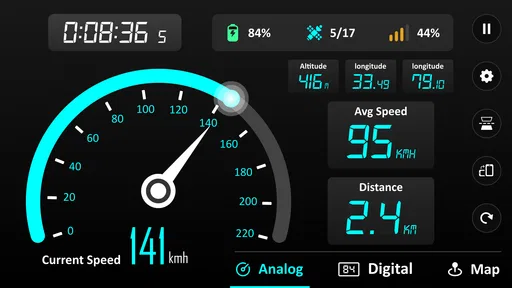
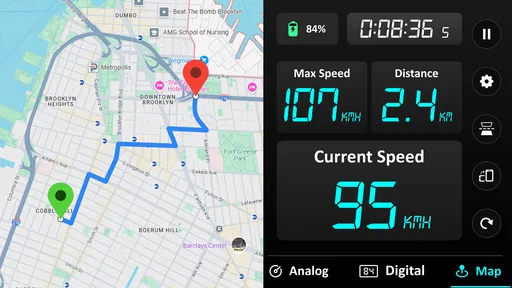
The app’s central appeal is the narrow set of travel details it brings together: speed, distance, location, and time. That combination can be enough for a short outing where I want a quick sense of pace and duration, without needing route guidance. It is also a useful distinction when choosing what to install: if your main goal is finding the way, this is not the same kind of tool as a map-first navigator.
The GPS Speedometer - Odometer App isn’t just about telling you how fast you’re going; it’s packed with features that make it stand out. For one, it offers real-time speed tracking, which is incredibly accurate thanks to its GPS integration. This means you can ditch the old-school odometer without a second thought.
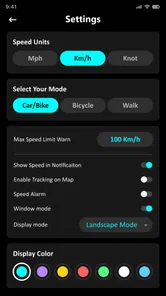
Another feature I absolutely love is the ability to switch between different units of measurement. Whether you’re more comfortable with miles per hour or kilometers per hour, this app’s got you covered. Plus, it even logs your trip distances, so you can keep track of how far you’ve traveled over time.
One practical way to use those unit options is to choose a familiar measurement before leaving rather than trying to interpret an unfamiliar scale mid-journey. That is especially helpful when the app is being used as a quick visual reference. I would also avoid treating a phone’s GPS distance as an authoritative measurement for billing, formal records, or any situation where a small discrepancy could matter.
Picking the right tool for the journey
Compared with a full navigation app, this one is better suited to a focused speed-and-distance check than to route planning. If I need turn-by-turn directions, traffic context, or help finding a destination, I’d choose a dedicated navigation app instead. If I only want a glanceable speed display and basic trip tracking, keeping those tasks separate can be simpler than opening a map full of extra information. The app was released on January 2, 2020, and its current version is 2.7.9; for an older phone, the stated Android 6.0 minimum is a useful compatibility check before installing.
A practical tip is to test the display while parked and compare its reading with a familiar reference on a clear, open stretch. That gives me a sense of how quickly the GPS reading settles on my device and whether the numbers are easy to read in the mount I use. I’d also decide in advance whether I want miles or kilometers, because changing units mid-ride or mid-drive adds needless fiddling. These checks are especially useful for cycling, where a secure mount and a quick glance matter more than repeatedly opening the app.
For someone deciding whether to install it, the key question is what they want the phone to do. If they need a straightforward secondary speed display for occasional trips, the focused purpose may be a plus. If they want turn-by-turn guidance, rich exercise analysis, or a display that works independently of a phone’s battery and reception, I would choose a navigation app, a sports watch, or dedicated vehicle equipment instead. The best choice depends less on the number of available readouts than on whether the tool fits the journey.
Good fit for casual road checks, with limits
Whether you’re a weekend warrior who loves taking the motorcycle out for a spin or someone who just wants to keep tabs on their driving habits, this app is versatile enough to meet your needs. It’s also great for cyclists and even runners, providing a comprehensive tool for anyone interested in their speed and distance metrics.
I would be more cautious about recommending it for a runner who wants structured training feedback. A phone can be awkward to carry, and a speed readout is not the same as a purpose-built workout experience. For a relaxed jog or a one-off distance check, it can be convenient; for regular training where comfort and dependable access matter, a sports watch is a more natural fit.
Drivers who already have a clear dashboard display may also find little reason to keep a second speedometer running. The benefit is strongest when the built-in readout is absent, inconvenient, or useful to compare against—not when the phone merely duplicates a display that is already easy to see. This is a small but important distinction: an extra screen can add reassurance in one vehicle and unnecessary clutter in another.
Screen visibility, power, and the HUD trade-off
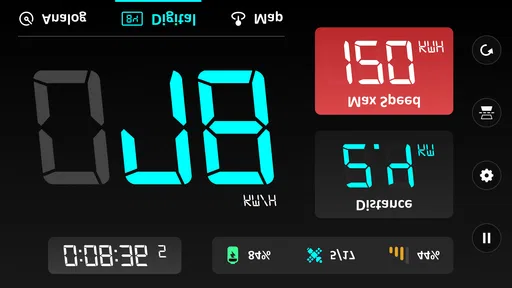
One feature that really blew me away was the HUD mode. You can actually project your speed onto your windshield, which is not only cool but super practical for nighttime driving. It’s like having a heads-up display straight out of a sci-fi movie!
I would treat that as an option to test carefully while parked rather than assume it will suit every car. Windshield angle, reflections, ambient light, and the phone’s placement can affect whether a projected display is comfortable to glance at. If it is distracting or difficult to read in your vehicle, the ordinary screen or the dashboard is the better choice. A feature is only practical when it makes information easier to see without pulling attention away from the road.
Screen brightness is another everyday compromise. A dim display may be hard to read in bright conditions, while a bright screen left on for a long trip can use more power. I would set up the phone before starting, use a stable mount, and keep a charging option in mind for longer outings rather than discovering a low battery halfway through. If I do not need a continuous display, checking briefly while stationary is a more sensible approach.
GPS reception can also change with the route, so I would not assume every stretch will produce an equally steady reading. Open roads are a better place to judge how the app behaves than enclosed or built-up sections. If the display looks unusual, I would avoid making an abrupt driving decision based on it and rely on the vehicle’s instruments and road conditions instead.
Reliability depends on the trip and the phone
That said, I would not choose a phone speedometer for a situation where I need guaranteed precision, uninterrupted tracking, or an always-visible instrument. GPS reception can vary with the route and surroundings, and the phone itself adds constraints: mounting, screen glare, battery level, and the need to keep attention on the road. Runners may find the speed-and-distance view useful for a casual check, but anyone following a structured workout may prefer a dedicated sports watch with controls designed for movement. Likewise, a driver who already has a clear, trusted dashboard display may gain little from running a second screen.
If a reading appears to lag or jump, I would first consider the surroundings and whether the phone has had a chance to settle, rather than assuming the trip itself has been recorded perfectly. That is why I see this as a helpful reference for ordinary journeys, not a dependable instrument for safety-critical use. Keeping a familiar dashboard or another suitable device as the primary reference is the more sensible choice whenever accuracy matters.
Recovery is also worth thinking about in simple terms: a phone app cannot help much if the phone runs out of power, shifts in its mount, or becomes difficult to view. Before a long outing, I would check charge, secure the device, and decide whether I truly need the screen visible throughout. Those steps are not special features; they are basic ways to avoid making a phone-based tool less dependable than the trip requires.
Final Thoughts
In a world where apps are a dime a dozen, the GPS Speedometer - Odometer App really stands out. It’s practical, easy to use, and packed with features that make it a must-have for anyone who spends a lot of time on the road. So if you’re looking for a reliable way to keep track of your speed and distance, look no further. Trust me, once you try it, you’ll wonder how you ever managed without it!
My more measured verdict is that it works best as a straightforward backup readout for casual journeys, not as a substitute for sound judgment, a vehicle’s instruments, or specialist tracking gear. The clearest wins are convenience and a simple focus on speed, distance, and trip context; the trade-offs are GPS variation, phone battery and mounting needs, and optional paid items. If that balance matches how you travel, it is worth trying. If you need navigation first, guaranteed precision, or hands-free information without mounting a phone, another tool is the better choice.
GPS Speedometer - Odometer App Frequently Asked Questions
Can I use GPS Speedometer - Odometer while driving without taking my attention off the road?
The app is intended to show speed and trip information, but checking a phone while driving can be distracting. Set up your device before setting off, secure it in a suitable mount, and avoid handling it while the vehicle is moving. Drivers should keep their attention on the road and follow local rules about phone use; the app should be treated as a display aid, not a reason to interact with your phone in traffic.
Does GPS Speedometer - Odometer record my location, and what permissions should I expect?
Location access is needed for the app’s GPS-based speed and distance functions. You can review the location permission request on your device and decide whether to allow it before using those features. Because location data can be sensitive, check your device’s permission controls and use them to manage access. The app’s core purpose is measuring speed and tracking distance during a journey.
Can GPS Speedometer - Odometer replace my vehicle’s built-in speedometer?
It can provide a separate GPS-based speed reading, but it should not be treated as a replacement for the vehicle’s speedometer or as an official instrument. GPS reception and device hardware can affect readings, so differences are possible. Use the app as a supplementary reference, keep your attention on the road, and follow the vehicle’s instruments and applicable speed limits when driving.
Will GPS Speedometer - Odometer work on a tablet as well as a phone?
The app is available for Android devices running Android 6.0 or later, so compatibility depends on whether a tablet meets that system requirement and can provide location services. Before downloading, check the Android version and confirm that location access is available. A tablet may be less convenient to position securely during a trip, so consider safe placement and visibility before relying on it while traveling.
Who develops GPS Speedometer - Odometer, and is it widely used?
GPS Speedometer - Odometer is developed by Imagination AI and is listed in Maps & Navigation. It has an average rating of 4.1 from around 202,000 ratings, with about 3,600 written reviews and over 10 million installs. Those figures offer a sense of its reach, but individual experiences can vary, so it is worth checking whether its GPS-based speed and distance functions suit your needs.
Pros
- Accurate speed tracking
- User-friendly interface
- Customizable display options
- Works offline
- Supports multiple units
Cons
- Ads in free version
- Battery consumption
- Limited free features
- May lag on older devices
- No real-time traffic data











