

Live Satellite Earth Map View
- 135.00
- 3.3
- Installs
- 1.00M
- Price
- Free

Screenshots


Analysis by Reviewed
I tend to reach for a map app when I need to get somewhere, but I also like knowing what a destination looks like before I arrive. That is the particular appeal of GPS Satellite Map, Live Camera: it puts navigation and a satellite-style view in the same experience, so checking a route can become a way to get a feel for the surroundings too. I see it as a useful extra perspective, rather than a reason to give up the straightforward maps I already use for turn-by-turn travel.
Why the satellite view changes the experience
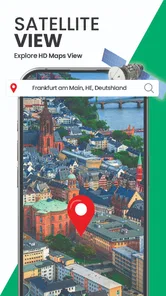
The central idea is simple: a map can show more than a route line. A three-dimensional satellite view can make it easier to orient yourself around a place by showing its broader layout, while the live-camera element adds a visual angle to exploring locations. That combination is most appealing when a street map feels too abstract or when I am curious about an area before visiting it.
It is worth keeping expectations grounded. A visual view is a companion to navigation, not a guarantee that every detail on screen will answer a practical question about a location. I would use it to build a general sense of where I am going, then rely on clear route instructions and my surroundings when making real-time decisions. That distinction makes the app more useful and helps avoid treating an appealing view as a substitute for careful navigation.
What’s the Buzz About?
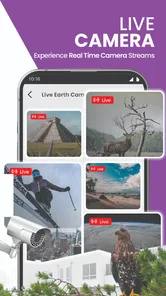
So, what exactly does this app do? In simple terms, it's like having a live map that not only gives you directions but also lets you see the world in real-time through a live camera feature. Yup, you read that right! While traditional GPS apps are great, the GPS Satellite Map, Live Camera elevates the whole navigation experience by integrating live camera feeds. It’s like having your very own travel show right on your phone.
How I would use it on an ordinary outing
Imagine arranging to meet someone at an unfamiliar part of town. Before leaving, I would look at the route and use the visual perspective to understand the area around the destination. Once nearby, that context could help me recognize the general layout instead of staring only at a line on a flat map. It is a small difference, but it can make planning feel less like following an abstract path and more like preparing for a real place.
For a trip, I would use the same approach in advance: check the destination and its surroundings while deciding how to get there, then keep the navigation view focused on the actual journey. A helpful habit is to explore before setting off rather than trying to inspect visual details while walking or driving. That keeps the camera-style element in its best role—as preparation and orientation, not a distraction at the moment when attention belongs on the road.
Features That Stand Out
The first thing I noticed was the app's sleek interface. It’s user-friendly and doesn’t overwhelm you with too many buttons or options. The live camera feature is undoubtedly the star of the show. It provides real-time imagery of the location you're navigating through. This is incredibly useful when you're trying to make sense of directions in a complex area.
More From Our News Desk

 Weather - By Xiaomi
Weather by Xiaomi Review: Clear at a Glance, Less Clear Up Close
Xiaomi’s weather app makes everyday forecasts quick to scan, but its calm surface can leave useful details and recovery paths harder to find than they should be.

 X
XX Under Pressure: Can It Recover When Posting Goes Wrong?
A resilience-focused review of X, examining setup, mistaken posts, interruptions, weak connections, and the gaps that matter when recovery needs to be dependable.

 Clash of Clans
Clash of Clans Is Won Between the Battles
Its raids are quick; its community is a long-term project of coordination, teaching, rivalry, and shared responsibility—with all the friction that entails.

 Android Auto
Android Auto Makes the Case for Quieter Car Software
The car interface is no longer judged by how much it can do, but by how quietly it helps. Android Auto shows what drivers now expect—and what still gets in the way.

 MobiOffice: Word, Sheets, PDF
MobiOffice: Transforming Mobile Productivity with Seamless Integration
MobiOffice: Word, Sheets, PDF is redefining mobile productivity with a surprising blend of functionality and innovation.

 EA SPORTS FC Soccer Mobile 26
EA SPORTS FC™ Mobile Soccer: Redefining Mobile Sports Gaming
Dive into EA SPORTS FC™ Mobile Soccer, where immersive gameplay and strategic depth transform mobile sports gaming.
Latest News



Another feature worth mentioning is the offline map access. We all know the struggle of losing internet connection just when you need it the most. With this app, you can download maps ahead of time, ensuring that you’re never truly lost, even in the middle of nowhere.
A practical way to approach route planning
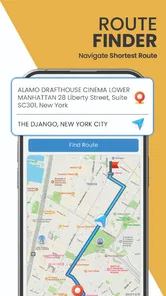
I would treat the visual view and the route as two different tools with different jobs. First, use the map to decide where you want to go; then use the satellite perspective to get a broader impression of the destination. If a view does not make a landmark or entrance clear, fall back on the route and on what you can see in person. This avoids the common trap of spending too long zooming around a map when a simple route check is all that is needed.
Offline access can also change how I prepare. If I expect to be somewhere with unreliable connectivity, I would check the route and make any relevant map preparations before leaving, rather than assuming I can sort everything out after the signal drops. That is especially sensible for unfamiliar areas: an offline map can be reassuring, but it does not remove the need to plan the route while the connection is available.
Exploring the World, One Camera at a Time
One of the coolest things about this app is its potential for exploration. I found myself using it not just for navigation, but also as a tool to explore new places virtually. Whether you’re planning a trip or just want to wander around a city from the comfort of your home, this app makes it all possible.
The accuracy of the GPS is quite impressive too. It locks onto your location quickly and provides precise directions. I’ve tried it in various locations and it didn’t let me down. It’s like having a personal guide who knows the terrain ever so well.
Where it fits among navigation choices
Compared with a conventional navigation app, the distinctive appeal here is the combination of route guidance with satellite and camera-oriented exploration. If my priority were simply reaching an address with familiar turn-by-turn prompts, a standard map app might be the quicker, more predictable choice. If I wanted to look around a destination as part of deciding where to go, this app’s visual emphasis would be more interesting.
The balance depends on the trip. A commuter who repeats the same route may not gain much from extra visual exploration, while a visitor heading somewhere unfamiliar may appreciate having another way to understand the surroundings. I would not make the visual element the sole basis for choosing a route; I would use it to complement directions, particularly when an area is unfamiliar or the destination is the main point of interest.
Making the visual view useful before you leave
A practical way to get value from this combination is to separate planning from travel. I would check the destination while I have time to look carefully, then make a note of one or two useful visual cues rather than trying to memorize a whole map. A broad layout, a nearby open space, or the general shape of a street network can help me feel oriented; tiny details are less dependable as a memory aid once I am moving.
This also answers a common question about whether the camera-oriented view replaces normal directions: I would not treat it that way. Its strength is giving an additional impression of a place, while a route remains the clearer tool for deciding where to go next. If I am walking, I can stop somewhere safe to check the map; if I am driving, I would set things up before moving and follow appropriate navigation cues rather than trying to study imagery on the road.
A realistic arrival-day example
Suppose I am visiting a neighborhood for an appointment and have never been there before. Before setting out, I can use the route to understand the general journey, then inspect the destination area so it feels less unfamiliar. When I arrive nearby, I still need to pay attention to street signs, entrances, and the actual surroundings. The satellite perspective is helpful preparation, not a promise that it will identify the exact door or solve every last turn.
That distinction matters most in places where several buildings or streets look alike. Rather than repeatedly zooming in and trusting a single image, I would use the view to narrow my sense of the area and then confirm the final approach with the route and what I can see on site. It is a small planning habit, but it keeps a visually rich map from creating false confidence.
Who is likely to get the most from it?
GPS Satellite Map is a free maps and navigation app from Sky Labs Studio. It is rated for Everyone, and its average rating is 3.7 from around 2.9 thousand ratings, with more than a million installs. It was released on January 4, 2023, and version 2.2.7 requires Android 7.0 or later. Those details make it easy to judge whether it fits your device and whether you are comfortable trying a navigation app with a mixed reception.
I think it suits curious travelers, people planning visits to unfamiliar places, and anyone who enjoys exploring a map before setting out. I would be less likely to recommend it as a sole navigation choice to someone who wants the simplest possible interface for daily commuting, or who needs navigation to work in a particular way for a demanding trip. The app’s visual angle is the reason to try it; if that does not interest you, a conventional map may be a better match.
When a familiar map app is the better choice
For an everyday commute, I usually value speed and consistency over extra ways to view the destination. If I already know the route and only need clear instructions, a conventional navigation app may keep the task simpler. The same goes for a time-sensitive journey where I want to follow a familiar interface without stopping to explore an area visually. This app makes more sense when the extra perspective is useful, not merely because it is available.
I would also be cautious about relying on it alone for trips where a wrong turn would have serious consequences. A map view can help with orientation, but it cannot replace attention to road conditions, signs, or current circumstances. For those journeys, I would choose the navigation setup I know best and use satellite-style exploration only as a secondary planning aid.
Small habits that reduce friction
Before an unfamiliar outing, I would check that the route and destination are ready while I have a connection, especially if I expect coverage to be uneven. I would also avoid treating offline access as a complete substitute for preparation: it is useful to have a map available, but planning ahead is still the sensible move. These steps are less about mastering a hidden setting and more about avoiding the moment when I need to solve everything in a hurry.
Another useful habit is to decide what question I want the visual view to answer. Am I trying to understand the surrounding area, compare the general layout, or get a feel for a place before visiting? Having a purpose keeps exploration focused. If I cannot identify a useful cue, I return to the route rather than spending extra time inspecting imagery that is not improving the plan.
Wrapping It Up
In conclusion, if you’re someone who loves exploring or simply needs a reliable navigation tool, this app is a must-have. The blend of GPS functionality with live camera feeds offers a fresh take on navigation apps. It’s not just about getting from point A to B; it’s about experiencing the journey in a new and exciting way. So, next time you’re planning a trip or just want to explore the world from your living room, give GPS Satellite Map, Live Camera a try. You might just find yourself hooked, like I did!
My recommendation comes with a practical caveat: use the extra visual perspective when it adds context, and keep your attention on safe, clear route guidance while travelling. For a free app focused on combining navigation with visual exploration, that is a worthwhile proposition. For someone who wants nothing beyond familiar, direct directions, it may be more app than they need; for a traveler who likes to preview a place before arriving, the different viewpoint is the reason to give it a chance.
Live Satellite Earth Map View Frequently Asked Questions
Is GPS Satellite Map, Live Camera free to download?
Yes, GPS Satellite Map, Live Camera is free to download. It is a maps and navigation app from Sky Labs Studio, designed around route guidance, a 3D satellite view, and live Earth camera streaming. If you are comparing navigation apps, its free price makes it easy to try, while the features you use most will determine whether it suits your everyday travel needs.
What devices and software versions can run GPS Satellite Map, Live Camera?
The app is available for Android devices running version 7.0 or later. Before downloading, check the operating system version on your phone or tablet to make sure it meets that requirement. GPS Satellite Map, Live Camera is listed as an Everyone-rated app, so its content rating is intended to be suitable for a broad audience.
What features does GPS Satellite Map, Live Camera offer?
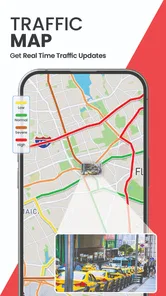
GPS Satellite Map, Live Camera provides comprehensive features such as real-time GPS navigation, live satellite view, and a built-in camera functionality to capture your journey. It also offers offline maps, route planning, and live traffic updates, making it a versatile tool for travelers and drivers alike. The app is designed to offer a seamless navigation experience with high accuracy.
Is GPS Satellite Map, Live Camera available for both Android and iOS?
Yes, GPS Satellite Map, Live Camera is available for both Android and iOS platforms. Users can download it from the Google Play Store or Apple App Store, ensuring a wide range of device compatibility. This makes it accessible for most smartphone users who wish to take advantage of its navigation and live camera features.
How user-friendly is GPS Satellite Map, Live Camera for new users?
GPS Satellite Map, Live Camera is designed with a user-friendly interface that makes it easy for new users to navigate. The app includes intuitive controls and clear instructions, ensuring that even those unfamiliar with GPS technology can use it effectively. Tutorials and customer support are also available to assist users in maximizing their experience.
Pros
- High-resolution satellite imagery.
- Real-time GPS tracking.
- User-friendly interface.
- Live camera integration.
- Offline maps available.
Cons
- Consumes significant battery life.
- Requires internet for updates.
- Some features are premium.
- Ads in free version.
- Limited customization options.











