

GPS Phone Tracker Live Map
- 0.00
- 0.0
- Installs
- 10.00K
- Price
- Free

Screenshots
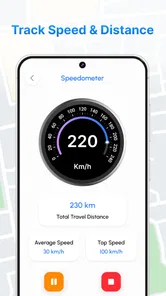
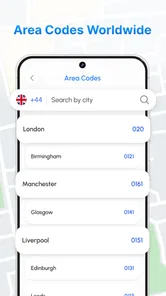
Analysis by Reviewed
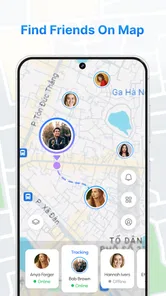
GPS Phone Tracker Live Map is the kind of Android navigation app I would look at when I want a straightforward way to stay aware of friends’ locations without turning the experience into a complicated mapping project. Its purpose is easy to understand: it combines location tracking with a map so people can remain connected while moving around. After spending time with it, my impression is that its appeal comes from simplicity rather than a long list of advanced tools.
The app is developed by INDEGOFT and is available free of charge. It belongs to the Maps & Navigation category, carries an Everyone age rating, and currently sits at version 1.0.0. It requires Android 8.0 or later, which makes it accessible to many older phones as well as newer devices. Its published reach is still modest, with over ten thousand installs, so I see it as a focused utility rather than an established replacement for the biggest navigation platforms.
How GPS Phone Tracker Live Map feels in everyday use
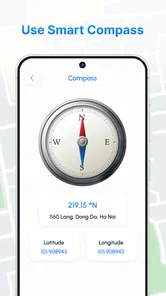
The first thing I noticed is that this is not trying to be a full driving assistant, public-transit planner, or travel guide. That distinction matters. If I need turn-by-turn directions, traffic layers, business searches, or detailed route planning, I would normally choose a mature mapping service. This app makes more sense when the central question is simply where connected people are and how to keep track of a shared outing.
A realistic example would be a group meeting at a large park or event area. Instead of repeatedly sending messages such as “Where are you now?”, everyone can use the location view as a shared reference point. The same idea can help when friends are arriving separately, when a family wants a basic way to remain connected during a day out, or when one person is trying to find the rest of a group in an unfamiliar area.
The most useful mindset is to treat it as a shared-location tool, not as a complete navigation replacement. That expectation keeps the experience clear. The map is valuable because it reduces unnecessary coordination, but it should not be judged by features that belong to a different kind of app.
Speed expectations and the map experience
For a location tracker, perceived speed is less about flashy animation and more about how quickly the map becomes useful after opening it. In my experience, the important moments are the initial display, the appearance of a current position, and the time it takes to understand where other people are in relation to me. A clean, focused interface can feel faster than a feature-heavy map that spends time loading unrelated information.
GPS Phone Tracker Live Map benefits from having a narrow purpose. There are fewer distractions between launching the app and looking at a location. That makes it suitable for quick checks, especially when I am already outside and do not want to navigate through several layers of menus. The app’s simple positioning also gives it a calmer feel than large mapping suites packed with recommendations, route options, and commercial details.
More From Our News Desk

 Weather - By Xiaomi
Weather by Xiaomi Review: Clear at a Glance, Less Clear Up Close
Xiaomi’s weather app makes everyday forecasts quick to scan, but its calm surface can leave useful details and recovery paths harder to find than they should be.

 X
XX Under Pressure: Can It Recover When Posting Goes Wrong?
A resilience-focused review of X, examining setup, mistaken posts, interruptions, weak connections, and the gaps that matter when recovery needs to be dependable.

 Clash of Clans
Clash of Clans Is Won Between the Battles
Its raids are quick; its community is a long-term project of coordination, teaching, rivalry, and shared responsibility—with all the friction that entails.

 Android Auto
Android Auto Makes the Case for Quieter Car Software
The car interface is no longer judged by how much it can do, but by how quietly it helps. Android Auto shows what drivers now expect—and what still gets in the way.

 MobiOffice: Word, Sheets, PDF
MobiOffice: Transforming Mobile Productivity with Seamless Integration
MobiOffice: Word, Sheets, PDF is redefining mobile productivity with a surprising blend of functionality and innovation.

 EA SPORTS FC Soccer Mobile 26
EA SPORTS FC™ Mobile Soccer: Redefining Mobile Sports Gaming
Dive into EA SPORTS FC™ Mobile Soccer, where immersive gameplay and strategic depth transform mobile sports gaming.
Latest News



There is an important practical limitation, though: location tracking is never controlled by the map screen alone. The phone’s GPS reception, network connection, battery condition, and system behavior all influence how current a position feels. A tracker can appear slow when the real issue is an indoor environment, weak reception, or a device that has restricted background activity. I would therefore avoid judging responsiveness from one difficult location, such as a basement, crowded building, or underground station.
One useful habit is to open the map before the moment becomes urgent. If I am meeting friends, checking the app while I still have a stable connection gives the device time to establish its context. That small change in workflow is more practical than repeatedly closing and reopening the app when I am already late.
What happens during heavier use
The app becomes more demanding when several things happen at once: the map is open, location information is being refreshed, the phone is moving between networks, and the display remains active for a long period. These are normal pressure points for any GPS-based tool. I would be especially conscious of them during a long walk, a festival, a road trip, or any situation where the phone is being used continuously rather than checked briefly.
For short sessions, I find the concept well suited to the task. A quick look before leaving a meeting point or while waiting for friends does not require the same resources as keeping a live map visible throughout an afternoon. If I were planning extended use, I would begin with a reasonably charged phone and avoid running several unrelated location-heavy apps at the same time. That is not a special trick for this product; it is a sensible way to reduce competition for battery and system resources.
Another non-obvious trade-off is the difference between active viewing and occasional checking. Keeping the map constantly visible may feel reassuring, but it can create more battery pressure than opening it only when coordination is needed. For a family outing, I would agree in advance on when people expect to check their positions. That turns the tracker into a practical communication aid instead of a screen that everyone watches continuously.
When the phone is under strain, recovery matters more than perfect continuity. If the map seems behind, my first response would be to move somewhere with a clearer view of the sky, confirm that the phone still has connectivity, and wait briefly before assuming the app has failed. Reopening the app can be a reasonable next step, but I would not make repeated restarts the normal workflow.
Reliability, recovery, and sensible expectations
I see reliability here as a combination of dependable access and understandable behavior. A location tracker is useful when I can open it quickly, recognize the map, and interpret the displayed positions without confusion. It is less useful if I expect it to replace direct communication in every situation. Location data should support a plan, not become the only way a group knows where to meet.
For that reason, I would still set a clear meeting point when using the app with friends. A shared map can show relative positions, but a simple landmark or agreed entrance makes recovery easier if someone loses signal or stops checking the screen. This is particularly important at large venues, where being “near” someone on a map may still leave several possible paths and entrances.
The app is also better suited to cooperative use than to silent assumptions. Everyone involved should understand that the purpose is staying connected and exploring locations together. If one person’s phone becomes unavailable, the group should have another way to communicate. That is not a criticism unique to this app; it is a basic safety principle for any location-sharing arrangement.
When a position appears outdated, I would avoid treating it as an exact live measurement. GPS readings can shift, especially around tall buildings or indoors, and a phone may not refresh in the same way while it is moving or resting. The right response is to combine the map with a message or call when precision matters. This is one of the clearest boundaries between a convenient tracker and a professional dispatch or emergency-location system.
Device constraints and Android compatibility
The Android requirement is one of the app’s practical strengths. Support for Android 8.0 or later means people using older compatible phones do not automatically need a recent flagship device. That can be useful for families who have a mixture of newer and older handsets, or for anyone keeping a secondary phone for travel and outdoor activities.
At the same time, operating-system compatibility does not guarantee identical performance on every device. Older hardware may take longer to display a map, handle background work less comfortably, or manage battery-saving rules more aggressively. A newer phone may feel more immediate, but the app’s basic value does not depend on owning premium hardware. I would judge it by whether the particular phone can maintain a stable connection and provide usable location access.
Battery management deserves special attention. GPS use, mobile data, and a bright screen can all contribute to faster battery drain, particularly during long sessions. Before a day out, I would charge the phone and carry a power bank if the tracker is expected to remain active for hours. I would also avoid assuming that an older battery will behave like a new one simply because the app itself is lightweight in concept.
Storage should not be the main concern for someone considering this app, but system conditions still matter. A phone with very little free space, many background processes, or strict power-saving behavior may provide a less consistent experience. If the app is being used for an important meetup, testing it beforehand on the actual device is smarter than discovering a limitation at the destination.
Who will get the most from it
I would recommend GPS Phone Tracker Live Map to people who want a focused way to coordinate locations with friends and who prefer a simple map-based experience. It can be a good fit for casual group outings, meeting arrangements, family coordination, and exploring a place together without demanding a full navigation suite.
It may also suit users who find major mapping apps overwhelming. A large platform can be excellent for directions but excessive when the only goal is checking where a group is. The smaller scope here can make the decision process easier: open the tracker, look at the shared location context, and decide whether to move, wait, or contact someone.
I would be more cautious about recommending it to someone who needs professional-grade tracking, detailed route guidance, long-term location history, or extensive travel planning. Those needs call for a more specialized or mature service. I would also skip it as a sole safety solution for situations where a missed update could have serious consequences. In those cases, direct contact and an appropriate dedicated service should remain part of the plan.
Privacy-conscious users should think carefully about the social side of any location-sharing app before using it. I would only share locations with people I trust, agree on when tracking is appropriate, and stop using the shared view when the outing is over. The convenience is real, but it should never replace personal boundaries.
How it compares with familiar alternatives
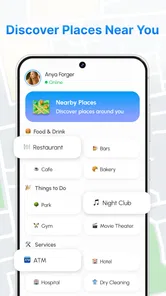
Compared with a general mapping app, GPS Phone Tracker Live Map appears more narrowly focused. The familiar alternative is usually stronger for addresses, routes, traffic, places, and broader geographic information. This app’s advantage is the directness of its tracking purpose. If I am trying to find a restaurant, I would use a conventional map. If I am trying to coordinate with friends around a shared location, this focused approach may feel less cluttered.
Compared with ordinary messaging, the map view can reduce the back-and-forth needed to describe where someone is. Messages remain better for explanations, last-minute changes, and confirming a landmark, so I would use both rather than treating them as competitors. The strongest workflow is often a quick map check followed by a short message when the visual information is not precise enough.
Compared with a dedicated family-safety platform, this app is easier to understand as a basic location utility, while a specialized service may be preferable for alerts, history, detailed controls, or structured family management. I would choose according to the job rather than assuming one category automatically wins. GPS Phone Tracker Live Map is most convincing when the requirement is modest and immediate.
Version, availability, and my performance verdict
At version 1.0.0, the app feels like an early, focused tool rather than a deeply expanded ecosystem. That can be positive for someone who wants a clean starting point, but it also means I would keep expectations realistic about polish and breadth. The current install base is over ten thousand, which suggests that it has reached real users while remaining a relatively small app in this space.
The free price removes the main barrier to trying it, and the Everyone rating makes it broadly approachable from an age-classification standpoint. I would still introduce it to children or family members with a conversation about responsible location sharing, because an age label does not replace good judgment about who can see a person’s whereabouts.
My final performance judgment is measured rather than dramatic: this app makes sense for short, purposeful location checks and uncomplicated group coordination. Its perceived speed should be best when the device has a stable connection and clear GPS conditions, while extended tracking will naturally place more pressure on battery and connectivity. Recovery is manageable when I use the map alongside a meeting plan and direct communication.
For a free, focused location tracker, its strongest quality is clarity. I would install it for casual meetups, shared outings, and simple location awareness, especially on an Android phone running 8.0 or later. I would choose a broader mapping service for navigation and a dedicated safety platform for advanced monitoring. Used within those limits, GPS Phone Tracker Live Map is a practical option from INDEGOFT for people who want less map clutter and a more direct way to stay connected while exploring together.
GPS Phone Tracker Live Map Frequently Asked Questions
What devices and operating systems can run GPS Phone Tracker Live Map?
GPS Phone Tracker Live Map is an app in the Maps & Navigation category, and its minimum operating system requirement is 8.0. Before downloading, check that your device meets this requirement and has location services available. Keeping the operating system and app updated can also help avoid compatibility issues and ensure that the location features work as expected.
Who developed GPS Phone Tracker Live Map, and what is it designed to do?
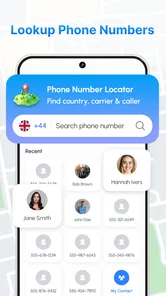
INDEGOFT developed GPS Phone Tracker Live Map as a simple location tracker for staying connected with friends and exploring locations. Its focus is location sharing on a map rather than general-purpose navigation. Whether it fits your needs depends on how you intend to use location features and whether the people you want to connect with are willing to share their locations.
What is GPS Phone Tracker Live Map used for?
GPS Phone Tracker Live Map is designed to help users view and share real-time location information through an interactive map. It can be useful for keeping track of family members, coordinating with friends, monitoring a personal device, or finding a phone’s recent location. Its usefulness depends on location permissions, an active internet connection, and the accuracy of the device’s GPS signal.
Does GPS Phone Tracker Live Map track a phone without the owner knowing?
No legitimate location-tracking app should be used to secretly monitor another person. GPS Phone Tracker Live Map generally requires location access and, depending on its features, may require the other user to install the app, create an account, or approve location sharing. Always obtain clear consent before tracking someone, and review local privacy laws because unauthorized monitoring may be illegal.
Does the app work without an internet connection or GPS signal?
The app may still display previously loaded map information or a last known location when the phone is offline, but live tracking normally requires mobile data or Wi-Fi. GPS accuracy can also decrease indoors, underground, between tall buildings, or when the device has disabled location services. For the best results, keep GPS, mobile connectivity, and the required app permissions enabled.
Pros
- Shows real-time location updates on an easy-to-read live map.
- Can help families coordinate meetups and monitor shared trips.
- Location sharing may improve safety during travel or outdoor activities.
- Map-based tracking makes it simple to check a person's recent position.
- Useful for finding devices or contacts when location access is enabled.
Cons
- Accurate tracking depends heavily on GPS signal and mobile data coverage.
- Continuous location use can noticeably reduce battery life.
- Privacy concerns arise when sharing precise location with other users.
- Some features may require subscriptions
- ads
- or in-app purchases.
- Background tracking may be limited by Android or iOS battery settings.











