

GPS Maps & Voice Directions
- 3.00
- 4.2
- Installs
- 50.00K
- Price
- Free
Screenshots
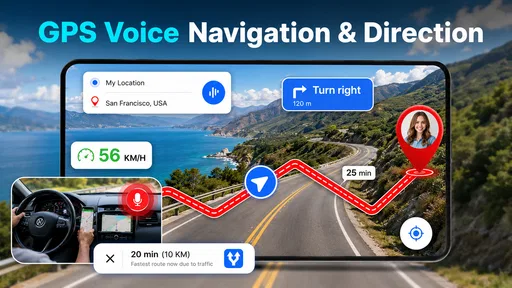

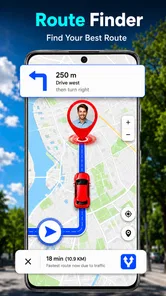

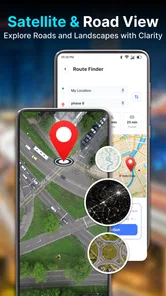
Analysis by Reviewed
Choosing a navigation app is less about finding the most features and more about finding one you can understand quickly when you are already on the move. I approached GPS Maps & Voice Directions with that practical question in mind: does it make everyday route-finding feel straightforward, and is its GPS voice guidance a good fit for the way you travel? My view is that it is worth considering if you want a simple maps-and-directions tool, but it should not automatically replace a navigation app you already trust for specialist needs.
Start with the trips you actually take
Before choosing any navigation app, I would think about the route I make most often, how much help I need at junctions, and what I expect to do before setting off. A short drive to a new shop is a different job from planning a day with several appointments. This app is most promising when the main task is getting from a starting point to a destination with GPS guidance, rather than organizing every part of a trip.
That distinction also helps answer a common question: can a focused navigation app replace a familiar mapping service? It might for uncomplicated journeys if its directions suit you, but I would not assume it will cover every feature or travel situation you have come to rely on elsewhere. I would keep the app that already handles complex routes or your particular planning habits until a real-world comparison gives you a reason to switch.
What matters when choosing a navigation app
For a useful navigation companion, I look first at how easily I can begin a trip, whether spoken guidance suits the journey, and how much I need the app to do beyond getting me from one place to another. Those priorities are different for a short drive across town and a long trip where I need detailed route planning, saved places, or information about changing road conditions.
This is an app in the maps and navigation category, developed by Big Ocean Studio. Its focus is easy to grasp: use GPS to find a route and receive voice directions. That makes it appealing to someone who wants navigation to be the main event rather than one feature among many. At the same time, a concise purpose is not proof that it covers every situation, so I would judge it by whether its core guidance matches your usual trips.
The app is free to download, and it is rated for Everyone. It has an average rating of 4.2 from around 859 ratings, with 50,000-plus installs. Those figures suggest that people have tried it and that its reception is generally positive, but they do not tell me whether it will work well for a particular route or driving habit. I would treat them as context, not a substitute for checking the app yourself before an important journey.
A simple way to assess the fit
Think about what you need during a trip, not just what you want to see on a feature list. If you mostly enter a destination and follow spoken prompts, a focused GPS app may be enough. If you regularly compare several routes, manage a complicated itinerary, or depend on specialized travel information, a broader navigation service may be a better starting point.
More From Our News Desk

 Weather - By Xiaomi
Weather by Xiaomi Review: Clear at a Glance, Less Clear Up Close
Xiaomi’s weather app makes everyday forecasts quick to scan, but its calm surface can leave useful details and recovery paths harder to find than they should be.

 X
XX Under Pressure: Can It Recover When Posting Goes Wrong?
A resilience-focused review of X, examining setup, mistaken posts, interruptions, weak connections, and the gaps that matter when recovery needs to be dependable.

 Clash of Clans
Clash of Clans Is Won Between the Battles
Its raids are quick; its community is a long-term project of coordination, teaching, rivalry, and shared responsibility—with all the friction that entails.

 Android Auto
Android Auto Makes the Case for Quieter Car Software
The car interface is no longer judged by how much it can do, but by how quietly it helps. Android Auto shows what drivers now expect—and what still gets in the way.

 MobiOffice: Word, Sheets, PDF
MobiOffice: Transforming Mobile Productivity with Seamless Integration
MobiOffice: Word, Sheets, PDF is redefining mobile productivity with a surprising blend of functionality and innovation.

 EA SPORTS FC Soccer Mobile 26
EA SPORTS FC™ Mobile Soccer: Redefining Mobile Sports Gaming
Dive into EA SPORTS FC™ Mobile Soccer, where immersive gameplay and strategic depth transform mobile sports gaming.
Latest News



There is also a practical difference between screen-based directions and voice guidance. Spoken prompts can reduce how often you need to look down, especially when the route is familiar enough that you only need a reminder before a turn. They are less helpful if you cannot hear them clearly, find spoken instructions distracting, or need a map view to make sense of an awkward junction. I would try both modes in a low-pressure trip rather than assume voice guidance is right for every drive.
Where GPS Maps & Voice Directions makes sense
I think this section is best approached as a question of fit: when does a focused GPS tool make a journey easier, and when does it add another app to manage? I’ll look at the kinds of everyday trips where its straightforward route guidance can be useful, while keeping the decision grounded in how you actually travel.
Keeping the trip focused
The clearest strength of GPS Maps & Voice Directions is its straightforward purpose. When I am going somewhere and want GPS directions rather than a large collection of travel tools, a focused app can make the decision process feel lighter. It is particularly relevant for occasional drivers, people visiting an unfamiliar neighborhood, or anyone who wants a separate navigation option instead of relying on a general-purpose app for everything.
A realistic use case is an evening errand across town. You know roughly where you are going but not which turns will be easiest, and you would rather listen for prompts than keep checking a phone at each junction. In that situation, a voice-navigation app can help you concentrate on the road while still giving you route guidance. I would set the destination before setting off, position the phone securely, and avoid interacting with it while moving.
Another useful situation is handing navigation to a passenger. A passenger can enter or check the destination and help interpret the map while the driver listens for instructions. This is a small workflow choice, but it matters: it reduces the temptation for the driver to manage the screen and gives you a chance to catch an incorrect destination before the trip begins.
Make a quick test part of your setup
For a first outing, I would choose a familiar route rather than a time-sensitive appointment. That gives you a fair chance to learn how the map and spoken directions work without making an unfamiliar road the place where you discover a setting or prompt you dislike. If a trip has several stops, check the route setup before leaving and confirm that the destination shown is the one you intended.
Voice navigation also rewards sensible phone placement. A mount that keeps the display visible without blocking your view is more useful than a last-second glance at a phone in your hand. If you prefer not to hear instructions continuously, decide before driving whether you want to rely on the map display or spoken prompts. The best arrangement is the one that keeps attention on the road, not the one that exposes the most information.
The current version is 1.0.5, and the minimum operating-system requirement is 7.0. That broad requirement may make it an option for some older devices, though compatibility alone does not guarantee a smooth experience on every phone. Before planning to depend on it, install it on the device you intend to use and try a short route. That is especially sensible if the phone is older or already struggles with navigation apps.
Where it may fall short for your routine
A focused navigation app is not necessarily the best choice for every traveler. If you need a dependable plan for a long journey, want to coordinate several stops, or rely on information beyond turn-by-turn guidance, compare it with the more comprehensive mapping apps you already use. I would not assume that the presence of GPS and voice directions means a service offers every advanced routing or trip-planning feature.
That distinction matters most when a wrong turn would create more than a minor delay. For an unfamiliar intercity trip, a rural drive, or a route with complicated timing, I would check the journey in a familiar alternative before leaving. You can then decide whether this app’s guidance is enough for the day or whether another service better suits the trip. Keeping a backup map or a second navigation option available is a sensible precaution, not a sign that the app is useless.
There is also a learning cost to switching. If you already know where your saved places are and how your usual app presents route choices, moving to a new navigation tool can briefly slow you down. Before making it your default, try finding a destination, starting guidance, and adjusting your preferred way of following directions while parked. A few minutes of practice can prevent frustration when you are already late or dealing with an unfamiliar intersection.
How it compares with common alternatives
Compared with a broad mapping service, GPS Maps & Voice Directions is best approached as a more focused option for GPS guidance. Broad services can be more convenient when you want navigation alongside other map-related tasks; a dedicated choice can feel more direct when you mainly need to follow a route. Which is better depends on your habits, and I would not switch away from a tool that already handles your regular journeys reliably just for the sake of trying something new.
Compared with specialist navigation tools, the trade-off may go the other way. If your routine depends on detailed planning or a particular kind of travel information, a purpose-built alternative may deserve a trial before this one. I would also choose a familiar, well-practiced option for a high-stakes trip if I had not yet tested this app’s directions in ordinary conditions. For a short local journey, though, learning a simpler tool can be a reasonable experiment.
My practical comparison is not about declaring one category a winner. It is about matching the app to the job: use a focused GPS option for uncomplicated point-to-point guidance, and keep a broader or specialist service for journeys that need more planning or context. If you alternate between those types of travel, there is no need to force one app to do everything.
Check the purchase model before settling in
Although the app is free, it includes in-app purchases ranging from $14.99 to $199.99 per item. That makes it worth checking what is offered inside the app before committing to any paid option. I would begin with the free experience, see whether it covers your usual route-finding needs, and only consider a purchase if you can identify a clear benefit for your own use.
This is especially important if you are downloading it as a backup. A free installation can be a low-commitment way to test whether the interface and spoken guidance suit you, but an optional purchase should not be treated as necessary without understanding what it unlocks. Take time to review the in-app choices rather than tapping through quickly, and do not pay simply because you hope a purchase will solve a problem you have not identified.
Who should try it—and who should keep looking
I would recommend giving it a short trial if you want a straightforward way to get GPS directions, value voice prompts, and do not need a complex travel-planning setup. It may also suit someone who wants a second navigation option on a compatible device, provided they test it before depending on it. Its Everyone content rating makes it suitable from a content-rating perspective for a general audience.
I would keep looking if your navigation routine depends on specialized features, if you need a single app to organize a complicated journey, or if your current map service already meets your needs. It is also not the right moment to learn a new app when you are about to take a route where there is little room for confusion. Familiarity and preparation count as much as a feature list when you are navigating.
A sensible way to decide
If you are weighing whether to install it, I would treat the first trip as a practical test rather than a commitment. Pick a destination you know, but take a route where a prompt could still be useful. Notice whether you can understand the directions at a comfortable volume and whether the map helps when an instruction arrives sooner or later than you expected. Those observations tell you more about personal fit than a quick glance at ratings.
For someone who does not drive, the same decision depends on how they plan to use GPS guidance while travelling. The key question is whether the app’s directions work for the journey at hand; I would not assume that a navigation tool aimed at route-finding automatically suits every mode of travel. If your regular trips involve a specific transport type or detailed local information, compare its usefulness with the service you already use before relying on it.
One small but useful habit is to prepare the destination and check the phone’s position while stationary, then leave the screen alone once moving. If you are travelling with someone else, agree who will handle any route changes. This avoids turning a minor uncertainty into a distracting scramble and makes voice prompts more useful as reminders rather than as a reason to keep looking down.
Overall, I see GPS Maps & Voice Directions as a reasonable candidate for everyday, point-to-point navigation rather than a guaranteed all-in-one replacement. Its appeal is the clear emphasis on GPS guidance and voice directions; its main trade-off is that you should confirm it fits your own workflow instead of assuming it matches a broader mapping service. Try it on a familiar outing, check the purchase options before spending, and keep your established alternative for trips that demand more planning. If it feels natural after that test, it may earn a place among your regular travel tools.
GPS Maps & Voice Directions Frequently Asked Questions
What is GPS Maps & Voice Directions used for?
GPS Maps & Voice Directions is a navigation app designed to help you plan routes and follow turn-by-turn guidance while traveling. Depending on the features available in your version, it may also offer map browsing, route details, and spoken directions. Check the app’s listing and settings to confirm which options are included, since features and availability can vary by device, region, and app version.
Does GPS Maps & Voice Directions work without an internet connection?
GPS navigation generally needs your phone’s location services, while downloading maps, searching for places, or checking live traffic may require an internet connection. Offline use depends on whether the app lets you save map areas or routes in advance. Before relying on it in a place with poor coverage, open the app’s settings and verify what can be downloaded and used offline.
What permissions does GPS Maps & Voice Directions need?
The app may request access to your device’s location so it can identify your position and provide route guidance. Microphone, notifications, or other permissions may be requested for specific features, but they are not necessarily needed for basic navigation. Review each permission prompt and the app’s privacy information, and allow only access you are comfortable providing. Location use can affect privacy and battery life.
Can I use GPS Maps & Voice Directions while driving?
The app’s voice prompts can help you follow a route without repeatedly looking at the screen, if spoken guidance is supported and enabled. Set your destination and adjust audio before you start moving; never enter information or handle your phone while driving. Follow road signs and local laws, because app directions can be delayed, incomplete, or unsuitable for changing road conditions.
Is GPS Maps & Voice Directions free, and what should I check before downloading?
The download may be free, but pricing, advertisements, subscriptions, or in-app purchases can vary by platform and version. Read the current Google Play or App Store listing for the full cost details, supported devices, developer information, and recent user feedback. Also check the requested permissions and privacy disclosures, and make sure the app is available in your region before installing it.
Pros
- Voice guidance helps you keep your eyes on the road while navigating.
- GPS-based directions make it easy to plan unfamiliar routes.
- Map and navigation features are useful for everyday trips.
- Turn-by-turn prompts help you anticipate upcoming maneuvers.
- The straightforward purpose makes the app easy to understand.
Cons
- GPS accuracy can vary with signal strength and surroundings.
- Voice directions may be less useful in noisy environments.
- Navigation can consume significant battery during longer trips.
- Map information may not always reflect recent road changes.
- Using GPS and maps may require an active data connection.











