

GPS+ Maps, Navigation, Traffic
- 3.03K
- 4.5
- Installs
- 10.00M
- Price
- Free

Screenshots


Analysis by Reviewed
I judge navigation apps by what remains useful after the first few trips, not by how impressive they seem on day one. GPS+ Maps, Navigation, Traffic is a free maps and navigation app from JVSTUDIOS, and its mix of live traffic information and offline maps gives it a practical starting point. I would consider it for regular driving, especially when a route may pass through places with unreliable service, but lasting value depends on whether its directions and traffic view fit your daily routine.
First-week appeal: easy to get moving
If you're anything like me, finding your way around new places can be a bit of a challenge. That's where GPS+ Maps, Navigation, Traffic comes in handy. This app is your ultimate travel companion, offering real-time navigation and traffic updates. Let's dive into what makes this app a must-have for your smartphone.
Intuitive User Interface
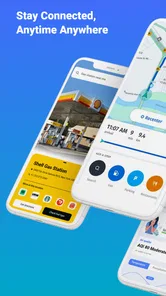
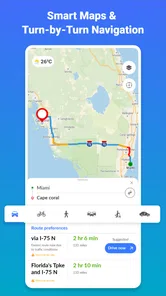
The first thing you'll notice about GPS+ Maps, Navigation, Traffic is its user-friendly interface. The developers have done a stellar job of keeping things simple yet effective. With just a few taps, you can set your destination, choose your preferred route, and be on your way. The app's layout is clean, and the icons are easily recognizable, making the user experience smooth and enjoyable.
Real-Time Traffic Updates
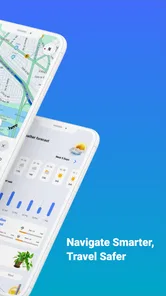
One of the standout features of this app is its real-time traffic updates. We all know how frustrating it can be to get stuck in traffic, especially when you're in a hurry. This app provides live traffic information, helping you avoid congested areas and plan your journey more efficiently. Whether it's a sudden road closure or an unexpected traffic jam, the app's got your back.
For a weekday commute, I would check the route before setting off, then treat the traffic view as a guide rather than a guarantee. Live conditions can help me spot a slow stretch and weigh another route, but they cannot promise that a detour will save time. If I already know the roads well, the benefit is smaller; on an unfamiliar cross-town trip, that quick overview can make the app worth opening.
Customizable Route Options
Another great feature is the customizable route options. You can choose from multiple routes based on your preferences, whether you're looking for the fastest route or the most scenic one. The app even allows you to avoid tolls or highways if that's what you prefer. This level of customization ensures that your journey is tailored to your needs.
Those choices are most useful when I decide what kind of drive I want before moving, rather than changing settings while navigating. Avoiding a highway may suit a relaxed local trip, while avoiding tolls can make sense when the added distance is acceptable. I would compare the proposed alternatives before committing, because a preference such as “no tolls” can trade a direct road for slower streets. For a familiar commute, I might leave the route alone; for a weekend drive, a quick review helps ensure the selected route matches the plan.
More From Our News Desk

 Weather - By Xiaomi
Weather by Xiaomi Review: Clear at a Glance, Less Clear Up Close
Xiaomi’s weather app makes everyday forecasts quick to scan, but its calm surface can leave useful details and recovery paths harder to find than they should be.

 X
XX Under Pressure: Can It Recover When Posting Goes Wrong?
A resilience-focused review of X, examining setup, mistaken posts, interruptions, weak connections, and the gaps that matter when recovery needs to be dependable.

 Clash of Clans
Clash of Clans Is Won Between the Battles
Its raids are quick; its community is a long-term project of coordination, teaching, rivalry, and shared responsibility—with all the friction that entails.

 Android Auto
Android Auto Makes the Case for Quieter Car Software
The car interface is no longer judged by how much it can do, but by how quietly it helps. Android Auto shows what drivers now expect—and what still gets in the way.

 MobiOffice: Word, Sheets, PDF
MobiOffice: Transforming Mobile Productivity with Seamless Integration
MobiOffice: Word, Sheets, PDF is redefining mobile productivity with a surprising blend of functionality and innovation.

 EA SPORTS FC Soccer Mobile 26
EA SPORTS FC™ Mobile Soccer: Redefining Mobile Sports Gaming
Dive into EA SPORTS FC™ Mobile Soccer, where immersive gameplay and strategic depth transform mobile sports gaming.
Latest News



Offline Maps
Worried about losing signal in remote areas? No problem! With offline maps, you can download maps in advance and navigate without an internet connection. This is particularly useful for those long road trips where connectivity might be an issue. Just download the map for your destination beforehand, and you're good to go!
The practical habit here is preparation: I would save the relevant area while connected, before leaving home or a hotel, instead of waiting until coverage drops. Offline access is a safety net for a route through patchy-service areas, not a substitute for checking conditions while online. Since live traffic depends on current information, I would not expect the offline map alone to provide the same picture of changing congestion. That distinction matters most on a long drive where the route crosses both connected towns and remote stretches.
Points of Interest
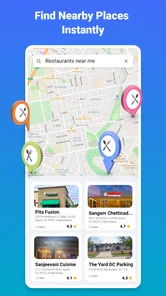
Exploring new places is part of the adventure, and the app makes it easier with its Points of Interest feature. You can discover nearby restaurants, gas stations, and tourist attractions with just a few taps. This feature is perfect for spontaneous travelers looking to make the most out of their trip.
In an everyday scenario, I might use this while arriving in an unfamiliar town: first choose a place to stop, then look for a nearby restaurant or fuel station without rebuilding the whole journey from scratch. I would still check that a place suits my needs before detouring, since a map result is a starting point rather than a personal recommendation. This makes the nearby listings handy for practical decisions, while travelers who plan every stop in advance may get less out of them.
Month-to-month value and upkeep
GPS+ Maps, Navigation, Traffic has a 4.6 average from around 328,000 ratings, and it has passed 10 million installs. Those figures suggest it has reached a broad audience, but they do not tell me whether it will fit my particular commute. The app is rated for Everyone, runs on Android 7.0 or later, and its current version is 4.0.36. I would keep it installed if I regularly drive unfamiliar routes or need offline coverage; if I only navigate occasionally in areas I know, the phone’s usual map option may already be enough.
Maintenance is mainly a matter of keeping offline areas useful: before a trip, I would check that the map I need is available and leave time to prepare it while connected. That small routine is easy to overlook when plans change suddenly. The app is free to download, with optional in-app purchases ranging from $0.99 to $49.99 per item, so I would review any purchase prompt and decide whether an added option solves a real need before spending. I would not pay simply because I use navigation often; the basic question is whether the free experience already covers my regular routes.
Putting it to work on a changing day
A useful test is a day when the plan is not fixed: I might leave home for an appointment, discover that the return trip will start from a different part of town, and need to decide whether to take a familiar road or follow a new route. I would enter the destination before driving, compare the available choices, and make the route decision while parked. If the day includes a rural stretch, I would prepare the offline area before leaving rather than assuming I can sort it out at the roadside.
This workflow makes the app’s separate strengths complement one another without treating them as interchangeable. Offline maps help with access to map information where service is poor; traffic information is useful for current conditions when connectivity is available. On a route that alternates between both situations, I would plan the broad journey offline and use live traffic where it can inform a choice. I would not count on an offline map to respond to a fresh delay, nor would I rely on a live traffic view as my only safeguard in a dead zone.
Choosing it over a familiar maps app
For someone deciding whether to switch, I would not start by replacing a map app that already handles every regular trip well. Instead, I would try GPS+ Maps, Navigation, Traffic on one route where its particular combination matters: an unfamiliar drive with a possible signal gap, or a trip where avoiding a toll road is important. Compare the suggested route with the option you normally use before you depend on either for a time-sensitive journey. A second app earns its space when it offers a useful alternative, not merely because it has a different screen.
The trade-off is routine. A well-established all-purpose map service may be more convenient if it already holds the places and travel habits you use every day. GPS+ Maps, Navigation, Traffic is more appealing when you want to make offline preparation part of your driving routine and still have traffic information for connected portions of a trip. If switching means maintaining another set of saved areas and remembering which app to open, that extra step may outweigh the benefit for a driver who rarely travels beyond familiar roads.
Where fatigue can set in
The trade-off with any navigation app is that extra route choices and nearby places can become distractions if I start exploring them while driving. I would set a destination and review alternatives before departure, then avoid fiddling with the screen on the road. Another limitation is that live traffic is most valuable when current connectivity is available, whereas offline maps are intended for areas where it may not be. If I need a navigation tool whose strengths are focused on a different kind of journey, or if my existing maps already handle my routine reliably, switching may add another app to maintain without a clear payoff.
Compared with the familiar all-purpose map apps people often already use, GPS+ Maps, Navigation, Traffic makes a straightforward case through the combination of traffic, route choices, nearby places, and offline maps. I would compare the actual route suggestions on a journey I know before relying on it for an important trip. Someone who values a single established mapping service for every travel task may prefer to stay with that routine; a driver who wants to keep offline preparation in the same navigation workflow may find this one more compelling.
Who is likely to keep using it
I see the strongest fit for drivers who regularly cross unfamiliar areas, take longer road trips, or have routes where mobile service can be inconsistent. For them, offline preparation is not just an occasional trick: it can become a repeatable pre-trip step, while route options and traffic information help with different decisions along the way. It may also suit someone who likes to compare a toll-free or highway-avoiding route before setting off rather than accepting the first suggestion automatically.
I would be less likely to recommend it to someone who almost never drives somewhere new, has no interest in preparing maps in advance, and is already comfortable with a familiar navigation app. It is also not the right choice if the main expectation is that offline use will preserve every live feature; the key trade-off is that a saved map and changing traffic information serve different needs. If a trip depends on up-to-the-minute conditions, I would check while connected and keep a sensible alternative in mind.
Long-term verdict
In conclusion, GPS+ Maps, Navigation, Traffic is a versatile and reliable app that enhances your travel experience. Its intuitive interface, real-time updates, and customizable options make it stand out from the competition. Whether you're commuting to work or embarking on a cross-country road trip, this app ensures you reach your destination with ease. So, next time you're planning a journey, give this app a try and see how it transforms the way you travel.
My lasting recommendation is more measured: give it a place in your routine if you will actually use its offline maps or traffic information, and prepare routes before you set off. For someone who rarely leaves familiar roads, another navigation app may be simpler to maintain. For regular drivers who want route flexibility and a backup when service fades, GPS+ Maps, Navigation, Traffic has a sensible role beyond the novelty of a first launch.
A practical way to decide
Before making it your default, I would use it for a routine commute and one unfamiliar journey, then ask two straightforward questions: did its route choices help me make a decision, and was preparing an offline area easy enough that I would repeat it? That small trial is more useful than judging it from a single launch. If the answer is yes, the app has a clear role; if I keep returning to my old option without using its offline maps or route controls, keeping both may not be worth the extra habit.
That is ultimately how I would judge its staying power. Its value is not that it replaces every other map, but that it can offer a practical combination for drivers who need both route flexibility and a backup map. For the right person, those benefits can justify keeping it ready month after month. For everyone else, a familiar app that already gets them where they need to go may remain the more convenient choice.
GPS+ Maps, Navigation, Traffic Frequently Asked Questions
Is GPS+ Maps, Navigation, Traffic free to download, and what does its Everyone rating mean?
GPS+ Maps, Navigation, Traffic is free to download and is rated Everyone, so its content rating is intended for a broad audience. The app also has in-app purchases, so consider your preferences before installing if you want to avoid spending inside apps. You can review the purchase options in the app before choosing whether any are right for you.
Will GPS+ Maps, Navigation, Traffic work on my device?
GPS+ Maps, Navigation, Traffic is available for Android and iOS devices, and Android users need version 7.0 or later. Before downloading, check that your device’s operating system meets the relevant requirements. The app’s current version is 4.0.36, so keeping the app and your device software up to date can help you benefit from available improvements.
What should I check before installing GPS+ Maps, Navigation, Traffic?
GPS+ Maps, Navigation, Traffic is a Maps & Navigation app from JVSTUDIOS, and it is free to download. It is rated for Everyone, making it suitable for a broad audience. The app is designed around maps and navigation, so consider whether those tools match what you need before installing. It also offers in-app purchases, which are worth keeping in mind if you prefer not to make purchases inside apps.
What features does GPS+ Maps, Navigation, Traffic offer?
GPS+ Maps, Navigation, Traffic offers a comprehensive suite of features designed to enhance your travel experience. It provides real-time traffic updates, turn-by-turn navigation, offline maps, and alternate route suggestions to avoid congestion. Additionally, the app integrates with your calendar and contacts for seamless navigation to appointments and meetings.
Is GPS+ Maps, Navigation, Traffic available for both Android and iOS devices?
Yes, GPS+ Maps, Navigation, Traffic is available for both Android and iOS devices. You can download it from the Google Play Store for Android devices or the Apple App Store for iOS devices. Make sure your device meets the app's system requirements to ensure optimal performance.
Pros
- Accurate real-time traffic updates.
- Offline maps for convenience.
- User-friendly interface.
- Customizable map views.
- Voice-guided navigation.
Cons
- Consumes high battery power.
- Occasional map loading delays.
- Limited features in free version.
- Requires frequent updates.
- Ads in the free version.











