GPS, Maps Driving Directions
- 1.52K
- 4.1
- Installs
- 5.00M
- Price
- Free
Screenshots


Analysis by Reviewed
When several people in a household use the same phone for errands or trips, a navigation app can be useful without becoming a family organizer. I’d treat GPS, Maps Driving Directions as a tool for the person holding the device: it can help them plan a route and follow directions, while any coordination with others still needs to happen through the household’s usual messages or calendar habits.
Sharing a device without sharing assumptions
A shared phone can make navigation convenient, but it also means the next person may encounter the previous driver’s settings or searches. I’d get into the habit of checking the destination and route before setting off, especially if somebody else used the app last. That quick check is more dependable than assuming the app knows who is holding the phone or which household member is travelling.
This is a practical choice for a family car, a borrowed device, or a household where one person handles directions for a passenger. It is less suitable if everyone expects separate profiles, individual histories, or automatic family coordination. I wouldn’t rely on it to manage those boundaries; keep personal plans and sensitive destinations in the appropriate account or communication tools.
Coordination works best with a clear handoff
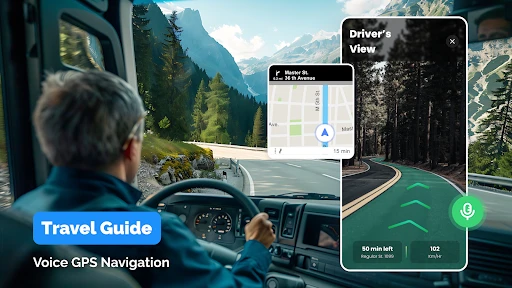
For a real-world example, imagine one person driving to pick up a relative while another is at home arranging the next stop. The driver can use spoken guidance and keep their attention on the road, while the other person sends any changed address through the channel they already use. Before moving, the driver should confirm the new destination aloud or while safely parked. That simple handoff avoids the common shared-device mistake of navigating to an old or similarly named place.
The calendar integration described in the app may help when an event already has an address, but I’d still check that the event is the right one and that its location is current. A calendar entry is a starting point, not a substitute for confirming a last-minute change with the person you’re meeting. For group travel, a shared calendar or messaging app remains better for assigning responsibilities and keeping everyone informed.
Age, trust, and choosing the right tool
The app is rated for Everyone, which makes its age classification broad, but that alone doesn’t make it a child-tracking or parental-control service. I’d use it with a younger passenger only as a navigation aid supervised by an adult, and I would not assume it can share a child’s location or alert a caregiver. Families who need those functions should choose a tool designed for that purpose.
Compared with familiar map apps, the appeal here is a straightforward mix of directions and navigation extras. A person who mainly wants a route may find that enough; someone who depends on established local place information, transit planning, or a particular ecosystem may prefer the map service they already know. I’d test a familiar short journey first, then compare the route and instructions with your usual option before relying on it for an unfamiliar drive.
More From Our News Desk

Clash of Clans Is Won Between the Battles

Android Auto Makes the Case for Quieter Car Software

MobiOffice: Transforming Mobile Productivity with Seamless Integration

EA SPORTS FC™ Mobile Soccer: Redefining Mobile Sports Gaming

How Microsoft OneDrive Became a Mobile Productivity Giant

How Google Translate Breaks Language Barriers Effortlessly
Planning for shared errands
One useful household habit is to decide who is responsible for choosing the route before anyone gets into the car. If one person enters the destination while another is loading bags or gathering children, say the destination out loud and check the displayed place before setting off. This matters most when a search returns several locations with similar names: the right business name can still point to the wrong branch. The app can guide the trip, but the person using it has to verify that the destination matches the plan.
For a day involving several pickups, I’d treat each stop as a separate decision rather than assuming a long chain of destinations will remain accurate as plans change. Confirm the next stop when the previous one is finished, especially if another household member has sent a revised address. That keeps the driver from trying to edit a route while moving and makes it easier for passengers to notice if the plan has changed.
Boundaries on a household phone
Sharing a device also calls for a simple privacy routine. Before handing the phone to another driver, I’d close or review the current route and remove any confusion about which destination is active. If a trip involves a private appointment or a sensitive address, it may be better to use a personal device or enter the destination only when the person travelling is ready to navigate. A shared phone should not be treated as a private account merely because one person is holding it at the moment.
There is a practical trade-off here: one device can make the car’s directions easy for everyone to see and hear, but it can also blur whose preferences or searches are in use. I would not build a household routine around presumed profiles or automatic separation. Instead, make the handoff explicit: identify the driver, confirm the destination, and decide whether the next person needs the same phone or should use their own mapping setup.
When the familiar map app is still better
I would compare this app with the map service a household already relies on before making it the default for every journey. Familiar alternatives may be a better fit when everyone already shares saved places, depends on a well-known local search workflow, or needs particular transit information. The advantage of keeping one established service is consistency: family members know where to check a route and how to interpret its directions. Switching only makes sense if this app’s combination of navigation tools fits the actual trips you take.
On the other hand, a driver who wants a focused route tool and occasional nearby stops may appreciate having those tasks together. I’d judge it on a route I know well, not just on how polished the first screen looks. Check whether the suggested roads make sense for your normal commute, whether the spoken prompts are easy to follow, and whether nearby results are useful in the places you visit. A short trial on familiar roads is a safer test than depending on a new app for an urgent appointment.
Hey there! So, I’ve been playing around with this awesome app called GPS, Maps Driving Directions, and I’ve got to say, it’s been quite the game-changer for my daily commutes and spontaneous road trips. Let me walk you through my experience with this app.
Getting Started
First off, downloading the app was a breeze. It took me just a couple of minutes to install. As soon as I opened it, I was greeted with a user-friendly interface that didn’t take long to get the hang of. The app pretty much holds your hand as you set up your preferences, which is great if you’re like me and not the most tech-savvy person around!
Features That Stand Out
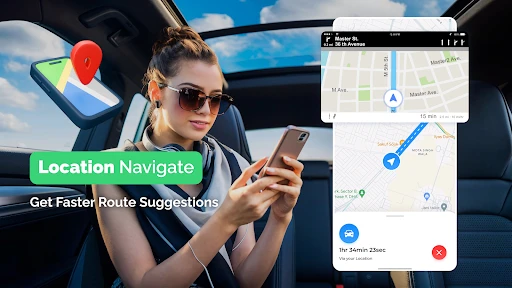
Now, let’s dive into what makes this app tick. One of the first things I noticed was the real-time traffic updates. It’s incredibly handy, especially when you’re trying to dodge those morning traffic jams. I remember one morning, the app rerouted me just in time to avoid a massive pile-up, saving me a good 20 minutes. Trust me, that extra snooze was worth it!
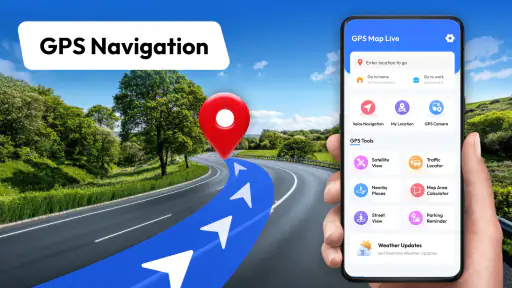
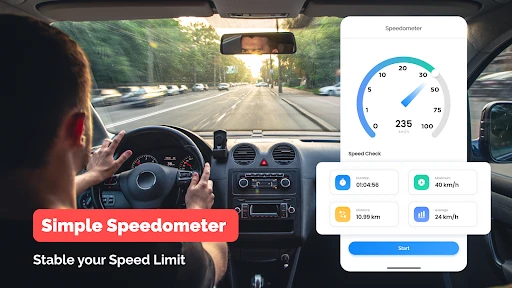
Another feature that deserves a shoutout is the voice-guided navigation. It’s like having a co-pilot who never gets tired or hangry. The directions are clear, and it even alerts you to speed limits. Plus, if you’re someone who loves hitting the road for long drives, the offline maps are a lifesaver. You can download maps for whole regions, so no Wi-Fi? No problem!
My practical tip is to prepare before pulling away: enter the destination, check that the displayed route is the one you intended, and set the volume so spoken directions are audible without drowning out the car. Offline maps are especially useful when you expect patchy reception, but I’d download the region while connected and check that the map covers the whole journey. They reduce dependence on a live connection for map viewing; they shouldn’t be treated as a guarantee that every live service will work offline.
Exploring the Extras
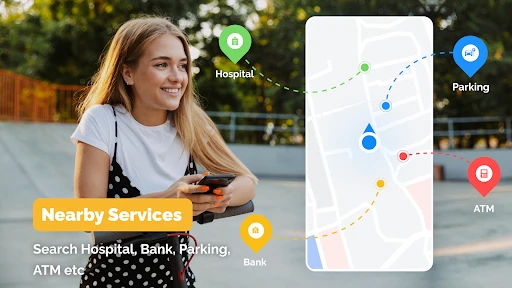
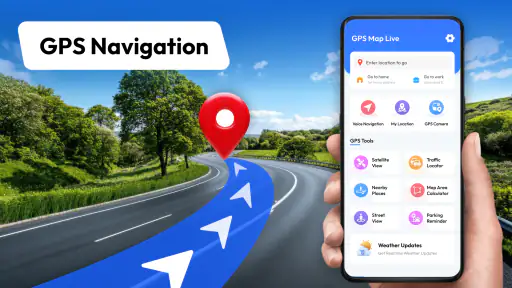
Aside from the basics, the app packs in a few extra goodies. There’s a nifty feature that highlights nearby attractions, restaurants, and gas stations. On a recent road trip, I was able to discover a charming little diner that I would have otherwise zoomed past. It’s like having a local guide in your pocket.
The app also integrates with your calendar, which is a neat touch. It automatically pulls in addresses from your events, so you’re always prepared ahead of time. No more last-minute scrambling to find a location!
I’d use those nearby suggestions as a way to find options, not as a guarantee that a place suits a tight schedule or a particular need. If I’m low on fuel, I’d choose a stop with enough time to pull over safely and verify that it is actually convenient for my route. For a day with several appointments, checking calendar addresses before leaving can prevent a rushed search in the car; if an event has moved, I’d update or confirm it rather than trusting an old entry.
Who will get the most from it
MAPIDIRECTIONS STUDIOS publishes this free maps and navigation app, which has an average rating of about 4.1 from around 14,000 ratings and more than 5 million installs. It is listed for Everyone, and the current version is 1.0.73. Optional in-app purchases range from $1.99 to $15.99 per item, so I’d check the purchase details before choosing anything beyond the free use. It suits drivers who want spoken directions, route help, and practical stops in one place. If you mainly walk, cycle, or depend on detailed public-transport planning, I’d compare it with a service built around those journeys before switching.
One limitation of any navigation app is that a suggested route can’t make every road condition or last-minute change predictable. I’d treat traffic guidance as useful assistance, not permission to rush or follow instructions blindly. If a turn is unclear, a passenger can check the screen, or the driver can pull over safely. On an unfamiliar trip, a quick look at the route before departure also helps you notice whether it heads toward the right area.
Making the free option work for you
The app is free to install, while optional purchases are offered within it. I’d start with the basic navigation experience and decide whether anything extra is genuinely useful before spending. That approach is particularly sensible on a shared household phone, where the person paying may not be the person who uses the feature. Check the purchase screen carefully and agree who is responsible for any purchase rather than treating an optional item as part of the standard route-planning experience.
For a first run, choose a destination you know and compare the route with your usual map. Then try a short trip that includes a turn or a stop, so you can judge whether the voice prompts arrive at a useful time and whether the map is easy to read from the passenger seat. These checks answer the most practical questions before you use it for a long drive: does it guide you clearly, does the route suit your needs, and do the extras help enough to earn a place in your routine?
Final Thoughts
All in all, GPS, Maps Driving Directions has become an indispensable tool in my daily life. Whether I’m navigating through city streets or exploring new territories, it’s got my back. The ease of use, combined with a robust set of features, makes it a standout choice for anyone in need of a reliable navigation app.
If you’re on the hunt for a navigation app that’s both intuitive and packed with features, give this one a whirl. You might just find yourself wondering how you ever got by without it!
For a household, I’d call it a useful driver’s aid rather than the center of a shared travel system. It can help with route guidance, traffic, nearby stops, and calendar-based preparation, while messages and calendars remain the better places to agree who is going where and when. That division keeps expectations realistic and makes handoffs less prone to confusion.
My recommendation is strongest for someone who wants an approachable driving app and is willing to verify destinations, routes, and changing plans. I’d skip it as a sole solution if your priority is family location sharing, separate personal histories, or specialized walking and transit planning. Used with sensible checks, it can earn a place on the phone; trusted blindly or asked to coordinate a whole household, it is the wrong tool for the job.
GPS, Maps Driving Directions Frequently Asked Questions
Who develops GPS, Maps Driving Directions, and what is it designed to do?
GPS, Maps Driving Directions is a Maps & Navigation app from MAPIDIRECTIONS STUDIOS. Its focus is straightforward: getting directions and using maps and GPS navigation. If you are looking for an app centered on planning routes and finding your way while driving, that is the purpose its name and description emphasize.
Is GPS, Maps Driving Directions suitable for everyone?
The app has an Everyone content rating, making it suitable for a broad audience. Its main purpose is map and driving navigation, so its usefulness will depend on whether you want route guidance on your device. As with any navigation app, drivers should set up a route before setting off and pay attention to the road rather than handling the phone while driving.
Is GPS, Maps Driving Directions free to download, and are there optional purchases?
GPS, Maps Driving Directions is free to download, so you can try its navigation tools without paying upfront. The app also offers optional in-app purchases, with items priced from $1.99 to $15.99. Check the purchase details in the app before confirming anything, and consider whether the free features meet your needs first.
What devices and operating systems can run GPS, Maps Driving Directions?
GPS, Maps Driving Directions is an app in the Maps & Navigation category, developed by MAPIDIRECTIONS STUDIOS. It is available for devices running Android 10 or later, and its content rating is Everyone. Before downloading, check your device’s operating system version and available storage in the relevant app store to make sure installation is likely to go smoothly.
What features does the GPS, Maps Driving Directions app offer?
The GPS, Maps Driving Directions app provides a comprehensive suite of features designed to enhance your navigation experience. It offers real-time GPS navigation, route planning with multiple stop options, live traffic updates, and alternative route suggestions to help avoid congestion. Additionally, the app includes offline maps, voice-guided turn-by-turn directions, and points of interest such as restaurants, gas stations, and landmarks. All these features make it an ideal companion for both daily commutes and long road trips.
Pros
- Accurate real-time traffic updates.
- User-friendly interface and design.
- Wide coverage of global maps.
- Customizable route options.
- Voice-guided navigation available.
Cons
- Occasional GPS signal loss.
- High battery consumption.
- Requires constant internet connection.
- Ads can be intrusive.
- Limited offline map availability.
- Category
- Maps & Navigation
- Version
- 1.0.73