GPS Location Tracker Ultra
- 3.00
- 4.6
- Installs
- 10.00K
- Price
- Free

Screenshots
Analysis by Reviewed
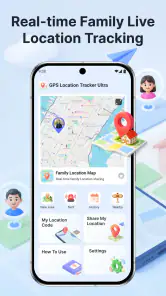
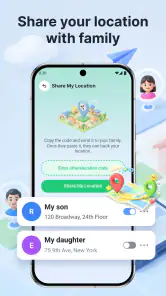
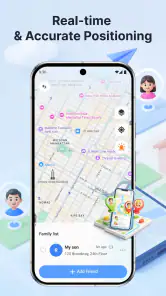
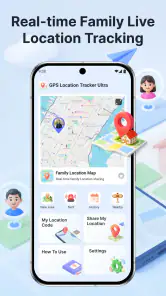
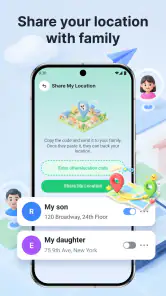
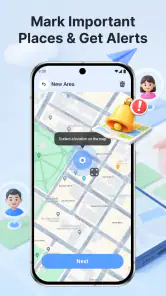
When I’m coordinating a family outing, the difficult part is often not choosing where to go but keeping everyone’s plans in sync. GPS Location Tracker Ultra is aimed at that practical gap: it’s a free navigation app from SUNCAP COMPAGNY for sharing location, following family routes, and finding nearby places. I’d consider it when a small group wants a shared view of movement rather than a full-featured navigation suite, while keeping in mind that location sharing works best when everyone is comfortable taking part.
Decide who needs to see what
Before bringing a tracker into a household routine, I’d keep the first trial small and specific. Choose one outing and only the people who need to coordinate it; that makes it easier to see whether shared location is useful or merely adds another screen to check. It also gives everyone a chance to agree on when sharing makes sense, rather than treating it as an all-day expectation.
I’d also settle on a simple fallback before leaving: a meeting point, a text if plans change, and a phone call if someone’s location seems confusing. That is not extra bureaucracy. It prevents a map from becoming the only source of truth when a person is stopped, taking a different route, or simply busy. A family tracker works best when it is one part of a plan that people understand.
From a simple plan to a shared route
I find it helpful to begin with a specific coordination problem rather than treating a tracker as something the whole family must use all the time. A planned outing gives everyone a chance to agree on who will share, what the map is meant to clarify, and when a message is still the better handoff. That agreement makes the next step—turning the plan into a shared route—much less awkward.
Start with the question you need answered
Before opening a family tracker, I find it useful to agree on what the group actually needs: “Has everyone set off?”, “Which way are we approaching the meeting point?” or “What’s nearby if our plan changes?” Those questions are different from turn-by-turn driving directions, and that distinction matters here. GPS Location Tracker Ultra is presented as a way to keep track of family routes and share location, with nearby places as another part of the experience. Its focus is coordination, not replacing every map tool on a phone.
That makes it a better fit for a family or familiar group than for someone who only wants a private map. The value of a shared tracker depends on other people joining the same routine and understanding why their location is being shared. I would discuss that openly before relying on it, especially with children or anyone who may feel monitored. A location app can reduce repeated check-in messages, but it should support an agreed plan rather than quietly become a substitute for trust.
Set up the handoff before everyone leaves
A useful workflow begins before anyone is in a hurry. I’d have the people involved install the app, open it, and work through its available setup together, then check that each person understands how the group will use location sharing. I wouldn’t wait until a driver is already navigating or a child is standing outside a class to find out that someone has not joined or is unsure what to do. This simple rehearsal is more valuable than assuming a tracker will resolve confusion automatically.
More From Our News Desk

Weather by Xiaomi Review: Clear at a Glance, Less Clear Up Close

X Under Pressure: Can It Recover When Posting Goes Wrong?

Clash of Clans Is Won Between the Battles

Android Auto Makes the Case for Quieter Car Software

MobiOffice: Transforming Mobile Productivity with Seamless Integration

EA SPORTS FC™ Mobile Soccer: Redefining Mobile Sports Gaming
The app’s title and short description identify it as a GPS location tracker, and its purpose is straightforward enough to explain without technical language: share where you are, follow family routes, and look for nearby places. Its current version is 1.3.0.0. I’d still test the actual routine with the people who will use it, because a clear concept is not the same as a group being ready to depend on it. A quick test also gives everyone a chance to raise privacy concerns before location sharing becomes part of daily life.
Use a realistic outing as the test
Imagine two adults taking separate routes to meet a child after an activity. One person is leaving home; the other is already nearby and needs to know whether to wait or head toward the entrance. Instead of exchanging several messages, they can use the shared-location purpose of GPS Location Tracker Ultra to coordinate where each person is in relation to the plan. If the first person is delayed, the other can make a more informed decision about where to wait. That is a modest benefit, but in a busy pickup it can spare everyone unnecessary calls.
There is a practical catch: the group still needs a clear meeting point and a backup way to communicate. A moving marker does not explain whether someone has parked, gone inside, or changed plans. I would pair the map with a short message when a meaningful handoff happens, such as “I’m at the north entrance.” That keeps the app from carrying more responsibility than a location view can reasonably bear.
Let nearby places help with a plan change
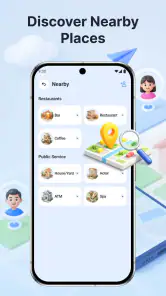
The nearby-places element is most useful when the original plan stops working. If a family arrives early, needs a convenient place to pause, or decides to meet somewhere easier to find, looking for nearby options can help turn a vague “let’s meet around here” into a more concrete choice. I would use that as a discovery aid, then confirm the destination and any important details separately. A place appearing nearby does not, by itself, tell me whether it suits a stroller, is open, or is the right choice for the group.
This is also where I’d avoid treating the app as a substitute for a dedicated route planner. For a long drive, I’d use a navigation app designed around detailed route guidance and traffic decisions, then use a family tracker for the separate question of where the people I care about are. Keeping those jobs distinct is a small but useful workflow improvement: one tool helps with the road, while the other helps with coordination.
Make the handoff explicit
Family plans often involve a chain of responsibility: one adult leaves work, another collects a child, and someone else is expected at home. A shared location can help the next person judge when to get ready, but I would still name the handoff in a message or conversation. For example, “I’ll take over when you reach the library” is clearer than expecting everyone to infer the plan from a moving location. The tracker can provide context; the people involved still need to communicate decisions.
That distinction is especially important when routes overlap or someone changes transport. A location view may show movement, but it cannot tell the group why a person stopped or whether they need help. If a stop is unexpected, a direct call or message is the better next step. I see this as a strength of a sensible setup, not a flaw to hide: location sharing can reduce routine uncertainty, while human communication handles exceptions.
Decide what a successful result looks like
For my purposes, success would not mean watching a map continuously. It would mean checking only when the plan requires it, knowing whether everyone is moving toward the agreed destination, and being able to adjust a pickup or meeting point with less back-and-forth. That mindset makes the app more useful and less intrusive. It also prevents the common mistake of treating a location marker as a guarantee that everything is fine.
I’d establish a lightweight habit: agree on the destination first, use the shared view to coordinate arrival, and switch to a call or message if something does not make sense. If the group’s need is simply “tell me when you get there,” a direct text may be easier and more respectful than ongoing location sharing. The tracker makes more sense when people genuinely benefit from seeing routes during a shared outing or repeated family handoffs.
Where the flow can break
The first friction point is participation. One person who has not installed or joined the workflow can make the shared view incomplete, so I would never plan a time-sensitive pickup around the assumption that every family member is visible. The second is interpretation: a map position is not a conversation, and a delayed update or an unexpected stop should prompt a check-in rather than a guess. The third is comfort. If someone dislikes sharing their location, insisting on it may create more tension than the app saves.
Battery use and location access are also sensible considerations for any GPS-based routine. I would check the phone’s own settings and use the app in a way that matches the group’s needs rather than leaving tracking habits unexplained. Since location-sharing behavior can depend on the device and the way each person configures it, I’d verify the setup on the phones involved before using it for a critical journey. This is not an emergency-response system, and I would not make it the sole safety plan for a child, an older relative, or anyone travelling alone.
How it fits beside familiar map apps
Most people already have a map app for searching destinations and getting directions. GPS Location Tracker Ultra earns a place only if the family-sharing side solves a recurring problem those usual tools do not solve comfortably. If you mainly need turn-by-turn directions, a conventional navigation app is the more direct choice. If you mainly want to send a one-off location, a message may be quicker. If you coordinate routes with family more than once in a while, a dedicated tracker may make the shared routine easier to understand.
I would not choose it as a general-purpose travel planner based only on its focus. Its appeal is the combination of family route tracking, location sharing, and nearby-place discovery, not a promise to handle every mapping task. That narrowness can be helpful: a family can use it for the coordination layer without expecting it to replace a navigation app, a calendar, or a conversation. The right comparison is therefore not “Which map has the most tools?” but “Which tool reduces this group’s particular coordination hassle?”
Who I’d recommend it to
I’d suggest trying GPS Location Tracker Ultra if your household regularly splits up during errands, school pickups, or outings and everyone involved is willing to share location for those situations. It is rated 4.6 on average from around 34 ratings, with 10K+ installs, and it is free. Those figures suggest that other users have tried it, but I would treat them as context rather than proof that it will suit a particular family’s habits.
The app is rated for Everyone, and its minimum operating-system requirement is 9. I’d check compatibility on each person’s phone before building a routine around it. The developer is SUNCAP COMPAGNY. Those practical details are worth checking early, especially when a household uses a mix of older and newer devices; a shared plan is only dependable when the people expected to take part can actually use the app.
My take after weighing the trade-offs
GPS Location Tracker Ultra makes the most sense as a family coordination tool with a clear, limited job. I like the idea of using shared location to reduce repetitive “Where are you?” messages and nearby-place discovery to make a changed plan easier to settle. I would also keep expectations grounded: the group must agree to participate, location alone cannot explain circumstances, and route guidance may still call for a separate navigation app.
If you want a low-friction way to coordinate familiar people on shared outings, it is worth considering, particularly when you can establish the routine together before you need it. If you want private turn-by-turn navigation, occasional one-time location sharing, or a tool that can serve as an emergency guarantee, I’d choose a more suitable alternative for that specific job. Used with consent and a simple backup plan, GPS Location Tracker Ultra can make everyday family handoffs easier to manage without pretending that a map replaces communication.
My recommendation is to try it on a low-stakes outing first: agree on who will share, choose a meeting point, and see whether the shared view genuinely saves effort. If the family finds itself checking the map constantly or arguing about who should be visible, the workflow is not helping and should be adjusted. When the group uses it as a practical aid rather than a watchful scoreboard, GPS Location Tracker Ultra has a clear role in the Maps & Navigation category.
GPS Location Tracker Ultra Frequently Asked Questions
What is GPS Location Tracker Ultra used for?
GPS Location Tracker Ultra is designed to help users view and manage location information using a device’s GPS. Depending on the version and the permissions granted, it may offer tools such as displaying a position on a map, recording location history, or sharing a location. Check the app’s current store listing and in-app settings before relying on any particular feature, since functions can vary by release and device.
Does GPS Location Tracker Ultra need an internet connection?
GPS can estimate a device’s position without mobile data, but maps, address lookups, live sharing, and other online services may need an internet connection. Location accuracy can also be affected by indoor use, tall buildings, weather, device settings, and the quality of the GPS signal. For dependable navigation or tracking, check that both location services and any required network connection are enabled.
Is GPS Location Tracker Ultra safe, and what location permissions does it require?
Because location data is sensitive, review the permission prompts and the app’s privacy policy before granting access. Choose the least access that still supports the features you intend to use, and check whether background location access is requested. The app’s data practices can depend on its current version and publisher, so consult the official store listing for details about collection, sharing, retention, and deletion.
Can I use GPS Location Tracker Ultra to track another person?
A location-tracking app should only be used with the knowledge and consent of the person whose location is being shared, and in accordance with local laws. Do not install it on someone else’s device or attempt to monitor them without permission. If the app includes sharing features, review who can see the location, how sharing is stopped, and whether the other person must accept an invitation.
Is GPS Location Tracker Ultra free, and is it available for my device?
Availability, pricing, in-app purchases, and compatibility may differ between Android and iOS and can change over time. Before downloading, open the app’s official listing in the relevant app store to confirm that it supports your operating-system version, see whether any features require payment, and read recent user reviews. Downloading from the official store also helps reduce the risk of installing an altered or unsafe copy.
Pros
- Quickly displays your current location and coordinates.
- Useful for sharing location details during outdoor trips.
- Map view makes it easier to understand nearby surroundings.
- Can help you retrace routes when exploring unfamiliar areas.
- Simple tracking tools are accessible without complex setup.
Cons
- GPS accuracy may drop indoors or in areas with weak signal.
- Continuous tracking can drain your battery faster.
- Location access is required for core features to work.
- Map and tracking results may depend on an internet connection.
- Background location permissions may raise privacy concerns.
- Category
- Maps & Navigation
- Version
- 1.3.0.0











