

GPS Location Tracker & Share
- 4.00
- 4.1
- Installs
- 100.00K
- Price
- Free

Screenshots
Analysis by Reviewed
GPS Location Tracker & Share caught my attention because it focuses on a very practical question: where are the people or devices I care about right now? I tested it as a location and navigation app rather than as a general-purpose map replacement, and my first impression was easy to understand. Its purpose is narrow, direct, and useful when everyone involved agrees that sharing a position is worthwhile.
That narrow focus is also the key to judging it fairly. I would not install it expecting turn-by-turn navigation, a complete travel planner, or the broad map database offered by established navigation services. I see it instead as a lightweight tool for checking a family member’s position and keeping a shared sense of where people are. The app is free, aimed at Everyone, and developed by Huju Network Technology CO., Ltd., which makes it accessible for households that want to try location sharing without committing to a paid service.
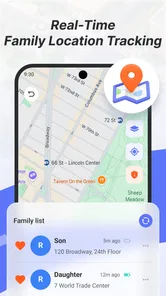
Its store summary presents the central idea as personal location and real-time family positioning, while the short description calls it a GPS location tracker. That is a more useful way to think about it than treating it as another map application. The value comes from a repeated routine: open it when you need reassurance, share your position when plans change, and close it when the situation is clear.
What the first week feels like
During the first week, an app like this has an obvious novelty advantage. Seeing a family member’s position represented on a map can make coordination feel simpler, especially when a phone call would interrupt someone or a text message would only tell you where they expected to be. For a parent waiting for a child after school, partners coordinating a pickup, or relatives checking that someone has reached a destination, the concept is immediately understandable.
I found the most useful early habit was to treat the tracker as a supplement to ordinary communication, not a replacement for it. If somebody is late, the map can provide context, but it cannot explain whether they are stuck in traffic, have stopped for groceries, or simply left the phone somewhere. A quick message still matters. This is an important distinction because location can look precise while the situation behind it remains ambiguous.
The first-week experience also depends heavily on cooperation. Location sharing is not something I would quietly impose on another person. Everyone who appears in a family view should understand who can see the position and why the arrangement exists. When the group agrees on a simple purpose, such as coordinating school pickups or checking arrival during a journey, the app feels reassuring. When the purpose is vague, it can quickly feel intrusive.
One practical workflow worked better for me than leaving the app open constantly. Before leaving home, I would make sure the relevant people knew the plan. During the journey, I would check the map only when there was a genuine reason, such as a delayed arrival or a change in the meeting point. Afterward, the app no longer needed my attention. This kept location sharing tied to an event rather than turning it into a background habit of watching somebody else.
More From Our News Desk

 Weather - By Xiaomi
Weather by Xiaomi Review: Clear at a Glance, Less Clear Up Close
Xiaomi’s weather app makes everyday forecasts quick to scan, but its calm surface can leave useful details and recovery paths harder to find than they should be.

 X
XX Under Pressure: Can It Recover When Posting Goes Wrong?
A resilience-focused review of X, examining setup, mistaken posts, interruptions, weak connections, and the gaps that matter when recovery needs to be dependable.

 Clash of Clans
Clash of Clans Is Won Between the Battles
Its raids are quick; its community is a long-term project of coordination, teaching, rivalry, and shared responsibility—with all the friction that entails.

 Android Auto
Android Auto Makes the Case for Quieter Car Software
The car interface is no longer judged by how much it can do, but by how quietly it helps. Android Auto shows what drivers now expect—and what still gets in the way.

 MobiOffice: Word, Sheets, PDF
MobiOffice: Transforming Mobile Productivity with Seamless Integration
MobiOffice: Word, Sheets, PDF is redefining mobile productivity with a surprising blend of functionality and innovation.

 EA SPORTS FC Soccer Mobile 26
EA SPORTS FC™ Mobile Soccer: Redefining Mobile Sports Gaming
Dive into EA SPORTS FC™ Mobile Soccer, where immersive gameplay and strategic depth transform mobile sports gaming.
Latest News



The app’s current version is 1.0.0.2, so I approached it as a relatively early product rather than a mature platform with years of accumulated refinement. That does not make it unusable, but it does affect my expectations. Early versions can be perfectly adequate for a focused purpose while still leaving room for smoother setup, clearer explanations, and more polished handling of unusual situations.
Where it helps in ordinary life
Consider a realistic weekday scenario. I am collecting a family member from a busy station, but their arrival time changes and phone calls are inconvenient. A shared position can help me decide whether to leave immediately or wait a little longer. If the person is still several streets away, I can avoid circling the area. If the position appears close, I can move toward a safer meeting point. The app does not solve the entire pickup problem, but it reduces unnecessary back-and-forth.
Another useful case is a relative traveling home alone. Instead of asking for repeated updates, the family can agree that the traveler will share a position during the journey and send a message after arriving. This creates a clear beginning and end to the arrangement. I prefer this approach because it avoids turning continuous tracking into an unspoken expectation.
It can also help with group movement during local outings. If several people are meeting in an unfamiliar area, a shared location view may be quicker than describing landmarks through messages. The benefit is greatest when the group is small and the purpose is temporary. For a large event, a conventional meeting point and a clear time may still be less confusing than trying to interpret several moving positions.
Does it still earn space after the first month?
The first month is where the app has to prove that it is more than an interesting experiment. Location tracking is not automatically valuable every day. Most people do not need to inspect a family member’s position continuously, and trying to do so can create anxiety rather than reduce it. In my view, the app earns a lasting place when it supports a few recurring routines without demanding constant attention.
The strongest long-term use is predictable coordination. Families with different schedules can use it around school runs, commuting, appointments, or regular journeys. The important part is consistency: everybody knows when sharing is expected, what the map means, and when the arrangement ends. Without those rules, the app becomes another notification source that people open only when they are already worried.
I would recommend creating a small household agreement before relying on it. Decide who needs access, which situations justify checking, and whether sharing is temporary or routine. Also agree that an old or unexpected position is a reason to contact the person, not proof that something is wrong. This simple habit prevents the map from being treated as an authority.
For occasional travel, the app may be useful in bursts rather than continuously. I can imagine installing it before a trip, using it while family members are moving between places, and then returning to normal communication afterward. That pattern may be more sustainable than keeping it active as a permanent surveillance tool. It also makes the purpose easier to explain to everyone involved.
The listed average rating is 4.2 from around 95 ratings, with 4 written reviews, and the app has passed 100K installs. Those figures suggest that people are finding the idea worthwhile, but they do not tell me that it will suit every family or that it can replace established navigation products. I read them as a sign of early interest rather than proof of deep, long-term adoption.
What it does not replace
My usual navigation app remains better for route planning, traffic context, searching for businesses, and getting directions. GPS Location Tracker & Share has a different job. If I am driving somewhere unfamiliar, I want a navigation service designed around roads, routes, and arrival guidance. If I am checking whether someone has reached a meeting area, a family positioning tool is more relevant.
That difference matters when choosing whether to keep it installed. People who want one app to handle maps, public transport, saved places, navigation, and family location may find a broader ecosystem more convenient. Those services can also provide more established account management and sharing workflows. On the other hand, a focused tracker may feel less cluttered for someone whose only requirement is seeing a shared position.
I would also avoid using this app as an emergency system. A map position is not a substitute for calling emergency services, contacting the person directly, or following a household safety plan. Phones can be misplaced, unavailable, or unable to communicate properly. The responsible role for this app is everyday coordination and reassurance, not guaranteed rescue.
The maintenance cost behind a simple map
The biggest long-term question is not whether the map looks useful; it is whether the people in the group maintain the habit. Location sharing depends on phones being carried, accounts or sharing arrangements being understood, and users remembering what they agreed to do. That human maintenance can be more demanding than the app itself.
I would review the sharing arrangement whenever family circumstances change. A new school schedule, a different commute, a replacement phone, or a change in who needs access can make an old setup confusing. Removing someone who no longer needs visibility is just as important as adding someone who does. Keeping the group small reduces accidental exposure and makes the map easier to interpret.
It is also worth checking the app before an important journey instead of assuming it will be ready because it worked previously. Open it, confirm that the right people are visible, and make sure everyone understands the plan. This is a practical test of reliability without inventing a false promise that tracking will always be continuous.
Battery and connectivity are natural concerns with any GPS-based tracker. I would not build a safety plan around a phone that is nearly out of power or has unreliable service. The sensible workflow is to charge devices before travel, carry a backup communication method when the situation warrants it, and treat a missing update as a prompt to investigate rather than a definitive status.
Privacy is another maintenance task. The app’s usefulness comes directly from access to personal location, so I would be selective about who participates and avoid sharing more broadly than necessary. A family group should discuss whether everyone is comfortable with the arrangement. If one person feels pressured, the tracking habit may damage trust even if the technical experience is smooth.
Small habits that make the app more useful
My first tip is to define a start and stop point for every tracking period. “Share your location during the trip” is clearer than “leave it on all the time.” That boundary makes the tool easier to accept and reduces the chance that a temporary arrangement quietly becomes permanent.
My second tip is to pair the map with a plain-language check-in. A position tells me where a device appears to be, while a message tells me what the person intends to do next. Using both prevents a common mistake: assuming that a stationary marker means the person is safe, available, or waiting.
My third tip is to use the app for coordination rather than judgment. If somebody’s route changes, ask what happened instead of treating the map as evidence of wrongdoing. This is not merely a matter of courtesy. It keeps the app focused on its useful role and makes people more willing to share when sharing genuinely matters.
A fourth useful habit is to keep a backup meeting plan. At a crowded station or large venue, the map may narrow the search but still leave several possible entrances, levels, or nearby streets. Agreeing on a visible landmark or a fallback time can save more effort than repeatedly refreshing the tracker.
Where fatigue begins
The main source of fatigue is checking without a clear reason. At first, the ability to view a position can feel comforting. Over time, repeated checking may become a reflex, especially when somebody is late by only a few minutes. That pattern can make ordinary delays feel alarming. I would keep notifications and checks tied to specific needs rather than allowing the app to become a constant window into family activity.
Another source of friction is interpretation. A displayed position may be delayed, approximate, or associated with a phone that is not physically with the person. Even when the marker appears current, it cannot communicate mood, safety, or intention. Users who expect a perfect live picture may become frustrated quickly, while users who understand it as a helpful indication will usually get more value from it.
There is also social fatigue. Some relatives may welcome the convenience, while others may see it as intrusive. The app is not the right choice for a household that cannot establish mutual consent and clear limits. A shared calendar, scheduled messages, or agreed check-in calls may be healthier for that group, even if they are less technically immediate.
Early-product friction can add to this feeling. With version 1.0.0.2, I would expect the experience to improve over time, but I would not assume that every edge case has been polished. If setup instructions, sharing controls, or status explanations leave me uncertain, I would pause before depending on it for an important journey. A location tool needs to communicate its state clearly, because ambiguity is more troublesome here than in a casual app.
The app is also a poor fit for someone who wants detailed navigation features. If my priority is finding the fastest route, comparing travel options, saving places, or following spoken directions, I would choose a dedicated maps service. Installing this tracker for those tasks would create disappointment because its central value lies in people positioning, not comprehensive navigation.
My long-term verdict
After the novelty fades, GPS Location Tracker & Share can justify its place on a phone, but only when a real recurring need exists. I like it most as a focused family coordination tool: useful during commutes, pickups, local trips, and agreed check-in periods. Its free access lowers the barrier to trying that arrangement, and its Everyone age rating makes the intended audience broad.
I would recommend it to families who can discuss privacy openly and follow a simple sharing routine. I would also recommend it to people who want a dedicated location view without asking a full navigation app to serve every purpose. The app’s strongest quality is that its central idea is easy to apply to an ordinary day.
I would skip it if I wanted advanced route planning, if nobody in the household is willing to maintain the sharing habit, or if the real goal is continuous supervision rather than practical coordination. In those situations, a conventional navigation service, calendar, messaging routine, or a more established family-safety platform may be a better match.
My final advice is to judge it after several weeks of normal use, not after the first impressive map view. Ask whether it reduced messages, made pickups easier, or provided useful reassurance without creating new arguments and checking rituals. If the answer is yes, it has lasting value. If the map is mostly opened out of anxiety, the problem is no longer navigation, and this app is unlikely to solve it.
For me, the lasting appeal is therefore conditional but genuine. This is best treated as a shared coordination habit, not a permanent surveillance screen. Used with consent, clear boundaries, and a backup communication plan, it can be a practical addition to a family’s routine. Used without those safeguards, its simplicity becomes a weakness rather than a strength.
Huju Network Technology CO., Ltd. has made a focused app that is easy to understand at a glance. Its early audience and 4.2 average indicate a promising start, while the real test will be whether future use remains dependable and comfortable after the initial curiosity disappears. I would keep it installed for a family that regularly needs location coordination, but I would not recommend it as a universal replacement for maps, messaging, or emergency services.
GPS Location Tracker & Share Frequently Asked Questions
Is GPS Location Tracker & Share free to download?
GPS Location Tracker & Share is a free Maps & Navigation app from Huju Network Technology CO., Ltd. That makes it possible to try its location-sharing features without paying for the download. As with any app, check the options and permissions shown on your device during setup, and make sure you are comfortable with the way it uses location access before enabling sharing.
What devices can install GPS Location Tracker & Share?
The app is listed for devices running Android 8.0 or later, and its current version is 1.0.0.2. Before downloading, check your phone’s operating system version and confirm that the app is available for your particular device. The age rating is Everyone, so its listed content rating is suitable for a broad audience, though families should still decide whether location sharing fits their needs.
What is GPS Location Tracker & Share used for?
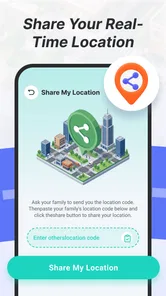
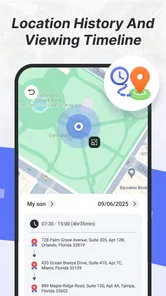
GPS Location Tracker & Share is designed to help users view and share real-time location information with selected contacts. It can be useful for coordinating with family members, meeting friends, monitoring a journey, or letting someone know that you have arrived safely. Before using it, remember that the app depends on GPS, mobile data, and the permissions granted on your device.
Does GPS Location Tracker & Share require location and internet permissions?
Yes. The app generally needs access to your device’s location services to determine where you are, while an internet connection is usually required to send or receive location updates. You may be asked to allow location access while using the app or in the background. Review these permissions carefully, because restricting them can reduce accuracy or stop live sharing from working correctly.
Can I share my location with anyone, and can I stop sharing it later?
Location sharing is normally intended for people you choose, such as trusted friends or family members. You should check the recipient details before starting a session and avoid sharing your location publicly. In most cases, an active sharing session can be stopped from inside the app, but you should confirm that sharing has ended and also review your phone’s location and account settings if you no longer want access enabled.
Pros
- Real-time location sharing helps coordinate meetups and family plans.
- Supports location updates for better awareness during trips or commutes.
- Useful for checking whether shared contacts reached a destination.
- Simple tracking features are accessible to less technical users.
- Can improve peace of mind when monitoring a consenting family member.
Cons
- Continuous GPS use may noticeably reduce battery life.
- Location accuracy can drop indoors or in dense urban areas.
- Sharing location data raises privacy and security concerns.
- Some features may depend on a stable mobile data connection.
- Background tracking may require extensive permission settings.











