

GPS Location Flow & Tracker
- 54.00
- 4.0
- Installs
- 100.00K
- Price
- Free

Screenshots
Analysis by Reviewed
I would judge GPS Location Flow by a practical question: does it make it easier to coordinate with people I care about without turning location sharing into another chore? This is a focused Maps & Navigation app from Karyaku Dev, built around viewing someone’s location, sharing your own, and keeping track of selected areas. That narrower purpose is useful, but it also means the app is best considered a companion to general-purpose maps rather than a replacement for them.
GPS Location Flow & Tracker is free, rated for Everyone, and has an average rating of 4.0 from around 300 ratings. It has passed 100,000 installs, which gives a prospective user some evidence that it has found an audience, though those figures alone do not tell you how well it will work in your particular routine. The current version is 1.2.0.0, and the app is developed by Karyaku Dev.
What the app is built to do
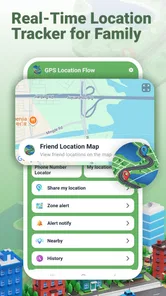
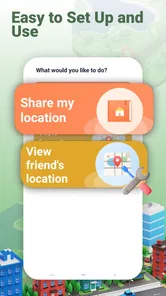
The core appeal is shared awareness, not turn-by-turn directions. A conventional map is usually opened to find a place or plan a route; this app makes more sense when the important question is where a person is, or whether they have reached an area that matters to the group. That distinction helps set realistic expectations: I would reach for a navigation app to drive somewhere, and for this one when family members or friends need a simple way to stay in the loop.
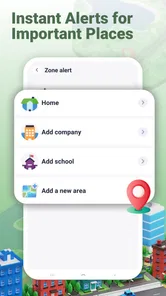
Its area-alert concept is particularly suited to recurring places. Rather than asking someone to send a message every time they arrive at home, school, or another agreed destination, an alert can make that boundary part of the coordination routine. I would keep the selected areas purposeful. A small set of places that genuinely affect plans is easier to understand and act on than a long collection of alerts that may produce noise.
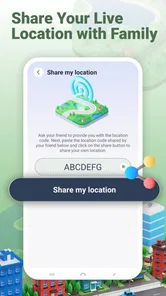
Location sharing also works best when everyone involved understands the arrangement. Before relying on it, I would agree with friends or family about who is sharing, which areas matter, and when a manual check-in is still preferable. This is not merely an app setup tip: clear expectations help prevent a location tool from becoming a source of unnecessary worry or repeated “where are you?” messages.
Speed: useful for checking, not a promise of instant updates
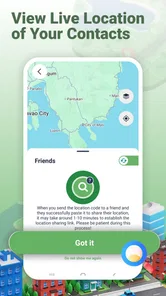
For a location-sharing app, perceived speed is about more than how quickly a screen opens. The useful question is whether the location shown is fresh enough for the decision at hand. GPS Location Flow is designed for real-time location viewing, but a person deciding whether to wait at a meeting point should still treat a map position as context, not as a guarantee that someone is exactly where the marker appears.
In an everyday scenario, imagine coordinating a family pickup. I might check the shared location to see whether the other person appears to be nearby, then send a short message if timing matters. That combination is more dependable than silently assuming a moving marker is perfectly current. For a casual meet-up, the app can reduce back-and-forth; for a strict appointment or a time-sensitive handoff, I would confirm directly as well.
More From Our News Desk

 Weather - By Xiaomi
Weather by Xiaomi Review: Clear at a Glance, Less Clear Up Close
Xiaomi’s weather app makes everyday forecasts quick to scan, but its calm surface can leave useful details and recovery paths harder to find than they should be.

 X
XX Under Pressure: Can It Recover When Posting Goes Wrong?
A resilience-focused review of X, examining setup, mistaken posts, interruptions, weak connections, and the gaps that matter when recovery needs to be dependable.

 Clash of Clans
Clash of Clans Is Won Between the Battles
Its raids are quick; its community is a long-term project of coordination, teaching, rivalry, and shared responsibility—with all the friction that entails.

 Android Auto
Android Auto Makes the Case for Quieter Car Software
The car interface is no longer judged by how much it can do, but by how quietly it helps. Android Auto shows what drivers now expect—and what still gets in the way.

 MobiOffice: Word, Sheets, PDF
MobiOffice: Transforming Mobile Productivity with Seamless Integration
MobiOffice: Word, Sheets, PDF is redefining mobile productivity with a surprising blend of functionality and innovation.

 EA SPORTS FC Soccer Mobile 26
EA SPORTS FC™ Mobile Soccer: Redefining Mobile Sports Gaming
Dive into EA SPORTS FC™ Mobile Soccer, where immersive gameplay and strategic depth transform mobile sports gaming.
Latest News



This is also why it is worth testing the app in the places where you expect to use it. A location tool can feel responsive outdoors and less convincing in a building or an area where a phone has limited reception. I would not interpret a briefly unchanged position as proof that someone has stopped moving. Check the time and circumstances, then use a call or message if the distinction affects your plans.
Busy routines and the value of restraint
The app’s most demanding moments are likely to be ordinary ones: several people checking locations during a busy day, an alert being used around a regular destination, or a family relying on shared awareness while everyone is travelling. In those situations, the challenge is less about staring at a map and more about making sure the information remains useful without encouraging constant monitoring.
A practical workflow is to decide in advance what counts as an important update. For example, a parent might use an area alert as a prompt to check that a child has reached a familiar destination, while still allowing for a late bus or a phone that has not refreshed immediately. That is a better fit than watching the screen continuously. The app can support coordination, but it cannot explain why someone is delayed or replace a conversation.
For groups, I would also avoid treating every shared location as equally important. If one person is driving, another is waiting at a station, and a third is simply out for the afternoon, the same level of attention is not needed for everyone. Keeping the routine selective helps preserve the app’s usefulness and makes an alert more meaningful when it does appear.
Reliability means knowing when to verify
Location sharing is only helpful when people can trust what they see, so reliability deserves a careful, grounded view. A phone’s reported position depends on the device and its surroundings, and the app cannot make a weak signal or an unavailable phone behave like a live tracking device. I would use GPS Location Flow as an aid to coordination, not as the sole source of truth in situations where safety or exact timing is at stake.
If a location appears stale, a sensible recovery is to give it a moment, reopen the view if needed, and contact the person directly rather than repeatedly refreshing in frustration. This is a small but important habit: it avoids turning a temporary delay into a false conclusion. If the app is part of a family routine, agree on a backup such as a message when someone reaches a destination, especially for journeys where an alert arriving late would matter.
Area alerts are most reliable as reminders around familiar, meaningful boundaries, not as proof of every movement. A person may pass near a place without intending to stop, or plans may change after an alert has been set. I would use alerts to prompt a check-in, not to infer someone’s intentions from a map. That distinction keeps the tool practical and gives everyone involved more room for normal changes in schedule.
Phone fit, battery habits, and alternatives
The minimum operating system is Android 9, so a device running an older version will not meet the stated requirement. If you are choosing the app for a family member, check the phone first rather than assuming that every Android handset can install it. The app is free, which makes trying it less of a financial commitment, but it still needs to fit the devices and habits of the people expected to use it.
Continuous location activity can be demanding for a phone in general, so I would pay attention to battery behavior during a normal day instead of assuming that tracking has no cost. Start with the sharing routine you actually need, then decide whether it is comfortable to keep using. If someone is already trying to conserve battery on an older or heavily used phone, occasional check-ins may be a better approach than relying on persistent location availability.
Compared with the usual alternatives, GPS Location Flow has a more specific job than a full navigation app. Maps are better for route planning, traffic decisions, and finding unfamiliar places. Messaging apps are often enough when all you need is a quick “I’m here.” This app makes sense when location visibility and area-based alerts are the point, rather than an occasional extra attached to a conversation. If your group already has a location-sharing tool that everyone uses comfortably, switching may add little.
The app is suitable for general audiences under its Everyone content rating, but location sharing is still personal information. I would set it up only with the people who have agreed to participate and explain what the group will use it for. A tracking app is not automatically a good fit for every friendship or household; someone who prefers to share their whereabouts only through occasional messages may find a live-location routine intrusive.
Who will get the most from it
I would recommend trying GPS Location Flow if your family or close group regularly coordinates arrivals and would benefit from a shared view of location plus alerts around a few important places. It may be especially handy when a person is travelling between familiar destinations and a simple update can prevent several check-in messages. The useful gain is less about watching every movement and more about reducing uncertainty at the moments that affect plans.
I would skip it if you want a complete navigation experience, need location data to serve as a guaranteed safety system, or dislike the idea of ongoing sharing. It is also not the obvious choice for a group whose members rarely need to coordinate: a direct message can be simpler and more respectful of everyone’s attention. The app’s value depends on shared agreement and a real recurring need, not merely on having a map available.
My verdict on everyday performance
GPS Location Flow has a clear role: it brings location viewing and area alerts together for people who coordinate with friends or family. Its strongest practical use is a light-touch routine around a few meaningful places, backed up by a message when exact timing matters. The main trade-off is inherent to location tools: usefulness depends on phone availability, timely updates, and the group’s comfort with sharing.
I would test it with one simple routine before making it part of a larger family plan. Choose a destination that matters, agree on what an alert should mean, and see whether the app reduces effort without creating extra checking. That gives you a realistic sense of fit on your devices and in your daily schedule. With that measured approach, it can be a handy companion for shared awareness; if you need precise navigation or guaranteed real-time certainty, a different tool or a direct conversation is the better choice.
Building a routine that stays useful
One sensible way to introduce a location-sharing tool is to make its purpose narrow enough that everyone can explain it in a sentence. For example, a household might use it to coordinate the end of a school day, while leaving errands and social plans to ordinary messages. That boundary makes it easier to notice whether the app is genuinely saving time or simply creating another screen people feel obliged to check.
I would also decide how to handle exceptions before they arise. If someone changes plans, loses reception, or leaves their phone behind, a shared marker cannot provide the missing explanation. A simple agreement—send a message when the plan changes, and don’t treat a quiet map as proof of a problem—can make the difference between helpful awareness and needless anxiety. It is a small social workflow, but it matters as much as the map itself.
For a person who is not comfortable with continuous visibility, there is no need to frame participation as all or nothing. The group can discuss whether location sharing is appropriate for a particular routine and use a direct check-in for everything else. If that compromise does not feel comfortable to everyone, a messaging app is likely the better fit. The value of GPS Location Flow comes from willing cooperation, not from persuading reluctant people to share.
Where it fits beside maps and messaging
I see the app as sitting between two familiar habits. A navigation app answers “how do I get there?” and a message answers “have you arrived?” GPS Location Flow is more relevant when the group benefits from seeing progress or using a place-based alert as part of coordination. It does not remove the need for route guidance, nor does it make a conversation unnecessary when plans become complicated.
That distinction can prevent a frustrating first impression. Someone who installs it expecting driving directions, destination search, or help choosing a route may be reaching for the wrong kind of product. Someone who already shares location through another service should compare the actual routine, not just the feature labels: if their existing method is clear and trusted, a second app may split attention rather than improve coordination.
On the other hand, a group that routinely sends several arrival messages may find a shared location view more convenient, especially when each person has agreed on a small number of useful places. My advice is to test one recurring situation rather than migrate every family habit at once. If it reduces follow-up messages without prompting constant monitoring, it has earned a place; if not, the simpler alternative is probably better.
For anyone deciding whether to try it, the practical questions are straightforward: does everyone involved want to share, do the phones meet the Android 9 requirement, and is there a repeatable coordination problem that alerts could help with? If the answer to those is yes, the free price makes a modest trial reasonable. If the need is only occasional, a quick text remains lighter and easier to interpret.
GPS Location Flow & Tracker Frequently Asked Questions
What does GPS Location Flow & Tracker do?
GPS Location Flow & Tracker is designed to help you view and follow location information using your device’s GPS. Depending on the app’s available features and your settings, it may display your current position, record location changes, or show movement on a map. Check the feature descriptions in the store listing before downloading, since tools and map options can vary by app version and device.
Does GPS Location Flow & Tracker need an internet connection?
GPS positioning can often determine your location without mobile data, but map tiles, online services, and sharing or syncing features may require an internet connection. Performance also depends on having GPS enabled and receiving a clear signal. If you plan to use the app while traveling or somewhere with limited coverage, check whether its maps or tracking functions work offline and test them beforehand.
What permissions and settings might the app require?
A location-tracking app generally needs location permission to determine where your device is, and some functions may work only when location access is allowed in the background. Your phone may also request permission for notifications or other features. Review each request when installing, choose the least access that supports your intended use, and check your operating system’s settings to change permissions later.
Can I use GPS Location Flow & Tracker to track another person?
GPS Location Flow & Tracker should be used only with appropriate permission and in accordance with local laws. A phone’s GPS can report that device’s location, but tracking someone else generally requires their informed consent and any sharing setup supported by the app. Do not install or use tracking tools to monitor another person secretly; review the app’s sharing options and privacy information before enabling them.
Is GPS Location Flow & Tracker accurate, and what should I check before downloading?
Location accuracy is not guaranteed: it can change with GPS reception, buildings, weather, device hardware, battery-saving settings, and the quality of map data. Before downloading, review the current store listing for supported devices, pricing or in-app purchases, privacy disclosures, and recent user feedback. After installation, compare the displayed position with a trusted map and avoid relying on it as the sole source for emergencies.
Pros
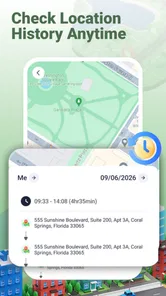
- Records location history so you can review past routes and trips.
- GPS tracking can help you keep tabs on a device’s movements.
- Useful for checking travel distances and route details.
- Location data can support trip planning and activity tracking.
- A practical tool for users who need ongoing location monitoring.
Cons
- Continuous GPS use can drain battery quickly.
- Tracking requires location permissions and may raise privacy concerns.
- Accuracy can vary indoors or in areas with weak GPS signals.
- Background tracking may be restricted by device power settings.
- Location history may use storage and mobile data over time.











