

GPS Live Tracker: Locate Phone
- 7.00
- 3.8
- Installs
- 500.00K
- Price
- Free
Screenshots
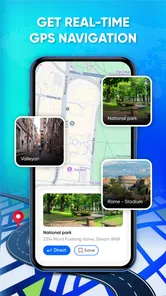
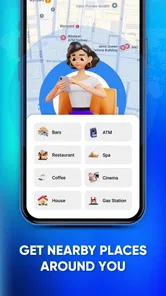

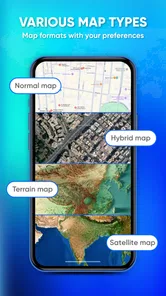
Analysis by Reviewed
I approached GPS Live Tracker: Locate Phone as a practical navigation and location tool rather than as a full replacement for every mapping app on a phone. Its purpose is easy to understand: it uses GPS to help you view a mobile location, follow movement, and explore where you are. That focused idea makes it potentially useful, but it also means your decision should depend on what you expect from a tracker. If you need a straightforward way to work with live location, it is worth considering. If you want a complete travel planner, public-transport guide, or highly polished family-safety platform, I would compare it carefully with more specialized alternatives first.
The app is free to install and is listed for everyone, which makes it approachable for casual users. It comes from African Humanitarian Relief Aid, sits in the Maps & Navigation category, and has reached over 500 thousand installs. Its average score is 3.8 from roughly 800 ratings, so the overall response is reasonably positive without suggesting that every user has found the experience perfect. I see that middle-ground score as a useful warning to test the workflow yourself instead of assuming that a GPS tracker will behave exactly like a familiar map service.
How I Would Decide Whether It Fits
My first decision criterion is the job I need the app to perform. There is a big difference between checking my current position, monitoring a moving phone, planning a route, and sharing a location with another person. Those tasks may all involve GPS, but they require different interfaces and different levels of reliability. This app is most interesting when the central need is live location awareness. It is less obviously the right choice when navigation instructions, detailed place information, or long-term location history matter more than the live position itself.
I would also think about who will use it. A person who is comfortable opening a map, checking the device position, and interpreting GPS information may find the focused approach convenient. Someone setting up location assistance for a less technical family member may care more about simple controls, clear sharing steps, battery behavior, and predictable alerts. Those practical details often matter more than the phrase “live tracker” itself, so I would run a short test before depending on it during a trip or outdoor activity.
The operating-system requirement is another useful checkpoint. The current version, 0.1.5, supports Android 7.0 and later. That gives owners of older compatible devices a chance to use it, while newer-phone owners should still make sure their device handles location access smoothly. GPS performance depends on the phone, surroundings, and system settings as well as the app. Tall buildings, indoor spaces, underground areas, and weak signal conditions can all make a position appear delayed or less precise.
I would not judge a tracker only by whether a marker appears on a screen. A good everyday test is to open it outdoors, wait for the phone to settle on a position, move a short distance, and check whether the displayed location updates in a way that makes sense. Then I would repeat the test indoors and with the phone locked. This reveals more about the experience than a quick launch does, especially if I plan to use it while walking, driving, or coordinating with someone else.
What I Like About the Focused Approach
The strongest part of the concept is its directness. Instead of presenting itself as a huge all-purpose travel suite, it puts live mobile location at the center. I appreciate that because a tracker can become frustrating when basic location information is buried under route planning, recommendations, account features, or social extras. For a quick check before leaving home, a simple GPS-oriented tool can be easier to understand than a feature-heavy alternative.
More From Our News Desk

 Weather - By Xiaomi
Weather by Xiaomi Review: Clear at a Glance, Less Clear Up Close
Xiaomi’s weather app makes everyday forecasts quick to scan, but its calm surface can leave useful details and recovery paths harder to find than they should be.

 X
XX Under Pressure: Can It Recover When Posting Goes Wrong?
A resilience-focused review of X, examining setup, mistaken posts, interruptions, weak connections, and the gaps that matter when recovery needs to be dependable.

 Clash of Clans
Clash of Clans Is Won Between the Battles
Its raids are quick; its community is a long-term project of coordination, teaching, rivalry, and shared responsibility—with all the friction that entails.

 Android Auto
Android Auto Makes the Case for Quieter Car Software
The car interface is no longer judged by how much it can do, but by how quietly it helps. Android Auto shows what drivers now expect—and what still gets in the way.

 MobiOffice: Word, Sheets, PDF
MobiOffice: Transforming Mobile Productivity with Seamless Integration
MobiOffice: Word, Sheets, PDF is redefining mobile productivity with a surprising blend of functionality and innovation.

 EA SPORTS FC Soccer Mobile 26
EA SPORTS FC™ Mobile Soccer: Redefining Mobile Sports Gaming
Dive into EA SPORTS FC™ Mobile Soccer, where immersive gameplay and strategic depth transform mobile sports gaming.
Latest News



That focus can also help in situations where I do not need a complete itinerary. Imagine meeting a friend at a large outdoor event. I may not need restaurant searches, transit schedules, or turn-by-turn directions. I need to understand where a phone is and whether it is moving toward the meeting point. A live location tool can be useful in that kind of short, practical exchange, provided both people understand how the location is being viewed and the phone has a usable GPS signal.
Another sensible use is checking movement during a walk or a simple field task. I could use the phone to keep an eye on its position while moving between known points, then compare the displayed location with the surroundings. This is not the same as professional surveying, and I would not treat an ordinary smartphone GPS reading as exact evidence. Still, for basic orientation and awareness, the app’s central purpose is more relevant than a general map filled with unrelated information.
The app’s broad age rating also makes it easier to consider for ordinary household use. That does not remove the need for adult guidance when location sharing involves children or vulnerable people. I would explain exactly who can see a location, when the feature is active, and how to stop using it. Location information is sensitive even when the interface is simple, so convenience should never replace a clear agreement between the people involved.
Its free price is helpful for trying the experience without committing money immediately. There are in-app purchases priced from $9.99 to $24.99 per item, so I would inspect any purchase screen carefully before confirming anything. The free entry point lowers the cost of testing, but it does not automatically mean every useful function is available without payment. My approach would be to install it, establish whether the basic tracking workflow suits me, and only then decide whether an optional purchase provides enough value for my situation.
Practical Ways to Test It Before Relying on It
My first tip is to test the app at the exact place where I expect to use it. A tracker that feels responsive outside may behave differently in a shopping center, apartment building, rural road, or crowded city street. I would allow the phone a moment to obtain a position rather than judging it from the first screen. If the location looks stale, I would check the phone’s own location setting before blaming the app, because system-level restrictions can affect any GPS tool.
My second tip is to separate “finding the phone” from “sharing the phone’s location.” Those are not necessarily the same workflow. Before asking another person to depend on the tracker, I would confirm what action creates a visible location, how the other person receives it, and whether the display continues updating while the phone moves. A short rehearsal prevents the common mistake of assuming that opening a tracker automatically gives someone else access.
My third tip is to plan for the phone’s battery. Live location work can be demanding, particularly during a long walk or drive. I would begin with a reasonably charged device, avoid treating the app as an invisible background service, and carry a power bank for extended use. This is a general GPS trade-off, but it matters especially when the purpose is continuous awareness rather than a one-time position check.
I would also avoid using a single location reading as proof that someone is at a precise doorway, trail junction, or room. GPS can drift, and map displays can create a false sense of exactness. For meeting someone, I would combine the location view with a message or a recognizable landmark. For outdoor work, I would use visible surroundings and agreed checkpoints as a backup. The app can support judgment; it should not replace it.
Where a Different App Category May Be Better
The usual alternative for many people is a full mapping app. That category is generally the better fit when I need route calculation, place search, road information, or turn-by-turn guidance. A dedicated map may answer “how do I get there?” more completely, while this tracker is aimed closer to “where is the phone now?” I would choose the broader map when navigation is the main task and use this app when live location awareness is the main task.
A family-location service may be more suitable when the priority is an ongoing household arrangement. Families often need recurring groups, arrival notifications, location history, or controls designed around several members. I would not switch to a tracker simply because it shows a position if my real need is a structured family-safety system. In that case, the extra organization of a specialist service could justify choosing a different category, even if it feels less lightweight.
For outdoor navigation, a hiking or trail-focused app can be the stronger choice. Such tools are normally built around routes, saved tracks, terrain information, offline preparation, and activity records. A live tracker may help me understand a current position, but that is not the same as knowing whether a trail is suitable, whether a route is saved for weak coverage, or how far I have traveled. I would select the outdoor category when preparation and route context are more important than a simple live view.
There is also a difference between phone recovery and personal location sharing. If I have lost my own device, the platform’s built-in device-finding service may be more appropriate because it is designed for account-based recovery and device management. If I am coordinating with a friend, a communication app with location sharing may be more convenient because the conversation and the location are already together. GPS Live Tracker: Locate Phone makes more sense when I specifically want a dedicated location-focused experience rather than a feature inside another service.
That comparison does not make the app a poor choice. It clarifies its place. I would recommend it to someone who wants to try a focused GPS tracker, understands the difference between current location and complete navigation, and is willing to verify the sharing workflow. I would steer a user toward a broader alternative when the request includes traffic, transit, detailed route planning, persistent family groups, or specialized outdoor maps.
What Switching Will Cost in Time and Habit
Moving from a familiar map app has a small but real learning cost. I would need to rebuild the habit of where I check routes, where I search for places, and how I communicate a meeting point. If I use this tracker beside my usual map, I may end up switching between apps: one for the live position and another for directions or local information. That is manageable for occasional use, but it can feel inefficient during a busy journey.
There is also a trust cost. A location tool becomes useful only after I know how it behaves in my normal environment. I would test it on a short trip before using it for a long drive, a crowded venue, or an important appointment. I would also make sure the people involved know which app is being used and what the displayed position means. A technically available location is not much help if nobody knows how to interpret or refresh it.
The purchase structure deserves attention during that trial. Because the app is free to start but includes optional items between $9.99 and $24.99, I would not assume that changing from another app has no financial consequence. I would read each purchase prompt, identify whether it is a one-time item or part of a broader unlock, and decide whether the added function solves a problem I actually have. The right question is not whether the paid option exists; it is whether it saves enough effort to justify its cost.
I would keep my existing navigation tool during the transition rather than uninstalling it immediately. That gives me a fallback if I need directions, place details, or a familiar sharing method. After a few real tests, I could decide whether the tracker adds something distinct or simply duplicates a feature I already use. This gradual approach is especially sensible because the app is relatively early in its version history and the experience may continue to evolve.
My Recommendation for Different Users
For a casual Android user who wants a free way to explore live GPS location, I think this app is worth a trial. The central idea is understandable, the age rating is broad, and the large install base shows that it has attracted substantial interest. I would start with a short outdoor test, verify the update behavior, and learn the location-sharing steps before making it part of a regular routine.
For someone who mainly needs driving directions, I would not make it my first recommendation. A full navigation app is likely to be more useful because it handles the journey itself rather than only the position. For parents seeking constant oversight, I would compare family-oriented services first. For hikers, I would look at trail and offline-navigation tools. In each case, the alternative is better because it matches the primary need, not because a live tracker is inherently weak.
I would also be cautious about using any phone tracker as an emergency guarantee. GPS availability, battery life, phone settings, and surroundings can all affect the result. In a safety-sensitive situation, I would combine the app with phone calls, messages, agreed check-ins, and a backup plan. That is not a criticism unique to this product; it is the responsible way to use location technology.
My final view is that GPS Live Tracker: Locate Phone is a focused option for people who want to experiment with live mobile location without paying at the door. Its best quality is its clear purpose, while its main trade-off is that a focused tracker may not cover the wider navigation and coordination tools many users expect. I would recommend it as a practical companion for location checks and simple movement awareness, not as an automatic replacement for maps, family-safety platforms, or outdoor navigation apps.
If that distinction matches your needs, the free starting point makes trying it sensible. Give it a real-world test in an open area, confirm how location updates and sharing work, watch the battery during longer sessions, and review any in-app purchase before accepting it. If the test feels natural and the app answers your specific location question, it can earn a place on your phone. If you keep reaching for another app for directions, history, alerts, or group management, that is a clear sign that a more specialized alternative will serve you better.
GPS Live Tracker: Locate Phone Frequently Asked Questions
Is GPS Live Tracker: Locate Phone suitable for first-time users?
The app is presented as a GPS location tracker for navigating, tracking, and exploring. Its purpose is straightforward, but using location features involves granting permissions and understanding when your location may be shared. Before downloading, consider whether you are comfortable enabling location access and sharing location information with people you trust.
Which phones can run GPS Live Tracker: Locate Phone?
GPS Live Tracker: Locate Phone is available for Android devices running Android 7.0 or later. Check your phone’s operating system before downloading, since an older version may not support installation. The app is free to download, and some features may involve in-app purchases, so review the available options before choosing to buy anything.
What is GPS Live Tracker: Locate Phone used for?
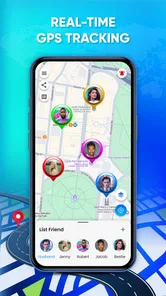
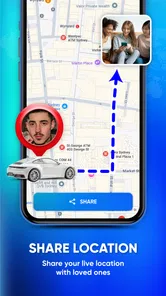
GPS Live Tracker: Locate Phone is designed to help users view and share real-time location information through GPS. It can be useful for keeping track of family members, coordinating with friends, finding a misplaced device, or monitoring a journey. The exact features may depend on the version installed, your phone’s operating system, and whether the other person has agreed to share their location.
Does GPS Live Tracker: Locate Phone track a phone without the owner’s permission?
No legitimate location-tracking app should be used to secretly monitor another person. GPS Live Tracker: Locate Phone generally requires location permissions and, for shared tracking features, consent from the person whose location is being viewed. Users should respect privacy laws and the app’s terms of service. It should not be installed or used to track someone covertly.
Does the app require an internet connection and location permission?
Yes, reliable tracking normally requires both GPS access and an internet connection. GPS determines the device’s position, while mobile data or Wi-Fi transmits that information to the app or map. You will need to grant location permission, and some features may require background-location access. Accuracy can be reduced indoors, underground, in dense cities, or when battery-saving settings restrict the app.
Pros
- Simple interface makes location tracking easy to start.
- Can help families share their whereabouts during trips.
- Useful for coordinating meetups in unfamiliar places.
- Location updates can provide extra peace of mind.
- Works well as a basic alternative to calling for directions.
Cons
- Accurate tracking depends heavily on GPS and mobile signal.
- Continuous location sharing may drain the phone battery quickly.
- Some features may require a paid subscription or in-app purchase.
- Background tracking can raise privacy concerns for some users.
- Location data may be delayed when the app runs in the background.











