GPS Emulator
- 3.21K
- 4.8
- Installs
- 10.00M
- Price
- Free

Screenshots
Analysis by Reviewed
I think GPS Emulator makes most sense when you treat it as a practical location-testing tool, not as a replacement for everyday navigation. It lets you set a different GPS position on your phone, which can help when checking how an app behaves in another place or simply exploring location-based features. The key is to use it deliberately: choose a spot, check what your target app reports, and restore your normal location when you’re finished.
A repeatable starting routine
For a first test, I’d pick a clearly identifiable place rather than a vague point in the middle of a city. Set the position, open the app you want to check, and confirm that it responds as expected. If the result seems wrong, return to GPS Emulator and verify the selected point before changing several things at once. That simple sequence makes it easier to tell whether a problem comes from the chosen location or from the app being tested.
This sort of routine is useful for app developers, testers, and curious users who want to understand location-dependent behavior without travelling. It is less suitable if you need turn-by-turn directions or a dependable record of a real journey: those are jobs for a conventional navigation app using your actual position. I’d also avoid relying on a simulated location for anything where an accurate, genuine position matters.
Settings that deserve a second look
The app includes options such as saved locations, different map types, and an adjustable update interval. These are most useful when they support a consistent test rather than when they’re changed for novelty. For example, save a few relevant places and reuse the same one when comparing how an app handles a nearby search, a regional result, or a location far from home. Keeping the test point fixed helps make the comparison meaningful.
The update interval is worth approaching carefully. A setting that makes a simulated position change too often may create confusing results in an app that checks location intermittently; a slower cadence may be more appropriate when you’re checking a broad change rather than movement. I would change one setting at a time, then repeat the same check. That way, you can see what actually affected the behavior instead of guessing.
Shortcuts for everyday testing
Search can be quicker than dragging around a large map when you already know the place you want to inspect. For repeat work, saved points are a better habit than re-entering coordinates from memory, especially when you need to revisit the same locations on different occasions. Manual coordinates remain useful when a test depends on a precise point, while a map pin is easier when the general area is what matters.
A realistic example: I’m checking whether a local discovery app changes its results between two neighborhoods. I’d save a point in each area, apply one, inspect the results, then switch to the other and repeat the same steps. I would keep the search terms and app settings unchanged. This avoids confusing a location effect with a change in the query or setup, and it makes the process easier to reproduce later.
You May Like

Clash of Clans Is Won Between the Battles

Android Auto Makes the Case for Quieter Car Software

MobiOffice: Transforming Mobile Productivity with Seamless Integration

EA SPORTS FC™ Mobile Soccer: Redefining Mobile Sports Gaming

How Microsoft OneDrive Became a Mobile Productivity Giant

How Google Translate Breaks Language Barriers Effortlessly
Where simulation has limits
GPS Emulator changes the location reported by the phone; it does not make every service behave as though you physically travelled. An app can use other signals or its own checks, so a simulated position may not be accepted everywhere. Location-based games and services may also have rules against manipulating location. I’d check the relevant terms and avoid using a spoofed position to gain an unfair advantage or mislead someone in a consequential situation.
There’s also a difference between setting a point and simulating a convincing route. The adjustable update interval can affect how often the position changes, but it should not be mistaken for a guarantee that another app will interpret the result as natural movement. If your goal is to test a real app, verify the outcome inside that app rather than assuming the emulator’s map view tells the whole story.
Who will get the most from it
I’d recommend this to someone who regularly checks location-aware apps, needs to revisit selected places, or wants a straightforward way to experiment with GPS coordinates. If you only need directions, a normal maps app is the better choice; if you need a real-world location for safety, travel, or navigation, use the phone’s genuine GPS instead. The distinction is important: this is a utility for controlled testing and experimentation, not a substitute for being somewhere.
GPS Emulator is a free app from Digitools UY in the maps and navigation category, with optional in-app purchases. It is rated Teen, and its current version is 3.13. Its average rating is 4.8 from around 246,000 ratings, with over 10 million installs. Those figures suggest broad interest, but they don’t remove the need to check whether location simulation fits your particular use case.
If you’re deciding whether to install it, ask yourself one practical question: will you reuse a location or test how an app responds to a different one? If yes, saved places and a repeatable routine can make it handy. If you simply want a map to guide you somewhere, stick with a standard navigation app. Used with that distinction in mind, it’s a focused tool rather than a travel companion.
If you’ve ever found yourself in a situation where you needed your phone to think you were somewhere else, then you’re in luck because the GPS Emulator app might just be your best friend. Whether you’re testing an app, playing location-based games, or just want to fool your friends into thinking you’re sipping cocktails on a beach in the Bahamas, this app has got you covered.
Getting Started
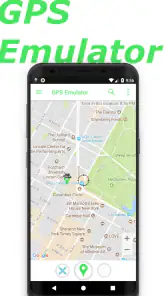
So, what’s the deal with GPS Emulator? First off, it’s super easy to use. After downloading and installing the app, you’re greeted with a simple interface that doesn’t take a tech wizard to figure out. You simply select a location by dropping a pin on the map or entering the coordinates manually. It’s as straightforward as ordering a pizza online, no kidding!
Features Galore
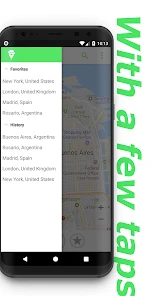
This app isn’t just a one-trick pony. It comes loaded with features that make it not just handy, but also kind of fun to use. You can save your favorite locations, switch between different map types, and even customize the update interval to make it look like you’re on the move. Imagine how much fun you can have with this! Plus, for those who are a bit more tech-savvy, you have the option to use it in developer mode to test your own apps.
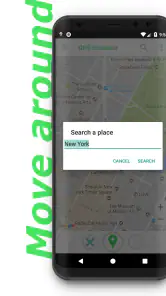
And let’s not forget the search bar feature that allows you to quickly find any location in the world. It's like having a little piece of the globe right there on your phone. No more scrolling endlessly through the map to find Timbuktu!
Performance and Usability
Now, onto the nitty-gritty: performance. I’ve been using the app for a couple of weeks now, and I must say, it’s pretty solid. It doesn’t crash or lag, which is a big plus. The map loads swiftly, and the app doesn’t drain your battery like some other GPS apps out there. You can tell the developers put some serious thought into making it as efficient as possible. Cheers to them!
The user interface is intuitive, which means even if you’re not the most tech-savvy person out there, you’ll still find your way around without feeling like you’re lost in a digital maze. Everything is where you expect it to be, and it just works.
Choosing it over a regular map app
The useful comparison is not whether this can replace a navigation app, but whether you need a map that guides you or a tool that changes what the phone reports. A conventional maps app is the clear choice for live directions, traffic-aware decisions, and finding your way while travelling. GPS Emulator is more relevant when the question is, “How does this other app respond if my location is different?” Keeping those jobs separate prevents a frustrating mistake: a simulated point is not evidence of where you actually are.
It can also be a handy companion to ordinary maps during a controlled check. I might use a regular map to identify a landmark or neighborhood, then set that target in the emulator and inspect the behavior of a separate location-aware app. The two tools have different roles; one helps me understand a real place, while the other lets me test a phone’s reported position. If you only want to browse a map or plan a drive, installing a GPS emulator adds little value.
Making a test easier to repeat
For more dependable comparisons, I’d keep a small, clearly named set of saved locations rather than building a long collection that becomes hard to manage. A useful set might represent the kinds of areas your target app needs to handle: a familiar local point, a second neighborhood, and a distant region. Before each run, note which saved point you used and keep the target app’s search or account state consistent. That simple record helps when a result changes later and you need to work out what differed.
There is a subtle trade-off between choosing a well-known landmark and choosing the exact point an app needs to test. A landmark is easy to find again and reduces the chance of selecting the wrong area, but it may not be precise enough for a test involving a boundary or nearby results. Coordinates give more control, though they are easier to mistype. I’d use a pin for broad comparisons and manually entered coordinates only when precision is genuinely part of the question.
What to expect before you install
GPS Emulator is aimed at changing a device’s reported coordinates, so it makes most sense for someone comfortable with a little trial and error. If you are testing your own app, the developer-mode option may be relevant, but the emulator alone cannot tell you whether your app’s location logic is well designed; you still need to check the result in the app being tested. For a casual user, the most approachable use is trying a different fixed location and observing what changes, without expecting every service to accept it.
The app is free to install, with optional purchases listed from under a dollar to just under ten dollars per item. It supports Android from version 8.0, and it is rated for Teen users. I’d treat the purchase options as a reason to check the in-app details before buying anything, not as a requirement for basic suitability. Its 4.8 average and broad install base make it a familiar option in this narrow utility niche, but the real deciding factor is whether you have a repeatable location task.
Everyday cases where I would skip it
I would not use this to check in somewhere I have not visited, to create a misleading impression about my whereabouts, or to make a location-sensitive decision that affects someone’s safety or money. Those situations depend on truthful, real-world location, and simulation is the wrong tool. I’d also skip it when a service’s terms prohibit location manipulation, even if the immediate experiment seems harmless; a test account or an official testing method is a better route when available.
It is also not the best answer when the issue is simply that a phone is reporting an inaccurate position. In that case, first check the device’s normal location settings and the app’s access to location, then compare the result with a standard map. Using an emulator to work around a genuine GPS problem can hide the cause instead of fixing it. For app developers, a dedicated test setup may be preferable when they need controlled, repeatable quality checks across many devices or test cases.
My take after weighing the trade-offs
The strongest reason to keep GPS Emulator around is repeatability: a saved point, a consistent target app, and one change at a time can turn a vague location experiment into a useful check. It is less compelling as a novelty, because changing coordinates does not guarantee that another service will behave as expected, and the result can depend on that service’s own checks. The app is most satisfying when the user knows what they are trying to learn before setting a new point.
So, is the GPS Emulator app worth your time? In my humble opinion, absolutely! It’s a nifty tool that does exactly what it promises without any frills or fuss. Whether you’re using it for work or play, it’s reliable, easy to use, and packed with enough features to keep things interesting.
Give it a try, and who knows, maybe the next time you’re sitting at home, you can convince your friends you’re off exploring the pyramids of Egypt. Just remember to use it responsibly! Until next time, happy exploring!
GPS Emulator Frequently Asked Questions
Can GPS Emulator be used on iOS, or is it for Android?
GPS Emulator is an Android app in the Maps & Navigation category, so it is intended for Android devices rather than iOS. If you use an iPhone or iPad, this app may not be the right choice for your device. Checking the platform before downloading helps avoid installing an app that does not match your phone.
What does GPS Emulator change on my phone?
GPS Emulator is designed to emulate your GPS position by changing your phone’s GPS coordinates. This can make location-aware apps receive a simulated position instead of the place where you are physically located. It is useful to understand that distinction before trying it, especially if you also use apps that depend on your real location.
Can simulated coordinates be useful for testing an app?
Yes. GPS Emulator can be useful for developers and testers who need to see how a location-based app behaves in different places without physically traveling there. Setting a simulated position lets you explore location-related scenarios on your device. Before testing, consider the rules of the app being tested, since some services may not permit simulated locations.
Is GPS Emulator free to download, and are there optional purchases?
GPS Emulator is free to download, so you can try its location simulation features without paying upfront. The app also offers in-app purchases, with items priced from $0.99 to $9.99. If you are considering an upgrade, check the purchase details shown in the app before confirming, so you know what you are choosing.
What devices and operating systems can run GPS Emulator?
GPS Emulator is an Android app in the Maps & Navigation category, developed by Digitools UY. It requires Android 8.0 or later, so check your device’s software version before downloading. The app has a Teen content rating. These requirements help you decide whether it is a suitable fit for your device and intended use.
Pros
- Highly accurate location simulation
- Easy to use interface
- Supports multiple location modes
- Customizable settings
- Free to use with no ads
Cons
- May drain battery quickly
- Not all features available offline
- Occasional bugs with location updates
- Limited support for older devices
- Requires some technical knowledge

- Category
- Maps & Navigation
- Version
- 3.13