

GPS Earth Live Satellite Maps
- 92.00
- 2.6
- Installs
- 1.00M
- Price
- Free

Screenshots
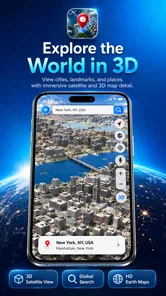
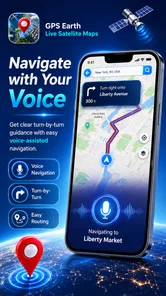
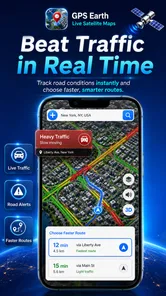
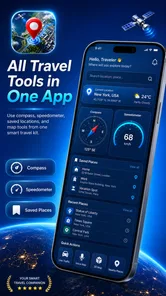
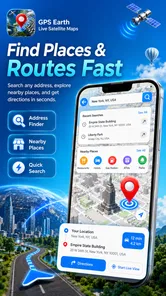
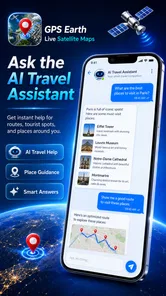
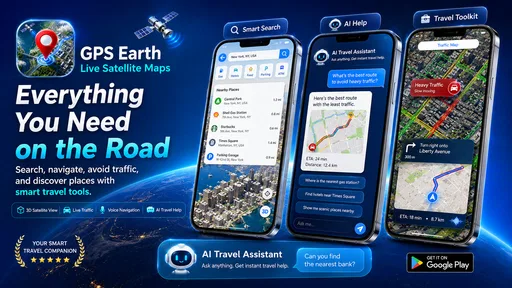
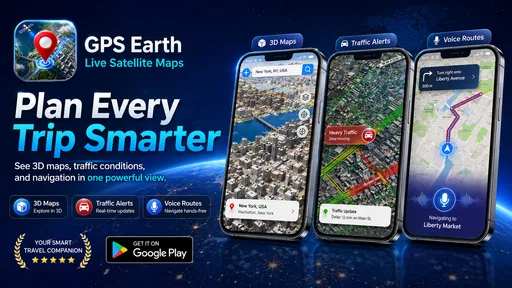
Analysis by Reviewed
Before I’d rely on a map app for a journey, I’d want to know whether it is a free download or a paid purchase. GPS Earth Live Satellite Maps is free, so trying it does not require an upfront payment. That makes it easy to open out of curiosity or use as a companion while planning, though “free” alone doesn’t tell me how well it will suit a particular trip.
What the free experience is useful for
I see the strongest value here in visual exploration: satellite imagery can help me get a feel for a place’s layout before I visit, while familiar map controls make casual browsing straightforward. The app is from M Z Tech, and its travel-assistant framing makes it sound aimed at people who want to move around maps as well as look at them. I’d treat that as a useful starting point, not a reason to assume it replaces a dedicated navigation service for every drive.
One practical way I’d use it is to inspect the area around a hotel before booking or arriving. I could look at the surrounding blocks, spot the broad shape of nearby roads, and save places I want to check later. For a day out, I’d make a short list of destinations before leaving rather than trying to research everything while walking. That small preparation makes map browsing more purposeful and reduces the chance of losing track of a place that caught my eye.
Where I’d be cautious
Satellite imagery is helpful for context, but an overhead view is not the same as a current, ground-level check. A road that looks obvious from above may be hard to cross on foot, and visual detail should not be confused with confirmation that a route is open or suitable. I’d compare an unfamiliar journey with a navigation app I already trust, especially when timing, turn-by-turn directions, or a reliable arrival plan matters.
I’d also keep the app’s modest reception in mind. It has an average rating of 2.6 from around 4,100 ratings, alongside more than a million installs. That doesn’t prove what any individual will experience, but it is a reason for me to test the functions I care about before depending on them. The current version is 4.0.5, and it is listed for Android 6.0 and later, so an older device below that requirement won’t be a fit.
Who is likely to get value?
If you enjoy looking at places from above, plan trips visually, or want a free way to explore map views, this is an easy app to try. It is rated for Everyone, which makes its intended audience broad. I’d be less likely to recommend it as someone’s only navigation tool if they need consistently dependable directions for work, a tight connection, or a time-sensitive appointment. In those cases, I’d choose a navigation app whose route guidance I have already tested.
For a low-stakes everyday use, imagine a friend suggesting a café in an unfamiliar part of town. I’d open the map beforehand, check how the surrounding streets connect, and save the destination so I can find it again. I would still confirm the final route when it is time to go. This split—using satellite views for orientation and a trusted route planner for the actual trip—is a sensible way to get value without asking one app to do everything.
More From Our News Desk

 Weather - By Xiaomi
Weather by Xiaomi Review: Clear at a Glance, Less Clear Up Close
Xiaomi’s weather app makes everyday forecasts quick to scan, but its calm surface can leave useful details and recovery paths harder to find than they should be.

 X
XX Under Pressure: Can It Recover When Posting Goes Wrong?
A resilience-focused review of X, examining setup, mistaken posts, interruptions, weak connections, and the gaps that matter when recovery needs to be dependable.

 Clash of Clans
Clash of Clans Is Won Between the Battles
Its raids are quick; its community is a long-term project of coordination, teaching, rivalry, and shared responsibility—with all the friction that entails.

 Android Auto
Android Auto Makes the Case for Quieter Car Software
The car interface is no longer judged by how much it can do, but by how quietly it helps. Android Auto shows what drivers now expect—and what still gets in the way.

 MobiOffice: Word, Sheets, PDF
MobiOffice: Transforming Mobile Productivity with Seamless Integration
MobiOffice: Word, Sheets, PDF is redefining mobile productivity with a surprising blend of functionality and innovation.

 EA SPORTS FC Soccer Mobile 26
EA SPORTS FC™ Mobile Soccer: Redefining Mobile Sports Gaming
Dive into EA SPORTS FC™ Mobile Soccer, where immersive gameplay and strategic depth transform mobile sports gaming.
Latest News



There are also a few useful habits that make this kind of map browsing more effective. I’d zoom out first to understand the neighborhood’s shape, then zoom in only around the places I may visit. When saving a location, I’d give myself a clear reason to return to it—such as “hotel entrance” or “possible lunch stop”—instead of collecting unlabeled pins. And if a view seems unclear, I’d switch back to a conventional map rather than making a decision from imagery alone. These are small steps, but they help keep exploration separate from route-critical decisions.
Discover the World with Just a Tap
When I first launched the GPS Earth Live Satellite Maps app, I was immediately struck by its sleek design and user-friendly interface. It’s not just eye candy; it’s functional too. Navigating through the app is a breeze, and within seconds, I was zooming in and out of various global locations. Whether you’re planning a trip or just curious about a place, this app brings the world to your fingertips.
Features That Make You Go "Wow!"
What sets this app apart is its robust set of features. The live satellite maps are incredibly detailed, offering a bird’s-eye view of virtually any location on the planet. I particularly enjoyed the street view option, which allowed me to explore streets in distant cities as if I was there in person.
Another neat feature is the real-time traffic updates. You can plan your trips better by avoiding traffic snarls. Plus, the app offers a variety of map styles – from terrain to hybrid – so you can customize your viewing experience.
Bringing Adventure to Your Fingertips
One of the aspects I found most appealing is how the app caters to the adventurous spirit. With its integrated location tracking, I could virtually follow hiking trails or find my way through bustling urban landscapes. It’s like having a personal tour guide who knows all the shortcuts and hidden gems.
For those who love to document their travels, the app allows you to save locations and routes. So, if you stumble upon a quaint little bakery in Paris or a stunning vista in the Rockies, you can bookmark it for future visits.
Using map views without overtrusting them
The imagery and map styles are most useful when I treat them as different ways to answer different questions. Satellite views help me understand the shape of a neighborhood, the position of a large building, or whether a destination appears to sit beside a major road. A terrain or hybrid view can offer a different sense of the surrounding area. None of those perspectives, by themselves, tells me whether a footpath is open, a doorway is accessible, or a place is operating today. I’d use the app to narrow down what I need to check, then confirm practical details through a more suitable source.
That distinction matters most when the map looks persuasive. A crisp overhead image can make a route seem simple, but it may hide barriers, one-way streets, private access, or changes since the imagery was captured. On a hike, I’d use a satellite view to get a broad sense of the landscape, not as proof that a trail is safe or passable. For driving, I’d follow a route planner I trust rather than choosing a shortcut just because it looks direct from above.
A practical routine for trip planning
For a new destination, I’d start with the destination itself and inspect the area at a wide scale before zooming in. That helps me notice whether it sits in a dense center, on the edge of town, or beyond a cluster of roads. Next, I’d save only the places I genuinely expect to revisit. A small, purposeful set of saved locations is easier to use later than a long collection made while browsing casually.
Before setting off, I’d review those saved points and decide which one is the actual destination and which are optional stops. That simple separation can prevent a saved café or viewpoint from being mistaken for the main address. If I’m meeting someone, I’d share or confirm a clear street address separately instead of relying on a pin alone. Pins are handy visual reminders, but they are not always the clearest way to communicate where to meet.
For a traveler arriving in an unfamiliar city, this can be a useful pre-arrival routine. I could inspect the blocks around my accommodation, note the broad direction of nearby streets, and save a few places I want to find. Once I’m on the ground, I’d use current directions for the actual walk or drive. This makes the app a planning companion rather than the single source of truth for every decision.
How it compares with everyday navigation apps
Compared with a conventional navigation app, the appeal here is the emphasis on visual browsing and satellite-oriented exploration. A route-first app is usually the more natural choice when I need a dependable sequence of turns, a clear arrival estimate, or guidance while already moving. GPS Earth Live Satellite Maps makes more sense when I want to look around first, understand a place’s layout, or explore from home without immediately committing to a route.
I wouldn’t treat the two approaches as competitors in every situation. They can complement each other: use this app to inspect the surroundings and save points of interest, then switch to a trusted navigation tool for live travel decisions. If I only want directions from one address to another, opening a dedicated route planner is likely faster. If I’m curious about the setting around a destination, the visual map experience is a more engaging starting point.
There is a trade-off in keeping two tools in the workflow: I may need to move between apps and check that I have the right destination in both. For a casual outing, that is a small inconvenience. For a rushed trip, a long drive, or an appointment where being late matters, I’d favor the tool I already know can guide me reliably, rather than adding a new step just for the sake of a different map view.
What to expect from the free price
Because the app is free, the decision to try it is straightforward: there is no purchase price to weigh against its usefulness. I see its value as the time it can save when exploring a location visually, not as a replacement for every map service. A free download can be worthwhile even if it becomes a secondary tool, provided its views and saved places fit the way you plan.
That does not mean I’d assume every capability is available without restrictions or that there are no other considerations. I’d install it, check the map views I actually want to use, and decide whether the experience justifies keeping it on my phone. The average rating gives me a reason to set expectations carefully, but not a reason to assume it will fail for everyone. My own test would focus on the specific task I care about: browsing a neighborhood, checking a saved spot, or comparing views before a trip.
Who should skip it, and when another tool is better
If your main need is spoken turn-by-turn guidance that you can trust on an unfamiliar route, I would not make this my sole choice. The same goes for anyone who regularly navigates under pressure and cannot afford to troubleshoot a map app while travelling. I’d use a route-focused service for those jobs and consider this one only if satellite exploration adds something useful to the planning process.
It may also be a poor fit if you rarely browse maps and already have a familiar app that answers your questions quickly. Adding another app is not valuable just because it offers a different presentation. The strongest reason to keep this one is a genuine preference for exploring places visually, or a habit of planning trips by looking at the surrounding area before you leave.
For someone who likes to compare the broad layout of destinations, save interesting places, and explore from the sofa, the low barrier to trying it is a real advantage. I’d still check the version and Android requirement before installing, particularly on an older phone. The app is rated for Everyone, but that broad age label doesn’t change the practical question: does its map experience suit the tasks you actually do?
Conclusion: A Must-Have for Explorers
In a world where technology can sometimes feel overwhelming, GPS Earth Live Satellite Maps is a breath of fresh air. It combines functionality with fun, making it a must-have for anyone with a thirst for adventure or curiosity about the world. Whether you’re planning your next vacation or just exploring from your sofa, this app is your ticket to world exploration without the jet lag.
My more measured verdict is that it is an appealing free companion for curious map users, especially when a visual overview is the goal. I would not recommend relying on it alone for time-sensitive navigation, and I’d verify important route details in a tool designed for that job. If you enjoy exploring map views and are happy to treat them as planning aids rather than guarantees, it is worth a try. If you need one app to handle every journey with confidence, I’d choose a route planner I already trust instead.
GPS Earth Live Satellite Maps Frequently Asked Questions
Is GPS Earth Live Satellite Maps free to download, and what should I know about its age rating?
GPS Earth Live Satellite Maps is free to download and is rated Everyone, so it is intended for a broad audience. The app is in the Maps & Navigation category and is developed by M Z Tech. Before installing, check that your device meets the minimum operating-system requirement and consider whether the app’s map and navigation features suit your needs.
What are the main features of GPS Earth Live Satellite Maps?
GPS Earth Live Satellite Maps offers real-time navigation assistance, high-resolution satellite imagery, 3D street views, and global positioning services. Users can explore new places virtually, get accurate directions, and view geographic details with precision. The app also provides traffic updates and route optimization, making it a comprehensive tool for travelers and explorers alike.
Is GPS Earth Live Satellite Maps available for both Android and iOS devices?
Yes, GPS Earth Live Satellite Maps is available for download on both Android and iOS platforms. Users can find the app on the Google Play Store for Android devices and the Apple App Store for iOS devices. This cross-platform availability ensures that a wide range of smartphone users can benefit from its functionalities.
Does GPS Earth Live Satellite Maps require an internet connection to function?
While GPS Earth Live Satellite Maps offers offline map features, an active internet connection is required for real-time updates, live satellite images, and traffic information. The app uses GPS for location tracking, but downloading maps and other data in advance is recommended to ensure full functionality when offline.
Are there any subscription fees or in-app purchases in GPS Earth Live Satellite Maps?
GPS Earth Live Satellite Maps is available as a free download, but it includes optional in-app purchases and subscription plans. These purchases can enhance the user experience by unlocking premium features such as ad-free browsing, high-definition satellite imagery, and additional customization options. It's advisable to review the app’s pricing details before making any purchases.
Pros
- High-resolution satellite imagery
- User-friendly interface
- Real-time GPS tracking
- Offline maps available
- Frequent updates
Cons
- Requires internet for live updates
- May drain battery quickly
- Some features are paid
- Limited 3D views
- Ads can be intrusive











