

GoPass ®
- 4.03K
- 4.8
- Installs
- 500.00K
- Price
- Free

Screenshots

Analysis by Reviewed
I judge a transit app by what happens when I’m already on my way: can I check a trip, sort out the fare and keep track of useful travel information without juggling several services? GoPass ® is built around that practical combination. It’s most appealing when the transport options I need are supported, and less convincing as a universal answer for every journey or destination.
What to check before your first ride
Before relying on any ticketing app for a commute, I’d test it while I still have time and a dependable connection. Look up a familiar route, see whether the relevant service appears, and explore how the ticket purchase steps fit your trip. This isn’t busywork: it helps distinguish a genuinely useful everyday tool from an app that happens to cover only part of your local network.
I’d also decide what I’ll do if the phone is unavailable. A digital ticket is convenient, but it ties access to a charged device and a functioning app. Keeping a locally accepted alternative in mind is especially sensible for an important appointment, an unfamiliar route, or a trip with little room for delay.
A commute is different from a one-off journey
For a repeated commute, convenience comes from reducing small decisions. Once I know that my normal route and ticket needs are handled, I can make checking the trip and preparing the fare part of my routine. That’s a more useful benefit than expecting the app to make public transport itself faster: it can simplify the preparation, but it can’t remove a service disruption or make an unsupported route appear.
Occasional riders have a different calculation. If I use transit only now and then, avoiding a stop at a ticket machine may still matter, but I’m less likely to benefit from building a daily habit around the app. I’d install it when I have a specific supported journey in mind, rather than assuming that a transit tool will be valuable simply because I travel sometimes.
When timing and connections matter
A realistic test is a weekday trip with a connection and a fixed arrival time. I’d check the planned journey before leaving, purchase or prepare the fare while I’m not under pressure, and look again as departure gets closer. If one leg changes, having travel information and ticketing in the same place may be easier than switching among separate tools. I would still leave a buffer: a combined app is not a substitute for extra time when the connection is tight.
For an unfamiliar late-evening trip, I’d be more cautious. I would confirm that the services I need are represented and avoid making the app my only source of direction. A broad mapping app may be better for finding a destination or comparing walking and driving options, while GoPass is the more relevant choice when its supported transit service and ticketing are the main concern.
More From Our News Desk

 Weather - By Xiaomi
Weather by Xiaomi Review: Clear at a Glance, Less Clear Up Close
Xiaomi’s weather app makes everyday forecasts quick to scan, but its calm surface can leave useful details and recovery paths harder to find than they should be.

 X
XX Under Pressure: Can It Recover When Posting Goes Wrong?
A resilience-focused review of X, examining setup, mistaken posts, interruptions, weak connections, and the gaps that matter when recovery needs to be dependable.

 Clash of Clans
Clash of Clans Is Won Between the Battles
Its raids are quick; its community is a long-term project of coordination, teaching, rivalry, and shared responsibility—with all the friction that entails.

 Android Auto
Android Auto Makes the Case for Quieter Car Software
The car interface is no longer judged by how much it can do, but by how quietly it helps. Android Auto shows what drivers now expect—and what still gets in the way.

 MobiOffice: Word, Sheets, PDF
MobiOffice: Transforming Mobile Productivity with Seamless Integration
MobiOffice: Word, Sheets, PDF is redefining mobile productivity with a surprising blend of functionality and innovation.

 EA SPORTS FC Soccer Mobile 26
EA SPORTS FC™ Mobile Soccer: Redefining Mobile Sports Gaming
Dive into EA SPORTS FC™ Mobile Soccer, where immersive gameplay and strategic depth transform mobile sports gaming.
Latest News



That distinction also helps answer a common practical question: should this replace a general maps app? I wouldn’t use it as a complete replacement. I’d treat it as a transit-focused companion and keep a general map available for wider navigation, particularly when a trip includes a walk, an unfamiliar stop, or a route outside the services covered.
Preparation that can prevent a platform-side scramble
One useful habit is to explore the ticket flow before the moment you need it. If activation has an extra step, discovering that at home is much less stressful than finding it at a boarding area. I’d also avoid waiting until the last few seconds to buy or open a ticket; a modest time cushion gives me room to respond to a slow connection or an unexpected prompt.
Another sensible trade-off is deciding when the phone needs to do less. Running a map, checking updates and handling a digital ticket can all be part of the same journey, but I wouldn’t want to spend the whole ride repeatedly refreshing screens without a reason. I’d check when new information could change my next step, then conserve attention and battery for the rest of the trip.
Where a different option may be wiser
If I’m taking a route that depends on a service I haven’t confirmed is covered, I’d use the transport provider’s own channel or another locally accepted way to pay until I know the app fits. The same goes for a trip where a ticket problem would have serious consequences and there’s no time to recover. Digital convenience is worthwhile only when the purchase and access process works for the journey in front of me.
Paper tickets have their own inconvenience: they can require a machine or a queue, and they’re easy to misplace. But they may be a better fallback if my phone battery is low, I don’t want to depend on an app at the point of boarding, or local rules make a physical fare simpler. I see these options as practical alternatives rather than assuming one method is always superior.
How I think about performance in real use
I’d assess speed by whether the essential steps feel manageable before a ride, not by expecting every screen to load instantly. A clean route from planning to ticket preparation can reduce friction, but a weak connection or local service issue may still interrupt the experience. For a high-pressure trip, I’d check the app in advance instead of making my first attempt when a vehicle is due.
Stability matters most at the point of ticket access. Since activation problems have been reported, I’d treat that step as something to verify, especially before a time-sensitive journey. If something goes wrong, the useful recovery plan is simple: allow time, check the ticket area before boarding, and know what alternative payment or travel arrangement is acceptable where I am.
I wouldn’t assume that every phone will feel equally responsive, or that battery and storage demands are negligible. My own practical approach would be to keep the device charged, avoid depending on a nearly empty battery for both navigation and ticket access, and install updates at a convenient time rather than just before leaving. Those precautions are ordinary, but they matter more when a phone is part of the fare plan.
For Android users, the operating-system requirement is also worth checking before making the app part of a routine. If a device is too old to run it, the sensible move is to use another locally supported ticketing or payment method rather than planning around an installation that won’t work.
Overall, I’d choose this app for a supported transit routine where fewer separate steps make the journey easier. I’d skip it as my sole travel tool if I mostly drive, walk or cycle, or if the routes I need are not confirmed. Its strongest case is practical coordination; its limits are the dependence on participating local services, the phone itself, and a ticket process that deserves a little advance attention.
What’s the Buzz About?
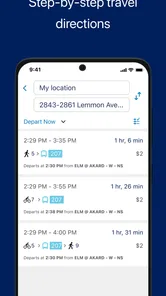
GoPass ® is essentially your all-in-one travel companion, especially if you’re navigating public transportation. Imagine having the ability to plan your journey, purchase tickets, and get real-time updates all from the palm of your hand. Pretty neat, right?
Features That Stand Out
First off, the user interface is super intuitive. I mean, nobody wants to fiddle around with a complicated app when you’re rushing to catch a train. The layout is clean and straightforward, so you can find what you need without any hassle.
One of the standout features is the ability to buy and store tickets digitally. No more worrying about losing paper tickets or standing in line at ticket machines. Plus, the app supports multiple transit systems, which is a huge bonus if you’re traveling across different cities.
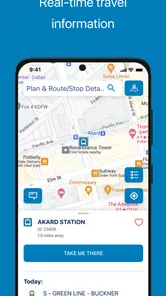
Real-time updates are another lifesaver. You get notifications about delays, schedule changes, and even track your ride live. It’s like having a personal travel assistant in your pocket!
Using it when the trip gets complicated
The biggest practical win for me is having journey planning, ticket purchase and travel updates together rather than switching between a route-planning app, a transit agency page and a separate payment method. On a day with a connection, I’d check the route before leaving, buy the ticket while I still have a moment, then keep the update screen handy as departure approaches. That small change in order matters: it gives me time to sort out a ticket issue before I’m standing at a gate or boarding area.
For a visitor making several unfamiliar trips, the same setup can reduce the mental load of remembering which local system handles each leg. Still, I wouldn’t assume that every transit option in every city is covered just because multiple systems are supported. I’d check the routes and services I actually need before relying on the app for a tight connection or an unfamiliar late-night journey.
Why You Might Love It
For those of us who value convenience, the app is a game-changer. It saves time, reduces stress, and makes commuting a breeze. Plus, it’s eco-friendly since you’re going paperless. And who doesn’t love doing a little good for the planet?
Another thing worth mentioning is the support for multiple languages, making it accessible to a broader audience. Whether you’re a local or a tourist, navigating the app is a piece of cake.
Who benefits most, and who may prefer another tool
I’d recommend it most to regular public-transport riders who want one place to handle the parts of a trip that usually involve several small tasks. It can also suit occasional riders who already know their route but want to avoid a ticket-machine stop. Someone who mainly drives, cycles, or walks, on the other hand, is unlikely to get enough day-to-day value from a transit-focused app.
Compared with a general maps app, GoPass is more compelling for the ticketing side of a journey; a maps app may still be the better choice when I need broad directions beyond public transit. Compared with buying a paper ticket, digital storage is convenient, but it makes a charged, usable phone part of the travel plan. I’d keep enough battery for the ride and avoid waiting until the last seconds to open or activate a ticket.
A Few Thoughts to Ponder
While I’m all praises for the app, like any other, it’s not without its quirks. Some users have reported occasional glitches with ticket activation. But honestly, these seem to be minor hiccups that don’t overshadow the overall functionality.
That activation concern is worth treating as a real travel-planning detail, not a reason to panic. If I’m taking a time-sensitive trip, I’d open the ticket area before reaching the platform and allow a little room to resolve anything unexpected. I’d also avoid assuming that an app update or a newly changed route will remove every local snag. At the time of writing, version 4.10.3 is current, but day-to-day reliability can still depend on the services involved.
Also, while the app is pretty comprehensive, it’s largely dependent on the integration and cooperation of local transit agencies. So, the experience might vary depending on where you are.
Speed, stability and device fit
For everyday use, I value the short path from checking a journey to getting a ticket more than flashy animation or extra visual effects. The clean layout described above is a practical advantage when I’m in a hurry, although I wouldn’t mistake a simple interface for a guarantee that every action will be instant. Network conditions, ticket processing and the local transit connection can all affect the moment that matters.
GoPass App develops the app, which is free and rated for Everyone. It has a 4.8 average from around 37,000 ratings, with over 500,000 installs, and it has been available since September 9, 2013. Those figures suggest that it has found an audience, but they don’t promise identical performance on every phone or route. It requires Android 10 or later, so anyone using an older Android device should check compatibility before planning a commute around it. I’d also keep the app updated when practical, while avoiding an update immediately before a journey if I have no time to check that everything still works.
I can’t judge resource use from a specification alone, so I wouldn’t claim that it is especially light on battery or storage. For a normal commute, I’d simply keep an eye on battery if I’m also using navigation and mobile data throughout the trip. If the phone is nearly out of charge, a paper ticket or another locally accepted option is a safer fallback than expecting any travel app to rescue the situation.
My practical verdict
My bottom line is that GoPass makes the most sense when the local transport services you use are supported and you want ticket handling and journey information in one place. It is less useful as a universal map replacement, and I would not make it my only plan for a trip where a failed ticket activation would leave no time to recover. Check your usual route, prepare the ticket before the rush, and keep a backup option in mind. For a supported everyday commute, that balance of convenience and sensible caution makes it worth considering.
To wrap it up, if you’re looking for a reliable travel companion, it has you covered. It’s efficient, user-friendly, and a great tool to simplify your daily commute or travel adventures. Give it a go, and who knows, it might just become your go-to app for all things transit!
GoPass ® Frequently Asked Questions
What should I check before using GoPass® for a trip?
Before relying on GoPass® for a journey, check that it suits the way you travel and that your phone meets the app’s operating-system requirements. It is a Maps & Navigation app centered on paying and riding, so it may be useful to have it installed and ready before you reach a station or stop. The app is free to download.
Can I use GoPass® to pay for transit without carrying cash or a paper ticket?
GoPass® is presented as a better way to pay and ride, and its transit payment features are a central part of its appeal. It is designed to give riders a mobile option for handling transit fares. As with any travel app, consider setting it up before heading out so you can become familiar with its payment flow and avoid learning it for the first time while commuting.
What devices can run GoPass®?
GoPass® is a Maps & Navigation app for Android and iOS. On Android, it requires version 10 or later, so it is worth checking your device’s operating system before downloading. The app is free and is rated for Everyone, making it suitable for a broad range of users who want a mobile option for transit-related travel.
Is GoPass® free to download, and what should I know before installing it?
GoPass® is free to download, and its focus is reflected in the short description, “GoPass®,” and the summary, “A better way to pay and ride.” It has an average rating of 4.8 from around 37 thousand ratings, with about 3.8 thousand written reviews. Those figures can help you gauge its reception, while your experience will depend on your travel needs.
What is GoPass® and how does it work?
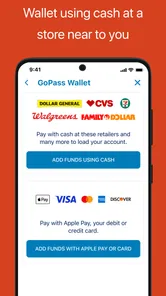
GoPass® is a mobile application designed to make your transit experience more convenient. It allows users to plan trips, pay for transit fares, and receive real-time updates about public transportation systems. The app uses GPS and a user-friendly interface to help you navigate public transport routes efficiently. Users can add funds to their account and use QR codes for easy access to buses and trains, making commuting smoother and more manageable.
Pros
- User-friendly interface
- Secure payment options
- Wide network of partners
- Real-time updates
- Customizable alerts
Cons
- Limited to certain cities
- Requires stable internet
- May have hidden fees
- Occasional app crashes
- Complex registration process











