Glympse - Share GPS location
- 18.84K
- 4.1
- Installs
- 5.00M
- Price
- Free

Screenshots
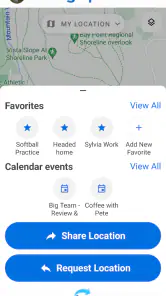
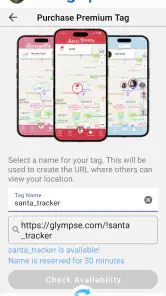

Analysis by Reviewed
Ever found yourself in a situation where you wished you could just magically let someone know exactly where you are without going through the hassle of sending pins and coordinates? That's where Glympse comes in, my friends. This nifty little app has been a total game-changer for my daily escapades. Let me walk you through why it rocks.
What is Glympse?
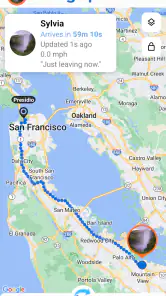
Imagine being able to share your location with friends, family, or even colleagues in real-time with just a tap. That’s precisely what Glympse offers. The app allows you to share your GPS location with anyone you choose for a specified duration. No sign-ups, no social networks, just simple location sharing. It’s like having a personal homing beacon on your phone!
Easy Peasy Setup
Setting up Glympse is a breeze. I found the interface quite intuitive. You open the app, choose who you want to share your location with, set the duration, and hit send. The recipient gets a link they can view in any web browser—no app required on their end. This makes it super convenient for those who aren’t exactly tech-savvy.
Real-Time Tracking
One of the coolest features is the real-time tracking. Whether you're running late for a coffee date or just want someone to know you're safe on your way home, Glympse updates your location continuously. It's like having a virtual travel buddy who keeps tabs on your whereabouts, so you don’t have to keep texting updates.
Safety First
We all know sharing your location can be a bit of a double-edged sword when it comes to privacy. But with Glympse, you have full control. You decide how long someone can see your location, and you can stop sharing at any time. Plus, there's no need for accounts or permanent connections, which I think is a huge plus for privacy-conscious folks.
Integration with Other Apps
Here’s another neat thing—Glympse integrates with several other apps and services. You can share your location through messaging apps, email, or even social media. I’ve used it to coordinate meetups with friends through WhatsApp and found it super seamless.
In conclusion, Glympse is a solid app that does exactly what it promises: simple, efficient, and secure location sharing. Whether you're coordinating with friends, ensuring your loved ones know you're safe, or just avoiding the "where are you?" texts, this app has got your back. So, if you haven't tried it yet, give it a whirl. You might just wonder how you ever managed without it!
Pros
- Real-time location sharing
- No sign-up required
- User-friendly interface
- Cross-platform support
- Temporary sharing option
Cons
- Drains battery quickly
- Occasional location inaccuracies
- Privacy concerns
- Requires data connection
- Limited offline functionality

- Category
- Maps & Navigation
- Version
- 4.0.23