

GlossGenius: Booking, Payments
- 770.00
- 3.7
- Installs
- 100.00K
- Price
- Free

Screenshots

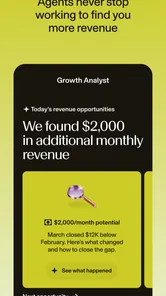
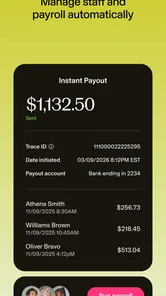
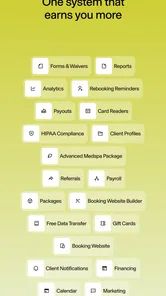
Analysis by Reviewed
I’d look at GlossGenius as a business tool for independent beauty professionals, not as a beauty app for people browsing products or tutorials. Its appeal is bringing client bookings and day-to-day business tasks into one place. The app is free to install, is rated for Everyone, and is made by GlossGenius. It has a 4.3 average from around 1,400 ratings, which gives a prospective user a useful snapshot of its reception without telling the whole story of whether its workflow will suit their business.
A good fit for a solo service business
The people most likely to benefit are stylists, estheticians, and other independent pros who personally handle appointments as well as client communication. When your workday is split between providing services and keeping the calendar in order, having those jobs connected can be more helpful than juggling a separate scheduler, contact list, and marketing tool. The practical question is whether you want one central system or prefer choosing a specialist tool for each task.
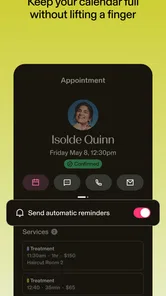
For example, imagine finishing a client appointment and needing to check the next booking, keep client details organized, and make sure the next person knows when to arrive. A single business app can make that handoff feel less scattered. I’d still treat automated reminders as a support rather than a substitute for clear booking policies: clients need to know what to expect, and the business owner remains responsible for setting those expectations.
Where an all-in-one approach helps—and where it can pinch
Compared with a basic calendar, GlossGenius is aimed at more than blocking out time: it brings scheduling into a broader beauty-business workflow. Compared with assembling separate booking, payment, and marketing services, the attraction is having fewer places to check. The trade-off is that an all-in-one setup may not match every owner’s preferred way of working. If you already rely on a carefully tuned set of tools, switching everything at once could create more disruption than value.
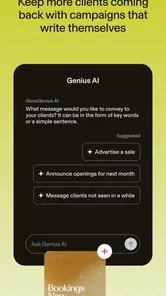
I’d also be deliberate about marketing. Email campaigns and promotions can help you reconnect with clients, but sending more messages is not automatically better. A useful approach is to plan a specific reason to contact people, such as sharing an offer that fits your services, rather than treating the campaign feature as a license to fill inboxes. Likewise, customize the booking site around the information clients actually need; too much decoration can get in the way of a straightforward appointment choice.
Getting Started with Ease
One of the first things I noticed about GlossGenius was how incredibly user-friendly it is. Setting up my profile was a breeze, and within minutes, I was diving into a world of features that seemed almost too good to be true. Whether you’re tech-savvy or a bit of a newbie, the app guides you through every step with intuitive design and helpful prompts. It’s like having a tech-savvy friend by your side, making sure you don’t miss a beat.
The Features That Stand Out
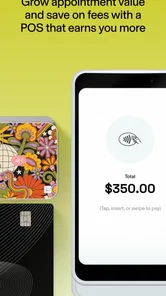
Let’s talk about the features, because boy, does GlossGenius pack a punch! From scheduling appointments with just a few taps to managing your entire client database, this app thinks of everything. I was particularly impressed with the automated reminders feature, which ensures that no appointment is forgotten, saving you those awkward ‘oops’ moments. Not to mention, the point-of-sale system is seamless, making transactions smoother than ever.
More From Our News Desk

 Gmail
GmailGmail in a Busy Inbox: Who Benefits Most?
From first account to crowded workday, Gmail earns its place through dependable search and flexible sorting—but its best fit depends on how much inbox maintenance you can tolerate.

 Prime Video
Switching to Prime Video: What Changes in Your Viewing Routine
Prime Video can make a compelling second home for streaming, but switching means learning a different catalog, rental layer, and route from browsing to playback.

 Universal TV Remote Control
Universal TV Remote Control Works Best as a Reliable Backup
A phone remote earns its place through quick setup and reliable habits. Here is how to get more from Universal TV Remote Control—and where its limits show.

 Weather - By Xiaomi
Weather by Xiaomi Review: Clear at a Glance, Less Clear Up Close
Xiaomi’s weather app makes everyday forecasts quick to scan, but its calm surface can leave useful details and recovery paths harder to find than they should be.

 X
XX Under Pressure: Can It Recover When Posting Goes Wrong?
A resilience-focused review of X, examining setup, mistaken posts, interruptions, weak connections, and the gaps that matter when recovery needs to be dependable.

 Clash of Clans
Clash of Clans Is Won Between the Battles
Its raids are quick; its community is a long-term project of coordination, teaching, rivalry, and shared responsibility—with all the friction that entails.
Latest News



One feature that took me by surprise was the marketing tools. Yes, you heard that right! GlossGenius allows you to create and send beautiful email campaigns and promotions directly to your clients. It’s like having a marketing team at your fingertips, ready to boost your business whenever you need it.
Customization and Personal Touch
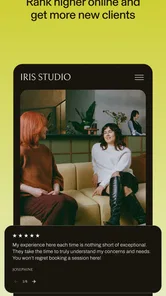
Another aspect where this app shines is customization. You can personalize your booking site, making it reflect your brand perfectly. It’s these little touches that help in creating a strong personal connection with your clients, and in the beauty business, that’s gold. I spent a good hour just playing around with the custom options; it’s quite addictive and rewarding to see your personal brand come to life.
Moreover, the app integrates smoothly with social media platforms, allowing you to showcase your work effortlessly. It’s a one-stop-shop for all your business needs, and it’s hard to imagine running a business without it once you get the hang of it.
Making the booking path work for your clients
The booking page is not just a place to show a logo and list services; it is where a potential client decides whether they understand your offer well enough to book. I’d write service descriptions around the practical questions people ask before an appointment: what the appointment is for, how to choose the right option, and what preparation is useful. That kind of clarity can reduce back-and-forth messages more reliably than adding extra visual flourishes.
There is a useful trade-off in how much choice to present. A detailed menu can help returning clients book precisely, but too many near-identical options may leave a new visitor unsure. I’d group services in a way that reflects how clients describe their needs, then check the page from a client’s point of view rather than only from the business-owner side. A polished booking flow still has to be easy to scan on a phone.
What I’d Check Before Committing
Before moving your whole operation into any booking system, I’d test the parts clients encounter most: how clearly they can find your services, choose a time, and understand the reminder they receive. Then try the owner-side routine on a busy day, when you’re between clients and have only a moment to make a change. This quick trial tells you more than browsing settings at your desk, because the real value is whether the workflow holds up under interruptions.
One useful habit is to keep service names and booking details plain and consistent. Clients often make choices quickly on a phone, so clear wording can prevent avoidable questions. I’d also review a campaign before sending it, checking that the offer is relevant and the message sounds like you. These small checks make the app’s tools more useful without turning routine administration into a second full-time job.
A realistic day-to-day workflow
Picture a solo stylist opening the day with appointments already on the calendar. Between clients, they can glance at the schedule, check a client record, and handle a booking-related task without switching between several unrelated apps. At the end of the day, they might prepare a thoughtful message for clients who would genuinely benefit from a relevant offer. The point is not that every task disappears; it is that the connected workflow can make the transitions between service work and administration less fragmented.
That setup is most appealing when the same person owns the client relationship from first booking through follow-up. If several staff members need different permissions, complex handoffs, or a tightly controlled multi-location process, I’d test those needs carefully before adopting it as the central system. An independent professional’s convenience and a larger team’s operational control are different problems, and an app designed around one should not automatically be assumed to solve the other.
Choosing it over separate tools
A basic calendar can be enough when you only need to block time and already handle client details elsewhere. A dedicated booking service may make more sense if appointment intake is the only problem you want to solve. GlossGenius is more compelling when a beauty professional wants scheduling, client organization, a booking presence, and marketing tasks to sit within one business workflow. That does not make it universally better; it makes the value depend on how much you will actually use the connected parts.
Before migrating, I’d make a short list of what currently works and what repeatedly causes friction. Then compare the new routine against those specific pain points, rather than moving data and changing client habits simply because an all-in-one system sounds convenient. If you depend on a specialized tool for a particular part of your business, keeping that tool may be sensible. Fewer apps are useful only when they do not remove a capability you rely on.
Current version and the longer view
The current Android release is version 7.49.0, and the app has been available since January 10, 2017. That history suggests an established product rather than a brand-new experiment, while the version number identifies the build available now; neither fact, by itself, tells me exactly which features changed over time. Existing users should judge a new release by whether their everyday booking and client-management routine remains comfortable, and check their own setup after updating rather than assuming every change will matter equally to every business.
For an existing user, the practical way to assess a release is to check the routines that matter most after updating: whether the schedule is easy to work with, whether client information is where you expect it, and whether your booking page still presents your services clearly. I would avoid changing several business processes at once. Keeping a simple note of what feels different can help distinguish a genuine workflow improvement from the temporary adjustment that comes with any changed interface.
Limits worth weighing before switching
An all-in-one app can reduce context switching, but it also asks you to accept its way of arranging tasks. If you prefer a paper diary, do not want online bookings, or have already built a dependable system around other services, adopting a new platform may add work before it saves any. There is also a human side to the change: regular clients may need a clear explanation of how to book, especially if your process has been informal or handled through direct messages.
I would also keep expectations modest about automation. Reminders can support communication, but they do not decide which policies are fair, explain an unusual service, or resolve a client’s concern. Marketing tools can make outreach easier, but they cannot replace a thoughtful offer or a genuine relationship. The app can organize those activities; the owner still supplies judgment, tone, and follow-through.
GlossGenius has more than 100,000 installs, and its beauty-business focus is clear. I would not choose it if I only needed a personal calendar, if I do not want clients booking through an online workflow, or if I need a system tailored to a larger operation with requirements beyond an independent professional’s routine. In those cases, a basic calendar or a more specialized business platform may be a better match. The app is free, but I would still review the terms for any services I plan to use before making it central to my business.
Final Thoughts
All in all, GlossGenius is a game changer for beauty professionals. It not only simplifies daily operations but also empowers you to grow your business in ways you might not have thought possible. If you’re in the beauty industry and looking for that extra edge, this app is definitely worth checking out. It’s like having a trusty sidekick who’s always got your back, helping you shine brighter than ever.
So, would I recommend GlossGenius? Absolutely, with bells on! It’s an investment in your business that pays off in spades, making both your life and your clients’ experience better. Give it a go, and watch your beauty business bloom like never before!
GlossGenius: Booking, Payments Frequently Asked Questions
Is GlossGenius free to download, and what should I consider before signing up?
GlossGenius is a free app for beauty professionals, with an Everyone age rating. It is designed as an all-in-one solution for independent beauty pros to manage and grow their business. Before signing up, consider which tools you need for your day-to-day work and whether the app’s business-focused approach suits the way you serve clients.
What devices can I use to run GlossGenius?
GlossGenius is available for iOS devices running version 8.0 or later. Checking your device’s operating system before downloading can help you avoid compatibility issues. The app is in the Beauty category and is intended for professionals managing beauty services, so its usefulness will depend on whether you need business-management tools rather than a general beauty or personal-care app.
What is GlossGenius and what does it offer?
GlossGenius is a comprehensive app designed for beauty professionals to manage their business seamlessly. It offers features like appointment scheduling, client management, payment processing, and marketing tools. The app aims to simplify daily operations, enabling users to focus more on their clients. It’s suitable for hairstylists, makeup artists, and other beauty service providers who want to streamline their workflow.
Is GlossGenius suitable for both individual practitioners and salons?
Yes, GlossGenius is designed to cater to both individual beauty practitioners and larger salon businesses. Whether you're a solo entrepreneur or managing a team, the app provides robust features to handle multiple appointments, staff management, and reporting, making it versatile and adaptable to various business sizes and needs.
How does GlossGenius handle payment processing?
GlossGenius integrates secure payment processing directly within the app, allowing beauty professionals to accept credit card payments seamlessly. It supports contactless payments, ensuring transactions are quick and safe. Additionally, the app provides detailed financial reports and analytics, helping users keep track of their revenue and manage their finances efficiently.
Pros
- User-friendly interface
- Comprehensive scheduling tools
- Integrated payment processing
- Customizable client profiles
- Automated reminders
Cons
- Limited free features
- Occasional sync issues
- High subscription cost
- Requires stable internet
- Limited customer support











