

Geotab Drive
- 528.00
- 4.3
- Installs
- 500.00K
- Price
- Free

Screenshots
Analysis by Reviewed
If you’re opening a fleet app for the first time, it helps to know what job you need it to do. Geotab Drive is a free Maps & Navigation app from Geotab Inc, built to work with a Geotab GO device and support compliance tasks. I’d approach it as a work tool for drivers and fleet teams, rather than as a general-purpose navigation app for planning a personal trip.
What to expect from a fleet-focused app
The distinction matters: a familiar map app is usually the better choice when all you want is directions from one address to another. Geotab Drive belongs in a fleet workflow, where a driver’s work and a vehicle’s connected device are part of the picture. The app has a 3.0 average from around 1.4 thousand ratings, so I would go in with practical expectations rather than assuming every driver will find it effortless. It has more than 500 thousand installs, but that reach does not make it a fit for someone whose only need is turn-by-turn directions.
That fleet focus also changes how I’d judge a first day with it. Success is not simply seeing a map or getting a route; it is completing the work step your organization expects, with the correct vehicle and account in place. If you are evaluating it for a team, ask what the driver is meant to accomplish in the app during a normal shift and how the fleet’s existing procedures fit around that task. A clear answer makes it easier to tell whether this is the right tool or whether your team actually needs ordinary navigation.
It is most relevant to people who drive a vehicle that is already part of a Geotab-based operation. A small fleet may value having a shared work process instead of relying on each driver to manage work details separately, while a larger operation may already have procedures that make the app part of the daily routine. On the other hand, a private driver, a contractor whose vehicle is not connected to the required equipment, or someone choosing an app independently should not assume installation alone will unlock the intended workflow.
Getting ready for a useful first session
Before opening it, I’d check with the fleet manager or dispatcher that the vehicle you’ll use is equipped with the required GO device and that your work account is ready. That simple check can prevent a frustrating first attempt: installing the app alone does not replace the connected device or the organization’s setup. The app is rated Everyone and runs on Android 7.0 or later; it is currently version 6.8.0. I’d also make sure I understand the company’s process for starting and ending a shift, rather than guessing at a compliance step while already on the road.
For a first-time user, I’d treat preparation as a short handoff rather than a technical project. Find out which vehicle you should use, what account or sign-in process your organization expects, and who can help if the vehicle does not appear as expected. Keep that contact information available before your first shift. These are practical questions for the fleet team, not signs that you have missed something obvious; the app sits inside a company workflow, so some of the setup naturally belongs to the organization.
I’d also separate the first test from a busy delivery run or a tight schedule. A quiet moment before departure gives you room to check that the work context looks right and to ask for help without doing it while driving. If your organization trains drivers on compliance steps, follow that process rather than using an app review as a substitute. The useful goal is to know where the app fits into your company’s routine, not to explore every screen at once.
More From Our News Desk

 Weather - By Xiaomi
Weather by Xiaomi Review: Clear at a Glance, Less Clear Up Close
Xiaomi’s weather app makes everyday forecasts quick to scan, but its calm surface can leave useful details and recovery paths harder to find than they should be.

 X
XX Under Pressure: Can It Recover When Posting Goes Wrong?
A resilience-focused review of X, examining setup, mistaken posts, interruptions, weak connections, and the gaps that matter when recovery needs to be dependable.

 Clash of Clans
Clash of Clans Is Won Between the Battles
Its raids are quick; its community is a long-term project of coordination, teaching, rivalry, and shared responsibility—with all the friction that entails.

 Android Auto
Android Auto Makes the Case for Quieter Car Software
The car interface is no longer judged by how much it can do, but by how quietly it helps. Android Auto shows what drivers now expect—and what still gets in the way.

 MobiOffice: Word, Sheets, PDF
MobiOffice: Transforming Mobile Productivity with Seamless Integration
MobiOffice: Word, Sheets, PDF is redefining mobile productivity with a surprising blend of functionality and innovation.

 EA SPORTS FC Soccer Mobile 26
EA SPORTS FC™ Mobile Soccer: Redefining Mobile Sports Gaming
Dive into EA SPORTS FC™ Mobile Soccer, where immersive gameplay and strategic depth transform mobile sports gaming.
Latest News



For a fleet manager deciding whether to introduce it, a good first check is to map one existing driver task to the app: what the driver does, what the connected vehicle contributes, and what the manager expects to see afterward. That small exercise can expose mismatches early, such as a vehicle assignment that needs attention or a procedure that drivers have not been taught consistently. It is more informative than asking a new user to install the app and work out the process alone.
For a first meaningful success, keep the test small. With the right vehicle and account, open the app before setting off and follow the process your fleet uses to begin work. Confirm that the app is showing the expected vehicle or work context, then complete the first required action while parked. If something doesn’t line up, ask the fleet contact to check the account and GO-device assignment before repeating steps. That is more useful than treating the app like a standalone tracker and trying random settings.
Where confusion can creep in
The likely point of friction is the difference between what a driver can do in the app and what depends on the fleet’s connected equipment or procedures. A driver may reasonably expect a map app to work as soon as it is installed; this one has a narrower purpose. I’d also treat compliance records as work information: follow the instructions your organization gives you, and don’t assume that a phone screen alone proves a task has been completed correctly.
One useful troubleshooting habit is to identify what kind of problem you are seeing before trying to fix it. If the expected vehicle or work context is missing, the account or vehicle assignment is a sensible first thing to ask the fleet contact about. If you are unsure which compliance action is required, ask for the company procedure instead of guessing. If your only concern is the route itself, use a navigation tool designed for that job. Separating these questions avoids changing settings at random and makes it easier for a dispatcher to help.
It is also worth clarifying expectations around connectivity and responsibility. The GO device is part of the intended setup, so the app should not be treated as a replacement for the vehicle equipment or the organization’s process. Drivers should complete required steps when safely parked and keep attention on the road once moving. For a team, a brief explanation of who handles a missing assignment or an unclear task can prevent drivers from assuming that every issue is something they can solve on the phone.
In an ordinary workday, that means using it as part of the routine rather than checking it only when a problem appears. A driver starting a scheduled route can get the work setup settled before leaving, while a dispatcher or fleet manager can use the broader Geotab system to support vehicle and compliance workflows. If you drive occasionally, don’t use a compatible vehicle, or just want traffic-aware directions, a conventional navigation app will be simpler and more appropriate.
Driving into Features
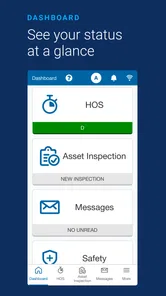
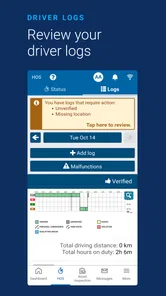
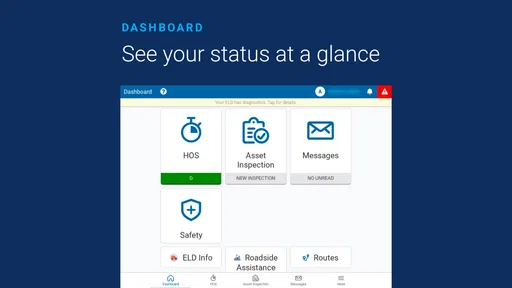
As soon as you fire up Geotab Drive, you’re greeted with a clean and intuitive interface. It’s like the app whispers, "Hey, let’s make fleet management as easy as pie!" With features like vehicle tracking, driver logs, and real-time notifications, it feels like having your co-pilot who never misses a beat. The app allows you to monitor vehicle health and driver behavior, which is super handy. Imagine knowing when one of your trucks is due for maintenance or if a driver is consistently braking hard. It’s like having a crystal ball for your vehicles!
That kind of fleet visibility is a different promise from the one made by consumer navigation apps. A route planner is built around a driver’s immediate journey; Geotab Drive is intended to sit within a wider vehicle and compliance operation. I would not choose between them as if one simply replaces the other. In practice, a fleet may need its work process and connected-device context while a driver still relies on a familiar navigation app for directions, depending on company policy. The key question is which task you expect this app to handle.
There is a trade-off in that wider scope. Connecting driver activity with fleet operations can make shared processes more coherent, but it also means a driver may depend on correct assignments and consistent instructions from the organization. A personal map app generally asks less of the user before it can help with a trip. For Geotab Drive, that extra coordination is not necessarily a flaw; it is part of using a fleet tool. It becomes frustrating when the organization has not explained the workflow or prepared the vehicle and account.
Ease of Use
One of the best things about this app is its user-friendliness. You don’t need a degree in rocket science to figure it out. The menus are straightforward, and the icons are pretty self-explanatory. I found myself navigating through the app like a breeze. Plus, the integration with Geotab’s GO device is seamless, making it a match made in fleet management heaven.
Even when an interface feels approachable, I’d avoid using the first shift as a time to learn by tapping through unfamiliar options. A driver’s best shortcut is to learn the few steps needed for their assigned routine and leave broader exploration for a parked moment or a training session. That keeps the app from becoming a distraction and helps separate a genuine setup problem from simple unfamiliarity. For supervisors, showing the same basic workflow to everyone can reduce inconsistent habits across a team.
The free price makes it easier to consider for a fleet that already uses the relevant setup, but free does not mean it is useful in isolation. The value depends on whether the organization has the connected equipment and a clear reason for drivers to use the app. A person looking for a no-cost map should still compare ordinary navigation options, because the central purpose here is not simply to provide directions.
Performance on the Road
Performance-wise, Geotab Drive offers an impressive level of reliability. I didn’t encounter any hiccups or crashes during my use. Even when I was out in the boonies, the app kept chugging along like a trusty engine. The real-time updates are swift, ensuring that you’re always in the loop, whether it’s about vehicle location or unexpected detours.
For a first-time user, I would still avoid treating any app as the sole authority for a time-sensitive work decision. Check the instructions your fleet provides, and resolve uncertainty before leaving rather than relying on a notification or a screen to explain what to do. This is particularly useful when a shift involves several stops: get the work setup settled first, then keep the phone out of the way while driving. The more demanding the route, the more valuable a calm pre-departure check becomes.
Another standout feature is the compliance aspect. With regulations changing faster than you can say “logbook,” keeping up can be a headache. But Geotab Drive simplifies this with automatic compliance tracking. It’s like having a personal assistant who’s always on top of the latest rules and regulations.
I’d read that benefit as support for an established compliance process, not a reason to stop paying attention to training or company instructions. Drivers still need to understand what their employer expects them to do, and managers need to explain how the app fits into their own procedures. When someone is unsure whether a step has been completed, the right response is to check the organization’s process rather than assume that the appearance of a screen settles the question.
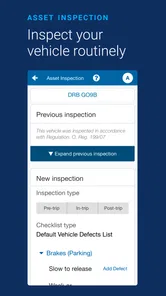
One realistic example is a driver arriving for a scheduled shift in a vehicle assigned by the fleet. Before leaving the depot, they check that the app and work context correspond to the expected vehicle, then follow the company’s start-of-shift routine while parked. If the vehicle does not appear correctly, they pause and contact the dispatcher rather than trying several unrelated settings. That small pause is a practical way to avoid carrying a setup problem into the route.
Who will get the most from it
I’d recommend considering Geotab Drive if you are a driver whose employer already uses the relevant Geotab equipment and has given you a clear role for the app. It is also a better fit for fleet teams that want drivers’ work routines to connect with a broader vehicle and compliance workflow. In those situations, the extra setup has a purpose: the app is not being asked to act like a standalone consumer map.
I would skip it if you drive a personal car, need occasional directions, or have no connection to a fleet that uses a GO device. A standard navigation app is a more direct answer for finding a destination, comparing routes, or getting familiar driving guidance. I’d also be cautious about recommending it to a team before confirming that its managers can support onboarding and explain the required steps. A work tool is only as useful as the process around it.
For a new driver, the practical question is not whether the app looks familiar but whether the employer has explained what counts as a successful session. Ask which vehicle to use, what the first action should be, and who to contact if the expected information is not there. Those answers turn installation into a usable work routine, and they are more valuable than exploring screens without a task in mind.
Final Thoughts
To wrap it up, Geotab Drive is like that dependable friend who always has your back. Whether you're managing a small team of vehicles or a big fleet, this app is designed to make your life easier. It combines efficiency, reliability, and simplicity in a way that feels almost magical. If you’re looking for an app that makes fleet management feel less like a chore and more like a passion, then this one is worth checking out. So, why not take it for a spin and see how it transforms your fleet operations? Happy driving!
My recommendation is conditional rather than universal: it is worth trying when your work already runs through Geotab’s connected setup and your employer can guide you through the first shift. The 3.0 average suggests I would listen to individual drivers’ experiences and avoid promising a friction-free rollout. But if the vehicle, account, and procedure are ready, a careful parked test gives you a sensible first milestone. If what you really need is personal navigation, choose a tool built around that simpler job instead.
Geotab Drive Frequently Asked Questions
Do I need a Geotab GO device to use Geotab Drive?
Yes. Geotab Drive works with a Geotab GO device, so the app is intended for drivers and fleets using that equipment rather than as a standalone navigation or tracking tool. Before downloading, check that your organization has the required device and setup in place. The app’s usefulness depends on its connection to the Geotab system.
Who is Geotab Drive intended for?
Geotab Drive is aimed at commercial drivers and fleet operations that need a mobile tool connected to Geotab telematics. It is most relevant when a company uses Geotab GO equipment and wants to support driver workflows and compliance needs. For someone seeking a general-purpose map or navigation app for personal travel, its fleet-focused role may not be the right fit.
What is Geotab Drive and how does it work?
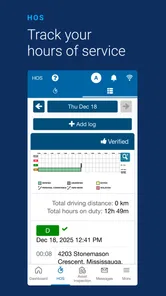
Geotab Drive is a comprehensive fleet management application designed to streamline vehicle and driver management for businesses. It works by integrating with Geotab's telematics devices to provide real-time data on vehicle location, driver behavior, and compliance with hours of service (HOS) regulations. Users can track vehicle performance, manage driver logs, and ensure safety and compliance with industry standards.
Is Geotab Drive compatible with all vehicle types?
Geotab Drive is compatible with a wide range of vehicles, including light-duty and heavy-duty trucks, as well as other commercial vehicles. The application relies on Geotab's telematics devices, which can be installed in most vehicle types to enable tracking and data collection. However, it's always recommended to check specific compatibility with your vehicle model before installation.
Can Geotab Drive help with regulatory compliance?
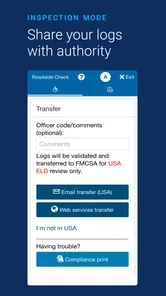
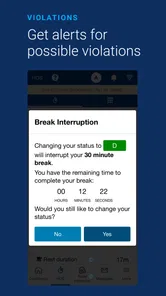
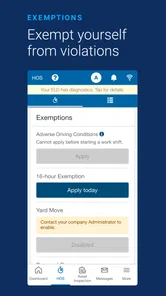
Yes, Geotab Drive is designed to assist with regulatory compliance, particularly regarding Hours of Service (HOS) and electronic logging device (ELD) mandates. The app automates logbook management, helping drivers and fleet managers ensure adherence to regulations. It alerts users to potential violations, reducing the risk of non-compliance penalties and improving overall fleet safety.
Pros
- User-friendly interface for easy navigation.
- Efficient real-time GPS tracking.
- Comprehensive vehicle diagnostics.
- Supports compliance with FMCSA regulations.
- Customizable dashboard for individual needs.
Cons
- Requires constant internet connection.
- Limited offline functionality.
- Can be complex for new users.
- Monthly subscription costs.
- Occasional sync issues with data.











