

Gazing
- 337.00
- 3.6
- Installs
- 10.00K
- Price
- Free

Screenshots
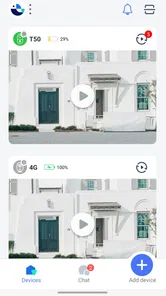
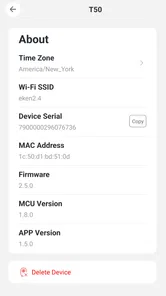
Analysis by Reviewed
When someone rings the bell while I am upstairs, outside, or busy with something that cannot be interrupted, I want a quick way to understand who is there before deciding what to do. Gazing is built around that simple situation: it lets me talk with visitors and see them through a smartphone. I found the idea useful because it focuses on a familiar problem rather than trying to become a general-purpose smart-home dashboard.
As a free tools app from WebFront Innovations Limited, Gazing is aimed at people who want their phone to act as the point of contact for visitors. Its store summary is brief, but the practical appeal is easy to understand once you think about the complete journey: a visitor arrives, I need to notice the request, I check the view, I speak to the person, and then I decide whether to open the door, ask them to wait, or tell them I am unavailable.
The important distinction is that Gazing is most useful as a visitor-response tool, not as a replacement for every part of a larger security setup. That distinction shaped my experience with it. It can make an everyday handoff more convenient, but its usefulness depends heavily on the hardware and visitor setup around it.
From an unexpected visitor to a clear answer
I find it useful to think through the moment before anyone touches the phone: an unexpected visitor arrives, and I need to decide whether to pause what I’m doing. Gazing’s role is to make that first exchange possible from a smartphone, so the next section looks at the household arrangements that help the interaction stay clear rather than leaving everyone guessing who should respond.
Starting with the situation at the door
The best way to understand Gazing is to begin before opening the app. Imagine I am preparing food, working in another room, or carrying something awkward when somebody arrives. The usual alternatives are to walk to the entrance without knowing who is there, ignore the interruption, or rely on a separate doorbell camera and its companion software. Gazing gives me another route: use the phone as the place where I can view and communicate with the visitor.
That workflow matters for more than convenience. Seeing the visitor first can help me avoid opening the door to an unknown person, while two-way conversation can prevent unnecessary trips to the entrance. It is also useful when I am expecting a delivery but cannot reach the door immediately. I can explain that I need a moment, ask the visitor to leave something in a suitable place, or make it clear that nobody is available.
I would not describe this as a perfect fit for every home. If your only goal is recording activity outside, a dedicated camera app may be a better match. If you need a broad collection of smart-home controls, Gazing may feel too focused. Its strength is the direct conversation between the visitor and the person holding the phone.
More From Our News Desk

 Gmail
GmailGmail in a Busy Inbox: Who Benefits Most?
From first account to crowded workday, Gmail earns its place through dependable search and flexible sorting—but its best fit depends on how much inbox maintenance you can tolerate.

 Prime Video
Switching to Prime Video: What Changes in Your Viewing Routine
Prime Video can make a compelling second home for streaming, but switching means learning a different catalog, rental layer, and route from browsing to playback.

 Universal TV Remote Control
Universal TV Remote Control Works Best as a Reliable Backup
A phone remote earns its place through quick setup and reliable habits. Here is how to get more from Universal TV Remote Control—and where its limits show.

 Weather - By Xiaomi
Weather by Xiaomi Review: Clear at a Glance, Less Clear Up Close
Xiaomi’s weather app makes everyday forecasts quick to scan, but its calm surface can leave useful details and recovery paths harder to find than they should be.

 X
XX Under Pressure: Can It Recover When Posting Goes Wrong?
A resilience-focused review of X, examining setup, mistaken posts, interruptions, weak connections, and the gaps that matter when recovery needs to be dependable.

 Clash of Clans
Clash of Clans Is Won Between the Battles
Its raids are quick; its community is a long-term project of coordination, teaching, rivalry, and shared responsibility—with all the friction that entails.
Latest News



Getting ready before the first real visit
The first practical step is to install Gazing on a compatible phone. It is listed for devices running Android 6.0 or later, which covers many older phones as well as newer ones. The app is free to install, and the content rating is Everyone, so it is presented as a general-purpose tool rather than something restricted to adults.
Before relying on it, I would test the entire route while nobody is waiting outside. That means checking whether the visitor-side equipment or entry point triggers the expected request, whether the phone receives it promptly, and whether the conversation can be completed without confusion. A test is more valuable than simply opening the app once, because the real experience depends on the handoff between the visitor and the phone.
I would also choose a regular place for the phone. If it is buried in a bag or left on silent, the app cannot make the visitor interaction convenient. Keeping the device charged and notifications easy to notice is a small but important part of the workflow. This is one of the less obvious trade-offs: an app can simplify access to a visitor, but it still depends on ordinary phone habits.
Gazing reached version 2.2.6 when I reviewed it. That gives potential users a clear version reference when checking compatibility or deciding whether their installation is current. I would still treat the first setup as a practical trial rather than assuming that the app will fit every entrance arrangement immediately.
Handling the visitor request step by step
Once the visitor arrives, the process should be straightforward in principle. The visitor initiates contact at the entrance, the request reaches the smartphone, and I open the relevant interaction. From there, the useful sequence is to look first, speak second, and decide third. That order reduces the pressure to answer blindly.
The visual check is particularly helpful when several people might arrive during the day. I can distinguish a courier from a friend, a neighbour from someone I do not recognize, or a scheduled visit from an unexpected one. The conversation then becomes more precise. Instead of saying “Who is it?” and immediately walking toward the door, I can respond based on what I see.
A good everyday habit is to use short, clear exchanges. I would confirm who I am speaking to, state whether I can come to the entrance, and give one simple instruction. Long conversations through a phone can become awkward, especially if the visitor is standing outside and waiting. Gazing is most effective when it reduces the interaction to a few useful decisions.
For a delivery, for example, I might check the visitor, explain that I am not immediately available, and give a clear next step. For a family member, I might use the conversation to let them know I am coming. For an unexpected visitor, I can ask for their purpose before choosing whether to continue. These are small differences, but they show why seeing and speaking together is more useful than receiving only an alert.
The handoff between people and devices
The central handoff is from the visitor at the entrance to the person holding the smartphone. That handoff needs to feel natural on both sides. The visitor must know where to initiate contact, while I need to recognize the incoming request and understand what action is available. If either side is unclear, the app becomes less useful even when the underlying connection works.
This is where Gazing’s focused design can help. I am not trying to search through a long list of unrelated controls while somebody waits outside. The purpose is narrow: see the visitor and communicate. A narrow purpose can make an app easier to approach, especially for household members who do not want to learn a complicated security system.
There is also a second handoff inside the household. If several people may answer visitors, the phone that receives the interaction becomes important. I would agree in advance who normally responds and what to do when that person is unavailable. Without that simple arrangement, family members may assume somebody else has answered, leaving the visitor waiting.
For a small workplace or shared property, the same issue becomes more noticeable. The app may be convenient for a designated responder, but a team needs a clear routine around the phone. Gazing can support the conversation, but it cannot replace an agreed responsibility for answering the entrance.
What the visitor experience feels like
From the visitor’s side, the best outcome is quick reassurance. They do not necessarily need a long conversation; they need to know that somebody has noticed them and understands what they should do next. A spoken response can be more helpful than a silent camera view because it removes uncertainty.
From my side, the value is control. I can decide how much information to share and whether the visit requires my physical presence. That is useful when I am home but not ready to open the door, and it can also help when the entrance is inconvenient to reach.
Still, I would avoid treating the visual feed as a guarantee of identity or safety. Seeing a person is helpful, but it does not automatically tell me why they are there or whether their request is genuine. I would use the conversation as an extra layer of awareness, not as a reason to ignore normal caution.
Reaching the result
A successful interaction ends with a clear outcome: I open the door, go to meet the visitor, provide instructions, ask them to wait, or end the conversation. That clarity is the real result Gazing is trying to deliver. The app is not valuable merely because it shows an image; it is valuable when the image and conversation help me choose the next action.
In a realistic home routine, this can save repeated walks to the entrance. I might be in the garden, listening to something with my phone nearby, or helping a child when a visitor arrives. Instead of abandoning what I am doing immediately, I can assess the situation first. The benefit is modest but frequent, which is often more meaningful than a dramatic feature used only occasionally.
It can also make remote communication more practical when I am not close to the door. If I am elsewhere on the property, the app gives me a way to respond rather than leaving the visitor with no information. The outcome is especially good when the household has agreed on simple instructions for common visitors such as deliveries or maintenance workers.
My advice is to decide those instructions before the first busy day. For example, agree on where a delivery may be left, when a visitor should wait, and when nobody should open the door. This turns Gazing from a button I press during a surprise into part of a repeatable household workflow.
Where the flow becomes less comfortable
The first weakness is dependency. The app’s usefulness is tied to the visitor-side setup, the smartphone, the connection between them, and the person who is expected to answer. If one part of that chain is unavailable, the experience can break at the exact moment it matters. That is why I would keep another way to handle visitors rather than treating Gazing as the only entrance solution.
There is also the question of responsiveness. A visitor is usually less patient than someone waiting for a normal phone call, so delays are more noticeable. If the alert is missed or the app takes too long to open, the visitor may leave before the conversation begins. Keeping the phone accessible helps, but it does not remove the underlying dependency on timely notifications and connectivity.
Another limitation is scope. Gazing is not the app I would choose if I wanted advanced home automation, a broad monitoring history, or a complete collection of security controls in one place. A dedicated video-doorbell platform may offer a more mature package for those needs. On the other hand, that kind of alternative can be more complicated than necessary for someone who mainly wants to see and speak with visitors.
The payment model also deserves attention. The app is free, but in-app purchases range from $19.99 to $169.99 per item. I would check the purchase details carefully before committing to a setup, especially if I only need basic visitor communication. The free entry point makes testing easier, while the possible higher-cost items mean that the total value depends on what the particular household needs.
The public response is mixed rather than universally enthusiastic: Gazing has an average rating of 3.6 from around 1.2 thousand ratings, alongside roughly 337 written reviews. I read that as a reason to test the complete visitor workflow in your own environment. A rating can signal friction, but the entrance layout, phone habits, and connection quality will determine whether that friction affects you.
Who should use it, and who should choose something else?
I would recommend Gazing to someone who wants a focused way to respond to visitors from a smartphone and is willing to test the setup before depending on it. It makes the most sense for homes where the entrance is not always within earshot, for people who regularly receive deliveries, and for users who prefer a direct conversation over a more elaborate security dashboard.
It may also suit a household that wants a simple shared routine. One person can normally answer, another can take over when needed, and everyone can follow the same rule about when to open the door. The app’s Everyone rating makes it approachable for a broad household audience, although practical comfort with smartphones still matters more than the label.
I would skip it if you need a standalone security system with extensive recording, detailed monitoring, or many connected devices. I would also look elsewhere if your entrance arrangement does not support a reliable visitor-to-phone handoff. In that case, a conventional doorbell, intercom, or established camera ecosystem may be more dependable.
People who dislike in-app purchase decisions should also examine the available options before building their routine around the app. Free installation is useful for trying the concept, but it should not be confused with every possible capability being included at no cost.
My practical verdict after following the full workflow
Gazing has a clear purpose and a useful everyday outcome: it helps me see and speak with a visitor through my smartphone before deciding what to do next. I like that the workflow is easy to explain and that it can reduce needless trips to the entrance. The strongest use cases are ordinary ones—deliveries, unexpected arrivals, and moments when I am nearby but cannot answer the door immediately.
Its weaknesses come from the same focused design. The app is not a complete substitute for a dedicated security platform, and the experience depends on the visitor setup, the phone, and a reliable response routine. I would test it during a quiet period, establish household rules, and confirm how the purchase options fit my needs before relying on it.
With over 10 thousand installs, Gazing is still a relatively small tools app rather than an unavoidable standard. That does not make it unsuitable, but it does make personal testing important. For the right home, Gazing can turn a disruptive arrival into a quick, informed conversation. For someone seeking a full surveillance or smart-home system, a different category of app will be the better choice.
Overall, I see it as a practical specialist: worthwhile when the main problem is communicating with visitors from a phone, less convincing when the goal is broad security management. If that starting condition matches your home, the free installation gives you a sensible way to try the complete flow before deciding whether it deserves a permanent place in your routine.
Gazing Frequently Asked Questions
Can I use Gazing to talk to visitors when I’m away from home?
Gazing’s store summary describes it as a way to talk and see your visitors through your smartphone, so it is intended for visitor communication and viewing. Before relying on it while away, make sure your phone has a working internet connection and that any equipment or setup needed for your situation is in place. The app is listed as a free download, with optional in-app purchases.
Which phones can install Gazing?
Gazing is an app for Android and iOS, and the Android version requires Android 6.0 or later. Check that your device meets the relevant operating-system requirement before downloading, and install the app through your device’s app store. Keeping your phone’s software up to date can also help with compatibility and security when using apps that connect you with visitors.
Who makes Gazing, and what should I expect from its user feedback?
Gazing is developed by WebFront Innovations Limited. Its average rating is 3.6, based on around 1,200 ratings, with 337 written reviews and over 10,000 installs. Those figures offer a broad snapshot of user feedback, but individual experiences can differ depending on the device and how the app is used. Reading recent reviews may help you decide whether it suits your needs.
What is Gazing, and what can I use it for?
Gazing is an app designed to support mindful observation, relaxation, and a calmer daily routine through visually focused experiences. Depending on the version and platform, it may offer guided activities, ambient visuals, or tools intended to help you slow down and concentrate. It is best viewed as a wellness and entertainment app rather than a replacement for professional medical or mental-health care.
Is Gazing free to download and use?
Gazing may be available as a free download, but some features, content, or customization options can depend on the app’s current subscription or in-app purchase model. Before installing, check the Google Play Store or Apple App Store listing for the latest pricing details. Also review whether subscriptions renew automatically and confirm the cancellation process through your device’s account settings.
Pros
- Simple interface makes the app easy to explore without a steep learning curve.
- Useful for discovering new visual content during short breaks.
- Smooth browsing experience on compatible modern devices.
- Content can provide inspiration for creative projects and ideas.
- Minimal setup lets users start exploring quickly after installation.
Cons
- The quality and usefulness of content may vary between items.
- Some features or content may require an internet connection.
- Limited customization may not suit users wanting a tailored experience.
- Frequent browsing can become repetitive for long-term users.
- Privacy details should be checked carefully before sharing personal data.








