Gather: Family Location & GPS
- 405.00
- 4.6
- Installs
- 100.00K
- Price
- Free

Screenshots


Analysis by Reviewed
I first approached Gather: Family Location & GPS as a practical family-safety tool rather than another social app. Its purpose is straightforward: help people locate family members and share GPS positions in real time. That sounds simple, but location sharing only becomes useful when it fits naturally into ordinary routines, so I paid attention to how the idea works for school pickups, commuting, travel, and the small moments when someone asks, “Where are you?”
Gather is a free lifestyle app from gather.life, available for users aged Everyone. It has reached over 100 thousand installs and holds a 4.6 average from around 5.1 thousand ratings, with more than 400 written reviews. Those figures suggest that the concept is connecting with a meaningful group of users, while the app’s most important quality remains how comfortably a family can agree to use it together.
How Gather fits into everyday family coordination
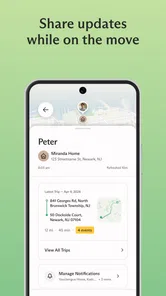
The strongest part of Gather is its focus. Instead of trying to be a full messaging platform, it centers the experience on knowing where people are and sharing that information with the right people. For a household that regularly coordinates around different schedules, that can remove a surprising amount of back-and-forth.
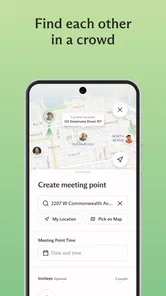
A realistic example would be a parent leaving work to collect a child while another family member is already waiting at an activity. Rather than sending several messages about traffic, arrival time, or the exact meeting point, live location sharing can give everyone a clearer picture. It is especially useful when plans change during the day and a quick glance is easier than a phone call.
I also see value for families with older children who are becoming more independent. Gather can support a conversation about staying connected without requiring constant check-in messages. That does not replace trust or good judgment, but it can make a new routine feel less uncertain for everyone involved.
The same idea applies to travel. When relatives are moving through a busy area, meeting at a large venue, or returning separately, a location-based view can be more practical than describing nearby landmarks. The benefit is not that the app solves every coordination problem; it is that it gives a family one shared reference point.
What the free access means in practice
Gather is free, so the basic decision is not whether the purchase price justifies the download. The real question is whether your household will actually use a dedicated location-sharing app instead of relying on tools it already has. Free access makes it easy to try without committing money, which is important because the usefulness depends on participation from the people you want to stay connected with.
More From Our News Desk

Weather by Xiaomi Review: Clear at a Glance, Less Clear Up Close

X Under Pressure: Can It Recover When Posting Goes Wrong?

Clash of Clans Is Won Between the Battles

Android Auto Makes the Case for Quieter Car Software

MobiOffice: Transforming Mobile Productivity with Seamless Integration

EA SPORTS FC™ Mobile Soccer: Redefining Mobile Sports Gaming
I would not describe the value as coming from a long list of extras. The value is concentrated in the central task: sharing and checking live family locations. If that task matters to you, free access makes the experiment low-risk. If your family rarely needs location coordination, installing another app may add more complexity than convenience even though it costs nothing.
There is also a practical distinction between downloading the app and getting value from it. One person using Gather alone does not create much benefit. The experience becomes worthwhile when the relevant family members understand why it is being used, know when location sharing is expected, and agree on reasonable boundaries. That social setup is part of the product experience, not an optional detail.
Small habits that make location sharing more useful
One useful habit is to treat live location as a coordination aid rather than a permanent demand for attention. For example, a family might use it during a pickup window, a journey home, or a day out, then stop checking repeatedly once everyone has arrived. This reduces the chance that the app becomes a source of unnecessary monitoring.
Another practical approach is to agree on what a location check should replace. If the answer is “several messages asking where someone is,” Gather has a clear role. If the answer is “every ordinary conversation,” the app may feel intrusive. Setting that expectation early can prevent misunderstandings, particularly with teenagers or relatives who value privacy.
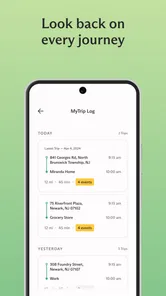
A third insight is to use the app around transitions rather than throughout the entire day. Departures, arrivals, school runs, appointments, and travel connections are the moments when location context is most valuable. Focusing on those situations can deliver most of the benefit while keeping the routine manageable.
Where it differs from familiar alternatives
Many people already use general-purpose map services, messaging apps, or built-in phone location tools. Those alternatives can be perfectly adequate when everyone is comfortable with them and the sharing process is easy to repeat. Gather’s appeal is that it is built specifically around family location coordination, so the purpose is clearer than it may be inside a broader app with many unrelated functions.
Compared with sending a pin in a message, live sharing is better suited to a journey that is still in progress. A single pin tells someone where you were when you sent it; a live location view is designed for situations where movement matters. That difference is valuable during pickups or meetups, although it also means users should think carefully about when they want their position visible.
Compared with a general family communication group, Gather puts less emphasis on conversation and more on location context. I would choose a messaging app when the main need is discussion, photos, instructions, or a detailed plan. I would choose Gather when the repeated question is simply where people are in relation to one another.
It is also worth remembering that a dedicated app can create an extra step. If your family already has a location-sharing routine that everyone follows reliably, switching may not improve anything. Gather is most compelling when existing methods feel scattered, difficult to repeat, or too dependent on individual messages.
Tradeoffs to consider before relying on it
Location sharing is inherently sensitive, so convenience should not be the only measure of success. Before making Gather part of a family routine, I would discuss who can see locations, when sharing is appropriate, and how each person can ask for a pause. A tool that improves coordination should not quietly create tension inside the household.
The app also depends on cooperation. If one family member forgets to participate, does not understand the setup, or simply does not want to share a position, the group experience becomes incomplete. That is not a flaw unique to Gather, but it is an important limitation: the app cannot manufacture agreement.
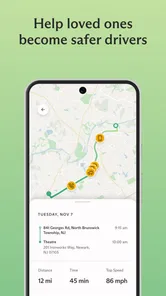
Live location can also encourage overchecking. A parent waiting for a late arrival may find it reassuring to see movement, but repeatedly refreshing a map can increase anxiety rather than reduce it. I think the healthiest use is to combine the app with direct communication when something genuinely seems wrong, instead of treating the map as a substitute for judgment.
Another tradeoff is that location information is only useful when the underlying phone and app setup support it. A person may be indoors, traveling through an area with weak connectivity, or unable to interact with the phone at that moment. Because of that, I would never treat a displayed position as a guarantee of immediate safety or exact real-world presence.
These limitations do not cancel out the app’s purpose, but they define it more accurately. Gather is a coordination layer, not an emergency response service, a parenting philosophy, or a replacement for a phone call. Families that understand that distinction are more likely to use it calmly and appropriately.
Who is likely to get the most value
Gather is a good match for families whose members move independently but still need occasional visibility. That includes households managing school activities, work commutes, appointments, sports, errands, or visits across different parts of town. It can also suit relatives who spend time together during trips but do not always travel in the same vehicle or follow the same schedule.
I can see particular value for a family that currently relies on a chain of messages such as “leaving now,” “almost there,” and “where should I wait?” In that situation, a shared live-location workflow may reduce repetitive updates and make meeting points easier to manage. The improvement is modest but meaningful because it addresses a recurring daily friction.
It may also help families introducing more independence gradually. A young person can have more freedom to travel to a familiar place while the household retains a way to coordinate. That arrangement works best when the app supports agreed boundaries rather than becoming an excuse to inspect someone’s movements constantly.
On the other hand, I would skip Gather if nobody in the household wants location sharing, if your existing method already works smoothly, or if your main requirement is a rich family chat. I would also avoid making it central to a safety plan that needs guaranteed emergency communication. In those cases, another category of tool may be more appropriate.
Version, availability, and the overall feel
The app is currently listed as version 1.446.0 and supports Android 7.0 or later. That makes it accessible to people using older Android devices, which can matter in families where not everyone upgrades phones at the same time. The developer is gather.life, and the app’s presence in the lifestyle category accurately reflects its everyday, household-oriented purpose.
The rating of 4.6 is encouraging, but I would read it as a sign of broad satisfaction rather than a promise that every family will have the same experience. Location tools are unusually dependent on habits, relationships, and expectations. A feature that feels reassuring to one household may feel unnecessary or uncomfortable to another.
What I appreciate most is that the idea is easy to explain. You do not need to persuade someone to learn an elaborate system before they understand the reason for using it. The challenge is not conceptual complexity; it is making sure the family agrees on a sensible routine and does not confuse visibility with constant supervision.
My verdict on downloading Gather
I would recommend trying Gather: Family Location & GPS if your household regularly coordinates pickups, journeys, or changing plans and wants a dedicated place for live location sharing. Since it is free, testing it does not require a financial commitment, and the central benefit is clear enough to judge quickly through real routines rather than abstract promises.
My recommendation comes with a boundary: decide together how and when it will be used. Start with one specific situation, such as meeting after an activity or tracking the journey home, and see whether it genuinely reduces messages and uncertainty. If it does, you have found a practical role for it. If it creates arguments, encourages constant checking, or duplicates a system your family already handles well, there is no reason to force it into your routine.
Overall, Gather delivers focused value rather than broad entertainment or a large collection of lifestyle tools. It is best for families who want location sharing to be simple, visible, and tied to everyday coordination. For those households, the free app is worth exploring. For people who need emergency-grade reliability, extensive communication features, or complete privacy from location tracking, a different solution will be the better choice.
My final take: Gather is a sensible, focused option for voluntary family location sharing, especially when it replaces scattered check-in messages. Its usefulness depends less on advanced complexity than on mutual consent and consistent habits, so I would judge it by whether it makes one recurring family routine easier without making everyone feel watched.
Gather: Family Location & GPS Frequently Asked Questions
Is Gather: Family Location & GPS free to download?
Gather: Family Location & GPS is free to download and is a Lifestyle app from gather.life. Its focus is sharing locations with family and trusted groups, rather than serving as a general-purpose navigation tool. Before downloading, consider whether the people you want to connect with are comfortable joining a shared group and enabling location access, since those choices shape how useful the app will be.
What phones can run Gather: Family Location & GPS?
Gather: Family Location & GPS is available for phones running Android 7.0 or later. Check your device’s operating system before downloading so you can avoid compatibility issues. The app is rated for Everyone, and its current version is 1.446.0. If your phone meets the operating-system requirement, you can then decide whether its location-sharing approach fits your family’s needs.
What is Gather: Family Location & GPS used for?
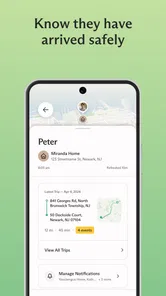
Gather: Family Location & GPS is designed to help families and trusted groups stay connected through location sharing. After creating or joining a private group, members can view one another’s reported locations, coordinate meetups, and check whether everyone has arrived safely. It is mainly a communication and safety tool, so it works best when all participants understand the privacy settings and willingly share their location.
Does Gather: Family Location & GPS track my location continuously?
Location behavior depends on the permissions you grant, the app’s settings, and your phone’s operating system. The application may use background location access to keep a family group updated, which can affect battery life and mobile data usage. Before enabling this feature, review the available sharing controls carefully. You should be able to decide who can see your location and change or stop sharing when needed.
Is Gather: Family Location & GPS safe for children and families?
The app can be useful for families who want an easier way to coordinate school trips, commutes, travel, or emergencies, but it should not replace direct communication or responsible supervision. Parents should discuss location sharing with children, use strong account credentials, and invite only trusted people. It is also important to check the app’s privacy policy, age requirements, and permissions before creating a family group.
Pros
- Real-time location sharing helps families coordinate arrivals and meetups.
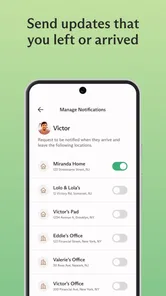
- Place alerts can notify you when family members reach or leave key locations.
- SOS features may provide extra reassurance during emergencies.
- Battery-conscious tracking settings help reduce unnecessary power consumption.
- A clean interface makes core family safety tools easy to find.
Cons
- Some features may require a paid subscription or premium plan.
- Continuous GPS use can increase battery drain on older phones.
- Location accuracy may drop indoors or in areas with weak signals.
- All family members need compatible devices and active internet access.
- Sharing sensitive location data requires careful privacy and permission settings.











