

Gaia GPS: Offline Trail Maps
- 3.96K
- 3.4
- Installs
- 1.00M
- Price
- Free

Screenshots

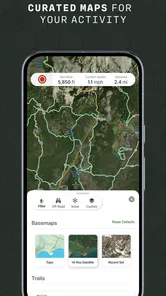
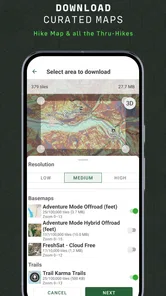
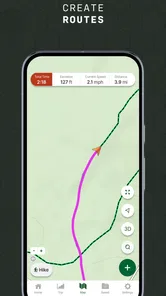
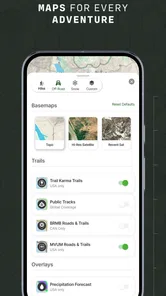
Analysis by Reviewed
During my first week with Gaia GPS: Offline Trail Maps, the appeal was immediate: I could prepare a map before leaving home and still consult it on a trail where mobile service was unreliable. That changes the feel of a hike, especially when a junction is unclear and I want to check the route rather than guess. The app is free to install, but some features are tied to in-app purchases, so I’d treat it as something to try first and consider paying for only if its mapping tools fit the way I actually get outdoors.
A useful first-week test
For a first outing, I would choose a route I already know rather than make my debut with Gaia GPS on an unfamiliar backcountry trip. That lets me learn where the map controls are and see how the saved area behaves without adding route-finding stress. A familiar trail is also a practical way to check that I downloaded the right region and can read the map before cell service becomes important.
That small test answers a question a quick download cannot: does the app’s style of navigation make sense to me when I am moving, stopping, and looking around? I would make a route decision at a junction, check the map, then put the phone away again. If that feels clear and low-friction, the app is much more likely to become part of my routine than if I only explore layers at home.
Where it fits into a regular outdoor routine
Gaia GPS is a navigation app from Outside, Inc., aimed at people who want more than a basic line on a road map. I can see its strongest use being hikes, backcountry trips, and off-road outings where terrain and route planning matter. For a familiar walk through town, a standard navigation app is usually quicker. For a remote trail, offline maps and topographic context are more relevant than turn-by-turn directions designed for streets.
A practical habit is to prepare the map while connected, then open it before setting off and check that the area you need is available offline. I’d also plan the return route, not just the outward leg: a trail can look different when I’m tired or the light changes. This small check makes offline navigation more useful than simply downloading a map and assuming I’ll remember where I saved it.
Exploring the Great Outdoors with Confidence
First off, what really caught my eye with Gaia GPS: Offline Trail Maps is its offline capabilities. Imagine being out in the wilderness, miles away from cell service, and still having access to detailed maps and trails. This app lets you download maps ahead of time, so you're never left in the lurch. I tried this on a recent hike, and trust me, not having to worry about connectivity was a game-changer.
Feature-Packed for Every Adventurer
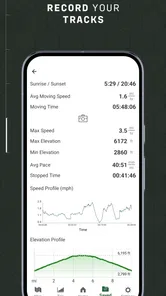
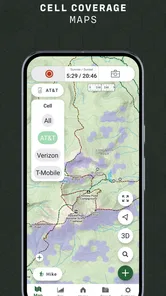
Now, let's talk features. This app is not just about maps. It's a whole toolkit for the outdoors. The app offers topographic maps, satellite imagery, and even weather updates. For someone who likes to plan hikes meticulously, having all this info in one place is a dream. And hey, if you're a data geek, you'll love the tracking feature. It logs your route, speed, elevation, and more. I found this particularly useful to review my trail performance and plan future trips.
More From Our News Desk

 Weather - By Xiaomi
Weather by Xiaomi Review: Clear at a Glance, Less Clear Up Close
Xiaomi’s weather app makes everyday forecasts quick to scan, but its calm surface can leave useful details and recovery paths harder to find than they should be.

 X
XX Under Pressure: Can It Recover When Posting Goes Wrong?
A resilience-focused review of X, examining setup, mistaken posts, interruptions, weak connections, and the gaps that matter when recovery needs to be dependable.

 Clash of Clans
Clash of Clans Is Won Between the Battles
Its raids are quick; its community is a long-term project of coordination, teaching, rivalry, and shared responsibility—with all the friction that entails.

 Android Auto
Android Auto Makes the Case for Quieter Car Software
The car interface is no longer judged by how much it can do, but by how quietly it helps. Android Auto shows what drivers now expect—and what still gets in the way.

 MobiOffice: Word, Sheets, PDF
MobiOffice: Transforming Mobile Productivity with Seamless Integration
MobiOffice: Word, Sheets, PDF is redefining mobile productivity with a surprising blend of functionality and innovation.

 EA SPORTS FC Soccer Mobile 26
EA SPORTS FC™ Mobile Soccer: Redefining Mobile Sports Gaming
Dive into EA SPORTS FC™ Mobile Soccer, where immersive gameplay and strategic depth transform mobile sports gaming.
Latest News



One of the standout features for me was the ability to customize routes. You can plan your path, adjust waypoints, and even share it with your buddies. It's like having a mini expedition planner in your pocket. Plus, you can track your friends' locations in real-time, which adds a layer of safety and fun to group adventures.
Making the tools work beyond the first trip
The route and tracking tools are most valuable when I use them deliberately. Before a group outing, I’d agree on a route and meeting points, then share the plan so everyone has the same reference. During the walk, a recorded track can help me compare the route I took with the one I intended, rather than relying on a hazy memory later. That is a more useful habit than logging every casual stroll just because the option exists.
For a solo hike, I’d treat live location sharing as a helpful layer, not a substitute for telling someone where I’m going and when I expect to return. Battery life and phone handling still matter outdoors, so I would avoid keeping the screen on constantly just to watch a moving dot. I’d check the map at decision points and carry a backup plan for navigation on trips where getting lost would have serious consequences.
Small workflows that make a real difference
One useful way to keep a saved map manageable is to think in terms of the whole outing, not just the trail line. I would include the approach, the route itself, and the way back to the starting point in my planning area. That helps avoid the common mistake of preparing only for the part of a trip that looks interesting on a screen. I would also avoid downloading an enormous region without a reason; a focused area is easier to check and less likely to leave me wondering whether the right section is ready.
Tracks can also serve as a quiet planning tool rather than a scorecard. After a walk, I can look at where I stopped or diverted and use that memory when deciding whether a future route is realistic for my group. That is more useful than comparing speed as if every outing were a performance test. Terrain, breaks, weather, and company all change how long a trip feels, so I would treat recorded details as context for planning, not as a promise about the next hike.
User Experience and Design
The app's design is sleek and intuitive. Navigating through its features is pretty straightforward, even for a non-tech savvy person like me. I appreciated the clean interface that doesn't overwhelm with options but still offers everything you need. The vibrant map layers are easy to read, and switching between them is seamless. The developers clearly put thought into making it user-friendly, which is a huge plus.
However, a minor hiccup I encountered was the initial learning curve. With so many features packed into one app, it took me a bit to get the hang of everything. But once you dive in, it's smooth sailing.
What to check before relying on it
Offline use takes a little preparation. I’d download only the areas I’m likely to need, since a large trip region can take more planning than a quick day hike, and I’d open the saved map before leaving service to make sure it is ready. I’d also keep the phone charged and remember that an app cannot make an unfamiliar route safe by itself. In rough conditions, a paper map or another backup may still be sensible.
There is also a difference between enjoying a feature and needing it often enough to justify a purchase. The app has a free starting point, while in-app purchases range from $3.99 to $199.99 per item. That broad range makes it worth checking what a particular purchase includes before spending. Casual hikers may be happy with a simpler map option; people who repeatedly plan remote routes may find more reason to invest in a specialized tool.
How it compares with everyday navigation apps
For city errands, commuting, or a straightforward drive, I would reach for a conventional road-navigation app. Those tools are built around street directions and quick arrival decisions, while Gaia GPS makes more sense when I want to understand terrain and prepare for a route that may leave reliable service behind. It is not a universal replacement for the map app already on my phone; its value is in being a more deliberate outdoor companion.
Even among outdoor options, the right choice depends on the trip. Someone who follows clearly marked local paths and mainly wants a simple overview may find a basic map less demanding to maintain. I would choose Gaia GPS when I expect to plan, save, revisit, or record routes often enough to use those extra layers. The trade-off is clear: more planning control can be reassuring, but it also asks me to spend time learning and preparing instead of opening an app at the trailhead and immediately setting off.
A realistic day out
Suppose I have a free morning and want to walk a loop in a wooded area where reception may drop. The evening before, I would identify the route, save the map area, and check the start and return points. At the trailhead, I would confirm that the map opens, then keep the phone away until a junction or route choice calls for it. If plans change, the saved terrain view gives me a useful reference for thinking through the options, but it does not decide whether a detour is safe or within my ability.
Afterward, I could review the track and note whether the route suited the time and energy I had. That information can make the next outing easier to choose. It is a modest benefit, but it is the kind that can add up over months: preparation becomes familiar, and each trip leaves a clearer basis for planning the next one. If I only go out once in a while, that cycle may never become valuable enough to offset the setup.
Why You Should Give It a Go
In a nutshell, if you're serious about your outdoor adventures, Gaia GPS: Offline Trail Maps is worth checking out. It's like having a Swiss Army knife for navigation in your pocket. The offline capabilities alone make it a must-have. So next time you're gearing up for a trek, consider giving this app a whirl. It might just become your new favorite trail companion.
Remember, the wild is calling, and with this app, you’re more than ready to answer.
Does it earn a place on my phone?
Its lasting value depends on whether outdoor navigation is a recurring part of my life. If I hike or drive backcountry routes often, I can see myself keeping it installed because planning, offline maps, and route review support a repeatable routine. If I only take an occasional marked park walk, the extra tools may go unused and a simpler maps app could be less work.
The app has an average rating of 3.2 from around 20,000 ratings, with roughly 3,800 written reviews and over 1 million installs. It is rated for Everyone, and its current version is 2025.7, with Android 11 as the minimum operating system requirement. Those details place it within reach of many Android users, though a rating in this range suggests I’d try it on a familiar outing before making it central to a complicated trip.
When I would leave it behind
I would skip making Gaia GPS my main choice if I mostly need spoken directions between addresses or if I dislike preparing an outing in advance. It is also a poor fit for someone who expects an app to remove the need for route judgment, basic navigation skills, or a backup plan. Offline access helps with a connectivity problem; it does not remove the need to understand where I am, decide whether conditions are suitable, and turn back when the sensible choice is to do so.
For a casual walk on a familiar, signed path, keeping a specialized navigation routine may feel like needless overhead. On the other hand, if I repeatedly explore unfamiliar trails or take a vehicle onto backcountry routes, the preparation can become second nature. The key question is not whether the app has many tools, but whether I will use enough of them on ordinary trips to justify maintaining maps and learning the interface.
My long-term take
What keeps me interested is not novelty but the chance to build a dependable pre-trip routine: choose the route, save the map, review key turns, and check that the phone is ready before heading out. What could wear me down is maintaining offline areas and learning which tools I actually use. I would start with a modest outing, keep the setup simple, and only expand my use if the app makes planning easier month after month.
Overall, Gaia GPS feels best suited to curious hikers and backcountry travelers who are willing to prepare before they leave. I wouldn’t call it the right choice for everyone, and I would never treat a phone app as a complete safety system. But if you want terrain-aware planning and offline access often enough to form a habit, it can earn its space on your phone after the first-week excitement fades.
Gaia GPS: Offline Trail Maps Frequently Asked Questions
Can I use Gaia GPS to find hikes and off-road routes?
Yes. Gaia GPS is built for exploring trails and planning outdoor routes, including hikes and off-road trips. Its tools are aimed at people who want to look over map information before setting out and keep navigation resources available along the way. It can be useful for planning a route, but take time to prepare for the conditions and needs of your particular trip.
What devices and operating systems can I use Gaia GPS on?
Gaia GPS is available for Android and iOS, so you can use it on a compatible phone or tablet. On Android, the minimum requirement is Android 11. Before downloading, check your device’s operating system and available storage, especially if you plan to keep maps available offline. A compatible device helps ensure the app is ready before you head out.
Is Gaia GPS free to download, and are there optional purchases?
Gaia GPS is free to download, so you can try the app before deciding whether its paid options suit your needs. It offers in-app purchases, with prices ranging from $3.99 to $199.99 per item. Since the app focuses on outdoor maps and navigation, consider what features you want for your trips before making a purchase.
What should I know about Gaia GPS before installing it on my phone?
Gaia GPS is a maps and navigation app from Outside, Inc., aimed at people planning hikes, exploring trails, and finding off-road routes. It is rated for Everyone and requires Android 11 or later. Its app-store average is 3.2 from around 20,000 ratings, giving you a sense of the range of opinions from other users before you install it.
What features does Gaia GPS offer for outdoor enthusiasts?
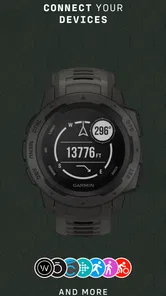
Gaia GPS provides a comprehensive suite of tools for outdoor enthusiasts, including offline maps, detailed topographic and satellite imagery, and an extensive database of trails. Users can track their routes, plan trips with custom waypoints, and access real-time weather updates. The app also supports integration with other GPS devices, making it a versatile choice for hikers, bikers, and campers.
Pros
- Extensive offline map availability.
- User-friendly interface and navigation.
- Comprehensive trail information.
- Frequent updates with new features.
- Customizable map layers.
Cons
- Premium features require subscription.
- Occasional GPS inaccuracies.
- Limited social features.
- Battery consumption can be high.
- Steep learning curve for beginners.











