Friend Tracker: Find a Phone
- 445.00
- 4.4
- Installs
- 1.00M
- Price
- Free

Screenshots
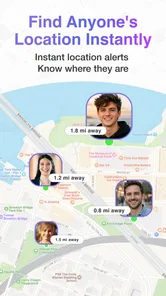

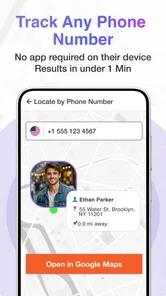
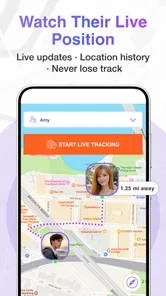

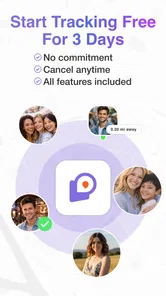

Analysis by Reviewed
I judge a location-sharing app by what happens after the first few outings: does it solve a recurring coordination problem, or does everyone forget it is installed? I found Friend Tracker: Find Anyone most convincing when a small group agrees on a specific reason to share, such as meeting in a crowded place or checking that someone has arrived. Without that shared purpose, the map can become one more app to maintain.
When the novelty is useful
The first good use is a situation with a clear beginning and end: meeting friends in a crowded place, checking whether a family member has reached a destination, or trying to regroup during a trip. The app is a lifestyle tool from MAJ X, and its basic idea is straightforward: people who have installed it can share their location so their circle can find them. That can spare a group from repeatedly texting for updates, especially when plans are changing quickly.
For example, if friends arrive at a festival at different times, I’d use the map to orient myself rather than sending a chain of messages that may go unread in a noisy crowd. The useful habit is to agree beforehand who will share, and for what occasion. Location visibility works best as a practical arrangement among people who trust one another, not as an assumption that everyone should be trackable all day.
Making the first setup count
I would treat the first setup as a short group conversation, not just a round of downloads. Decide who actually needs to appear on the map, when sharing makes sense, and what the group will do if someone is not visible. That prevents a common mismatch: one person expects a quick check during a trip, while another assumes the app will be watched throughout the day. Agreeing on the purpose first makes the tool feel less intrusive and gives everyone a clear reason to keep it.
A useful first test is a low-pressure meetup where nobody depends on the app for safety or a strict arrival time. Check that the people who want to participate can find one another, then decide whether the view was genuinely easier than messaging. This is more informative than installing it before an important journey and discovering that the group has different expectations. If the trial does not save effort, there is no reason to force a new routine.
What keeps it useful after the first week
Its lasting value depends on whether your household or friend group has recurring coordination needs. A family that often checks on arrivals may find a shared location view easier than calling every time. A group that meets only occasionally may prefer to install it for a particular outing and otherwise rely on ordinary messages. That difference matters: a tracker is not automatically useful just because it can show a location.
Compared with texting, the main convenience is seeing where a participating person is without waiting for a reply. Compared with the location-sharing tools many people already use in their messaging or map apps, the benefit is less obvious if your circle already has a comfortable routine elsewhere. I would avoid asking everyone to maintain a second location-sharing setup unless it solves a real coordination problem for them.
More From Our News Desk

Weather by Xiaomi Review: Clear at a Glance, Less Clear Up Close

X Under Pressure: Can It Recover When Posting Goes Wrong?

Clash of Clans Is Won Between the Battles

Android Auto Makes the Case for Quieter Car Software

MobiOffice: Transforming Mobile Productivity with Seamless Integration

EA SPORTS FC™ Mobile Soccer: Redefining Mobile Sports Gaming
For a realistic everyday example, imagine two relatives coordinating a pickup after an appointment. If the person waiting can see that the driver is still on the way, they may avoid a string of “how far away are you?” messages. But if the driver is already parked nearby, a simple call or text may be faster than opening a separate tracker. That distinction is the app’s recurring-value test: it helps when seeing movement answers a question, not when the group already knows what to do.
The app includes geofences and location history, which can make it more useful than a one-time map check. A practical tip is to keep any boundary tied to a specific, agreed purpose, such as knowing when someone reaches a regular destination, rather than creating alerts for every place they visit. Too many notifications can turn a reassuring tool into background noise. Location history can also help explain a missed meetup, but I’d treat it as a rough aid to coordination, not a substitute for asking someone what happened.
Keeping the habit comfortable
Before relying on it, I’d make sure everyone understands who can see their location and when they want sharing to be active. The app’s sharing is optional and can be turned off, which is important, but the social agreement still matters. If one person feels pressured to keep sharing, the convenience is not worth the loss of trust. For children or relatives who need support, a calm conversation about the purpose is better than presenting tracking as a rule with no explanation.
There is also a maintenance cost: each person who needs to be visible has to use the app, and the group has to remember that the arrangement exists. If someone stops sharing or does not have the app available, the map cannot replace a direct check-in. I’d keep a simple fallback—call or message when timing is important—and avoid treating a location display as proof that everything is fine.
The app is free to download, with in-app purchases ranging from $10.99 to $59.99 per item. Its average rating is 3.8 from around 2,700 ratings, and it has more than 500,000 installs. It is rated Teen, so families should consider that age guidance and discuss location sharing before setting it up. Version 2.7.3 supports Android 7.0 and later, which makes checking device compatibility a sensible first step.
What can make the routine tiring
The friction is not only technical; it is also social. Someone may be happy to share during a weekend trip but uncomfortable with the same arrangement becoming an everyday expectation. I would check in after the first few uses rather than assume that initial agreement still feels right. A location tool should reduce coordination work, not create a new obligation to explain every pause, detour, or period when sharing is off.
There is a practical trade-off in using geofences as well. A boundary can reduce the need to ask whether someone has reached a regular destination, but every alert asks for attention, and repeated alerts can make the important ones easier to ignore. I’d begin with one clearly useful boundary, then keep it only if it changes what the group needs to do. If it merely confirms what everyone already knows, it is clutter rather than value.
Effortless Connection and Peace of Mind
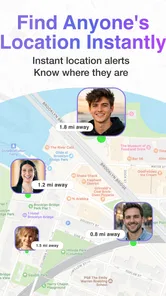
One of the first things that struck me about Friend Tracker: Find Anyone is how easy it is to set up. I mean, who has time to fuss over complicated settings, right? After a quick download and a few taps, I was able to see the real-time location of my friends who had also installed the app. This is particularly awesome for those of us who like to wander off the beaten path during trips or just want to ensure our loved ones are safe on their commute home.
Features That Make a Difference
Now, let’s talk about features. This app packs quite a punch with its variety of functions. You can set up geofences, which is a fancy term for virtual boundaries. When your friend enters or leaves these areas, you get a little ping. It’s like magic, but with a sprinkle of technology! Another cool feature is the ability to check the history of your friends' locations. Whether you're trying to track down the best coffee shop your friend visited or just see where they spent their Saturday night, this app has got you covered.
What I really appreciated was the app's commitment to privacy. All location data sharing is optional and can be turned off anytime, so you’re not stuck sharing your whereabouts with that one friend who can't take a hint!
Real-Life Applications
In real-world scenarios, Friend Tracker: Find Anyone can be a lifesaver. Picture this: you're at a music festival, surrounded by thousands of people, and suddenly, your group decides to split. Instead of sending "where are you?" messages into the void, you can easily find each other with a glance at the app. It’s also a great tool for parents who want to keep an eye on their kids without being overly intrusive.
And it's not just for emergencies. Planning a surprise party or meeting up in a bustling city becomes a breeze when you can see everyone's location in real time. The app almost feels like a social network, but for locations!
Who should keep it installed
I’d recommend it to a small, consenting circle that has a recurring reason to coordinate: relatives checking arrivals, friends who travel together, or people who regularly meet in unfamiliar places. It is less suited to someone who mainly wants directions, a one-off meetup pin, or a private record of their own movements. For those needs, a maps app or a quick message may be simpler and avoid asking a whole group to adopt another service.
A useful way to reduce friction is to decide on a sharing routine before the first outing. For instance, agree that everyone turns sharing on for the trip and turns it off afterward if that is what the group prefers. That small conversation answers a common practical question—whether the app has to become an always-on part of daily life—and helps prevent different expectations from souring the experience.
When the map is not enough
Location can be delayed, imprecise, or unhelpful in a crowded area, so I would not use a dot on a screen as a guarantee that someone is safe or standing at an exact doorway. If a person is late, a direct call is still the better next step. Likewise, location history may offer context, but it cannot explain why someone took a route or whether a stop was intentional. Those are small but important limits when deciding how much reassurance to expect.
The app is best when everyone sees the same arrangement as helpful. If a friend does not want to share, I’d respect that and coordinate by text instead. A tracker can make a group easier to reunite, but it should not become a test of loyalty or a way to monitor someone without their knowledge. For a person who wants hands-off directions or a tool for tracking a device they do not own, this is not the right approach; its value is in voluntary coordination between people.
Will it earn a regular place?
For me, the deciding question is whether the group uses it often enough to remember its routine without turning location sharing into a background expectation. The app is free to download, but its in-app purchases mean it is sensible to look at the purchase options before deciding whether to spend anything. I would first try the basic arrangement for a real shared need and judge it by the time and confusion it saves, rather than by how many features the group could potentially use.
It is a better fit for people who value a shared view during recurring meetups than for someone seeking a complete family-safety system or a replacement for direct communication. If your circle already shares locations in a map or messaging app, switching is worthwhile only if this particular setup makes coordination clearer. If no one wants to install another app, a group chat and a meeting point remain perfectly reasonable alternatives.
Wrapping It Up
To sum it all up, Friend Tracker: Find Anyone is a handy app that brings people closer together without the need for constant communication. It blends technology with our everyday social needs in a way that’s both practical and fun. So, whether you're someone who loves to explore or just wants to keep tabs on your inner circle, this app is definitely worth checking out. Just remember, with great power comes great responsibility – use it wisely!
Friend Tracker: Find a Phone Frequently Asked Questions
Is Friend Tracker: Find Anyone free to download, and what might cost extra?
Friend Tracker: Find Anyone is a free Lifestyle app, so you can download it without an upfront purchase. In-app purchases are available, with prices ranging from $10.99 to $59.99 per item. Check the purchase details in the app before choosing any paid option, and consider whether the features offered suit your needs. The app is rated for Teen audiences.
What is Friend Tracker: Find Anyone and how does it work?
Friend Tracker: Find Anyone is a mobile application designed to help you locate your friends and family members on a map in real-time. By using GPS technology, the app allows you to see the current location of your contacts who have agreed to share their location with you. It requires both parties to have the app installed and location services enabled for accurate tracking.
Is Friend Tracker: Find Anyone safe to use and how is my data protected?
Yes, Friend Tracker: Find Anyone is designed with user safety and privacy in mind. The app uses encryption to protect your data and ensures that only those you have explicitly granted permission can view your location. Additionally, you have full control over who can see your location and can disable sharing at any time. It's important to use the app responsibly and ensure that permissions are granted only to trusted individuals.
What are the main features of Friend Tracker: Find Anyone?
Friend Tracker: Find Anyone offers several key features, including real-time location sharing, location history, and alerts for when a friend arrives or leaves a designated area. The app also supports group tracking, allowing you to see the location of multiple friends or family members at once. Additionally, it provides customizable privacy settings and an easy-to-use interface for seamless navigation and operation.
Does Friend Tracker: Find Anyone require a subscription or is it free to use?
Friend Tracker: Find Anyone is available as a free download with basic features accessible to all users. However, it offers a premium subscription that unlocks additional features such as extended location history, ad-free experience, and priority customer support. The subscription is optional and users can choose to upgrade based on their needs for enhanced functionality.
Pros
- Accurate location tracking
- User-friendly interface
- Real-time updates
- Customizable alerts
- Cross-platform compatibility
Cons
- Privacy concerns
- Requires constant internet
- May drain battery quickly
- Subscription needed for full features
- Limited customer support











