Free Stuff
- 10.82K
- 4.5
- Installs
- 1.00M
- Price
- Free

Screenshots
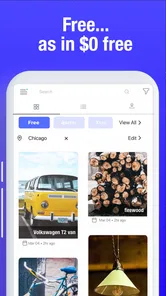


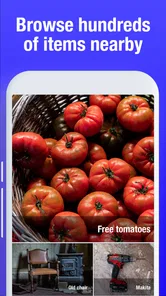

Analysis by Reviewed
I like the idea behind Free Stuff: instead of hunting across scattered posts and deal pages, I can use one place to look for no-cost offers and see what other people make of them. It is a free lifestyle app from ApoLeaf, and its focus is simple—helping a community find and share freebies. The appeal is easy to understand, though getting value from it depends on treating offers as possibilities to check, not guaranteed rewards.
A useful way to make the first visit count
I would start with a small, clear question: what kinds of free items would I genuinely use? That gives the feed a purpose and makes it easier to skip offers that are merely eye-catching. For example, someone who likes testing household products might browse with that in mind, while a person trying to reduce clutter could decide in advance to ignore samples they would not normally buy.
It also helps to separate finding an offer from completing it. I’d first check the description and any visible user feedback, then decide whether following through is worth the time and information requested. If it involves a trial, sign-up, or another step beyond simply claiming a sample, I’d stop and read the terms before proceeding. The app is most useful when curiosity does not push me into a commitment I had not planned to make.
Discovering Free Stuff
First things first, Free Stuff is like a treasure trove for those who love freebies. Imagine a place where you can find anything from free samples of the latest snacks to complimentary trial subscriptions for your favorite services. The app is designed to connect users with brands that are eager to give away products in exchange for honest reviews or simply to create buzz around a new launch.
User Experience and Interface
Now, let’s talk about the app’s interface. It’s pretty straightforward and user-friendly, which means you won’t be spending hours trying to figure out how to nab those free goodies. The home screen greets you with a list of the latest available offers, and you can easily navigate through different categories like beauty, tech, food, and more. I was pleasantly surprised by how intuitive and well-organized it is. Kudos to the developers for keeping it simple yet effective!
For a practical routine, I would open the feed when I have a few spare minutes, scan for offers I could actually use, and save the details elsewhere if I need to act later. That last step matters: a promising listing is not the same as a completed request, and deadlines or eligibility can make a tempting offer impractical. I’d also check whether an offer is relevant to my location before spending time on it, since availability can vary.
Settings that support a calmer routine
Settings are most useful when they reduce noise rather than promise a stream of perfect matches. I’d choose a few interests I care about, keep notifications limited to those, and revisit the choices if the feed starts feeling cluttered. If I am only casually browsing, I might prefer to open the app when convenient instead of letting every new post compete for my attention.
More From Our News Desk

Weather by Xiaomi Review: Clear at a Glance, Less Clear Up Close

X Under Pressure: Can It Recover When Posting Goes Wrong?

Clash of Clans Is Won Between the Battles

Android Auto Makes the Case for Quieter Car Software

MobiOffice: Transforming Mobile Productivity with Seamless Integration

EA SPORTS FC™ Mobile Soccer: Redefining Mobile Sports Gaming
A repeatable check can be simple: scan the relevant categories, read the offer details, and decide whether the next step is worth it. If it is not, I move on without treating that as a failed visit. This matters because a free offer can still cost time, attention, or personal information. The best filter is sometimes my own rule about what I am willing to try.
Features You’ll Love
One of the standout features of Free Stuff is its notification system. You can customize it to get alerts whenever a new freebie that matches your interests is available. This way, you never miss out on the latest offers. Plus, the app allows you to filter offers based on your preferences, making it super easy to find what you’re genuinely interested in.
I’d keep those alerts selective rather than turning on every possible notification. A narrow set of interests makes it easier to spot useful opportunities without letting deal updates interrupt the day. Filters are most helpful when I already know what I would accept—say, household samples but not another trial I may forget to cancel. This is a small habit, but it turns browsing from aimless scrolling into a quick, repeatable check.
Another neat feature is the community aspect. Users can leave reviews and share their experiences with different offers, creating a sense of community among bargain hunters. It’s always nice to see real feedback before you decide to try something new, right?
I would read those comments for context, not as a promise that my own experience will match. A user’s location, timing, or eligibility may differ from mine. Before sharing details or following an offer away from the community, I’d pause and inspect what the request involves. The useful trade-off here is that community feedback can help me judge whether an offer is worth investigating, but I still need to make the final call.
Turning a promising find into a sensible decision
When a post looks appealing, I’d use a quick three-part check: is it relevant to me, do I understand the conditions, and am I comfortable with the next step? This is more practical than judging an offer by the word “free” alone. It also helps me compare two possibilities fairly: a sample I can use right away may be a better fit than a trial that requires remembering a later decision.
If I find something I want to revisit, I’d keep a short note of the offer and what I still need to check. That habit is useful when I am browsing between other tasks and do not want to rely on memory. I would avoid saving every interesting post, though; a long backlog can turn a light browsing habit into another list of chores.
Making the most of a short visit
A realistic use case is checking during a lunch break: I can filter toward categories I care about, look at the newest relevant posts, and read a couple of recent user experiences before deciding whether to follow up. If nothing fits, I can close the app rather than treating every visit as a task that must produce a free item. That keeps the experience light and avoids signing up for something just because it looks like a bargain.
This approach also helps when comparing Free Stuff with the usual alternatives. Social-media groups and general deal pages can surface offers, but their feeds often mix freebies with discounts, promotions, and unrelated posts. A dedicated community for no-cost finds is more focused; the compromise is that its usefulness still depends on what other users share and what is available to you. If I need a particular product immediately, shopping normally is more predictable. If I enjoy browsing and am open to trying something unexpected, this app makes more sense.
Who benefits most—and who may prefer another route
I see the strongest fit for people who enjoy discovery, have flexible tastes, and are happy to check an offer before deciding. It can suit a student looking for occasional samples, a household that likes testing everyday products, or someone who enjoys contributing feedback to a community. In each case, the value is not only the item; it is also the chance to spot something that would not have been on the person’s shopping list.
It is a weaker choice for anyone who needs a particular product by a particular day, wants predictable availability, or dislikes reviewing conditions for each offer. A retailer is better when the goal is to buy a known item reliably. A general search may be faster when I have one specific sample or promotion in mind. Free Stuff is for browsing across possibilities, not for replacing a targeted purchase or guaranteeing a result.
Settings, expectations, and limits
Before settling into a routine, I’d check the notification and preference controls and choose only the subjects I genuinely want to hear about. I’d also make a personal rule to review any trial offer’s terms outside the excitement of finding it. Free access can still involve a commitment, a later charge, or a request for information, so the word “free” should prompt a closer look rather than an automatic yes.
The app is best for curious bargain hunters who enjoy discovering samples and sharing practical feedback. It is less suitable for someone expecting a steady supply of specific items, guaranteed acceptance, or a replacement for careful research. The Teen content rating also makes it sensible for younger users to involve a parent or guardian when an offer asks for personal details or an account.
A quick answer to the obvious question—does it cost anything to install? The app is free. That does not mean every offer has no conditions, so I’d check each one individually. Another question is whether it is worth keeping: with a 4.5 average from around 70,000 ratings and over a million installs, it has clearly attracted a sizeable audience, but those figures cannot tell me whether today’s available offers suit my needs. I’d judge it by the relevance of the feed in my own routine.
My Personal Take
I’ve been using Free Stuff for a couple of weeks now, and I must say, it’s kind of addictive. Who doesn’t love getting things for free? The app has introduced me to products I wouldn’t have tried otherwise, and the thrill of opening the app to see what new goodies are up for grabs is genuinely exciting.
However, it’s worth noting that the availability of offers can vary depending on your location, and sometimes you might not find anything that interests you. But hey, it’s free, so there’s really nothing to lose!
All in all, Free Stuff is a fantastic app for anyone looking to explore new products without spending a cent. It’s easy to use, packed with exciting offers, and the community aspect adds a nice touch. So why not give it a shot? You might just find your next favorite product in the process!
For a measured recommendation, I’d say the app works best as an occasional browse rather than a source I depend on. ApoLeaf’s version 3.0047 supports devices running Android 8.0 or later, and the app is rated for Teens. Its release dates back to September 9, 2019, while its current audience reflects a continuing interest in free finds. If you enjoy sharing tips and can ignore offers that do not suit you, I think it is worth trying; if you want certainty or a specific item on demand, a regular retailer or a focused product search will be the better choice.
One last practical point is how I would judge whether to keep it in my routine: after a few visits, I’d ask whether I found offers that matched my actual interests and whether checking them felt worthwhile. That is a better test than expecting a reward every time I open the app. The community element is part of the appeal, but it works best when I contribute useful observations too, rather than treating other users’ experiences as guarantees.
For anyone deciding whether to install it, the short version is that this is a low-pressure place to look for possibilities, not a dependable pipeline of complimentary products. I’d recommend it to a friend who enjoys browsing and is comfortable checking conditions carefully. I would steer a friend who needs certainty, dislikes sign-ups, or is easily tempted by trials toward a more direct option instead. Used with selective alerts and a little skepticism, Free Stuff can make casual bargain hunting more organized without turning it into a commitment.
Free Stuff Frequently Asked Questions
Is Free Stuff suitable for someone who only wants to browse and not post?
Free Stuff is a lifestyle app focused on community sharing and support, with freebies and giveaways at its center. Its community orientation may appeal to people who want to explore offers as well as share opportunities with others. If you prefer to browse without contributing, consider whether the app’s community-focused approach suits you before downloading.
Does Free Stuff require Android 8.0 or later?
Yes. Free Stuff requires Android 8.0 or a later version, so check your device’s operating system before downloading. The app is listed for Teen users, which is worth keeping in mind when deciding whether it is appropriate for you or someone in your household. A device running an older Android version may need an operating-system update first.
What kind of community is Free Stuff, and can users interact with one another?
Free Stuff is a lifestyle app centered on community sharing and support, with freebies and giveaways as its focus. It is intended for people looking to discover opportunities and share in a community built around free items. Before downloading, consider whether you are comfortable engaging with a community-based app and reviewing the details of offers that interest you.
What is Free Stuff and how does it work?
Free Stuff is a mobile application designed to help users discover free items, offers, and giveaways available in their local area or online. Users can browse through various categories, including electronics, clothing, household items, and more, to find deals that interest them. The app aggregates offers from multiple sources, ensuring users have access to a wide range of free items without the hassle of searching across different platforms.
Is the Free Stuff app free to download and use?
Yes, the Free Stuff app is free to download. There are no subscription costs associated with accessing the deals and offers within the app. Users can browse and claim free items without a financial commitment to the app itself. However, some offers may require users to meet conditions, such as signing up for newsletters or participating in surveys, so read each offer’s terms before taking part.
Pros
- Easy to use interface.
- Wide variety of categories.
- Frequent updates with new offers.
- No in-app purchases required.
- Supports multiple languages.
Cons
- Contains ads.
- Limited customer support.
- Requires internet connection.
- Some offers may expire quickly.
- Occasional app crashes.











