

FRAYT Driver
- 240.00
- 3.6
- Installs
- 100.00K
- Price
- Free

Screenshots
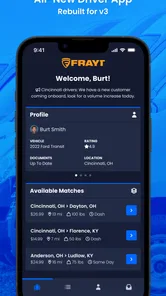
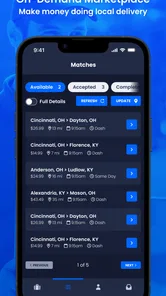
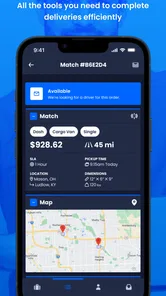
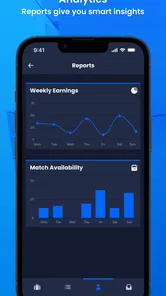
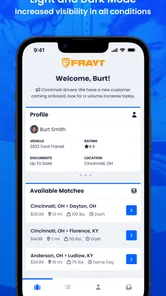
Analysis by Reviewed
When I look at a driver app, I do not judge it only by whether it can show a route. I want to know how clearly it explains the work in front of me, how much control it gives me before I commit, and whether the experience feels practical during a busy day on the road. FRAYT Driver is built for that specific purpose: it is the driver-facing app from FRAYT, a free Maps & Navigation app for people handling delivery work through the service.
That focus immediately separates it from Google Maps, Apple Maps, or a general navigation tool. Those apps are excellent at getting me from one address to another, but they are not designed around the decisions a delivery driver makes before, during, and after a job. FRAYT Driver is more specialized. Its value depends less on being a universal map and more on helping a driver interact with the FRAYT workflow while moving freight.
I would describe it as a practical work tool rather than an app I would install casually. The developer is FRAYT, and the app is available at no charge with an Everyone content rating. It has passed the point of being a new experiment, with over one hundred thousand installs, an average rating of 3.7, and roughly one thousand ratings. Those figures suggest a real working audience, but also a mixed experience: useful for many drivers, yet not something I would recommend blindly without considering how closely its workflow fits your delivery routine.
What the app is really for during a delivery day
The most important thing to understand is that FRAYT Driver is not simply another route planner. Its role is tied to drivers using FRAYT, so the app makes the most sense when I am already participating in that delivery environment. If I only need directions to a personal appointment, it offers no obvious reason to replace the navigation app I already know.
For a working driver, the appeal is concentration. Instead of treating every stop as a separate search in a general map app, a dedicated driver tool can keep the delivery task and the driving task closer together. That can reduce the mental switching involved in checking an assignment, moving toward a destination, and returning to the work screen. The benefit is not glamorous, but it matters when a day contains several stops and small delays begin to accumulate.
I found the specialized purpose more useful in situations where the delivery itself was the main thing I needed to manage. A normal map is usually strongest once I already know where I am going. A driver app has to support the context around that destination as well. That difference is why I would judge FRAYT Driver by how well it supports a complete job, not by whether its map looks more attractive than a consumer navigation app.
A realistic example is a driver starting the morning with a phone mounted in the vehicle and a delivery task waiting in the app. The sensible routine is to review the job before pulling away, check the destination and any visible details, then decide whether the route and timing fit the day. Once moving, I would keep interaction brief and rely on voice guidance from my preferred navigation tool when necessary. At arrival, I would return attention to the FRAYT workflow rather than trying to manage every part of the stop through a general map.
More From Our News Desk

 Weather - By Xiaomi
Weather by Xiaomi Review: Clear at a Glance, Less Clear Up Close
Xiaomi’s weather app makes everyday forecasts quick to scan, but its calm surface can leave useful details and recovery paths harder to find than they should be.

 X
XX Under Pressure: Can It Recover When Posting Goes Wrong?
A resilience-focused review of X, examining setup, mistaken posts, interruptions, weak connections, and the gaps that matter when recovery needs to be dependable.

 Clash of Clans
Clash of Clans Is Won Between the Battles
Its raids are quick; its community is a long-term project of coordination, teaching, rivalry, and shared responsibility—with all the friction that entails.

 Android Auto
Android Auto Makes the Case for Quieter Car Software
The car interface is no longer judged by how much it can do, but by how quietly it helps. Android Auto shows what drivers now expect—and what still gets in the way.

 MobiOffice: Word, Sheets, PDF
MobiOffice: Transforming Mobile Productivity with Seamless Integration
MobiOffice: Word, Sheets, PDF is redefining mobile productivity with a surprising blend of functionality and innovation.

 EA SPORTS FC Soccer Mobile 26
EA SPORTS FC™ Mobile Soccer: Redefining Mobile Sports Gaming
Dive into EA SPORTS FC™ Mobile Soccer, where immersive gameplay and strategic depth transform mobile sports gaming.
Latest News



That last point is an important trade-off. A specialized app may organize the work better, while a dedicated navigation app may still feel smoother for live driving directions. I would not assume that one application has to do everything. In practice, FRAYT Driver is more convincing as the work hub, while a familiar navigation alternative can remain the route specialist.
Where its focused design helps
The strongest use case is a driver who wants one place to stay connected to FRAYT delivery activity instead of relying on memory, screenshots, or a collection of separate notes. A focused interface can make the day feel less improvised. Even when the individual actions are simple, keeping them in the same work context can reduce the chance of forgetting which stop I am handling or why I opened the app in the first place.
Another useful situation is a driver who alternates between different kinds of trips. General map applications do not know whether I am driving for work, heading to a warehouse, or making a personal journey. FRAYT Driver has a narrower purpose, which can make it easier to separate delivery activity from everything else on the phone. That separation is valuable for anyone who wants a clearer boundary between personal navigation and professional tasks.
The app can also be useful for drivers who are new to FRAYT and need to become familiar with the service’s way of presenting work. I would spend time learning the sequence while parked, not during the first active delivery. The goal is to know where to look before accepting or beginning a task, where to return after navigation, and which screen contains the information I need at the next stage.
My practical tip is to treat the app as a workflow tool and prepare it before the engine starts. Confirm that I am signed in, check the phone’s connection, and make sure the device is positioned safely. That small routine is more important than trying to solve a login or loading problem beside a busy road.
Where a normal map app may still be better
For flexible, personal, or multi-purpose navigation, I would choose Google Maps or Apple Maps first. They are familiar, broad, and designed for everything from walking directions to finding businesses. FRAYT Driver has a narrower job, so using it for unrelated travel would add friction rather than remove it.
I would also be cautious if my priority is advanced route planning across many personal stops. A delivery-focused app may be the right place for FRAYT work, but that does not automatically make it the best tool for building a complex itinerary outside that service. Drivers who already have a carefully tuned navigation setup may prefer to keep that system for road guidance and use FRAYT Driver only for the service-specific side of the day.
There is a second limitation in specialized tools: they can feel less forgiving when my working pattern does not match their intended use. A driver who takes occasional jobs, switches between vehicles, or wants to combine several delivery platforms may find a dedicated app less convenient than a general setup. I would skip it as a primary navigation app if I do not actually need the FRAYT driver workflow.
Trust, controls, and moments that deserve attention
Trust in a driver app is not just about a polished screen. It is about what I can see before taking action, how clearly the account experience is presented, and whether I can make decisions without feeling rushed or confused. Because this app is connected to delivery work, I would pay closer attention to account controls and visible choices than I would with a simple offline map.
I would begin by checking the sign-in experience and the account details shown inside the app. A driver should know which account is active before handling work, especially when a phone is shared, replaced, or used for more than one professional purpose. If the app offers account-management choices, I would use them deliberately and avoid leaving an old account active simply because the screen is convenient.
The same caution applies to notifications. A delivery app may need to draw attention to work-related changes, but constant alerts can become distracting while driving. I would review the notification choices available in the app and in the phone’s system settings, keeping only the alerts that help me act. The safest approach is to make changes while parked and judge them by whether they support awareness without encouraging phone use on the road.
Data-sensitive moments are easiest to overlook when they occur as part of a normal task. Entering an address, opening a delivery detail, signing in, or switching from the work screen to a map can all expose information on the display. I would avoid showing the screen to other people unnecessarily, lock the phone when it is not in use, and keep the device mounted where passengers or passersby cannot easily read it.
I would also avoid copying delivery details into random notes or messaging threads unless there is a clear work reason. That habit creates extra places where sensitive information may remain. Keeping the task inside the intended workflow is usually cleaner and makes it easier to remove old material from the phone later.
How I would manage permissions and visible choices
When installing any navigation-related app, I review each permission prompt instead of accepting everything automatically. I want to understand why a permission is being requested at the moment it appears and whether the choice can be changed later through the phone’s settings. If a prompt is unclear, I would pause the setup until I can make an informed decision rather than granting access simply to move forward.
This is especially important on a driver’s phone because location access can affect both privacy and battery life. I would choose the least intrusive option that still supports the work I need to do, where the operating system provides that choice. I would then revisit the permission settings occasionally, particularly after an app update or a phone change. A permission granted months ago may no longer match how I use the app today.
I would take the same approach with contacts, files, photos, microphone access, and notifications: review the request, consider the task, and keep control in the phone’s settings. I am not treating every request as suspicious, but I do believe a professional driver should know what is enabled on a work device. Clear personal habits matter even when the app itself is straightforward.
One useful habit is separating work and personal phone activity as much as possible. I would avoid signing into unrelated services on the same screen while handling a delivery, and I would use a device lock that is not easy for someone else to guess. If the phone is used by multiple drivers, each person should take extra care to confirm the active account before beginning work.
Version, support expectations, and day-to-day reliability
The current version is 3.14.4, and the app requires Android 11 or later. That requirement is reasonable for drivers with a relatively modern Android phone, but it matters if I am trying to use an older spare device. I would check the operating system before planning around the app, especially if the spare phone is kept in the vehicle as a backup.
Keeping the app updated is sensible for a work tool, but I would not install an update moments before an important shift without testing it. My preferred routine would be to update while connected to a reliable network, open the app, confirm that the account still works, and review the main workflow before leaving. That is a simple way to catch login or compatibility friction while I still have time to fix it.
Battery planning is another overlooked issue. Navigation and mobile connectivity can already be demanding, and a driver may keep the screen active for long periods. I would carry a dependable vehicle charger, avoid placing the phone in direct sun, and make sure the mount does not block the charging connection. These are not special FRAYT features, but they directly affect whether a driver can rely on the app throughout a shift.
I would also test the app in the exact environment where I expect to use it. A strong home Wi-Fi connection does not tell me how it will feel in a vehicle moving through areas with weaker service. Before accepting a busy day, I would learn which information remains visible after a brief connection drop and which actions clearly require the network. I would not assume that a task can be completed offline unless the app itself makes that behavior clear.
Who should use it and who should pass
FRAYT Driver is a sensible choice for someone actively driving through FRAYT and wanting a dedicated place for that work. It is also worth considering for a driver who prefers a focused professional tool over managing delivery tasks through email, browser tabs, and a general map. The free price removes the financial barrier to trying it, so the real question is whether the workflow saves enough time and attention to earn a permanent place on the phone.
I would be less enthusiastic for someone who only needs occasional directions, does not drive for FRAYT, or already has a simple routine that works well with a general navigation app. Installing a specialized driver app without using its service-specific purpose would probably create another account and another interface to maintain. In that case, the usual map alternative is more appropriate.
Drivers who are highly sensitive to privacy should make the same careful permission and account review they would make with any work-related navigation app. The right decision is not based on the category label alone. It depends on the choices visible during setup, the permissions enabled on the particular phone, and how much delivery information the driver is comfortable handling on that device.
My overall view is cautiously positive. The app has a clear audience, a practical reason to exist, and enough adoption to show that it is being used beyond a tiny test group. At the same time, the 3.7 average tells me to keep expectations realistic. I would not promise a seamless experience for every driver, and I would not replace a trusted navigation app until I had tested the two together.
After using FRAYT Driver, my recommendation is to start with a low-pressure trial: install it on a compatible Android phone, review the account and permission choices while parked, run through the workflow before the first real shift, and keep a backup navigation method available. The app is most convincing when it acts as a dedicated FRAYT work companion, not as a universal replacement for every map tool.
For drivers already connected to FRAYT, that focused role may be exactly the point. It can bring delivery activity into a single work setting and reduce the need to improvise. For everyone else, I would stay with a familiar general-purpose map. The cautious choice is also the honest one: use the specialized tool where its context helps, keep control of the phone’s visible choices, and let real working conditions decide whether it deserves a regular place in the driving routine.
FRAYT Driver Frequently Asked Questions
What should I check before installing FRAYT Driver on my phone?
FRAYT Driver is a Maps & Navigation app for people interested in handling deliveries through the FRAYT platform. Before installing, check that your phone runs Android 11 or later, and consider whether you have a suitable vehicle and are ready to complete the driver application process. The app is free to download, but using it as a driver involves eligibility and work-related requirements.
Who develops FRAYT Driver, and what is its age rating?
FRAYT develops FRAYT Driver, described as the official driver app for its platform. It has an Everyone content rating, so its store age classification is suitable for a broad audience. That rating does not mean everyone can sign up to drive: applicants still need to meet the platform’s driver, vehicle, and location requirements before accessing delivery work.
What is FRAYT Driver, and who is it designed for?
FRAYT Driver is a delivery platform for independent drivers who want to transport freight, packages, and other items for businesses. It is mainly designed for cargo van, box truck, and other qualified vehicle owners, depending on the requirements in their area. Drivers use the app to find available delivery opportunities, review job details, and manage completed work from their mobile device.
What requirements must I meet to become a FRAYT Driver?
Requirements can vary by location and vehicle type, but applicants generally need to meet age, driving, insurance, and vehicle standards. You may be asked to provide a valid driver’s license, proof of insurance, vehicle registration, background information, and tax or payment details. Before applying, check the current requirements in the app or on FRAYT’s official driver website because eligibility rules may change.
How do deliveries and earnings work in the FRAYT Driver app?
After approval, drivers can view available delivery opportunities and inspect information such as pickup and drop-off locations, timing, cargo details, and expected compensation. You can choose jobs that fit your schedule and vehicle capabilities. Earnings depend on the delivery, distance, route, vehicle type, and local demand. Review each offer carefully, including any special handling or waiting-time expectations, before accepting it.
Pros
- Flexible delivery work with control over when you accept jobs.
- Clear pickup and drop-off details help plan each route.
- Useful earnings information before committing to a delivery.
- Designed for independent drivers using their own vehicles.
- Supports local and regional deliveries beyond standard food orders.
Cons
- Availability of delivery offers depends heavily on your location.
- Vehicle costs
- fuel
- insurance
- and maintenance reduce actual earnings.
- Some jobs may involve bulky items or challenging loading conditions.
- Navigation and traffic issues can make delivery times difficult to meet.
- Driver eligibility requirements may vary by market and vehicle type.











