FOX5 Vegas - Las Vegas News
- 619.00
- 2.9
- Installs
- 100.00K
- Price
- Free

Screenshots






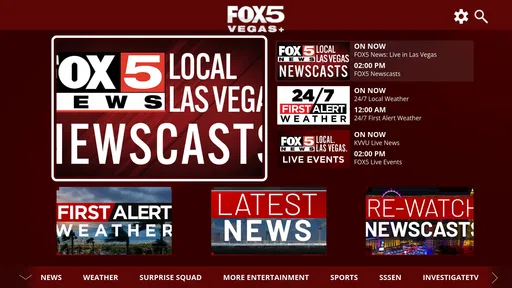
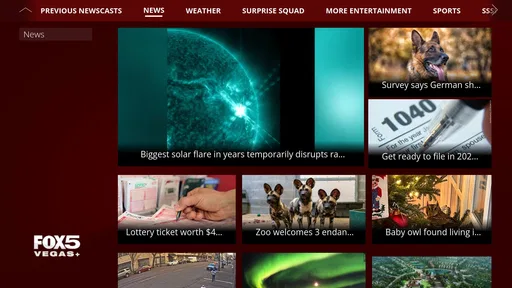
Analysis by Reviewed
When I want a quick sense of what is happening around Las Vegas, I prefer a local news app that keeps the focus close to home instead of making me sort through a national feed. FOX5 Vegas - Las Vegas News is built for that purpose. It is a free News & Magazines app from Gray Media, aimed at people who want local reporting and updates connected to Las Vegas and the surrounding area.
My first impression is that the app makes the most sense as a practical daily check-in rather than a complete replacement for every news source. It can help me see what deserves attention, follow local developments, and return to stories that affect my commute, neighborhood, plans, or understanding of the city. At the same time, its average rating of 2.9 from around 1.8 thousand ratings suggests that the experience is not equally smooth for everyone. I would approach it as a useful local companion, while keeping realistic expectations about polish and consistency.
What to expect from the Las Vegas-focused news experience
The central appeal is simple: the app concentrates on news in and around Las Vegas. That local emphasis is important because national news apps often bury regional stories beneath politics, entertainment, business, and breaking events from everywhere else. Here, the reason to install it is not endless variety. The reason is relevance.
For a resident, that can mean opening the app in the morning to get oriented before work, checking for developing local stories during the day, or using it in the evening to understand an event that has been affecting the city. For someone visiting Las Vegas, it can be a convenient way to add a local perspective to a trip, especially when plans may be influenced by conditions or major events in the area.
I would not treat it as a research archive or as my only source for a complicated story. A television news organization’s mobile app is usually strongest when I need timely awareness and a local angle. If I need a long, deeply sourced explanation, a specialist publication or several independent sources may be more suitable. That distinction helps prevent disappointment: this is a focused local news tool, not a universal information library.
The app is rated for Everyone, which makes it broadly approachable for households and casual readers. Still, local news can naturally include serious incidents and difficult subjects. The age label describes the intended audience, but it does not mean every story will be light or suitable for a young child to read without guidance.
Gray Media is the developer behind the app, and its long presence in the store is clear from the release date of August 6, 2012. That history gives the app a familiar role in the local-news space, but it also makes current usability especially important. A long-running app needs to feel straightforward on a modern phone, and that is where my judgment would depend on how comfortably the current version handles reading, navigation, and returning to a story.
More From Our News Desk

Weather by Xiaomi Review: Clear at a Glance, Less Clear Up Close

X Under Pressure: Can It Recover When Posting Goes Wrong?

Clash of Clans Is Won Between the Battles

Android Auto Makes the Case for Quieter Car Software

MobiOffice: Transforming Mobile Productivity with Seamless Integration

EA SPORTS FC™ Mobile Soccer: Redefining Mobile Sports Gaming
Who gets the most value from it
I think it is a good fit for Las Vegas residents who want one recognizable place to begin a local-news routine. It is also useful for people who have moved away but still care about what is happening in the area, provided they are comfortable with a local broadcast-news style rather than a purely text-based newspaper experience.
The app is less compelling for someone who wants a broad national briefing, international coverage, or a highly customizable news reader. It is also not my first recommendation for a person who dislikes broadcast-news presentation and wants every article organized like a traditional newspaper. In that case, a newspaper app, an RSS reader, or a general news aggregator may offer better control.
One practical advantage is that a focused local app reduces the effort needed to begin. Instead of building a collection of local websites and checking each one, I can open one place and decide whether anything matters to me today. That small reduction in friction is the main reason I would keep it installed.
Getting started without overcomplicating the first visit
After installing the free app, I would begin with a simple goal: find one current story that is genuinely relevant to my day. That is more useful than immediately trying to explore every screen. I would look through the opening news view, identify the local headlines, and open the story that most closely matches my interests, such as traffic, public safety, weather-related developments, community news, or a major event.
The first setup should be treated as an orientation step, not a commitment to read everything. I would notice how the app presents headlines, whether the story opens in a clean reading view, and how easily I can return to the main feed. Those details tell me more about whether it suits my habits than the number of sections on the screen.
If the app presents any optional prompts during setup, I would make each choice based on how I actually use news. Someone who wants immediate awareness of major local developments may welcome timely alerts. Someone who checks news only once or twice daily may prefer a quieter experience. The important point is to avoid accepting every prompt automatically and then blaming the app when the phone becomes noisy.
I would also sign in only if the app gives me a clear reason to do so. For basic reading, I prefer to first confirm that the news flow and article layout work well for me. If an account is useful for saving or personalizing content, that benefit should be weighed against the extra step. A first-time user does not need to make the setup feel like a project.
On a small phone screen, I would test the app in both a quick glance and a longer read. A headline may be easy to scan while the full article feels less comfortable, or the reverse. This matters because local-news apps often serve two different moments: a short check while I am busy and a deeper read when I have time. The better fit is the one that handles both without making me hunt for basic controls.
The first meaningful success
For me, the first successful action would be opening a local story, reading enough to understand why it matters, and then returning to the news list without losing my place. That sounds basic, but it is the workflow I would repeat every day. If it feels natural, the app has already proved its main value.
A realistic example would be a weekday morning before leaving home. I might open the app while drinking coffee, scan the Las Vegas headlines, select a story connected to a developing local issue, and decide whether it changes my plans. I would not expect the app to make that decision for me. Its job is to put relevant information in front of me quickly enough that I can make a better-informed decision.
Another useful routine is the “two-pass” check. On the first pass, I would read only the headlines and identify one or two stories worth attention. Later, I would return for the full articles rather than trying to consume everything at once. This keeps the app from turning a short news check into an unplanned hour of scrolling.
I also recommend opening a story from the main feed and then deliberately returning to the feed before exploring further. That simple test reveals whether the navigation matches your habits. If you regularly lose track of where you were, the app may still be useful for headline checks, but less suitable for extended reading sessions.
The best first-use test is not how many headlines you can browse; it is whether one local story helps you understand your day more clearly. If that happens with little effort, the app has earned a place in your routine.
Where new users may feel uncertain
The biggest possible confusion is knowing what the app is meant to replace. I would not use it as a replacement for every news source. Its value comes from local focus, while a general aggregator is usually better at combining national and international coverage. A newspaper app may also provide a different editorial rhythm, with more emphasis on written reporting and organized sections.
Another point of confusion is the difference between a headline feed and a complete account of an event. A headline can tell me that something is happening, but I still need to read the full story before drawing conclusions. For breaking or developing news, details can change, and I would avoid forwarding a short headline as though it were the final word.
The app’s rating of 2.9 is also worth taking seriously. I would not interpret it as proof that the app is unusable, but I would take it as a reason to test the current experience on my own device before depending on it for important updates. User experiences can vary with phone models, software versions, connectivity, and individual expectations.
There are around 619 written reviews, so prospective users can get a sense of recurring frustrations by reading several rather than relying on one extreme opinion. I would look for patterns involving navigation, reliability, alerts, or reading comfort. That is a better way to decide whether a limitation matters to me than treating the average rating as a complete verdict.
I would also remember that an app can be useful even when it is not perfect. If I only need a local headline check, a minor design annoyance may not matter. If I expect to read long stories every evening, frequent friction becomes much more important. The right judgment depends on the job I want the app to perform.
Practical ways to make the routine work
I would keep the app in a place on my phone where I can reach it during my morning routine, but I would avoid opening it automatically every time I have a spare second. News is more useful when I choose a purpose: checking local developments, following a story, or catching up after work. That keeps the feed from becoming background noise.
When following a developing story, I would return to the original article or the app’s current feed instead of relying on an old screenshot or copied headline. This is a small but important habit. Local events can move quickly, and the latest version may contain context that was not available earlier.
If I am comparing the app with a general news aggregator, I would use each for a different job. I would start here for Las Vegas-specific awareness, then move to a broader source when I need national context. That combination is more effective than forcing one app to cover every kind of news equally well.
For a visitor, I would use it as a local supplement rather than a trip planner. I could check it before heading out to understand the local conversation, but I would still verify practical details through the relevant official source when a decision involves travel, safety, or an event schedule. A news app can explain what is happening without being the final authority for every logistical detail.
For a former resident, the app can support a lightweight connection to Las Vegas without requiring a large reading commitment. I would check it a few times a week, open only the stories that affect people or places I know, and skip the rest. That selective approach makes more sense than trying to follow every local headline from a distance.
How it compares with familiar alternatives
Compared with a broad news aggregator, this app offers a narrower starting point. That is its strength when local relevance matters and its weakness when I want variety. An aggregator may be better for comparing viewpoints across regions or topics, while FOX5 Vegas is more direct for beginning with Las Vegas coverage.
Compared with a newspaper app, the experience is likely to appeal more to readers who already recognize the FOX5 Vegas local-news style. A newspaper-focused alternative may feel better for people who prefer carefully arranged sections, extensive written analysis, or a slower reading session. I would choose between them based on whether I want quick local awareness or a more traditional publication experience.
Compared with visiting a mobile website, the app can be more convenient because it gives me a dedicated place to check. However, a website may be the better choice if I do not want another app on my phone or if I prefer browsing several sources in one browser session. The app earns its space only if I return to it often enough for that convenience to matter.
Its install base is over 100 thousand, which indicates that it has reached a substantial audience, but popularity alone would not decide my choice. I would focus on whether the app consistently helps me complete the local-news workflow I care about: open, scan, read, understand, and leave.
Who should skip it and who should keep it
I would skip it if my main goal is international news, financial markets, specialist reporting, or a fully personalized multi-source feed. I would also look elsewhere if I need a news experience with advanced organization tools or if I find the local broadcast format distracting. In those cases, a dedicated alternative is likely to serve me better.
I would keep it installed if I live in Las Vegas, regularly visit the area, or have personal reasons to follow local developments. The free price removes the financial barrier, so the decision mostly comes down to attention and convenience. If the app gives me useful local awareness in a few minutes, that is enough value for a casual reader.
My final recommendation is cautious but positive. I would suggest trying it with one clear test: use it for several short local-news checks, open full stories instead of judging only the headlines, and see whether the experience fits your phone and routine. FOX5 Vegas - Las Vegas News is most worthwhile when you want a focused Las Vegas starting point, not when you expect one app to replace every source of information.
For me, its strongest quality is the local purpose. Its main trade-off is that the modest rating signals possible friction that some users may notice. If the first meaningful story is easy to find and the reading flow feels comfortable, the app can become a practical part of the day. If navigation or presentation gets in the way, there is no reason to force it; a broader aggregator, newspaper app, or mobile website may be a better match.
FOX5 Vegas - Las Vegas News Frequently Asked Questions
Who is FOX5 Vegas - Las Vegas News intended for?
FOX5 Vegas is most useful for people who live in Las Vegas or nearby communities, as well as visitors who want to keep up with local developments. Its focus is regional news, weather, and community information, so readers looking primarily for coverage of another city may find a local news app for that area more relevant. It is a News & Magazines app developed by Gray Media.
What is FOX5 Vegas - Las Vegas News?
FOX5 Vegas - Las Vegas News is a local news app focused on the Las Vegas area and surrounding communities. It provides access to breaking news, weather updates, traffic information, investigative reports, sports coverage, entertainment stories, and video content. The app is designed for users who want a convenient way to follow important developments in Southern Nevada from a mobile device.
What type of news and content can I find in the FOX5 Vegas app?
The app covers a broad range of Las Vegas topics, including local and national news, crime reports, politics, health, business, community events, sports, and entertainment. It also commonly features live or recorded video reports, special investigations, weather forecasts, severe-weather notices, and stories relevant to nearby areas. Available sections and content may change depending on current events.
Does FOX5 Vegas provide weather alerts and live updates?
Yes, weather is one of the app’s main features. Users can typically view current conditions, forecasts, radar information, and updates from the FOX5 weather team. When significant weather or other urgent events affect the Las Vegas region, the app may send notifications or publish live updates. Availability and alert timing can depend on your location and notification settings.
Is FOX5 Vegas - Las Vegas News free to download and use?
The FOX5 Vegas app is generally available to download at no cost on supported Android and iOS devices. Most news articles, forecasts, alerts, and videos can usually be accessed without a subscription, although some content may include advertising or links to external services. Mobile data charges may apply, especially when streaming video or receiving updates over a cellular connection.
Pros
- Fast updates on breaking news across Las Vegas and Southern Nevada.
- Live video coverage helps users follow developing stories in real time.
- Weather forecasts include local conditions and severe weather alerts.
- Sports coverage keeps fans informed about the Vegas Golden Knights and Raiders.
- News categories make it easy to find traffic
- crime
- entertainment
- and community stories.
Cons
- Some articles may contain frequent ads or promotional content.
- Breaking-news notifications can feel excessive without careful customization.
- Video playback may use significant mobile data when streaming over cellular.
- Coverage is mainly focused on Las Vegas and offers limited national news.
- App performance may vary depending on connection quality and device model.













