

FourKites CarrierLink App
- 2.06K
- 4.8
- Installs
- 500.00K
- Price
- Free

Screenshots
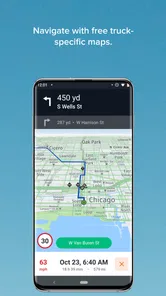
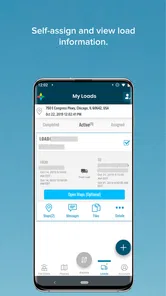
Analysis by Reviewed
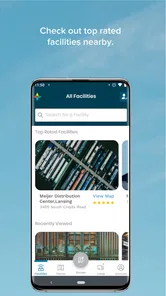
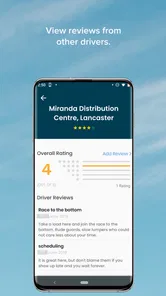
I would treat FourKites CarrierLink as a work tool for drivers with loads assigned through a participating logistics workflow, not as a general-purpose package tracker. That distinction matters: it is most useful when someone expects the driver’s progress to be visible to others, rather than when a consumer simply wants to follow a parcel. FourKites, Inc. makes this free Maps & Navigation app for Everyone, and its central job is to help truck drivers share the progress of assigned loads.
When a live connection matters
The app’s value depends on timely location updates. In practice, that means the phone’s network connection can affect how current the tracking view is for people coordinating the load. If coverage becomes weak on a rural stretch or inside a large facility, updates may not reflect the driver’s position as promptly as they would with a reliable connection. I would avoid treating any live map as an exact promise of arrival; it is a planning aid, not a substitute for confirming a changed appointment or a significant delay directly.
A useful habit is to check that the assigned load is the one you intend to track before setting off, then use the app as part of the normal trip routine rather than repeatedly reopening it to watch the map. That keeps attention on driving and makes the shared location more meaningful to dispatchers. For a dispatcher, the practical benefit is a clearer view of progress; for a driver, the trade-off is that location sharing is part of the work process, not merely a personal navigation feature.
Enhancing Logistics with Real-Time Tracking
First things first, the FourKites CarrierLink app is all about real-time tracking. Imagine having the power to track your shipments as they make their way to their destination, right at your fingertips. This feature not only helps in reducing anxiety over delays but also improves customer satisfaction by keeping everyone updated. Whether you’re a driver, a dispatcher, or a logistics manager, having access to real-time data can significantly boost efficiency and transparency.
User-Friendly Interface
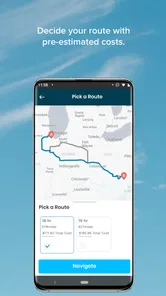
One of the first things I noticed when using the app is its user-friendly interface. Even if you’re not a tech-savvy person, navigating through the app is a breeze. The layout is intuitive, and the design is minimalistic, ensuring that users can easily access the features they need without getting lost in a sea of options. The app provides all the necessary information like shipment details, estimated time of arrival, and route optimization in a clear and concise manner.
Communication Made Easy
Communication is key in logistics, and this app nails it. The built-in messaging feature offers seamless communication between drivers and dispatchers. This is a game-changer, as it minimizes the chances of miscommunication and ensures that everyone is on the same page. I found this feature particularly useful during my review, as it allowed for quick updates and changes to be communicated effectively, saving both time and resources.
Security and Reliability
In the world of logistics, security and reliability are paramount. The app ensures that all data is securely transmitted and stored, providing peace of mind to its users. No more worrying about data breaches or lost information! Additionally, the app’s reliability is commendable, with minimal downtime and fast loading times, making it a dependable tool for any logistics operation.
More From Our News Desk

 Weather - By Xiaomi
Weather by Xiaomi Review: Clear at a Glance, Less Clear Up Close
Xiaomi’s weather app makes everyday forecasts quick to scan, but its calm surface can leave useful details and recovery paths harder to find than they should be.

 X
XX Under Pressure: Can It Recover When Posting Goes Wrong?
A resilience-focused review of X, examining setup, mistaken posts, interruptions, weak connections, and the gaps that matter when recovery needs to be dependable.

 Clash of Clans
Clash of Clans Is Won Between the Battles
Its raids are quick; its community is a long-term project of coordination, teaching, rivalry, and shared responsibility—with all the friction that entails.

 Android Auto
Android Auto Makes the Case for Quieter Car Software
The car interface is no longer judged by how much it can do, but by how quietly it helps. Android Auto shows what drivers now expect—and what still gets in the way.

 MobiOffice: Word, Sheets, PDF
MobiOffice: Transforming Mobile Productivity with Seamless Integration
MobiOffice: Word, Sheets, PDF is redefining mobile productivity with a surprising blend of functionality and innovation.

 EA SPORTS FC Soccer Mobile 26
EA SPORTS FC™ Mobile Soccer: Redefining Mobile Sports Gaming
Dive into EA SPORTS FC™ Mobile Soccer, where immersive gameplay and strategic depth transform mobile sports gaming.
Latest News



Working around signal gaps
A driver should think of a temporary loss of service as a reason to verify the tracking status once coverage returns, not as proof that a load has stopped moving. If a dispatcher is waiting on an update, a short, clear message about the situation can be more useful than assuming the map tells the whole story. I would also keep a familiar route app available for turn-by-turn navigation: CarrierLink’s tracking role is different from a dedicated navigation app’s job of guiding a driver around road changes.
That distinction is one of the most practical choices to make before a trip. General map apps are built for finding places and planning routes, while a carrier workflow is built around assigned freight and visibility between people handling that load. If you only need directions, the conventional navigation option is likely the better fit. If your work depends on a dispatcher seeing progress against an assigned shipment, CarrierLink addresses a more specific need.
Using it during a real workday
Picture a driver leaving a pickup and heading toward a delivery while dispatch is coordinating the next step. The useful move is to begin with the correct load, keep the phone’s connection available as the trip proceeds, and use a direct message when a meaningful change needs explaining. That gives the tracking view context: a location point can show progress, while a brief note can clarify why the schedule has shifted. It is a small workflow adjustment, but it can prevent a dispatcher from having to guess what a map update means.
For a long day on the road, I would avoid making repeated manual checks a distraction. Let the app serve the coordination process, and check it when safely stopped if something needs attention. Drivers who have no assigned load in the relevant workflow, or who want a private navigation tool for personal journeys, are unlikely to get much from it. Likewise, a small operation that does not rely on shared shipment visibility may find ordinary calls and a standard map app simpler.
What to expect from the app
CarrierLink is best judged as one piece of a logistics routine rather than a complete transport-management solution. The app’s focus on assigned loads is useful precisely because it narrows the task, but that focus also means it is not a universal answer for every driver or delivery. Before relying on it for a particular trip, make sure the load is available to you and that the people who need to follow it are using the same coordination process.
Network use is another sensible consideration. Location sharing and checking live information rely on a working mobile connection, so drivers who spend time in areas with patchy service should plan for occasional uncertainty in how current the view appears. I would not use a momentary lack of an update as the sole basis for judging whether a driver is delayed. A direct check-in is the safer way to resolve an important ambiguity, especially when timing affects a pickup or handoff.
How it fits among navigation choices
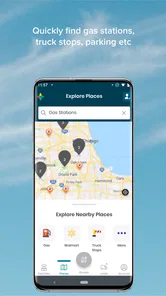
The app sits in a different lane from consumer navigation tools. Those are convenient for choosing roads, searching for stops, and getting guidance to a destination; CarrierLink’s distinguishing purpose is making assigned-load progress visible within a carrier’s work. Using both can make sense: one for road guidance and the other for shipment coordination. The trade-off is managing two tools, but their jobs are not interchangeable, and expecting a load-tracking app to replace a full navigation routine can lead to frustration.
Its audience is therefore fairly clear. A truck driver whose work calls for load tracking may appreciate having that coordination on a phone, while dispatchers and logistics staff can benefit from more timely visibility. Someone looking to track a personal online order, plan a family drive, or find a route without a freight assignment should choose a tool designed for that purpose instead.
Practical limits and a fair verdict
CarrierLink has a strong average rating of 4.8 from around 31,000 ratings, with about 2,000 written reviews and over 500,000 installs. Those figures suggest that many people find a reason to use it, but they do not change the basic fit question: its usefulness depends on a driver having an assigned load and a work process that uses shared tracking. It is free, currently at version 6.7.14, and supports devices running Android 7.0 or later.
For a driver deciding whether to install it, I would first ask: will a dispatcher or logistics team use the tracking for my assigned loads, and can I keep a mobile connection available for most of the route? If yes, it can be a practical coordination companion. If the answer is no, a standard navigation app is probably more useful. My overall view is that CarrierLink is worth considering for its intended freight workflow, as long as users understand that live visibility is most helpful when paired with clear communication and sensible expectations about connectivity.
Final Thoughts
All in all, the FourKites CarrierLink app is a robust tool for anyone involved in the logistics industry. Its real-time tracking capabilities, user-friendly interface, and strong communication features make it a standout choice for optimizing logistics operations. Whether you’re managing a fleet or just want to ensure your package arrives on time, this app is worth considering. If you’re ready to take your logistics game to the next level, give this app a try—you might just find it’s the missing piece you’ve been looking for!
FourKites CarrierLink App Frequently Asked Questions
Does FourKites CarrierLink require a work account or invitation before I can use it?
FourKites CarrierLink is built around tracking assigned freight loads, so it is most useful when a driver is participating in a shipment managed through the FourKites process. Before downloading, consider whether your work or dispatcher uses FourKites and whether you have an assigned load to track. The app’s purpose is operational rather than general consumer navigation.
What kind of information can FourKites CarrierLink help a driver share during a shipment?
The app is intended to support load tracking and communication during freight transportation. Drivers can share location updates and delivery status, helping dispatchers and other parties follow a shipment’s progress. This makes CarrierLink relevant to drivers who need to keep work-related shipment information visible to the people coordinating the load, rather than to people seeking a standalone travel planner.
Is FourKites CarrierLink free, and what devices can run it?
FourKites CarrierLink is a free app in the Maps & Navigation category, developed by FourKites, Inc. It is rated for Everyone and requires Android 7.0 or later. The app has over 500,000 installs and an average rating of 4.8. Check your device’s operating system before downloading to ensure it meets the requirement.
Who is FourKites CarrierLink intended for, and do I need an assigned load to use it?
The app is intended for truck drivers who need to enable tracking for their assigned loads. Its role is connected to freight transportation, so it is most relevant to drivers using FourKites as part of their work. If you are not involved in a shipment or load managed through this process, the app may not offer much practical value for everyday navigation.
What is the primary function of the FourKites CarrierLink app?
The FourKites CarrierLink app is designed to provide real-time tracking and visibility for shippers, carriers, and drivers. It enables seamless communication between all parties involved in freight transportation, helping to ensure timely deliveries and efficient operations. Users can track shipments, optimize routes, and receive updates, making it an essential tool for logistics management.
Pros
- Real-time load tracking for efficiency.
- Easy integration with existing systems.
- User-friendly interface and navigation.
- Supports multiple languages.
- Provides detailed analytics for insights.
Cons
- Requires stable internet connection.
- Limited offline functionality.
- Occasional app crashes reported.
- Data privacy concerns for some users.
- Initial setup can be time-consuming.











