

Food Recalls & Alerts
- 692.00
- 4.4
- Installs
- 50.00K
- Price
- Free

Screenshots
Analysis by Reviewed
Food safety is easy to ignore until a product in the refrigerator suddenly becomes part of a recall notice. I tested Food Recalls & Alerts as a practical Food & Drink app from SmartAddress, Inc., and its purpose is refreshingly focused: help me notice food recall information before a questionable item becomes a meal. The app is free to install, suitable for Everyone, and built for Android devices running version 7.0 or later.
That narrow purpose is also its main appeal. This is not a recipe planner, grocery budget, nutrition tracker, or general health dashboard. It is closer to a safety watchlist for people who want recall information within reach. I found it most useful when treated as one part of a household routine rather than as a replacement for checking labels, following storage guidance, or using common sense with food that looks or smells wrong.
How Food Recalls & Alerts fits into a shared household
The most realistic use case is a shared kitchen. One person buys groceries, another prepares dinner, and someone else may unpack delivery bags or clean out the refrigerator. In that arrangement, food safety information can easily stop with the person who first sees it. An app such as Food Recalls & Alerts can give the household a single place to look when a recall becomes relevant.
I would use it after a large grocery trip, especially when the shopping includes packaged foods, refrigerated items, snacks, or products bought for children or older relatives. Rather than assuming that every recall applies to my kitchen, I would use the alert as a prompt to compare the product name, package details, and identifying information with what is actually at home. That distinction matters: an alert is a reason to investigate, not automatic proof that every item in the same broad food category is unsafe.
On a shared device, the value is simple. The person who notices an alert can show it to the person responsible for the pantry or refrigerator, and the household can decide what to inspect. This is more useful than leaving a vague message such as “check the food,” because the app gives the conversation a specific safety subject. Still, the app does not remove the need for communication. If other household members never open it, its usefulness depends on someone deliberately passing along important information.
I also like the idea of using it during a kitchen reset. When cleaning shelves, I can open the app, review current recall information, and then check unopened products before putting them back. That workflow is less stressful than trying to remember whether something was mentioned in a news report days earlier. It also encourages a better habit: checking the actual package instead of relying on memory or a familiar brand name.
What setup can and cannot solve
The initial setup should be approached with realistic expectations. This is a safety-information tool, not a household management system. I would not expect it to create separate profiles for parents, roommates, guests, or children, and I would not hand a young child responsibility for deciding whether recalled food is safe to eat. The Everyone age classification makes the app broadly approachable, but age suitability is not the same as food-safety responsibility.
More From Our News Desk

 Gmail
GmailGmail in a Busy Inbox: Who Benefits Most?
From first account to crowded workday, Gmail earns its place through dependable search and flexible sorting—but its best fit depends on how much inbox maintenance you can tolerate.

 Prime Video
Switching to Prime Video: What Changes in Your Viewing Routine
Prime Video can make a compelling second home for streaming, but switching means learning a different catalog, rental layer, and route from browsing to playback.

 Universal TV Remote Control
Universal TV Remote Control Works Best as a Reliable Backup
A phone remote earns its place through quick setup and reliable habits. Here is how to get more from Universal TV Remote Control—and where its limits show.

 Weather - By Xiaomi
Weather by Xiaomi Review: Clear at a Glance, Less Clear Up Close
Xiaomi’s weather app makes everyday forecasts quick to scan, but its calm surface can leave useful details and recovery paths harder to find than they should be.

 X
XX Under Pressure: Can It Recover When Posting Goes Wrong?
A resilience-focused review of X, examining setup, mistaken posts, interruptions, weak connections, and the gaps that matter when recovery needs to be dependable.

 Clash of Clans
Clash of Clans Is Won Between the Battles
Its raids are quick; its community is a long-term project of coordination, teaching, rivalry, and shared responsibility—with all the friction that entails.
Latest News



For a shared phone or tablet, I would establish a simple boundary: one adult or trusted household member checks the information, while everyone else knows where that person will share a relevant warning. That avoids a common mistake with shared devices, where several people assume someone else is monitoring the same screen. If the app is installed on multiple personal devices, the household should still agree on who confirms a product and who takes action.
The app is free, which makes trying it low-risk for a household that wants a dedicated recall reference. It also contains optional purchases priced from $3.99 to $99.99 per item. That price range is important when deciding whether it belongs on a shared device: I would review any purchase screen carefully before approving an upgrade, particularly if children or guests can use the device. The free starting point is convenient, but I would not assume that every useful function is included without checking what a particular purchase provides.
I would also avoid treating installation as proof that the household is covered. The app needs to be opened and used. A dormant icon cannot protect food in the refrigerator, and an alert is only helpful when someone connects it to a real product at home. My practical setup would include placing it somewhere easy to find, agreeing on a checking routine, and keeping the conversation focused on verification rather than panic.
Turning an alert into a household action
The strongest workflow is a short chain of actions. First, notice the alert or recall information. Next, identify whether the household owns the affected product. Then compare the package carefully and follow the appropriate safety guidance. Finally, tell everyone who might eat, serve, donate, or move that food. This sounds obvious, but the fourth step is where shared homes often fail.
For example, imagine that I see a notice while another household member is preparing lunch. I would not simply say that a brand has been recalled and leave the other person to guess what that means. I would ask them to pause, bring the package into view, and compare the details. If it matches, the item should be kept away from food that is still considered safe, and the household should follow the instructions attached to the recall information. If it does not match, I would still avoid making a sweeping conclusion based only on the brand name.
This is one of the app’s less obvious strengths: it can improve the quality of a conversation. Instead of relying on a social-media post, a half-remembered headline, or a message forwarded without context, the household can begin with a dedicated food-recall reference. That does not guarantee a perfect decision, but it reduces the chance of acting on an incomplete rumor.
A useful habit is to keep the app involved in the decision without making it the only authority. Product packaging, official instructions, retailer notices, and professional medical advice still matter in situations involving illness or possible exposure. The app works best as an early-warning and organization aid. It is not a substitute for urgent help when someone is already sick.
Trust, age, and the limits of shared access
Because the app is rated for Everyone, it is easy to imagine it being available on a family tablet. I think that is reasonable for viewing general recall information, but I would set clear expectations for younger users. A child can learn why checking food matters, yet an adult should make the final decision about discarding, returning, or isolating a product. The same principle applies to a teenager who is cooking for the household: showing them how to verify an item is useful, while asking them to interpret uncertain safety information alone is less sensible.
Trust also matters between adults. Roommates may have different standards for food storage, and one person may be more cautious than another. The app can support a shared reference point, but it cannot settle disagreements about what to do with a product. My approach would be conservative: if the package appears to match a recall, do not serve it while trying to talk yourself into a more convenient interpretation.
Another boundary concerns personal information. I would not use a shared device for private notes about a person’s medical condition or food allergies unless the household is comfortable with everyone who can access that device seeing them. The app’s focus is recalled food, not a private health record. Keeping those subjects separate makes the household routine clearer and avoids giving a general safety app more responsibility than it deserves.
For older family members, the app may be helpful if someone introduces it patiently and explains the workflow in plain language. The important lesson is not how to browse every screen; it is how to recognize that a notice requires checking a package before eating it. If the interface feels difficult for a particular person, a trusted relative can perform the check and communicate the result. That is a better arrangement than assuming that installing the app automatically makes everyone independent.
Where it stands against ordinary alternatives
The usual alternatives are scattered: television reports, news websites, supermarket notices, manufacturer messages, printed signs, and word of mouth. Those sources can be valuable, especially when a recall is urgent, but they are not always convenient during a pantry check. A dedicated app has an advantage because it gives me a repeatable place to look instead of asking me to remember which website or message contained the information.
On the other hand, a general search engine can be faster when I already know the exact product and need a very specific answer. Official food-safety sources may also provide fuller background, instructions, and updates than a compact mobile app. For a household that already checks those sources regularly, Food Recalls & Alerts may feel like an extra step rather than a complete solution.
I see the app as the middle ground between doing nothing and building a complicated monitoring system. It is easier to keep nearby than a collection of bookmarked pages, but it still requires judgment. Its value increases when several people share responsibility for groceries, because it turns recall checking into a visible household task. Its value is smaller for someone who rarely buys packaged food, lives alone, and already checks official notices directly.
The app’s public reception suggests that many people find this focused approach worthwhile: it holds a 4.4 average from around 2.3 thousand ratings, with over 692 written reviews and more than 50 thousand installs. I treat those figures as a sign of interest rather than a guarantee that the experience will suit every household. Recall information is a practical subject, and the right app is the one that fits the way a person actually shops, cooks, and communicates.
Practical strengths and friction I noticed
The biggest strength is focus. Food Recalls & Alerts does not ask me to reorganize my entire diet or maintain a detailed inventory before it becomes useful. I can open it when I am concerned about a product, use it during a grocery or pantry check, and bring the information into a household discussion. That low-commitment role makes sense for an app that people may need urgently but not continuously.
The main friction is the gap between seeing information and identifying a product correctly. Packages can have similar names, different sizes, different identifying details, or different production information. A rushed user may read only the brand and assume the whole line is affected. I would slow down at that point. The app can point me toward a concern, but I still need to inspect the package and read the notice carefully.
Another limitation is coordination. If the app lives on one person’s phone, everyone else depends on that person to share what matters. If it lives on a shared tablet, people may forget to check it. I would therefore use it alongside a simple household agreement, such as mentioning relevant alerts during meal planning or after unpacking groceries. That small human step is more important than installing the app on every device.
The current version is 3.9.1, and the app was released on November 3, 2021. Those details make it compatible with an established Android setup rather than requiring a very recent operating system; the minimum is Android 7.0. I would still keep the app updated through the normal store process, because safety information is a category where current software matters. The developer is SmartAddress, Inc., and the app’s continued usefulness depends on how clearly and promptly its information is presented.
Who should use it and who should skip it
I would recommend trying it if your household buys a lot of packaged food, shares grocery duties, cares for children or older relatives, or wants a straightforward place to begin checking recall information. It is especially suitable for people who do not want to build a complicated spreadsheet or remember several different websites. The free entry point makes it easy to see whether the app fits your routine before committing to any optional purchase.
I would be more cautious about recommending it as the only tool for a restaurant, childcare operation, community kitchen, or other setting where many people depend on formal food-safety procedures. Those environments need documented processes, assigned responsibility, and authoritative records. A consumer app can support awareness, but it should not replace professional compliance work.
I would also skip it if you expect a full pantry inventory, highly personalized household profiles, or automatic decision-making about every product you own. That is not the role I would give this app. Someone who wants recipe suggestions, shopping-list management, nutrition analysis, or allergy meal planning will probably be better served by a different category of app and a separate food-safety reference.
My household verdict
After using Food Recalls & Alerts, I see it as a sensible safety companion rather than a complete food-protection system. Its best contribution is helping a household move from vague concern to a concrete check: open the notice, inspect the package, decide carefully, and tell the people who need to know. That workflow is modest, but it is genuinely useful when several people share a kitchen.
I would install it on a household device if everyone understood its boundaries. Adults would handle final decisions, younger users could learn the checking habit without carrying the responsibility, and any optional purchase would be reviewed before approval. I would also keep official notices and package instructions in the loop, especially when the situation involves possible illness or uncertainty.
My recommendation is to use Food Recalls & Alerts as an accessible first check, not as permission to stop thinking. For a family or shared home that needs a common starting point, it earns a place in the routine. For users seeking detailed inventory tools, professional compliance features, or a broad food-management suite, another option will be a better fit. Its value comes from being focused, easy to bring into a conversation, and most effective when paired with careful verification and clear household communication.
Food Recalls & Alerts Frequently Asked Questions
Is Food Recalls & Alerts free to download, and are there in-app purchases?
Food Recalls & Alerts is free to download, so you can try its food-safety alert features without paying an upfront price. The app also offers in-app purchases, with prices ranging from around $4 to $100 per item. Check the purchase details shown in the app before confirming anything, particularly if you only want to use its basic recall information.
Will Food Recalls & Alerts work on my phone, and is it suitable for all ages?
The app is available for devices running Android 7.0 or later, and its content rating is Everyone. Before downloading, check your phone’s operating-system version to make sure it meets that requirement. Food-safety alerts can be useful for households and shoppers of different ages, though anyone making a health decision should still follow official instructions and seek appropriate professional advice when needed.
What is Food Recalls & Alerts, and what does the app do?
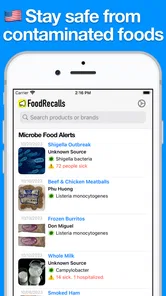
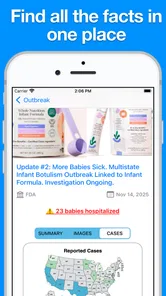
Food Recalls & Alerts is designed to help users stay informed about food safety notices, product recalls, contamination warnings, and other alerts that may affect items sold in stores or used at home. After reviewing the app, its main value is the convenience of having important recall information gathered in one place, making it easier to check whether a product, brand, or food category may present a safety concern.
How does Food Recalls & Alerts notify users about new recalls?
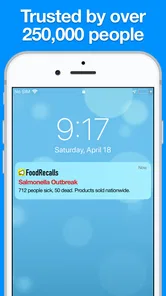
The app can provide updates about newly published food recalls and safety announcements, depending on the notification settings enabled on your device. Users should allow push notifications if they want timely alerts rather than checking manually. Notification availability and delivery speed may vary according to the source of the information, regional coverage, internet connection, and the app’s update schedule, so urgent concerns should also be verified through official government sources.
Does Food Recalls & Alerts cover recalls in every country?
Coverage may depend on the country or region supported by the app and by the agencies supplying its recall information. Many food-safety applications focus primarily on a specific market, such as the United States, rather than offering worldwide results. Before downloading, check whether the listed alerts apply to your location. Even when an international product is mentioned, local availability, product codes, and recall instructions can differ between countries.
Pros
- Quick access to current food recall notices and safety alerts.
- Search tools help users check products before buying or consuming them.
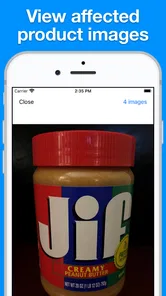
- Useful details may include affected brands
- lot numbers
- and recall reasons.
- Can support safer shopping for households with allergies or dietary restrictions.
- Simple alert-based format makes important updates easy to scan.]
- contras:[
Cons
- Coverage may vary depending on the user’s country or region.
- Some alerts may appear after products have already reached consumers.
- Notifications can become excessive when many recalls are issued.
- Product details may require careful comparison with packaging at home.
- The app should not replace checking official food safety sources.











