FolderSync Pro
- 2.64K
- 4.6
- Installs
- 100.00K
- Price
- $6.49

Screenshots
Analysis by Reviewed
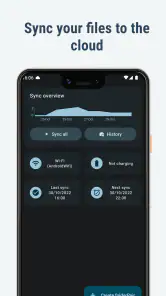
I find FolderSync Pro most useful when the same files need to be in more than one place, but I don’t want to keep uploading them by hand. It is an Android communication app from Tacit Dynamics, and its appeal is practical: set up transfers between folders on a device and cloud storage, then use those routines to cut down on repetitive file handling. It is not a replacement for every cloud app, and it makes the most sense when you have a specific workflow to improve.
Making file transfers fit your routine
A realistic example is working on a document during the day, then wanting a copy in cloud storage without remembering to upload it each time. Another is keeping selected phone files available elsewhere while leaving the rest of the device untouched. In either case, the important decision is not simply whether to sync, but which folder should move, in which direction, and on what schedule. I would get those choices right before relying on automation.
That distinction is why I would not treat this as a universal file manager. FolderSync is for coordinating transfers; a cloud provider’s own app is often more convenient for browsing a library, sharing a link, or handling an isolated upload. If I am only moving a photo once, opening the service I already use is likely easier. If the same folders need attention week after week, a dedicated sync tool has a clearer role.
Where the paid price makes sense
FolderSync is a paid communication app from Tacit Dynamics, priced at $6.49. That makes the decision fairly straightforward: you are paying for a dedicated way to coordinate files, rather than trying another general-purpose cloud app. It has an Everyone age rating, a 4.6 average from around 25 thousand ratings, and more than 100 thousand installs. Those figures suggest an established audience, but I would judge the purchase by how often you need files to move between services and your Android device.
Its value is clearest when syncing is a repeated chore. If I regularly move documents from a phone folder into cloud storage, or keep a working folder available in both places, configuring a task can replace a series of manual uploads. That is a practical benefit, not a reason to pay if I only upload an occasional photo. For a one-off transfer, the cloud provider’s own app may be simpler and cheaper; FolderSync is more compelling when I want the same routine to happen again without rebuilding it each time.
Easy Setup and User-Friendly Interface
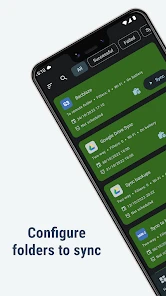
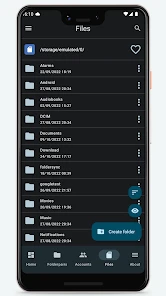
Getting started with FolderSync is as easy as pie. The setup process is straightforward, and the user interface is intuitive. Even if you're not tech-savvy, you'll have no trouble navigating through the app. The design is clean and organized, making it simple to manage your file synchronization tasks. It’s like the developers anticipated every question you might have and answered it before you even asked!
In everyday use, I would start with one small, low-risk folder rather than immediately syncing a whole device. For example, a person who edits a document on a phone during a commute could set a task to copy that work folder to cloud storage, then check that the expected files arrive before relying on the routine. This gives you a chance to learn the direction and scope of a task. It also helps avoid an easy-to-miss mistake: syncing the wrong folder or choosing a direction that does not match what you meant to preserve.
You May Like

Clash of Clans Is Won Between the Battles

Android Auto Makes the Case for Quieter Car Software

MobiOffice: Transforming Mobile Productivity with Seamless Integration

EA SPORTS FC™ Mobile Soccer: Redefining Mobile Sports Gaming

How Microsoft OneDrive Became a Mobile Productivity Giant

How Google Translate Breaks Language Barriers Effortlessly
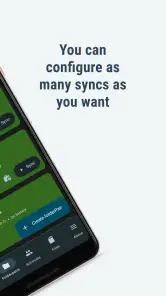
One useful habit is to give each task a clear purpose and keep its scope narrow. A routine for current work files does not need to include downloads, screenshots, and temporary exports just because they sit nearby. That separation makes it easier to understand what should appear in the cloud and gives you a smaller area to inspect if the result looks unexpected. I would also avoid building several overlapping tasks until the first one behaves as intended; duplicate or competing routines can make it harder to work out which transfer produced a particular file.
Advanced Features for the Tech-Savvy
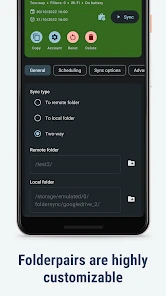
For those who love to tinker, FolderSync offers advanced features that are sure to impress. You can schedule sync tasks, configure sync filters, and even set up multiple accounts. These options give you the flexibility to tailor the app to suit your specific needs. It’s perfect for users who require more from their apps than just the basics.
Filters are especially useful when a folder contains both files worth keeping in the cloud and temporary clutter. Rather than treating every item as equally important, I would use a narrow sync scope and filters to keep a routine focused on the material I actually need elsewhere. Multiple accounts can also help separate personal and work storage, but they introduce another thing to check when troubleshooting: confirm which account and folder a task is using before assuming that a sync has failed.
Scheduling adds convenience, though it also means the app is managing a process you may not be watching. I would check a newly configured task manually before trusting it for anything important, and review it after changing folders or accounts. A sync routine can keep copies aligned, but it should not be treated as a complete backup strategy by itself: accidental deletion or an unintended change can be carried along with the files. Keep an independent copy of irreplaceable material if losing it would matter.
There is a useful trade-off in choosing an automatic schedule: less remembering, but also less immediate visibility into each transfer. For files I need quickly on another device, I would not assume a scheduled routine has already run; I would check the destination before leaving the source behind. For material that changes infrequently, a schedule may be more convenient than repeatedly opening an app and starting the same process. The right choice depends on how much delay your particular workflow can tolerate.
FolderSync is currently at version 4.8.2 and requires Android 8.0 or later. It was released on May 25, 2011, so it is a long-running option rather than a new arrival. That history may reassure people seeking a focused utility, while the version requirement is a practical reason to check device compatibility before paying. I would also distinguish its role from a standard cloud-storage app: those apps are often better for browsing, sharing, and occasional uploads within one service, while FolderSync is aimed at setting up repeatable transfers across folders and providers.
For someone deciding whether it fits, the key question is whether the Android device is a regular part of a wider file routine. If most work starts and ends inside one cloud service, its own mobile app may already cover the important tasks. If files are split between local folders and multiple accounts, manually repeating the same transfer becomes a stronger reason to consider FolderSync. It is the workflow, not the number of services alone, that determines whether the extra setup is worthwhile.
Security is another area where FolderSync shines. With all the stories about data breaches, knowing that your files are securely transferred gives you peace of mind. The app uses secure protocols to ensure your data is safe during transmission.
Even with secure transfer, I would keep sensitive-file decisions separate from convenience. Before creating a routine, decide whether the destination account is the right place for the material and whether the folder scope is appropriately limited. That is a useful check for any tool that moves files automatically: a secure transfer cannot correct an overly broad selection or a mistaken destination.
Who gets the most from it
If you’re someone who uses multiple cloud services regularly, this app is a game-changer. The convenience of having all your files synchronized automatically can’t be overstated. No more manual uploads or downloads, just seamless file management. Plus, FolderSync eliminates the risk of losing important data due to device failures or accidental deletions.
I would recommend it most to someone who already knows which folders need to travel between Android and cloud storage and is willing to spend a little time setting up and checking those tasks. It is less suitable if you want a simple place to browse one cloud account, share a link, or make a single upload; the provider’s own app is likely the more direct tool for those jobs. It is also not the right fit if you expect syncing alone to protect every file from deletion or device trouble. Its real strength is reducing repeated file handling, not removing the need to think about where important copies live.
It is also a less comfortable choice for someone who wants automation with no setup or oversight. A person who is unsure which folder contains the current version of a file may find that a manual upload, with a chance to inspect the destination, is safer until the workflow is clear. Likewise, if the main need is collaborative editing or sharing documents with other people, the cloud service’s own tools may be more useful than a file-sync utility. I would choose FolderSync when the job is moving files reliably between locations, not when the job is managing a team’s work.
For a small personal workflow, I would test with copies rather than valuable originals. Make a simple folder, place a few nonessential files in it, configure the intended direction, and check what arrives at the destination. Then try the routine again after changing one setting, such as the filter or schedule, so you know what that choice changes. This modest rehearsal is more useful than assuming that the word “sync” means every transfer will behave like a one-way backup.
In conclusion, FolderSync is a powerhouse app for anyone looking to streamline their file management process. Its robust features, ease of use, and secure operations make it a must-have for both casual users and tech enthusiasts alike. So, if you're tired of the chaos that comes with managing files across different platforms, give FolderSync a shot. It might just become your new favorite app!
My buy-or-skip verdict
At $6.49, I see FolderSync as a focused purchase rather than an essential download for every Android user. If you routinely move files between several cloud accounts and local folders, the scheduling, filters, and account options can make the cost worthwhile by replacing repetitive manual steps. If your needs are occasional, or you mainly use one provider’s built-in tools, I would skip it and keep the simpler workflow. Before committing to an important sync, test the direction and folder selection with unimportant files; that small check is the best way to make sure the app’s automation works the way you expect.
My final recommendation is to buy it for a recurring, clearly defined transfer problem, not simply because you have cloud storage. It earns its place when a handful of carefully configured tasks saves you from repeating the same file movement and you are prepared to review those tasks when your folders or accounts change. If you would rarely open it after setup, or would rather make every upload manually, the paid price is harder to justify. For that kind of user, the familiar cloud app is the more sensible choice.
FolderSync Pro Frequently Asked Questions
Can I use FolderSync Pro to keep files on my Android device connected with cloud storage?
Yes. FolderSync is designed to sync files between cloud storage and Android devices, which can make it useful when you want files available across those locations. Before downloading, consider which folders you want to sync and which cloud accounts you plan to connect. The app is focused on file synchronization, so it is most relevant if that is a task you need to manage.
Who makes FolderSync Pro, and what is its age rating?
FolderSync Pro is developed by Tacit Dynamics and has an Everyone content rating. That makes it suitable for users of all ages, though the more important practical consideration is how you plan to use it and which cloud accounts or folders you connect. If the device is shared, think about account access and the files that other people using the device may be able to reach.
Is FolderSync Pro available for iOS, or is it intended for Android devices?
FolderSync Pro is an Android app for syncing files between cloud storage and Android devices. Its minimum operating system requirement is Android 8.0, so check your device’s Android version before downloading. If you use an iPhone or iPad, this Android app is not the version to install; look for an option specifically designed for iOS instead.
How much does FolderSync Pro cost, and is it suitable for a shared or family device?
FolderSync Pro costs $6.49 and is rated Everyone, making it suitable for users of all ages. Since it connects cloud storage with an Android device, consider which accounts and folders will be accessible on a shared device before setting it up. Its purchase cost is separate from any terms that may apply to the cloud services you connect.
What is FolderSync Pro and what does it do?
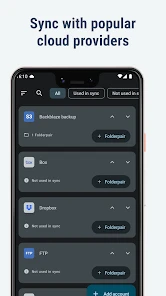
FolderSync Pro is an advanced application that allows users to sync their files and folders between their mobile devices and cloud storage services. It supports a wide range of cloud providers, including Google Drive, Dropbox, OneDrive, and many more. Users can manage their files seamlessly, ensuring that data is always up-to-date and accessible across all connected devices.
Pros
- User-friendly interface
- Supports various cloud storage services
- Automatic file synchronization
- Customizable sync settings
- No ads
Cons
- Paid app
- no free version
- Initial setup can be complex
- Limited advanced features
- Occasional sync errors
- Requires cloud account setup

- Category
- Communication
- Version
- 4.8.2











