Flat Earth Pro
- 106.00
- 4.8
- Installs
- 5.00K
- Price
- $3.99
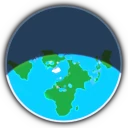
Screenshots
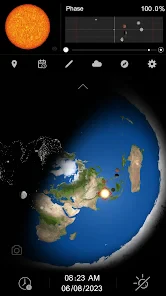
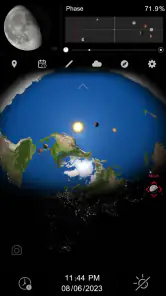
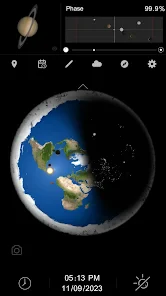
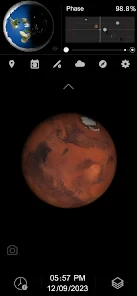
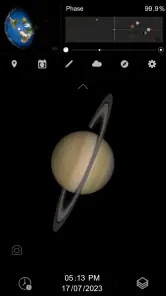
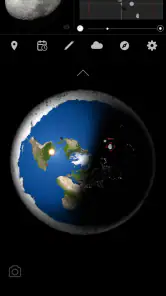
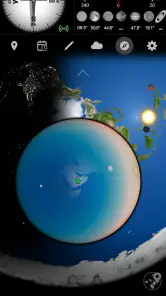
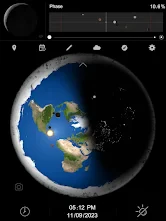
Analysis by Reviewed
I would approach Flat Earth Pro as a curiosity app rather than a navigation tool for getting from A to B. Its subject is an alternative, geocentric presentation of Earth and the Moon, so the appeal is in examining that perspective, not in finding the quickest route across town. That distinction matters: if you want dependable directions, a conventional maps app is the more practical choice; if you want a focused visual topic to explore, this has a narrower but more unusual purpose.
When a connection becomes part of the experience
With an app built around exploring a particular presentation of Earth and the Moon, a steady connection can affect how smoothly you move through material that may be delivered or refreshed online. I’d open it before a planned discussion or study session rather than assume every element will be ready in a poor-signal spot. That small habit is useful when you are comparing what you see with a book, a classroom globe, or another map: you can spend the session looking closely instead of troubleshooting mid-conversation.
For a casual check at home, connectivity is less of a planning concern. On a commute or in a building with patchy reception, I would keep expectations modest and avoid relying on it as a live reference. The key question is not whether the app replaces a map service—it doesn’t have the same everyday job—but whether it gives you enough material to make a brief exploration worthwhile when you have time and a usable connection.
A mobile use case, and a useful comparison
Picture a student preparing a short presentation about how different models represent the planet. They could open the app at a desk, inspect its geocentric framing, then compare that view with a standard globe or a familiar atlas. That is a more productive use than treating one depiction as proof: the interesting exercise is noticing what each representation emphasizes, what it leaves difficult to interpret, and what questions need independent checking.
This is also where the app differs from mainstream navigation tools. Those are designed to help you follow roads, locate places, and make practical travel decisions. Flat Earth Pro is better understood as a topic-specific viewing tool, so I would not choose it for route planning, orientation outdoors, or deciding where to turn. It may suit curious readers, students, or people who want a visual starting point for a discussion; anyone seeking neutral, evidence-led astronomy instruction should compare its claims with established educational references.
Getting more from a short session
I’d use a simple three-step workflow: choose one question, inspect the relevant view, then check that question against a trusted reference before repeating a claim. For example, rather than browsing without a goal, ask how the app places the Moon in relation to Earth, note what the display actually shows, and distinguish observation from interpretation. That keeps an unusual model interesting without mistaking a persuasive presentation for scientific consensus.
There is a trade-off in the app’s focused subject. It can make a niche perspective easy to inspect, but a narrow point of view is not a substitute for balanced coverage. If you are researching astronomy for coursework or making decisions that depend on accurate geographic information, use broader references as well. I would also avoid leaving material open on a limited mobile connection until you know how the app behaves in your own setup; checking it at home first is a sensible way to prevent an inconvenient interruption.
More From Our News Desk

Weather by Xiaomi Review: Clear at a Glance, Less Clear Up Close

X Under Pressure: Can It Recover When Posting Goes Wrong?

Clash of Clans Is Won Between the Battles

Android Auto Makes the Case for Quieter Car Software

MobiOffice: Transforming Mobile Productivity with Seamless Integration

EA SPORTS FC™ Mobile Soccer: Redefining Mobile Sports Gaming
Exploring the World Through a Different Lens
Right off the bat, Flat Earth Pro offers an intriguing interface that pulls you in. The app’s design is sleek yet mysterious, much like the theory it supports. Navigating through the app is a breeze, with a user-friendly interface that ensures even the most tech-averse individuals can explore without a hitch. I found myself surprisingly engrossed, flipping through the various sections that offer everything from articles and videos to interactive maps.
Features That Keep You Hooked
The app has a variety of features that cater to every kind of flat Earth enthusiast. One of the standout features is the interactive map that supposedly shows how our world really looks like when viewed as flat. It’s fascinating, albeit a bit mind-boggling, to see how certain landmarks and continents are represented on this map. And if you’re someone who enjoys debates, there’s a section dedicated to discussion forums where users can engage with others.
What caught my attention was the collection of documentaries and videos available within the app. These range from amateur footage to more polished productions, each aiming to present evidence or theories supporting the flat Earth concept. I spent quite some time watching these, and while some were entertaining, others provided a deep dive into the arguments that keep this theory alive.
Engage and Challenge Your Beliefs
One of the app's most compelling aspects is how it encourages users to challenge and discuss different viewpoints. The discussion forums are vibrant, filled with a mix of believers and skeptics. It’s a platform where you can either strengthen your own beliefs or question them, which is a refreshing take in the age of echo chambers. I found myself reading through various threads, sometimes surprised at the level of detail and research presented by some users.
Cost, compatibility, and expectations
Flat Earth Pro is a paid Maps & Navigation app from OProjects, priced at $3.99. It has a 4.8 average from around 890 ratings and more than 100 written reviews, with over 5,000 installs. The Everyone age rating makes it broadly accessible, and version 2.2.3 runs on Android 6.0 or newer. That is useful to know if you are considering it for an older device, although I would still check that the app behaves well on the phone you plan to use before making it part of a regular routine.
The price is easiest to justify if you specifically want this subject and expect to spend time exploring it. If you only want a conventional map, a free mainstream alternative is a better fit; paying for a niche perspective makes little sense when the core need is directions. For a parent considering it for a child, the Everyone rating is reassuring as an age classification, but I would still talk through the difference between viewing a claim and verifying it. That turns the app into a prompt for critical thinking rather than an unquestioned reference.
What to do when something stalls
If a page or piece of media does not load as expected, I would first check the connection and try again somewhere with a stronger signal. If the problem continues, closing and reopening the app is a sensible next step before deciding that the content itself is unavailable. For a time-sensitive presentation, avoid making the app your only source: keep a separate reference ready so an interruption does not derail the activity.
That practical caution is especially relevant for video-heavy browsing, which can be less comfortable on a metered connection than reading a short text. I would save longer viewing for Wi-Fi when possible and use mobile data for targeted checks. This is not a claim about a particular data-saving mode; it is simply a way to stay in control of consumption while exploring media on a phone.
Final Thoughts
While Flat Earth Pro might not convince everyone of its theories, it certainly provides an entertaining and informative space for those curious about the flat Earth concept. Whether you’re a firm believer, a skeptic, or someone who simply enjoys exploring unconventional ideas, this app offers a unique experience that’s worth checking out. Just remember to keep an open mind and enjoy the journey it takes you on. After all, exploring different perspectives is what makes our world – flat or round – so fascinating.
My recommendation comes with a clear boundary: treat it as a niche exploration tool, not a source of scientific consensus or a substitute for practical navigation. Released on November 3, 2019, it has a specific point of view that can be useful for examining how an alternative model is presented, especially when you bring other references into the conversation. If you want that kind of focused comparison, the $3.99 purchase may be worthwhile; if you need ordinary directions or a broad astronomy guide, I’d choose another app instead.
Choosing the right moment to open it
A useful way to judge whether this app belongs on your phone is to think about the moment you expect to use it. For a quiet evening of comparing representations, or a planned conversation where you can pause and check claims, the focused subject is an advantage. On a rushed walk, during a journey, or while trying to answer a practical location question, it is the wrong tool. I would keep a regular navigation app available for those needs and open this one only when I have time to examine its particular viewpoint.
That distinction also helps with the purchase decision. Someone who is already interested in how geocentric presentations are framed may get more out of repeated, deliberate visits than a person who simply wants a map on hand. If you are uncertain, decide what question you want the app to help you explore before paying. A specific curiosity gives the app a clearer purpose; vague expectations of a general-purpose atlas are likely to lead to disappointment.
Make comparisons useful, not overwhelming
When I compare a display with an atlas or globe, I try to keep the comparison narrow. Pick one feature—such as the relative placement of Earth and the Moon—and write down what each visual actually communicates before moving on to explanations of why it is presented that way. This makes it easier to separate the image from the argument attached to it. It also prevents a long session from turning into a sequence of dramatic claims that are difficult to verify later.
For a classroom or family conversation, that method can be more valuable than browsing every available item. One person can describe what they notice, another can check the same topic in a trusted educational source, and the group can discuss where the explanations differ. The app then serves as a discussion prompt rather than a final authority. If the goal is to learn established astronomy systematically, a dedicated educational resource remains the better starting point.
Practical limits on a phone
Small-screen use changes the kind of attention this subject needs. A compact map can be handy for a quick look, but close comparison is easier when you can pause, read carefully, and keep another reference nearby. I would avoid trying to assess a complicated claim while walking or switching between apps in a hurry. A stable place to sit, a charged phone, and a clear question make for a more useful session than trying to squeeze the material into spare seconds.
Connectivity is part of that preparation. If you expect to use the app somewhere with unreliable reception, test your intended workflow at home first rather than assuming every page or video will be ready later. When a connection is limited, choose a short, targeted check instead of opening several videos in succession. That is a practical way to reduce interruptions and avoid spending mobile data on material you may not need.
Who is likely to appreciate it
I can see the appeal for readers who enjoy examining unconventional ideas, students comparing how different models are presented, and people who like having a visual starting point for a debate. The app’s focused scope gives those users something specific to inspect. It is less suitable for someone seeking an impartial science curriculum, current travel information, or directions that can guide a real journey. In those cases, established astronomy learning tools or conventional map services are more useful choices.
Parents may also want to use it alongside a conversation rather than hand it over as an unqualified reference. The Everyone classification describes its age category, but it does not replace a discussion about evidence, interpretation, and how to check a claim. That is especially important when a persuasive image or confident explanation is involved: ask what can be observed directly and what depends on an argument that should be independently tested.
A grounded verdict on connectivity
For me, the connection question is mainly about planning, not about whether this should function as a navigation service. A weak signal can interrupt browsing or viewing, while a stronger connection makes it easier to explore the app’s material in one sitting. I would use Wi-Fi for longer video sessions when practical, keep a second reference ready for any important comparison, and avoid depending on the app during an activity where a delay would matter.
Those habits suit the app’s narrow role: a paid, topic-specific way to explore a particular presentation of Earth and the Moon, not a replacement for maps or balanced science resources. If that focused exploration is what you want, it can make for an engaging conversation starter. If you need reliable directions, broad instruction, or a source to settle factual questions on its own, I would choose a different tool and use this only as an object of comparison.
Flat Earth Pro Frequently Asked Questions
What devices and operating system can run Flat Earth Pro?
Flat Earth Pro is an Android app in the Maps & Navigation category, with a minimum operating-system requirement of Android 6.0. Before downloading, check that your device meets this requirement and that you are choosing the Android version. The app is rated for Everyone, so its stated age classification is suitable for a broad audience.
What is Flat Earth Pro and what does it offer?
Flat Earth Pro is an application designed to provide users with comprehensive information and resources about the flat earth theory. It offers a variety of features including interactive maps, scientific explanations, and a community forum for discussions. The app aims to educate and engage users interested in exploring alternative views about our planet's shape. Its stated focus is a simple, easy-to-use geocentric presentation of Earth and the Moon, so it is best approached as a particular viewpoint rather than a general-purpose navigation reference.
Is Flat Earth Pro available for both Android and iOS devices?
Yes, Flat Earth Pro is available for download on both Android and iOS platforms. Users can find the app on the Google Play Store for Android devices and the Apple App Store for iOS devices. This ensures that the app is accessible to a wide range of users regardless of their device preference. Its developer is OProjects, and the Android version is listed as version 2.2.3.
Does Flat Earth Pro require an internet connection to function?
While Flat Earth Pro offers some offline functionalities, such as saved articles and maps, an internet connection is necessary for accessing the latest updates, participating in community discussions, and downloading additional content. For the best user experience, a stable internet connection is recommended when using the app.
Are there any in-app purchases or subscriptions in Flat Earth Pro?
Flat Earth Pro operates on a freemium model. The basic features of the app are free to use, but there are optional in-app purchases and subscription plans available for users who want to access premium content, such as exclusive articles and advanced map features. This allows users to tailor their experience based on their interest and budget. The app itself costs $3.99, so review the purchase details shown in the store before proceeding.
Pros
- User-friendly interface for easy navigation.
- Comprehensive database of flat Earth theories.
- Frequent updates with new content.
- Offline access for convenience on the go.
- Engaging multimedia resources.
Cons
- Limited scientific backing for theories.
- Potential for misinformation spread.
- Ads can be intrusive at times.
- Requires internet for initial download.
- Content may not suit all audiences.
- Category
- Maps & Navigation
- Version
- 2.2.3











