FlashGo: Fake GPS Location
- 493.00
- 4.5
- Installs
- 1.00M
- Price
- Free

Screenshots

Analysis by Reviewed
I approach a location-changing app less as a teleportation toy and more as a tool whose usefulness depends on what you want to test. FlashGo: Fake GPS Location is a free Maps & Navigation app from Wonderful AI. Its basic promise is easy to understand: choose a place and have your phone report that location instead of its real one. That can be useful for controlled testing or harmless experimentation, but it also calls for care. A changed GPS position is not the same as actually being somewhere, and apps that rely on location may respond in unexpected ways.
What I would use it for—and where I’d draw the line
The most convincing use case is testing your own location-aware app or checking how a service behaves when its user appears to be somewhere else. A developer or tester can use a chosen point to reproduce a location-specific screen without travelling, while someone learning about mock locations can explore how GPS-dependent features react. I’d keep experiments within apps and accounts I control, and I wouldn’t use a false position to mislead another person or bypass a service’s rules.
There’s also a practical difference between changing a point and making every part of a phone agree with it. Some apps may rely on signals or checks beyond GPS, so a simulated position is not guaranteed to work everywhere. If your aim is simply to share your real whereabouts or get reliable directions, your phone’s normal location tools are the better choice; FlashGo is for deliberate testing, not everyday navigation.
A sensible way to test a location change
I’d start with a low-stakes test in an app I own, choose a nearby destination, and check whether the target app actually updates before trying a more complicated scenario. That small step helps separate a setup issue from a limitation in the other app. If the displayed position looks stale or jumps unexpectedly, stop the test and restore your usual location settings rather than assuming the change has taken effect everywhere.
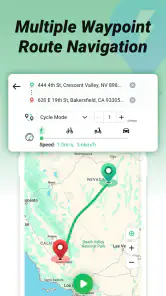
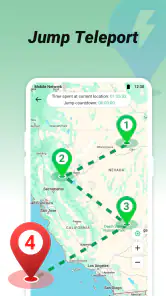
Routes and joystick-style control can be useful for checking how an app handles movement, but they also make it easier to create unrealistic location changes. For a useful test, move in a way that matches the behaviour you want to examine, and give the target app time to refresh. Frequent changes may make results harder to interpret, especially when you are trying to find out whether a screen or feature responds to a particular place.
Setting the Stage: Getting Started with FlashGo
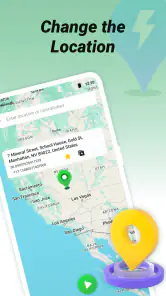
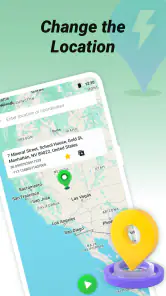
The first thing you’ll notice about FlashGo: Fake GPS Location is its straightforward user interface. It’s like the app is saying, “Hey, let’s get you where you need to be, virtually!” Once installed, you’re greeted with a map and a search bar. Type in your desired location, hit the start button, and voilà, your phone believes you’ve traveled miles in a second. The app cleverly manipulates your GPS settings without the need for any rocket science.
Diving Deeper: Features and Functionalities
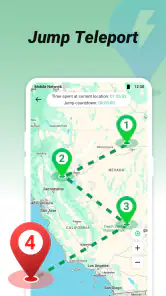
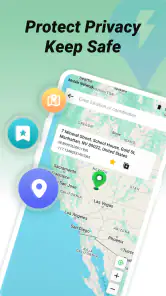
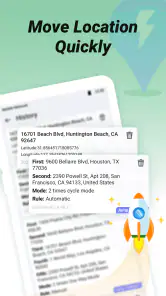
What’s incredibly handy is the app’s ability to save your favorite locations. So if you’re someone who loves “visiting” the Eiffel Tower every other day, FlashGo has your back. Another neat feature is the ability to create routes. It’s not just about static locations; you can simulate a journey from point A to B. It’s like taking a virtual road trip without leaving your couch!
More From Our News Desk

Clash of Clans Is Won Between the Battles

Android Auto Makes the Case for Quieter Car Software

MobiOffice: Transforming Mobile Productivity with Seamless Integration

EA SPORTS FC™ Mobile Soccer: Redefining Mobile Sports Gaming

How Microsoft OneDrive Became a Mobile Productivity Giant

How Google Translate Breaks Language Barriers Effortlessly
For those techies out there, FlashGo also offers options to tweak the GPS update intervals, giving you more control over how frequently your location changes. This is particularly useful for apps that require constant location updates. And let’s not forget the joystick mode – a fun little tool that allows you to manually control your GPS location in real-time. It’s perfect for those moments when you need to be a little more precise with your virtual travels.
Speed, stability, and the limits of a simulated trip
Choosing a place can feel immediate, but I wouldn’t confuse that with guaranteed speed or reliability in every app that reads the phone’s location. The other app controls when it requests updates and how it interprets them. For example, if you select a point and a map-based app still shows the previous one, I’d wait for a refresh and check the setup before repeatedly changing destinations. A deliberate, single change is easier to troubleshoot than several rapid adjustments.
For a realistic everyday scenario, imagine testing a travel-planning feature before a trip: I could set a destination, open my own app, and see whether its location-based content changes as expected. If I wanted to test a moving route, I’d do that separately, so I could tell whether a problem came from the route simulation or the destination itself. This kind of step-by-step workflow is less entertaining than jumping around the map, but it makes the result much more useful.
When another option is the better fit
Compared with the usual alternatives, FlashGo’s appeal is the combination of a map-based selection with saved places and movement controls. A basic mock-location utility may be enough if you only need to test one fixed point; someone who needs turn-by-turn directions should use a conventional navigation app instead. I’d also skip location spoofing entirely if the goal depends on a service accepting a particular location, since those services can apply their own checks and a changed GPS reading may not be sufficient.
There is a little setup friction to account for: changing a phone’s reported location is not the same as changing the location used by every app, and results can vary. Treat the first session as a test rather than assuming that a selected place will immediately appear everywhere. When you finish, return to your usual location configuration and verify the position in an ordinary map or app. That recovery check is a worthwhile habit, especially if you switch between simulated and real locations often.
Diving Deeper: Features and Functionalities
What’s incredibly handy is the app’s ability to save your favorite locations. So if you’re someone who loves “visiting” the Eiffel Tower every other day, FlashGo has your back. Another neat feature is the ability to create routes. It’s not just about static locations; you can simulate a journey from point A to B. It’s like taking a virtual road trip without leaving your couch!
For those techies out there, FlashGo also offers options to tweak the GPS update intervals, giving you more control over how frequently your location changes. This is particularly useful for apps that require constant location updates. And let’s not forget the joystick mode – a fun little tool that allows you to manually control your GPS location in real-time. It’s perfect for those moments when you need to be a little more precise with your virtual travels.
Performance, compatibility, and practical trade-offs
FlashGo has a 4.5 average from around 9,700 ratings, and it has passed the million-install mark. Those figures suggest that it has found an audience, but they don’t tell me whether it will behave identically on every phone or with every location-based app. The current version is 3.6.10, and it supports Android 6.0 and later. It is rated for Everyone, though the responsibility involved in altering a location still makes thoughtful use important.
I’d avoid making claims about battery use or stability based on the idea of a typical session: the workload depends on how long you run a route, how often the location changes, and what else is open. If you plan a longer test, close unrelated apps and keep the movement simple so you can notice whether the target app is lagging or merely refreshing slowly. That is a useful diagnostic habit, not a promise that the phone will use fewer resources.
The app is free to install, with in-app purchases ranging from $4.99 to $19.99 per item. I’d begin with the free experience and decide whether the controls suit your task before spending anything. If you only need a single fixed location for a brief test, extra options may not be necessary; if you regularly examine routes or changing positions, take time to work out which controls you actually use rather than paying on assumption.
Who is likely to get the most from it?
I see the strongest fit for someone who needs to test their own software or learn how location-driven screens react, especially when repeating a scenario at the same place matters. Saved locations can make that kind of comparison less fiddly: instead of searching for the same point each time, you can return to it and focus on what changed in the app under test. That is more useful than treating saved spots as a novelty, because consistent starting conditions make observations easier to trust.
A casual user may find the map and joystick entertaining, but the novelty can wear off if there is no clear task behind it. I would not recommend it as a substitute for a maps app, a privacy setting, or a proper way to share where you are. If you simply want to limit location access, review the phone’s app permissions; if you want to reach somewhere, use navigation based on your real position. FlashGo is most worthwhile when you have a specific, legitimate test to run.
Making route tests easier to interpret
One useful habit is to separate “where am I?” tests from “how do I move?” tests. First choose a fixed point and confirm the target app responds; only then try a route or joystick movement. If both variables change at once, it becomes difficult to tell whether a delayed screen reflects the destination, the simulated movement, or the target app’s own refresh behaviour. This simple order turns a casual experiment into a repeatable check.
For a route test, I’d also decide in advance what result I’m looking for: perhaps a screen should update when the simulated position changes, or a location-based element should remain stable until a new update arrives. Avoid making a route more elaborate than necessary. A shorter, simpler test is easier to review and easier to stop if the target app behaves oddly. It also reduces the temptation to assume that a smooth-looking movement on the map means every app is receiving the same information at the same time.
Questions worth settling before a session
Will it change the location in every app? I would not count on that. FlashGo changes the phone’s reported GPS position, but individual apps can refresh at different times or use additional checks. Test the exact app and task you care about, and treat the result as specific to that setup rather than proof that the same method will work elsewhere.
Does it replace ordinary navigation? No. It is designed for simulated location experiments, not finding a real route or helping you travel. Can a route test run indefinitely without affecting the phone? I would not assume so; keep an eye on the device during longer sessions, simplify the test if it becomes sluggish, and restore normal location settings when finished. These are practical precautions, not claims about a particular battery drain or performance threshold.
Another question is whether it is worth paying for. Since it can be installed for free and offers in-app purchases, I’d first check whether the controls available to you already cover your needs. If your work only involves selecting one point, the extra cost may not add value. A regular tester who needs more involved control may judge that differently, but I would make that decision after trying a real workflow, not just because more options sound useful.
Ending Thoughts: Why FlashGo Stands Out
Now, let’s talk about why FlashGo is a standout in the fake GPS app arena. Firstly, its simplicity is a breath of fresh air. You don’t need to be a tech wizard to make the most of it. Plus, the app is robust enough to handle various scenarios, from casual use to more demanding applications. And while there are many apps out there that promise similar functionalities, FlashGo manages to deliver with minimal fuss.
In a world where our phones are almost an extension of ourselves, tools like FlashGo bring a bit of magic and mischief into our digital lives. Whether you’re using it for fun, work, or a bit of both, it’s an app that does exactly what it says on the tin. Just remember to use it wisely and responsibly – after all, with great power comes great responsibility!
So, if you’re up for a virtual adventure or just want to dabble in some GPS trickery, give FlashGo a whirl. Who knows? You might just find yourself “traveling” more than you ever expected!
FlashGo: Fake GPS Location Frequently Asked Questions
Is FlashGo: Fake GPS Location free to download?
FlashGo: Fake GPS Location is free to download, so you can try its basic location-spoofing function without an upfront purchase. The app also offers in-app purchases, which may be relevant if you want access to paid options. Before downloading, consider whether you are comfortable with optional purchases and review the purchase details shown on your device.
Which devices can run FlashGo: Fake GPS Location?
FlashGo: Fake GPS Location is an Android app that requires Android 6.0 or later. Check your device’s Android version before downloading to avoid compatibility problems. The app is listed for everyone, but that age classification does not change the operating-system requirement. If your device meets it, you can install the app and configure mock location through Android’s developer settings.
What is FlashGo: Fake GPS Location and how does it work?
FlashGo: Fake GPS Location is an app designed to simulate your device's GPS location, allowing users to set a fake location anywhere in the world. It works by using the device's developer settings to override the actual GPS location with the coordinates you choose, which can be particularly useful for privacy, testing apps that require location data, or gaming purposes.
Is using FlashGo: Fake GPS Location safe and legal?
Using FlashGo: Fake GPS Location is generally safe as long as users follow the app’s instructions and use it responsibly. However, it's important to note that the legality of using such apps depends on your country's laws and the terms of service of other apps you may use it with. Always ensure compliance to avoid potential issues.
Can FlashGo: Fake GPS Location affect other apps on my phone?
FlashGo: Fake GPS Location might affect the functioning of apps that rely on your real location data. For instance, navigation apps like Google Maps or location-based games may not work correctly while the fake GPS is active. Users should disable the fake GPS feature when accurate location data is required for specific applications.
Pros
- Customizable location settings
- Bypass geo-restrictions easily
- User-friendly interface
- Works on both Android and iOS
- Helps with app testing
Cons
- May violate terms of use
- Risk of account bans
- Drains battery quickly
- Requires developer mode
- Potential privacy issues
- Category
- Maps & Navigation
- Version
- 3.6.10











