Fivestars
- 6.35K
- 4.1
- Installs
- 1.00M
- Price
- Free

Screenshots
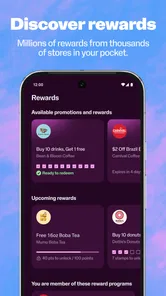
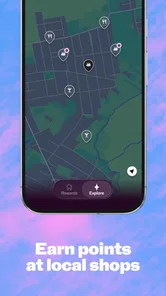
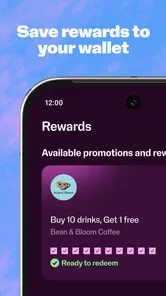
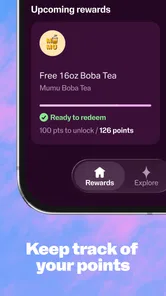
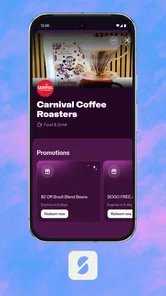
Analysis by Reviewed
I find Fivestars most useful when I treat it as a simple way to keep track of rewards at participating local businesses, rather than as a reason to shop somewhere I otherwise would not. That distinction matters: loyalty points feel worthwhile when they follow habits I already have, not when they nudge me into spending just to chase a perk.
A loyalty card that lives on your phone
The main appeal is replacing separate punch cards and loyalty sign-ups with one app. For someone who regularly visits participating cafés, shops, or other neighborhood businesses, that can make rewards easier to remember and use. It is a lifestyle app from FiveStars by SumUp, and its focus is practical: everyday purchases can contribute to rewards without adding another physical card to your wallet.
In my view, the best way to use it is to check whether the places you already frequent take part before changing your routine. A loyalty app is only as useful as its overlap with your real life. If your usual coffee stop is included, it can be a convenient extra; if most of your spending happens elsewhere, it may stay idle on your phone.
What using it looks like
At a participating business, you enter your phone number so the purchase can be associated with your account. That is a small step, but it is worth remembering at checkout: the points do not help if you leave before making sure the visit was recorded. I would make a habit of checking the app after a purchase when something seems delayed, rather than assuming every transaction appears instantly.
Notifications about offers can bring a reward to your attention, but I would use them as reminders, not shopping instructions. Before acting on a promotion, consider whether you would have visited that business anyway and whether the reward is useful to you. That quick check keeps the app’s convenience from turning into an excuse for an unnecessary purchase.
Where it fits among loyalty options
Compared with carrying individual stamp cards, a single digital account is easier to keep with you and less likely to get lost in a bag or wallet. Compared with loyalty schemes tied to one large chain, Fivestars is appealing if the participating local businesses match your routines. The trade-off is that a dedicated chain app may be more useful if nearly all your repeat visits are to that one brand, while a physical card can remain simpler for a person who rarely wants another app account.
Fivestars is free, rated for Everyone, and has an average rating of 4.1 from around 21,000 ratings. It has been installed over a million times, and its 6.1.27 version supports devices running Android 8.0 or later. Those details make it easy to consider, but they do not replace the practical question: are there participating places you visit often enough to make the rewards matter?
More From Our News Desk

Weather by Xiaomi Review: Clear at a Glance, Less Clear Up Close

X Under Pressure: Can It Recover When Posting Goes Wrong?

Clash of Clans Is Won Between the Battles

Android Auto Makes the Case for Quieter Car Software

MobiOffice: Transforming Mobile Productivity with Seamless Integration

EA SPORTS FC™ Mobile Soccer: Redefining Mobile Sports Gaming
Who is likely to get the most from it
I would recommend trying it if you already rotate among local businesses and tend to forget paper reward cards. A realistic use is adding your number when you pay for a regular coffee, then checking later that the visit appeared before relying on a reward for a future stop. If the points take time to sync, waiting and checking again is more sensible than repeatedly entering details at the counter.
On the other hand, skip it if your favorite businesses are not participating, you prefer not to manage loyalty accounts, or rewards tend to make you buy things you do not need. Fivestars is most convincing as a quiet helper for routines you already enjoy. I see its value less in the promise of a big payoff and more in making local loyalty easier to remember.
Why Fivestars Caught My Attention
Right off the bat, Fivestars shows its promise by making loyalty programs more accessible and engaging. Instead of carrying a pocket full of punch cards, all you need is your phone. The app has partnered with numerous local businesses, so you’re likely to find something that tickles your fancy.
Getting Started is a Breeze
Setting up the app is straightforward. Download it, sign up, and you’re ready to explore a world of rewards. The interface is user-friendly, with a clean design that doesn’t overwhelm you with options. A few taps and you’re in – no need to be a tech wizard here!
Making Every Purchase Count
The beauty of Fivestars is in its simplicity. You make a purchase at a participating store, enter your phone number, and voilà, points are added to your account. The more you shop, the more you earn. It’s like getting a pat on the back every time you swipe your card. Plus, the app notifies you of special deals and promotions, so you never miss an opportunity to earn extra points.
A Community-Focused Experience
What I love about Fivestars is its support for local businesses. It’s a win-win: small businesses get more customers through the door, and we, the consumers, get rewarded for our loyalty. It’s a refreshing change from the big brand loyalty programs that often overlook the little guys. This community-centric approach makes you feel like you’re part of something bigger, supporting local economies with every purchase.
Room for Improvement?
No app is without its quirks, and Fivestars is no exception. Sometimes, syncing points can be a tad slow, especially when the network's acting up. Also, while the app has a wide range of partners, it might not cover all your favorite spots just yet. But hey, they’re constantly expanding, so there’s hope your local hangout will join the Fivestars family soon!
Make the Rewards Fit Your Routine
I would approach the app as a small convenience rather than a complete loyalty-management system. Before relying on it, I’d check which businesses near home, work, or a regular route appear as participating options. That quick scan answers the most important practical question: whether opening the app at checkout will actually help with places I visit.
It also helps to choose a simple routine for using it. I’d enter my number while paying, then take a moment after the transaction to confirm that the visit registered if I’m counting on the progress. If it has not appeared, I would avoid holding up a line or repeatedly submitting the same purchase; I’d check again later and ask the business how it handles a missing visit. This is a more reliable habit than assuming the phone interaction worked automatically.
A Realistic Day-to-Day Example
Imagine stopping at a participating café on the way to work, then returning to the same neighborhood shop later in the week. Fivestars makes most sense in that kind of pattern: I can use the same account at the counter instead of remembering which paper card belongs to which place. A notification about an offer might be useful if it lines up with a visit I already planned, but it would not change my route just to collect points.
That distinction matters for budgeting. A reward has value only if the purchase is one I wanted to make and the eventual benefit is something I would use. I would not treat points as cash or assume that a promotion makes an otherwise unnecessary stop worthwhile. Keeping the app in the background of an existing routine lets it serve as a reminder without turning every errand into a hunt for offers.
What to Check Before Depending on It
People often want to know whether this can replace every loyalty card they carry. I would not assume that. Its usefulness depends on participating businesses, so a card from a favorite store may still be necessary if that business does not use the app. The practical approach is to keep using whichever program applies at each place rather than expecting one service to cover every purchase.
Another question is whether rewards appear immediately. In my experience, syncing can sometimes take time, so I would not plan a purchase around a balance that has not shown up yet. If a visit appears missing, checking later is a sensible first step; keeping a receipt can also help when asking the business about the transaction. I would avoid entering a phone number multiple times for the same purchase, since that does not make a delayed sync more dependable.
Privacy and Checkout Comfort
Using a phone number to associate a purchase with an account is part of the checkout routine, and that may not suit everyone. If I preferred not to share a number or create another account, I would stick with a physical card where one is available, or simply skip that business’s loyalty program. The convenience is real, but it is a personal trade-off rather than a requirement for buying something.
There is also a small social friction: entering a number can take longer than handing over a stamp card, especially if I have to pause to recall which account details I used. I’d set up the account before reaching a busy counter and make the app easy to find on my phone. That way the process stays brief for me and for the people waiting behind me.
Choosing Between Fivestars and Other Options
The closest alternatives are usually paper stamp cards, a business’s own app, or a chain’s built-in rewards scheme. Paper is straightforward and does not depend on opening an account, but it is easy to misplace and may be forgotten at home. A dedicated chain program can be a better fit if most of my repeat spending goes to one brand, since its rewards are directly tied to that routine. Fivestars is more attractive when I want one digital place for participating local businesses rather than a stack of separate cards.
That does not make it universally better. If only one nearby business participates, its value may be no greater than keeping that shop’s card. If several places I already visit are included, the shared account becomes more convenient. I would judge it by that local overlap, not by the number of offers I see or the general appeal of earning points.
Who Should Give It a Try—and Who Can Pass
Fivestars is a good fit for people who make repeat visits to participating cafés, shops, and neighborhood businesses and want a nudge to remember rewards. It may also suit someone who is happy to use a phone number at checkout and check an app occasionally rather than manage a different card for every place. Its free price makes trying it a low-commitment choice, as long as the available businesses fit existing habits.
I would pass if my regular places do not participate, if I already prefer the simplicity of a single store’s scheme, or if promotional messages make it harder for me to stick to a spending plan. Anyone who expects every transaction to sync instantly may also find the occasional delay frustrating. The app is most useful when I can accept those limits and keep the rewards secondary to the reason I was shopping in the first place.
To wrap it up, Fivestars is more than just a loyalty app; it’s a nifty little tool that makes your shopping trips more rewarding. It’s easy to use, supports local businesses, and gives you a reason to smile every time you shop. So next time you’re out grabbing a bite or picking up essentials, remember that with Fivestars, every purchase is a step closer to a reward. And let’s be honest, who doesn’t love a good reward?
Fivestars Frequently Asked Questions
Is Fivestars available for my phone?
Fivestars is an Android app that requires Android 8.0 or later. Before downloading, check your phone’s operating system version to make sure it meets that requirement. The app is free, so you can install it without a purchase, then decide whether its rewards program is useful for the businesses you visit.
What should I check before downloading Fivestars?
Fivestars is a lifestyle app for earning rewards at participating businesses. It is free to download, rated for Everyone, and requires Android 8.0 or later. Before installing, consider whether the businesses you visit take part in the program, since rewards are tied to participating locations rather than being available everywhere.
What is Fivestars and how does it work?
Fivestars is a customer loyalty app that allows users to earn rewards and points at participating local businesses. By signing up and using the app, customers can check in at stores, track their points, and redeem them for discounts or free items. It enhances shopping experiences by providing personalized offers and alerts about special promotions.
Is Fivestars free to use or are there any costs involved?
Yes, Fivestars is free for users to download and use. There are no hidden costs for customers using the app to collect points or redeem rewards. However, businesses that partner with Fivestars may have to pay a fee to be part of the network, but this does not affect the customer directly.
How secure is my personal information on Fivestars?
Fivestars takes user privacy and data security seriously. The app uses encryption and other advanced security measures to protect personal information. Users can rest assured that their details, such as email addresses and purchase history, are kept safe and are not shared with third parties without consent. As with any account-based app, use a strong password and review the privacy settings available to you.
Pros
- User-friendly interface
- Quick and reliable service
- Wide range of service categories
- Transparent pricing
- Convenient scheduling options
Cons
- Limited availability in rural areas
- Some services can be pricey
- Occasional app crashes
- Customer support can be slow
- Limited payment options











